
Patent drafts get messy fast when feedback lives in email, chat, notes, PDFs, and random file names like “final_v7_real_final.” That mess can slow your team down, hide key ideas, and lead to weak patent filings. PowerPatent helps teams do this with smart software and real attorney oversight, so you can protect your invention without losing speed. You can see how it works here: https://powerpatent.com/how-it-works
Build One Clean Place Where The Patent Draft Lives
A patent draft review breaks down when the team does not know where the real draft lives. This sounds simple, but it is one of the biggest reasons patent work gets slow. One person reads a PDF.
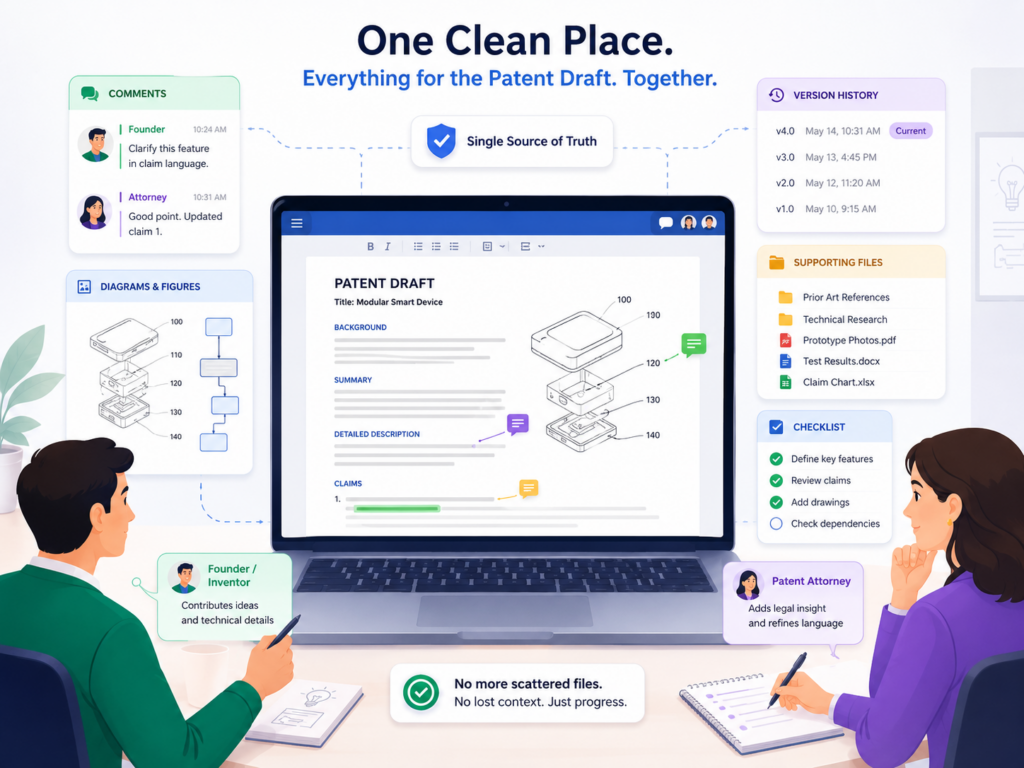
Another person comments in a Google Doc. An engineer replies in Slack. A founder sends a voice note. The attorney gets three versions of the same file. Then everyone spends time asking, “Which one are we reviewing?”
That is not review. That is cleanup.
A shared workspace should become the single home for the draft. It should hold the latest version, the main comments, the key questions, the drawings, the technical notes, and the final decisions.
When your team treats the workspace as the source of truth, the patent review becomes much easier to manage.
Keep The Latest Draft Easy To Find
The first rule is simple. The latest draft must be obvious the second someone opens the workspace. No one should need to search through folders or ask another person where the newest file is.
A good workspace should make the current draft stand out. The name should be clear. The status should be clear. The owner should be clear.
For example, instead of naming a file “Patent Draft Final 3,” use a name that shows what it is and where it stands. A name like “AI Model Training Patent Draft For Founder Review” is much easier to understand.
The goal is not to make the file name fancy. The goal is to remove doubt. Doubt creates delay. Delay creates missed details. Missed details can weaken the draft.
The Draft Should Not Move Around During Review
Once the review starts, the draft should stay in one place. The team can add comments, answer questions, and attach notes, but the main draft should not be copied into new places over and over again.
When the draft moves, the review gets split. One person may comment on an old version. Another person may add a key detail in a side file that never makes it back into the main draft.
A founder may approve language that the attorney has already changed. These mistakes are common, and they are expensive because they waste time and create risk.
This is where a purpose-built tool can help. PowerPatent gives teams a cleaner way to move from invention details to attorney-reviewed patent work, without forcing founders and engineers to chase files across scattered tools. You can see how the process works here: https://powerpatent.com/how-it-works
Give Every Person A Clear Role Before Review Starts
A shared workspace is only useful when people know what they are supposed to do inside it. If everyone opens the draft with a different goal, the comments will become noisy.
One person may fix words. Another may question business strategy. Another may add technical details. Another may mark things as wrong without explaining why.
That kind of review feels active, but it does not always help.
Before review begins, decide who is checking what. The founder may focus on the business value and product direction. The engineer may focus on how the invention actually works.
The patent attorney may focus on protection, claim scope, and filing quality. The product lead may focus on use cases and customer value. Each person should know their lane.
Review Works Better When People Stay In Their Lane
A founder does not need to rewrite every technical sentence. An engineer does not need to polish every legal phrase.
A product person does not need to decide how the claims should be shaped. Each person should add the kind of input only they can give.
This matters because patent drafts need both detail and judgment. The draft must explain the invention clearly, but it also needs to protect the right parts. That is hard to do when every reviewer tries to edit everything.
A strong shared workspace helps by making each question easy to route. If the attorney asks, “Can the system work without this step?” the right engineer can answer.
If the founder asks, “Does this cover our next product direction?” the attorney can respond. If the draft says the model uses one kind of data, but the system may later use another kind, the team can capture that change right away.
Keep Comments Focused On What Improves The Patent
Not every comment belongs in a patent draft review. Some comments make the draft better. Some just create noise.
Useful comments explain what is missing, what is wrong, what is too narrow, what is unclear, or what future version of the product should still be covered.
Weak comments say things like “this sounds odd” or “maybe rewrite this” without explaining the real issue.
The shared workspace should train the team to leave comments that help the patent move forward. A good comment should give context. It should say what the reviewer sees, why it matters, and what the attorney or team should consider.
A Helpful Comment Gives The Attorney Better Raw Material
For example, a weak comment might say, “This part is not right.” A strong comment says, “This step is not always required.
In our newer version, the system can skip this step when the confidence score is high. We should avoid making this step sound required.”
That second comment is much more useful. It gives the patent team a real technical insight. It may help make the patent broader.
It may also stop the draft from locking the invention into one version that the company has already moved beyond.
This is the real power of shared review. It helps turn small team knowledge into stronger patent content.
The best details often live in the heads of engineers and founders. A good workspace gives those details a place to land before the filing is done.
Set Up The Workspace So Review Moves In The Right Order
A shared workspace should not feel like a blank room where everyone throws notes at the wall. It should guide the review in the right order. Patent review is not just reading from top to bottom.
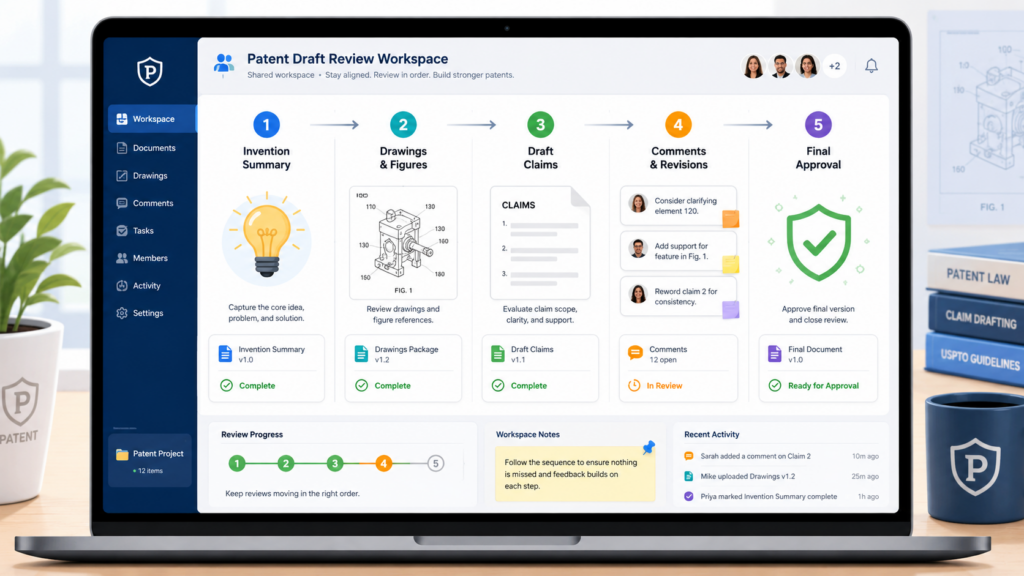
It is a step-by-step check of the invention, the product, the technical choices, the business goals, and the final draft language.
If the workspace is not shaped around that flow, the team will waste time. People will comment too early on small wording issues before the big invention questions are clear.
Others will jump into claim language before the core system has been checked. Some will approve sections that still depend on unanswered technical points.
A better way is to build the shared workspace like a review path. The team should know what to check first, what comes next, and what must be resolved before the attorney finalizes the draft.
Start With The Big Idea Before Touching The Small Words
The first review should focus on the heart of the invention. The team should ask whether the draft captures what is actually new, useful, and important.
This is not the time to worry about perfect sentence flow. It is the time to check whether the draft explains the real breakthrough.
For a software invention, that may be a new way to process data, train a model, control a system, improve speed, reduce errors, or make a workflow smarter.
For a hardware invention, it may be a new structure, connection, sensor setup, control method, or manufacturing step.
The shared workspace should make this first review easy. Place a short invention summary near the top. Then place the draft below it. That way, reviewers can compare the big idea against the full text.
The First Question Is Whether The Draft Protects The Right Thing
A patent draft can be long and still miss the point. It can describe many parts of a product but fail to capture the key move that makes the invention valuable. That is why the first workspace discussion should be about the main protection goal.
The team should ask whether the draft protects the thing competitors would try to copy. This is a very practical question.
If another company studied your product and tried to build around it, what part would you want the patent to cover? What part gives your company an edge? What part was hard to build? What part would be painful to lose?
These answers should be captured in the shared workspace, not left in a call transcript that no one reads again.
PowerPatent is built for this kind of founder and attorney teamwork. It helps turn invention details into a draft that can be reviewed with more control and less confusion, while real patent attorneys stay involved. Learn more here: https://powerpatent.com/how-it-works
Review The Technical Flow Before Reviewing The Writing
After the big idea is clear, the next job is to check the technical flow. The team should walk through how the invention works from start to finish.
This is where engineers can add the most value. They should look for missing steps, wrong assumptions, narrow wording, outdated product details, and places where the draft makes one version sound like the only version.
A shared workspace is helpful here because technical review often needs back-and-forth. The attorney may ask whether a step is required.
The engineer may explain that there are three possible ways to do it. The founder may add that one way is in the current product, while another is planned for next year. That discussion can shape a stronger draft.
The Best Technical Review Looks For Optional Paths
One of the biggest mistakes in patent drafts is making the invention sound smaller than it really is. This often happens when the draft only describes the current product. But startups change fast. The product you file on today may look different six months from now.
During review, the team should use the workspace to capture alternate paths. Could the system use a different model? Could it run on a device instead of the cloud? Could it work with another data type?
Could the user be a machine instead of a person? Could one step happen before another? Could some steps be skipped?
These questions are not random. They help the patent attorney see the full shape of the invention. They may also help avoid a draft that is too easy for a competitor to design around.
Save Wordsmithing For The End
Many smart teams waste review time by editing words too early. They fix commas, rewrite sentences, and debate style before they have checked whether the invention is fully covered.
That feels productive, but it can slow the real work.
In a shared workspace, make it clear that wording review comes later. First, confirm the invention. Then confirm the technical paths.
Then confirm the examples, drawings, and use cases. Only after that should the team focus on clarity and wording.
Clean Language Matters More After The Substance Is Right
This does not mean writing quality is unimportant. Clear writing matters a lot. A patent draft should be easy enough for the team to follow and strong enough for filing. But polished words cannot fix a draft that misses the real invention.
When the substance is right, word review becomes much easier. The attorney knows what needs to stay broad. The engineer knows which terms are accurate.
The founder knows which product direction matters. The team can then clean up confusing parts without changing the meaning by accident.
A shared workspace lets you separate these stages. That is the key. Do not let every kind of feedback happen at the same time. Make the review move in order, and the draft will get better with less stress.
Use The Workspace To Capture The Real Invention, Not Just The Current Product
A patent draft review should not only ask, “Does this match what we built?” That question matters, but it is too small. A stronger question is, “Does this protect the core idea behind what we built, including the ways this may grow later?”
This is where many startup teams lose value. They review the draft like a product manual.
They check whether the screen names are right, whether the workflow matches the current release, and whether the examples sound familiar. That kind of review can help, but it can also trap the patent draft inside today’s product.
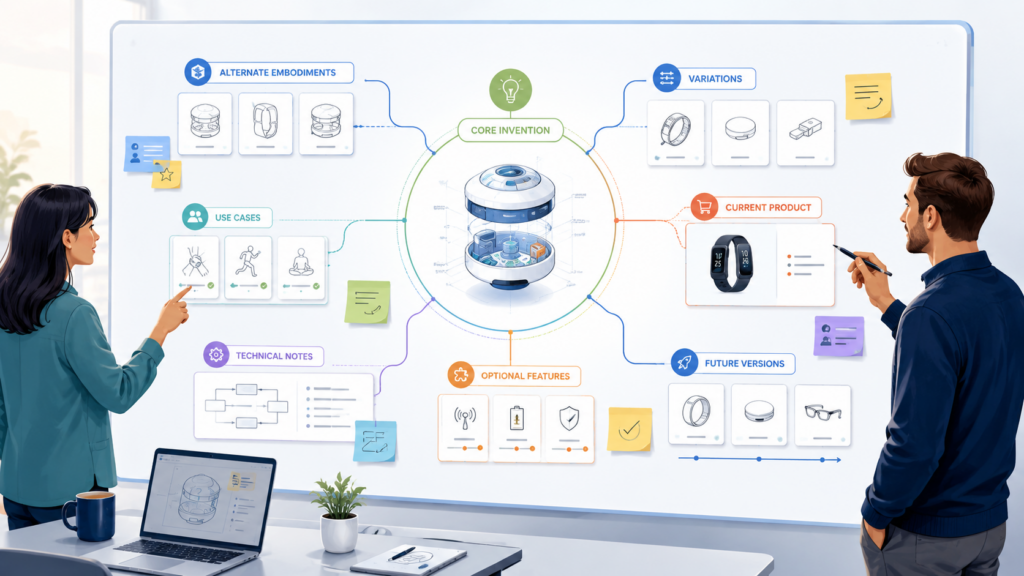
A shared workspace gives your team a better way to think. It lets you collect what the invention is today, what it may become, what parts are required, what parts are optional, and what parts competitors may try to copy. That is the kind of review that can make the draft stronger.
Separate The Product From The Invention
Your product is what users see. Your invention is the smart thing under the surface that makes the product work in a new or better way. Those two things are linked, but they are not the same.
For example, your product may be a dashboard that helps doctors review patient data faster.
The invention may be a new way to rank risk signals, filter noisy data, and trigger alerts based on changing patterns. The dashboard is the product face. The ranking and filtering logic may be the invention.
In the shared workspace, reviewers should call out these differences. When a draft talks too much about the product interface, the team should ask whether the deeper method is clear.
When a draft describes one customer workflow, the team should ask whether the same invention could work in another setting.
This kind of thinking helps the patent attorney write with more range. It also helps founders avoid filing a patent that sounds impressive but protects only a thin slice of the business.
The Workspace Should Hold The “Why This Matters” Notes
A good patent draft does not just list parts. It explains how the invention solves a real problem. During review, your shared workspace should collect short notes about why each important feature matters.
If your system reduces false alerts, say why that matters. If your model learns from fewer examples, say why that matters.
If your tool makes a manual review faster, say what was slow before. If your hardware setup uses less power, say where the old waste came from.
These notes may not all appear in the final draft in the same words, but they help the patent team understand the invention with more depth. They also give the attorney better raw material when shaping the story around the invention.
Mark What Is Required And What Is Optional
One of the most useful things your team can do in a shared workspace is mark which parts of the invention are truly required and which parts are only examples.
This is a big deal. If the draft makes an optional feature sound required, the patent may become too narrow. That can give competitors an easy path around it. They may copy the main idea while changing one detail that was never truly needed.
Engineers are often the best people to catch this. They know which parts are hard rules and which parts are just current design choices. Founders also play a key role because they know where the product may go next.
A shared workspace should make these comments easy to see. When a reviewer spots a required-sounding phrase, they should explain whether that part is always needed, sometimes needed, or merely one possible version.
Optional Details Should Still Be Captured Clearly
Optional does not mean useless. Many optional details are valuable. They can support different versions of the invention and show that the team thought beyond one narrow build.
For example, a system may use a neural network today, but later use a rules engine, a smaller model, or a hybrid approach.
A device may use Bluetooth today, but later use Wi-Fi, cellular, or wired data transfer. A workflow may require human approval today, but later allow automatic approval under certain conditions.
These possible versions should be captured during review. The attorney can decide how to use them, but the team should not leave them buried in someone’s head.
This is one reason PowerPatent is helpful for technical teams. It gives founders and inventors a clearer way to share invention details while still getting real attorney oversight. That means your review can be faster, but not careless. See how it works here: https://powerpatent.com/how-it-works
Add Future Versions Before The Draft Is Final
Startups move fast. By the time a patent draft is ready for review, the product may already be changing. A new feature may be planned. A new model may be under test. A new customer may want a different version. A new technical path may have appeared.
The shared workspace should become the place where those future versions are captured before filing.
This does not mean the draft should become a wish list. It means the team should explain realistic paths the invention may take. If a future version is already being designed, tested, or seriously planned, it should be discussed in review.
Future Product Plans Can Help Avoid A Narrow Draft
A patent draft that only matches today’s product may feel accurate, but it may not support tomorrow’s business.
If the company plans to move from web to mobile, from single-user to team use, from cloud to edge, or from one market to another, the patent team should know.
The same is true for AI, robotics, biotech tools, climate tech, developer tools, and deep tech systems. Early versions often change a lot. The core invention may stay the same, while the product wrapper changes many times.
A shared workspace helps your team connect these dots. It lets the attorney see which changes are likely and which details should not be treated as fixed.
Turn Comments Into Decisions Instead Of Endless Discussion
Comments are only useful when they lead to clear action. A shared workspace can hold hundreds of notes, but if no one knows which comments are open, which are answered, and which are resolved, the review will stall.
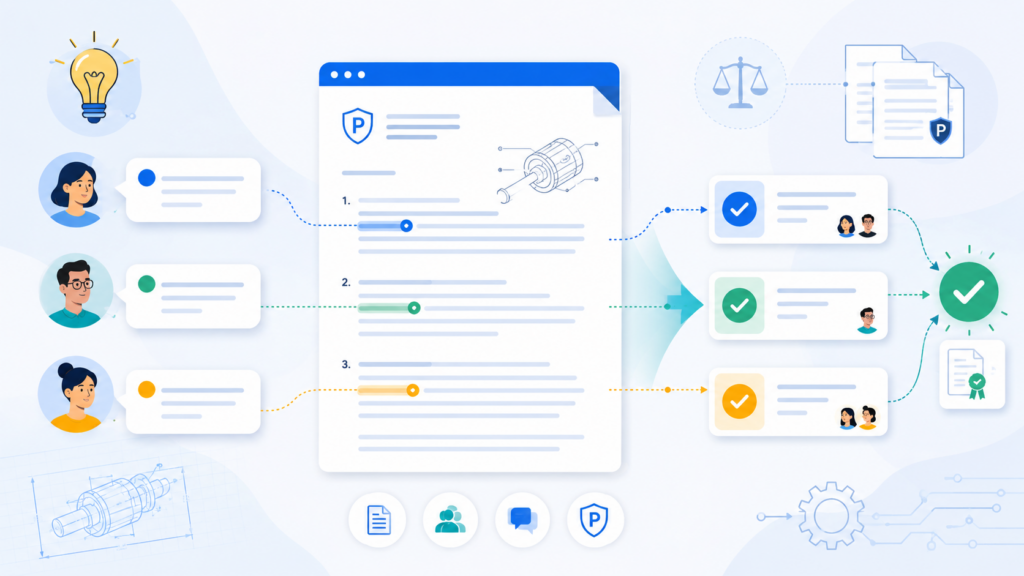
This is where many teams lose control. They think more comments mean better review. Not always. More comments can mean more confusion if the team does not turn them into decisions.
The goal of the workspace is not to collect every thought forever. The goal is to move the patent draft from unclear to clear, from incomplete to complete, and from pending to ready for attorney final review.
Every Comment Should Have A Clear Purpose
Before adding a comment, reviewers should ask what they want to happen next. Are they pointing out a factual error? Are they adding a missing technical detail? Are they asking the attorney to broaden the language? Are they flagging a business concern? Are they saying a term is wrong?
A comment without a purpose creates work for someone else. A useful comment makes the next step easier.
For example, instead of writing, “This part seems off,” a reviewer can write, “This part should not say the sensor always sends data every second. In some versions, it sends data only when a threshold is crossed.” That comment gives a clear correction and explains why it matters.
The shared workspace should reward this kind of clarity. The best review culture is not the one with the most comments. It is the one where each comment helps the draft get stronger.
Vague Comments Create Hidden Delay
Vague comments often feel harmless, but they slow everyone down. The attorney may need to ask follow-up questions.
The engineer may need to explain what they meant. The founder may need to join another call. The same issue may be reopened later because it was never fully answered.
That delay is not just annoying. It can affect filing timelines, product launches, investor updates, and public disclosures. If your team is preparing to launch, pitch, publish, demo, or sell, a slow patent review can create real pressure.
A shared workspace should reduce that pressure by making each open issue easy to understand and easy to close.
Assign Each Open Question To One Owner
When everyone owns a question, no one owns it. This is true in product work, and it is also true in patent review.
If the draft has an open technical question, assign it to the person who knows the answer best. If the question is about business direction, assign it to the founder or product lead.
If the question is about patent strategy, the attorney should own it. If the question is about drawings, assign it to someone who understands the system layout.
This does not need to feel rigid. It just needs to be clear. Every open question should have one person responsible for moving it forward.
Ownership Keeps The Review From Going In Circles
Without ownership, the same topic can come up again and again. One reviewer says the draft should cover edge deployment. Another says cloud deployment is enough. Someone else says both matter. But no one decides what the attorney should do with that input.
A clear owner can gather the needed facts and make the call with the attorney. That keeps the review moving.
This is especially useful for technical founders who are already stretched thin. A clean workspace lets you give targeted input without getting buried in scattered messages. PowerPatent is designed around that kind of faster, cleaner patent process with smart software and real attorney guidance. Learn more here: https://powerpatent.com/how-it-works
Close The Loop On Every Resolved Comment
A comment should not simply disappear after someone answers it. The workspace should show that the issue was handled. That may mean the draft was changed, the attorney decided no change was needed, or the team agreed to handle the point in another part of the draft.
This closing step is small, but it matters. It gives the team trust that feedback was not ignored. It also prevents people from reopening the same issue because they cannot see what happened.
A good closeout note does not need to be long. It should simply say what decision was made and where the change was handled.
Good Review Leaves A Trail Of Smart Decisions
Patent drafts involve judgment. Not every suggestion will be used. Not every technical detail belongs in the same place. Not every possible version needs the same level of detail. That is normal.
What matters is that the team can see how key decisions were made. If a founder later asks why a certain feature was not described as required, the workspace should show the answer. If an engineer asks whether an alternate version was included, the workspace should show where it was addressed.
This kind of record helps the whole team feel more confident. It also makes the final review much smoother because fewer questions remain unresolved.
Use The Workspace To Make Attorney Review Faster And More Focused
A strong shared workspace does not replace a patent attorney. It makes the attorney’s work sharper. That distinction is important.

Patent drafting is not just typing technical words into a document. It involves judgment about what to protect, how broad the draft should be, how to describe different versions, and how to avoid mistakes that can weaken the filing. A shared workspace helps by giving the attorney better input at the right time.
When your workspace is clean, the attorney does not need to hunt through emails, decode messy comments, or ask the same question five times. They can spend more time improving the draft and less time doing cleanup.
Give The Attorney The Context Behind The Invention
An attorney can draft better when they understand not only what the invention does, but why the team made certain choices. This is especially true for deep tech, software, AI, robotics, hardware, and other technical fields.
The shared workspace should include context that does not always fit neatly into the draft. What was hard about the old way? What failed before this approach worked? What tradeoffs did the team make? What does the system do better than normal tools? What data, timing, structure, or control step makes the result possible?
These answers help the attorney understand the invention at a deeper level. They also help the draft avoid sounding generic.
Strong Context Helps The Draft Sound Less Like A Feature List
A weak patent draft can read like a pile of parts. It says the system has a processor, memory, data, rules, and outputs. That may describe something, but it may not explain the invention in a meaningful way.
The workspace can help fix this. When reviewers add context, the attorney can shape the draft around the real improvement. The draft can explain how the parts work together, what problem they solve, and why the approach is different from a basic setup.
That difference matters. A patent should not feel like a product brochure. It should clearly teach how the invention works and why the technical approach matters.
Group Attorney Questions In One Place
During review, the attorney will likely have questions. Some may be about technical details. Some may be about alternate versions. Some may be about drawings. Some may be about terms. Some may be about how the product may change.
If those questions are spread across email and chat, they are easy to miss. If they live in one shared workspace, they become much easier to answer.
The workspace should have a clear place for attorney questions. Each answer should be direct, complete, and tied to the draft section when possible. This saves time and reduces the risk of half-answered issues.
The Best Answers Teach The Attorney How The System Really Works
A short answer is not always a good answer. If the attorney asks whether the system can work without a certain step, the answer should explain the real technical rule.
For example, “Yes” is less useful than, “Yes. The system can skip that step when the input data already includes a verified label. In that case, the model uses the verified label directly and does not run the separate check.”
That second answer gives the attorney something valuable. It may support a broader version of the invention. It may also help the draft avoid making one step sound required.
This is where PowerPatent can make the process feel much less painful. It helps technical teams share the right details and move toward attorney-reviewed patent work with less back-and-forth. You can explore the process here: https://powerpatent.com/how-it-works
Keep Strategy Comments Separate From Text Edits
Attorney review gets harder when strategy questions are mixed with tiny wording edits. A comment about claim scope should not be buried between notes about grammar. A question about future product direction should not sit next to a typo.
The shared workspace should make high-value comments easy to find. Strategy comments should be marked as strategy. Technical corrections should be marked as technical. Simple edits should be left for the end.
This keeps the attorney focused on what matters most first.
Not All Comments Have The Same Weight
A typo can be fixed in seconds. A narrow description of the invention can affect the whole filing. A missing alternate version can change how useful the patent is later. A wrong technical assumption can cause serious confusion.
The workspace should reflect that difference. The most important questions should rise to the top. The attorney and founder should be able to see which issues affect protection, timing, or product direction.
This helps avoid the common mistake of spending too much time polishing language while bigger issues remain open.
Use Drawings And Visual Notes To Catch Gaps Faster
Patent drafts are easier to review when the team can see the invention. Words alone can hide gaps. A drawing, flow chart, system map, or simple sketch can expose missing parts in minutes.
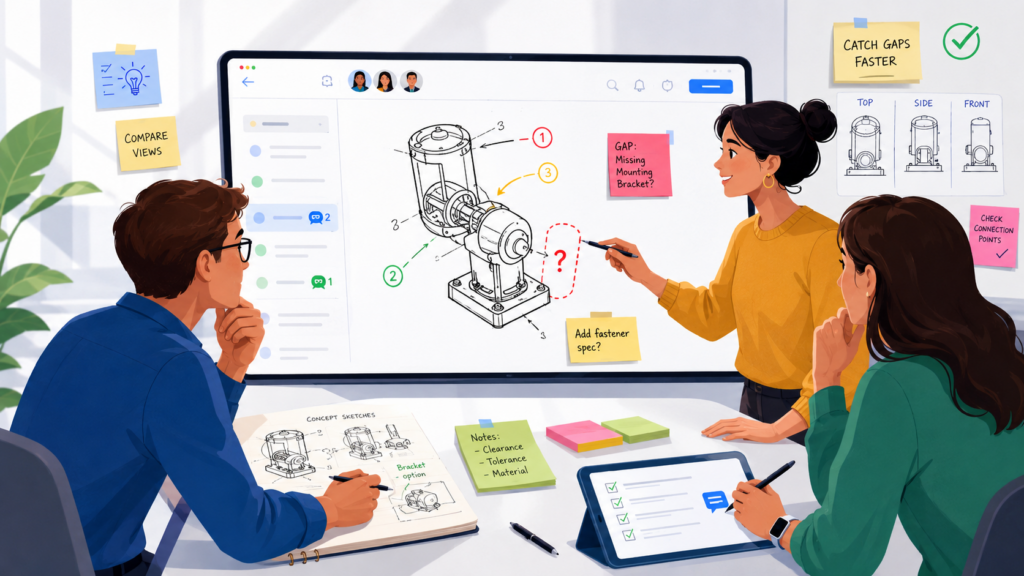
Shared workspaces are powerful because they let teams place visuals next to the draft. This helps engineers, founders, and attorneys talk about the same thing without guessing.
You do not need perfect art at the review stage. A rough diagram can be enough if it shows how the system works. The goal is not beauty. The goal is clarity.
Put The Main System Diagram Near The Draft
Every technical patent review should have a main system view. This can show the major parts, how they connect, what data moves through them, and where the invention sits.
For software, this may show users, servers, databases, models, APIs, devices, and outputs. For hardware, it may show sensors, controllers, power parts, housings, signals, and physical connections.
For AI systems, it may show training data, model inputs, model outputs, feedback loops, checks, and deployment points.
When reviewers can see the full system, they catch errors faster. They may notice that the draft forgot a key module. They may see that a step happens in the wrong order. They may point out that the system can run in more than one place.
A Diagram Makes Hidden Assumptions Visible
Patent drafts often contain hidden assumptions. The draft may assume that data always comes from one source. It may assume that the user is always human. It may assume that processing happens in the cloud. It may assume that a device is always connected.
A diagram helps the team spot those assumptions. Once they are visible, reviewers can decide whether they are true, optional, or too narrow.
For example, a founder may look at a system diagram and say, “This should also work when the model runs on the device.”
An engineer may add, “The database is not required in every version.” The attorney can then adjust the draft so it does not lock the invention into one setup.
This is the kind of practical review that helps patents support real startup growth. PowerPatent gives teams a smarter way to organize invention work and attorney review, so key technical details do not get lost. See how it works here: https://powerpatent.com/how-it-works
Use Flow Charts To Review The Method
A system diagram shows the parts. A flow chart shows the steps. Both matter.
During patent draft review, the team should compare the written method against the flow chart. Does each step appear in the right order? Are any steps missing? Are some steps optional? Can the order change? Can the method repeat? Can it run in real time? Can it run in batches? Can part of it happen before user input?
These questions are easier to answer when the team can see the flow.
The Flow Should Show More Than The Happy Path
Many drafts describe the cleanest version of the invention. Data comes in. The system processes it. An output appears. Everything works.
Real systems are not that neat. Inputs can be missing. Data can be noisy. A model can return low confidence. A sensor can fail. A user can reject a recommendation. A device can go offline. A system can need a fallback path.
The shared workspace should capture these alternate flows. They may be important to the invention. Even when they are not the main point, they may help show that the team built a real solution, not just a simple idea.
Attach Examples That Make The Invention Easy To Understand
Examples make patent drafts easier to review. They turn abstract language into something concrete.
A good workspace should include example inputs, example outputs, sample screens, test cases, data snippets, performance results, user scenarios, or prototype notes. These examples help the attorney and reviewers understand how the invention works in real life.
Examples should be chosen with care. They should show the invention clearly without making the draft sound limited to one use case.
Good Examples Help Without Shrinking The Invention
A strong example says, “Here is one way this can work.” It should not imply, “This is the only way this can work.”
That is why reviewers should pay attention to how examples are framed. If the draft gives one example using medical data, but the invention can also work with industrial data, the workspace should capture that.
If the example uses images, but the system can also process text, audio, sensor data, or logs, reviewers should say so.
This makes the attorney’s job easier. It gives them enough detail to make the draft clear while preserving room for other versions.
Control Version History So The Team Never Loses The Thread
Version control is not just a software issue. It is a patent review issue too. When draft versions are unclear, teams lose trust in the process. People do not know what changed, why it changed, or whether their input was handled.
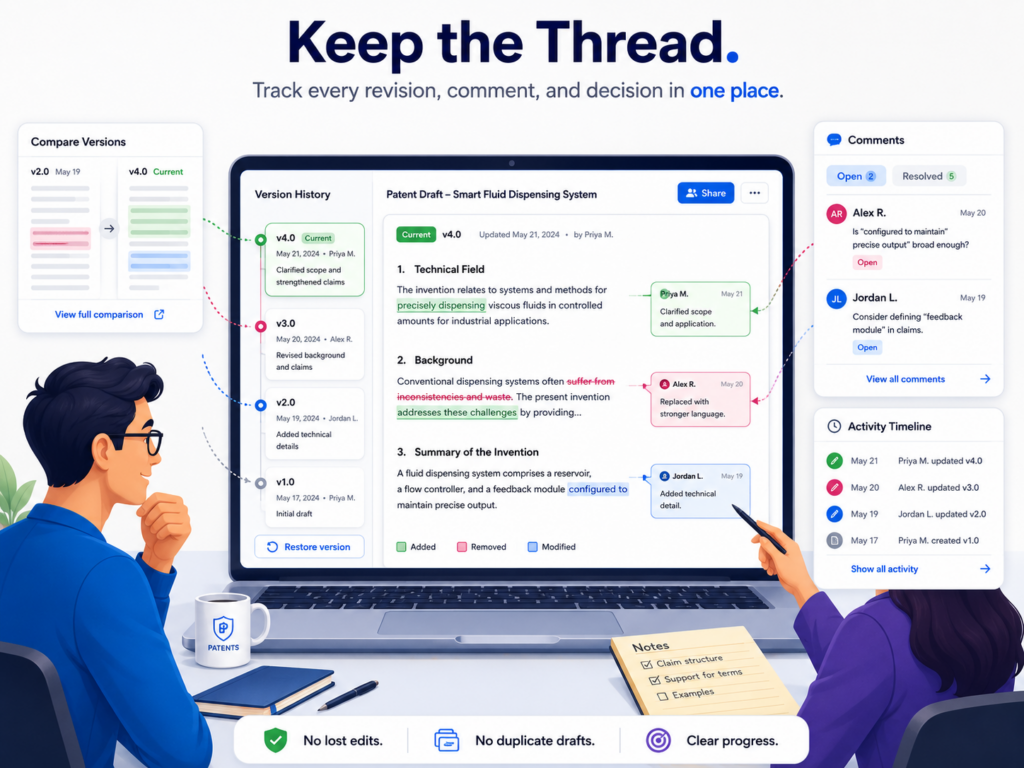
A shared workspace should make version history simple. Everyone should know which draft is current, what changed since the last version, and which issues still need attention.
This prevents the painful “final draft confusion” that happens when a team is close to filing but no one is fully sure whether the latest draft reflects the last round of feedback.
Name Each Version In A Way Humans Can Understand
Version names should be boring and clear. The name should show the invention, the review stage, and the date. It should not rely on words like “final” unless the draft is truly final.
Names like “Founder Review Draft,” “Engineer Technical Review Draft,” “Attorney Revision Draft,” and “Pre-Filing Review Draft” are easier to understand than random file names. They tell people what the draft is for.
The workspace should also show who created the version and what changed. That way, reviewers do not need to reread the whole draft every time.
Never Use “Final” Too Early
The word “final” creates false comfort. Teams use it too soon, then end up with “final final,” “final revised,” and “final approved new.” This is more than a naming problem. It shows that the review process is unclear.
A better approach is to name the stage, not the emotion. If the draft is ready for founder review, call it that. If it is ready for attorney cleanup, call it that. If it is ready for filing approval, call it that.
Clear names reduce mistakes. They also make the whole process feel calmer.
Keep A Simple Change Record
Every new version should have a short change record. This does not need to be long. It should explain what changed in plain words.
For example, the record may say that the draft now includes the edge deployment version, adds a second training method, updates the system diagram, removes a required-sounding step, and answers the attorney’s questions about fallback logic.
That kind of note helps reviewers focus. They can check what changed instead of searching blindly.
Reviewers Should Know What To Recheck
When a new version appears, not every person needs to review everything again. The engineer may only need to recheck technical changes.
The founder may need to review strategy updates. The attorney may need to verify that the changes support the protection goal.
A change record makes this possible. It saves time and reduces review fatigue.
Review fatigue is real. When people are asked to reread long drafts too many times, they stop seeing details. A clean workspace helps the team focus their energy where it matters.
Preserve Key Earlier Notes
Version control should not erase important comments. Sometimes an old comment explains why a decision was made.
Sometimes an earlier version includes useful language that may need to be restored. Sometimes the team needs to see how a technical point evolved.
The shared workspace should preserve key notes even after the draft changes. This does not mean every old comment needs to stay open. It means important decisions should remain easy to find.
The Workspace Should Tell The Story Of The Review
By the end of review, the workspace should show a clear story. It should show what the invention is, what the team checked, what changed, which issues were resolved, and why the draft is ready.
This story helps founders feel more confident before filing. It also helps new team members understand the work if they join later.
Most of all, it helps the patent process feel less like a black box. That is a major reason PowerPatent exists. It gives builders a better way to move from invention to attorney-reviewed patent work without losing control of the process. You can learn more here: https://powerpatent.com/how-it-works
Build A Review Rhythm That Keeps The Patent Moving
A shared workspace is not enough by itself. The team also needs a review rhythm. Without rhythm, the workspace can become another place where comments sit untouched.

A good rhythm keeps the draft moving. It gives people clear times to review, clear moments to answer questions, and clear checkpoints for decisions.
This matters because patent work often competes with product work, fundraising, hiring, customer calls, and launch deadlines.
The review process should respect that reality. It should be focused, light enough to fit into a startup schedule, and strong enough to catch the details that matter.
Set Review Windows Instead Of Open-Ended Feedback
Open-ended feedback sounds flexible, but it often causes delay. If reviewers can comment anytime, they may wait too long.
The attorney may not know when feedback is complete. The founder may think engineering has reviewed the draft when they have not.
A better approach is to use review windows. Give each review stage a clear start and end. During that window, the right people add comments, answer questions, and flag concerns. After the window closes, the team moves to resolution.
This keeps review from dragging on forever.
A Review Window Creates Healthy Pressure
Healthy pressure helps busy people act. It tells reviewers, “This is the moment to give input.” That is important because many patent details are time-sensitive. Once the draft moves to final attorney review, late comments can cause rework.
A review window does not need to be harsh. It just needs to be clear. The team should know when comments are due and what kind of comments are needed.
For example, the first window may focus only on invention accuracy. The next may focus on technical options. The next may focus on final approval. This is much better than asking everyone to review everything at once.
Use Short Review Meetings Only When Needed
The workspace should reduce meetings, not create more of them. Many questions can be handled directly in comments. But some issues deserve a live conversation.
A short meeting can help when the team is stuck on a major technical choice, a future product path, a claim strategy issue, or a confusing part of the invention. The key is to use the meeting to make decisions, not to read the draft out loud.
The workspace should prepare the meeting. The open questions should already be written down. The right people should already know what needs to be decided.
Meetings Should End With Workspace Updates
A meeting is only useful if the decisions make it back into the shared workspace. Otherwise, the team has the same problem again: important information lives in someone’s memory.
After a review call, update the relevant comments, draft sections, diagrams, or decision notes. Make it clear what was decided and what still needs action.
This habit keeps the workspace as the source of truth. It also helps the attorney avoid relying on scattered call notes.
Keep The Final Approval Calm And Focused
The final review should not feel like a panic. If the workspace has been used well, the final approval should be a focused check that confirms the major issues are resolved.
At this stage, the founder should review the protection goal, the key invention summary, the main examples, the drawings, and any important strategy notes.
The engineer should confirm that the technical details are accurate. The attorney should confirm that the draft is ready for the next filing step.
A Calm Final Review Starts Much Earlier
Final review becomes stressful when earlier review was messy. If major technical questions are still open, if comments were never resolved, or if versions are unclear, final approval becomes risky.
But when the workspace has captured the invention, tracked decisions, organized questions, and controlled versions, the final review becomes much easier. The team can move with confidence.
That is the point. Shared workspaces are not just about neat files. They are about helping smart teams protect their work without slowing down the company.
PowerPatent helps founders, engineers, and patent teams work this way by combining smart software with real attorney oversight.
It helps you move faster, stay organized, and avoid the common patent review mess that wastes time and weakens drafts. See how it works here: https://powerpatent.com/how-it-works
Make The Workspace Safe For Honest Technical Feedback
A patent draft gets stronger when people are willing to say what is missing, wrong, too narrow, or unclear. That kind of feedback is not always easy. Engineers may worry that they are slowing things down.

Founders may worry that a gap means the invention is not ready. Product leads may think patent work is only for lawyers. When that happens, people stay quiet, and the draft may miss important facts.
A shared workspace should make honest review feel normal. The goal is not to prove that the first draft is perfect.
The goal is to make the final draft stronger. That mindset changes how people comment. Instead of treating feedback like criticism, the team treats it like protection.
Patent draft review should feel like a serious product review. You are testing the draft against the real invention. You are looking for weak spots before the outside world sees anything.
You are making sure the attorney has the details needed to write with strength. That is not delay. That is how smart teams protect what they built.
Create A Review Culture Where Corrections Are Welcome
The best shared workspace is not just a tool. It is a team habit. If the founder acts annoyed every time an engineer points out a missing detail, engineers will stop pointing things out.
If the attorney seems to dismiss product feedback, founders will stop sharing strategy. If comments turn into debates about who is right, the review becomes harder than it needs to be.
A strong review culture starts with a simple idea: the draft is allowed to improve. No one should feel strange about saying a section is too narrow, a term is wrong, or an example is outdated. In fact, that is exactly what review is for.
The workspace should make this easy by keeping comments tied to the draft, not to a person. The issue is not “Alex wrote this wrong.” The issue is “this step can happen in a different order.” That small shift keeps the review calm and useful.
Honest Comments Protect The Company From Quiet Mistakes
Quiet mistakes are the dangerous ones. A loud mistake gets discussed. A quiet mistake sits in the draft until it becomes part of the filing.
That can happen when a technical reviewer sees an issue but assumes it does not matter. It can also happen when a founder notices that the draft does not match the product roadmap but thinks it is too late to speak up.
The shared workspace should remove that fear. It should be clear that late-stage comments are not always bad if they catch something important.
Of course, earlier is better. But silence is worse than rework when the point affects the strength of the patent.
A useful review process invites people to say, “This part may be too limited,” or “This is not how the system works anymore,” or “This version should also cover the next release.” These comments can make a real difference.
Keep Feedback Direct, But Not Harsh
Patent review needs clear words. Soft, unclear comments create confusion. But direct feedback does not need to sound harsh.
A reviewer can say, “This is wrong,” but it is more helpful to say, “This does not match the current system because the model now receives two inputs instead of one.” The second version is still direct. It also gives the reason, which helps the attorney act.
The shared workspace should help people explain the issue and the fix. A good comment should not leave the reader guessing. It should show what the reviewer saw, why it matters, and what should be checked.
Tone Matters Because Review Is A Team Sport
Patent review usually brings together people who think in different ways. Engineers care about exact technical truth. Founders care about business coverage and speed.
Attorneys care about protecting the invention in a way that can hold up later. Product people care about user value. These views can clash if the workspace becomes tense.
Good tone keeps the work moving. A calm comment is easier to answer. A clear comment is easier to resolve. A respectful comment is easier to trust.
This matters even more when your team is under pressure. Maybe a demo is coming. Maybe fundraising is in progress.
Maybe a public launch is near. In those moments, the patent process can feel like one more thing on the pile. A clean, respectful workspace keeps the pressure from turning into chaos.
Encourage Engineers To Explain The “Almost True” Parts
Some of the most important review comments are not about things that are fully wrong. They are about things that are almost true.
A draft may say the system “always” ranks data before sending an alert. That may be true in the current build, but not in every version.
A draft may say the device “requires” a cloud link. That may be true today, but the roadmap includes offline use. A draft may say a user “selects” a setting, but in some versions the system chooses it on its own.
These almost-true statements are easy to miss because they sound reasonable. Engineers are often the people who can catch them. A shared workspace should make it normal for engineers to flag these details.
“Almost True” Can Become “Too Narrow”
The danger of almost-true language is that it may shrink the invention without anyone noticing. It may make one design choice sound like a hard rule. It may make a current product limit sound like a required part of the invention.
When reviewers find this kind of issue, they should not just say the sentence is wrong. They should explain the range.
For example, they can say the step is used in the current version but can be skipped when the confidence score is high. Or they can say the device sends data to a server today, but the same process can also run on the device itself.
Those small explanations can help the attorney write the draft in a stronger way.
PowerPatent is built to help technical teams capture these details before they get lost. It combines smart software with real patent attorney oversight, so founders and engineers can move faster while still taking the review seriously. See how it works here: https://powerpatent.com/how-it-works
Use The Workspace To Review Claims Without Making The Team Feel Lost
Claims can feel scary to non-lawyers. They are often written in a style that does not feel like normal speech. Founders and engineers may look at them and think, “This is not for me.”

That reaction is common, but it can cause a problem. The claims are often the most important part of the patent draft, so the team should not ignore them.
A shared workspace can make claim review more useful by giving the team a simple way to look at the claims. The team does not need to become patent experts.
They only need to help check whether the claims point at the right invention, avoid false limits, and line up with the technical truth.
The attorney should still guide this part. But founders and engineers can add huge value when they understand what to look for.
Start By Asking What The Main Claim Is Trying To Cover
Before anyone edits claim wording, the team should ask what the main claim is trying to protect. In plain words, what is the target? Is it a method? A system? A device? A model process? A data flow? A training method? A control loop? A user workflow? A manufacturing step?
The workspace should include a plain-language note beside the claim that explains the protection goal. This note does not replace the claim. It helps the team review it.
When reviewers understand the target, they can give better input. They can say whether the claim is focused on the right thing. They can flag missing pieces. They can spot details that sound too narrow.
Plain-Language Claim Notes Help Everyone Stay Oriented
A claim may be hard to read, but the idea behind it should not be mysterious. If the team cannot explain the main claim in simple words, that is a sign the review needs more work.
For example, the plain-language note might say, “This claim is trying to cover how the system chooses which data to review first based on model confidence and user risk rules.” That simple line helps reviewers check the claim against the real invention.
An engineer may then say, “The claim should not require user risk rules because the system can also use machine-set rules.”
A founder may say, “This should also cover the enterprise version where the rules come from an admin.” The attorney can then decide how to handle that feedback.
Look For Words That Accidentally Limit The Invention
During claim review, reviewers should pay close attention to words that make the invention sound smaller than it is.
Words like “always,” “must,” “only,” “required,” “single,” “fixed,” and “manual” can create problems when they do not reflect the full invention.
This does not mean those words are always wrong. Sometimes a part truly is required. But the team should not let limiting words slip into the draft by accident.
A shared workspace helps because reviewers can comment directly on the claim and explain what is broader in real life.
Limiting Words Need A Reason
If the claim says a model must receive image data, the reviewer should ask whether the invention also works with text, sensor data, audio, logs, or mixed data.
If the claim says a user approves an output, the reviewer should ask whether approval can also be automatic. If the claim says a server performs the step, the reviewer should ask whether a local device can do it too.
These are not small wording concerns. They can affect how useful the patent may be later.
The shared workspace should make these checks visible. A reviewer can mark a limiting word and explain whether it is correct, too narrow, or tied only to one example.
Connect Each Claim Back To The Draft Details
A claim should not float alone. It should be supported by the rest of the draft. That means the written description, examples, drawings, and technical details should help explain the claim.
During review, the workspace should help the team connect claims to the sections that support them. If a claim covers an alternate version, the team should make sure that version is described somewhere.
If a claim mentions a module, the draft should explain what that module does. If a claim covers a method step, the flow chart should match it.
This is where the shared workspace can prevent hidden gaps.
Claims Are Easier To Review When The Support Is Easy To Find
When support is hard to find, review gets slow. The attorney may ask whether a version was described. The engineer may know it was discussed in a comment but not know whether it made it into the draft.
The founder may assume the draft covers a future version, but no one can point to the section.
The workspace should reduce that uncertainty. It should let the team connect key claims to the right text, drawings, and examples.
This is also where PowerPatent can help. The platform helps teams organize invention details and move toward attorney-reviewed patent work with less confusion.
For founders who want protection without getting trapped in old, slow processes, it is worth seeing how it works: https://powerpatent.com/how-it-works
Use The Workspace To Protect Speed Without Rushing The Draft
Startup teams care about speed for good reason. A slow patent process can get in the way of launches, investor talks, sales, hiring, and product work.

But rushing a patent draft can create bigger problems later. The smart move is not to go slow. The smart move is to remove waste.
A shared workspace helps you move faster by cutting confusion. It keeps the current draft in one place. It keeps open questions visible.
It gives each reviewer a clear role. It helps the attorney get better answers. It keeps decisions from disappearing into chat threads.
That kind of speed is healthy. It does not come from skipping review. It comes from making review clean.
Speed Comes From Clarity, Not From Pressure
Many teams try to speed up patent review by telling everyone it is urgent.
That may get people’s attention, but it does not always improve the work. Pressure without clarity creates rushed comments, missed issues, and last-minute rework.
A shared workspace creates a better kind of speed. It tells reviewers exactly what to check. It shows which questions need answers.
It makes the latest draft easy to find. It shows what changed since the last version. That saves time without making the team careless.
A Clear Workspace Reduces Rework
Rework is one of the biggest hidden costs in patent drafting. It happens when the attorney has to rewrite a section because the technical facts changed late.
It happens when a founder adds a product direction after the draft is almost done. It happens when an engineer finds that a required step is not actually required. It happens when comments were made on the wrong version.
The way to reduce rework is not to ask people to work harder. It is to make the review path cleaner.
When the workspace is clear, the team catches major issues earlier. The attorney gets better context sooner. Reviewers spend less time repeating old points. The draft moves forward with fewer loops.
Put Time-Sensitive Issues At The Top
Not every review issue has the same urgency. Some issues affect the filing date. Some affect a public launch.
Some affect what can be said to investors or partners. Some affect whether the draft is ready for attorney final review.
The shared workspace should make time-sensitive issues easy to see. If a disclosure is coming soon, say so.
If a demo is scheduled, say so. If a product announcement is planned, say so. If the company needs the draft ready before a partner meeting, say so.
This helps the attorney and team prioritize.
Timing Context Helps The Patent Team Make Better Calls
A patent team cannot manage timing well if they do not know what is happening in the business. Founders sometimes treat patent work as separate from company work. That is a mistake.
Patent timing can be tied to product launches, public talks, investor decks, research papers, website updates, sales pilots, app releases, and customer demos.
If the team is about to share technical details publicly, the attorney should know. If the product roadmap is shifting, the attorney should know. If a new feature may become the real core of the invention, the attorney should know.
A shared workspace gives those timing notes a home.
Use Fast Review For Low-Risk Issues And Slow Review For High-Value Issues
Not every part of the draft deserves the same level of attention. A typo should not get the same energy as a claim scope question.
A formatting issue should not delay review of a missing technical path. A small wording preference should not distract from whether the invention covers the future product.
The workspace should help the team spend time where it matters most. Low-risk issues can be handled quickly. High-value issues deserve careful thought.
Smart Review Is Uneven On Purpose
A strong review process does not treat every sentence as equally important. It pays more attention to the parts that affect protection, accuracy, and business value.
This means the team should spend real time on the invention summary, claims, main technical flow, alternate versions, drawings, examples, and open attorney questions.
It should spend less time on style preferences unless the wording creates real confusion.
That is how you keep speed without cutting corners.
PowerPatent is designed for teams that want this balance. You get smart software to move faster and real attorney oversight to help avoid costly mistakes. Learn how PowerPatent works here: https://powerpatent.com/how-it-works
Review The Draft Against Competitor Workarounds
A strong patent draft should not only describe what your team built. It should think ahead to what a competitor might do to avoid it. This is one of the most strategic parts of patent review.

Founders and engineers are often very good at this because they know how someone else might copy the idea.
They know which parts are easy to change and which parts are hard to replace. They know where the real value lives.
A shared workspace gives the team a place to capture this thinking. Instead of only asking whether the draft is correct, the team can ask whether the draft would still matter if a competitor changed small details.
Ask How A Competitor Would Copy The Value Without Copying The Exact Product
A competitor may not copy your product screen for screen. They may build a different interface. They may use different labels.
They may change the order of steps. They may use a different model. They may move processing from the cloud to the device. They may use a different sensor. They may replace a manual step with an automatic one.
The review should think about these moves.
In the shared workspace, the team should add notes about likely workarounds. These notes can be simple. The goal is to help the attorney see where the draft may be too tied to the current build.
Workaround Thinking Helps Reveal The Core Invention
When you ask how someone could work around the draft, you often discover what the invention really is.
For example, the real invention may not be the dashboard. It may be the way the system ranks cases based on changing risk signals. It may not be the exact sensor housing.
It may be the way the sensor data is cleaned before control decisions are made. It may not be the chatbot flow. It may be the way the tool combines user context with model output to reduce wrong answers.
This kind of insight is gold during patent review. It helps the team avoid over-focusing on surface details.
Identify Easy-To-Change Parts Of The Product
Some product details are easy for a competitor to change. Names, screens, colors, button locations, data formats, and basic workflows may not be the strongest place to focus.
Other details may be much harder to avoid, like the technical method that makes the result possible.
During review, the team should use the workspace to mark which parts are easy to change and which parts are central.
This helps the attorney understand what should not be treated as the main invention if it is only a surface choice.
The Draft Should Not Depend On Fragile Details
A fragile detail is a detail that can be changed without losing the value of the invention. If the draft depends too much on fragile details, competitors may have an easier time designing around it.
For example, if your invention works whether data is shown in a table or a graph, the draft should not make the table sound essential.
If the system can use many kinds of scores, the draft should not depend only on one named score. If the method can run before or after a user action, the draft should not lock the order unless that order truly matters.
The workspace should help reviewers catch these fragile details before the draft is finalized.
Capture The “Hard To Copy” Parts Clearly
The hard-to-copy parts are often the most valuable. These may be the parts that took the most testing, the most engineering judgment, or the most domain knowledge. They may also be the parts that make your product meaningfully better.
The shared workspace should collect these details in clear language. What was hard? What did the team try that failed?
What worked better than expected? What tradeoff did the team solve? What part would another team struggle to rebuild?
Hard-Won Lessons Can Strengthen The Draft
Patent drafts do not need to include every internal lesson, but the attorney should understand them. If the team discovered that a certain data cleaning step makes the model much more reliable, that may matter.
If the team found that a certain sensor position reduces noise, that may matter. If the system improves speed by changing the order of operations, that may matter.
These are the kinds of details that can separate a strong technical draft from a shallow one.
PowerPatent helps founders and engineers surface these details in a more organized way, with attorney oversight built into the process.
That means your patent work can reflect the real invention, not just the visible product. See how it works here: https://powerpatent.com/how-it-works
Conclusion
A shared workspace makes patent draft review faster, clearer, and stronger because it gives every key idea, comment, drawing, question, and decision one clean home. It helps founders protect the real invention, helps engineers catch technical gaps, and helps patent attorneys focus on better protection instead of chasing scattered feedback.
The key is to use the workspace with care: keep roles clear, review in the right order, resolve comments, track versions, and capture future product paths before filing. PowerPatent brings this cleaner process together with smart software and real attorney oversight. See how it works here: https://powerpatent.com/how-it-works
Leave a Reply