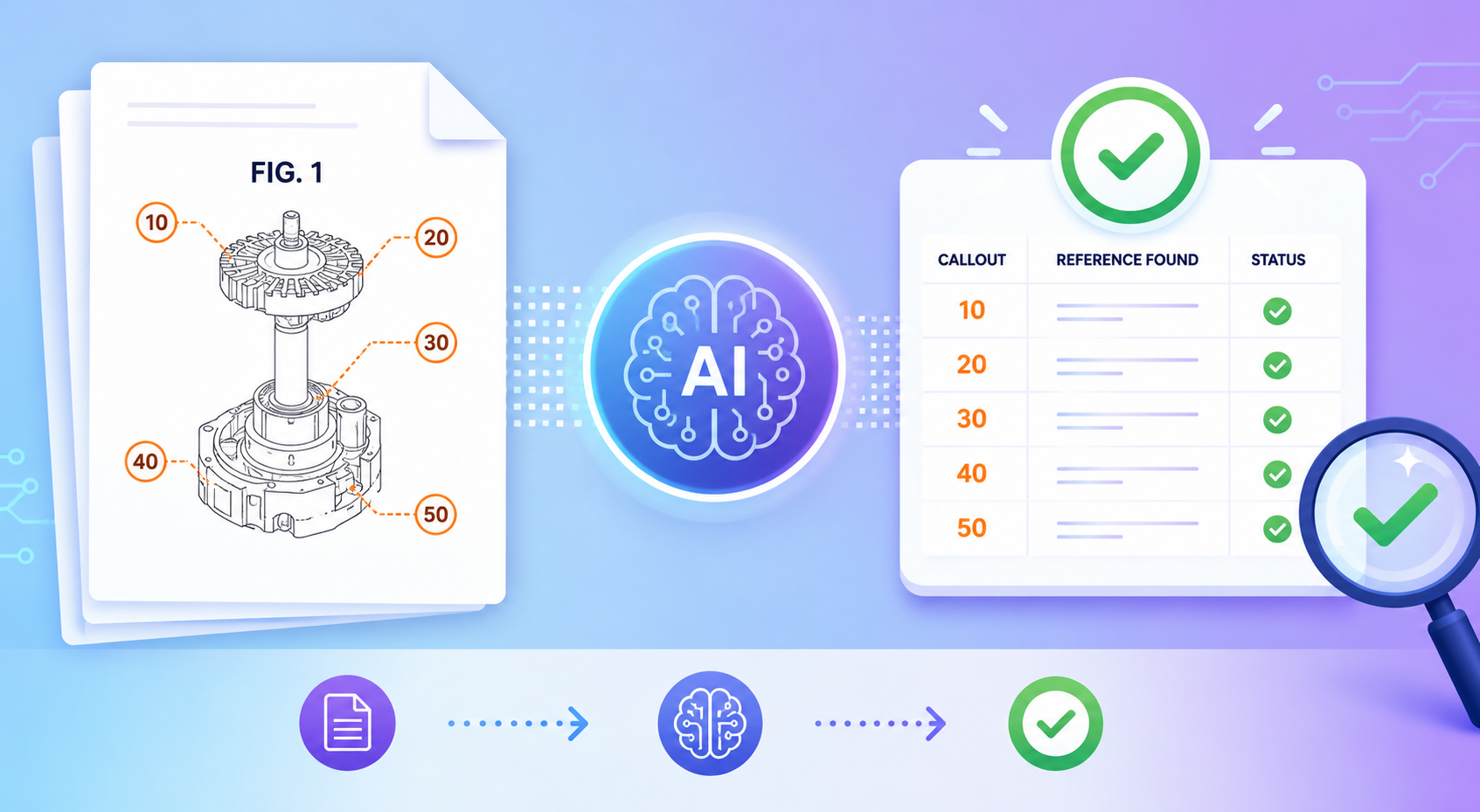
Patent drawings look simple from the outside. A box points to a part. A number names that part. The text says what the number means. Done, right? PowerPatent helps founders move faster with smart software and real attorney oversight, so your patent work feels clearer, safer, and less painful. Learn how it works here: https://powerpatent.com/how-it-works
Why figure references and callouts need careful review before filing
Patent figures are not just pictures. They are part of the story of your invention. When someone reads your patent, the figures help them see what the words mean.
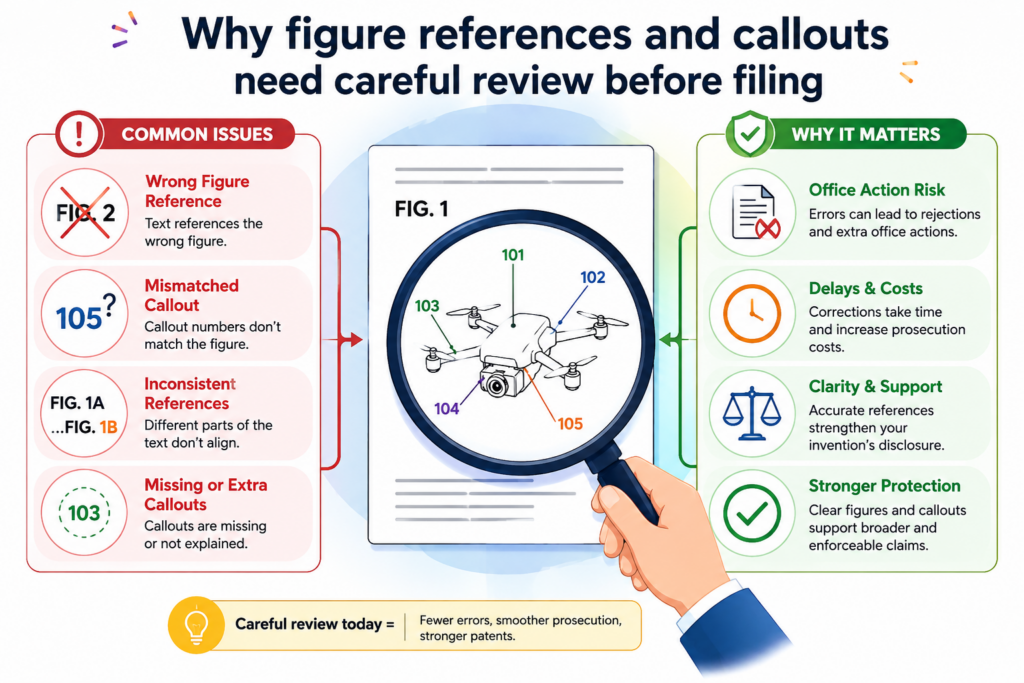
The callouts, which are the small numbers or labels in the drawings, act like road signs. They point to each part and help the reader follow the design without getting lost.
If those road signs are wrong, the whole patent can feel harder to trust.
Patent drawings and text must match in a clean way
A patent application often has many drawings. One drawing may show a system. Another may show a method.
Another may show a device, screen, flow, circuit, model, training pipeline, data path, or user action. Each drawing may include many numbers. Those same numbers must be used in the written text in a clear and steady way.
For example, if Figure 1 shows a “processor 104,” then the text should not later call that same part “processor 140” unless there is a real reason.
If Figure 2 shows “database 118,” the text should explain what database 118 does. If the text talks about “sensor 122,” the drawings should show where sensor 122 appears.
This sounds simple. In real patent work, it can get messy fast.
A founder may change the design. An engineer may update the system map. A draft may be revised by more than one person. A drawing may be copied from an older version.
A reference number may move from one part to another. A label may be removed from a figure but left in the written text. These are normal draft problems. The danger is letting them reach the filed version.
A small mismatch can create a big review problem
When patent figure references do not line up, the patent can become slower to review and harder to clean up.
The issue is not only that a number is wrong. The bigger issue is that the reader may not know what the invention actually includes.
This matters because a patent is meant to explain the invention clearly. A strong patent should help a reader understand the idea, the parts, the steps, and the different versions of the invention.
If the drawings and text fight each other, the reader has to guess. Guessing is bad for patents.
This is why founders should treat figure checks as more than a final formatting task. It is a quality step. It helps protect the full value of the invention.
PowerPatent helps teams catch these kinds of issues earlier, with smart software and real attorney review working together. You can see the process here: https://powerpatent.com/how-it-works
What patent figure callouts actually do inside the patent story
A callout is usually a number placed near a part of a drawing. A line may point from the number to the part.
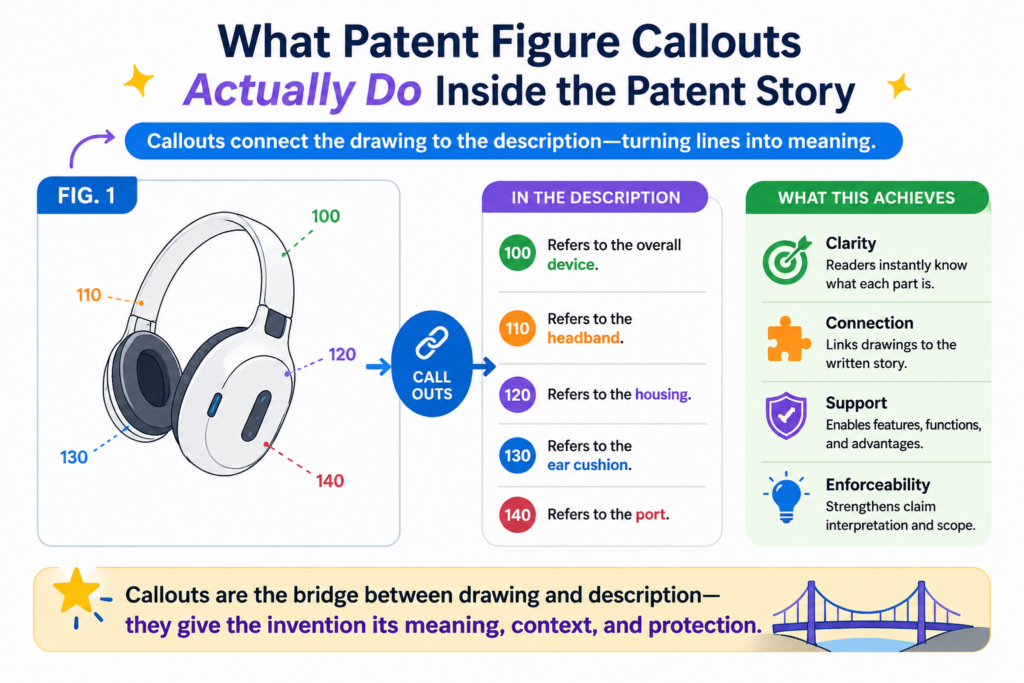
That number is then used in the written text. The goal is to connect the picture and the words so the reader can move between them with ease.
Good callouts make a patent easier to read. Bad callouts make the patent feel like a puzzle.
Callouts turn drawings into a map of the invention
Think of a patent drawing as a map. A map without labels may still show shapes and roads, but it does not tell you enough. Labels make the map useful. Patent callouts do the same thing.
In a software patent, a callout might point to a user device, server, machine learning model, data store, API, event stream, or interface.
In a hardware patent, it might point to a housing, sensor, board, channel, arm, hinge, light source, or connector.
In a biotech or deep tech patent, it may point to a sample flow, chamber, control unit, electrode, reaction area, or analysis module.
The callout gives the reader a handle. Once the reader sees “control module 130,” the text can explain how control module 130 works, what it receives, what it sends, and how it improves the system.
That handle must stay steady.
The same number should not mean two different things
One of the most common figure problems is reuse of a number for two different parts. At first, this may look harmless.
Maybe “112” points to a memory in one figure and a valve in another. A busy team may miss it because the figures are far apart.
But to the reader, this is confusing. A patent should not make the reader stop and wonder whether “112” means the first part, the second part, or both.
The number should be clean. The meaning should be clear. If one number is used for more than one thing, the draft needs review.
The opposite problem is also common. The same part may receive two different numbers in two figures. A server may be labeled “106” in Figure 1 and “116” in Figure 3 even though it is meant to be the same server.
Sometimes that is fine if the figures show different versions. But if it is the same part, the numbering should usually stay consistent.
AI tools can help by building a map of every number in every figure and every number in the written text.
That map gives founders and patent teams a faster way to see what changed, what is missing, and what looks risky.
Why manual checking is hard for founders and engineering teams
Most founders do not ignore figure checks because they are careless. They miss them because patent drafts are dense, the drawings are detailed, and the team is moving fast.
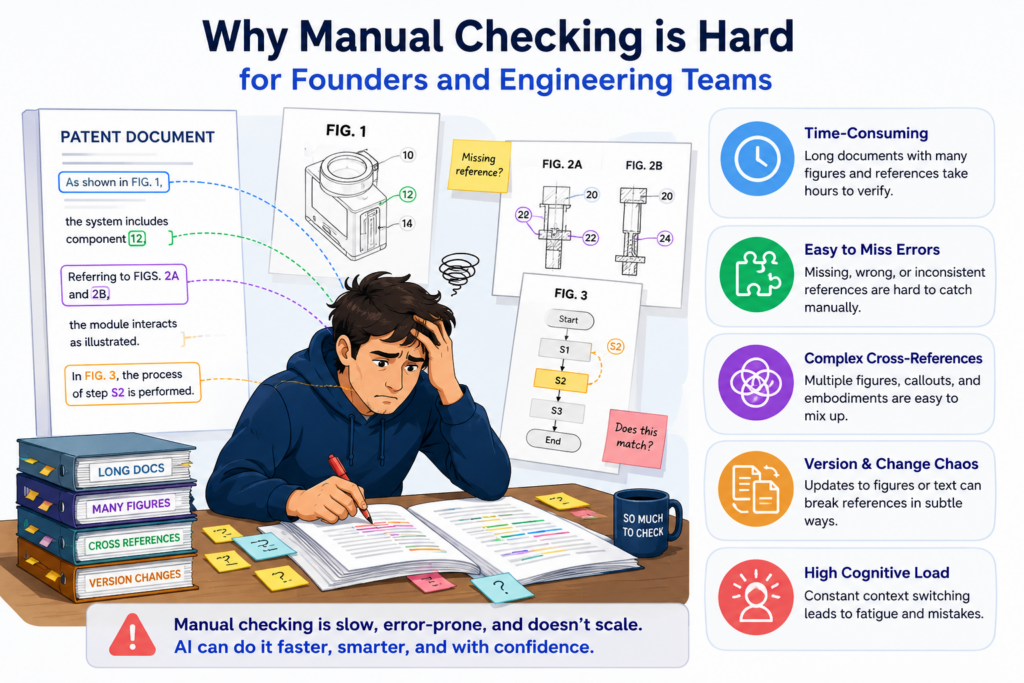
By the time a patent draft is ready for review, the product may have changed several times.
The team may have renamed features, updated system parts, moved data flows, removed modules, or added new steps. Those changes can break figure references without anyone noticing.
Patent drafts change faster than figure numbers do
In startup life, the invention rarely stays still. The first version of the patent may describe one system design. Two weeks later, the engineering team may have a better way to route data.
A model may move from the device to the cloud. A training step may be split into two parts. A user flow may change after customer feedback.
The patent draft must keep up with those changes.
But figure references are easy to break during edits. A writer may add a paragraph that mentions “feature extractor 124,” but the drawing may still show that part as “feature extractor 126.”
A figure may be updated, but the text may not be updated. A paragraph may be deleted, but its callout may remain in a drawing with no support in the text.
These problems are hard to catch with normal reading. Your eyes often see what they expect to see.
If you already know the invention, your brain fills in gaps. That is useful when building. It is risky when reviewing patent figures.
The best review process does not rely on memory
Manual review often depends on someone reading the whole draft and checking every number by hand.
That person has to compare the drawings, the figure descriptions, the detailed text, and sometimes the claims. This takes focus. It also takes time.
For a simple patent, the process may be manageable. For a deep tech patent with ten or more figures and many moving parts, it can be painful. The more complex the invention, the easier it is to miss a mismatch.
This is where AI is useful. AI does not get tired in the same way. It can scan the draft, pull out the callouts, compare them across sections, and flag items that deserve human review.
It does not replace good judgment. It makes good judgment easier to use.
PowerPatent is built for this kind of founder problem. It helps turn technical work into cleaner patent work without forcing your team to slow down or become patent experts. You can learn more here: https://powerpatent.com/how-it-works
How AI tools check patent figure references and callouts
AI tools can review figure references in a few simple but powerful ways. They can read the patent text.
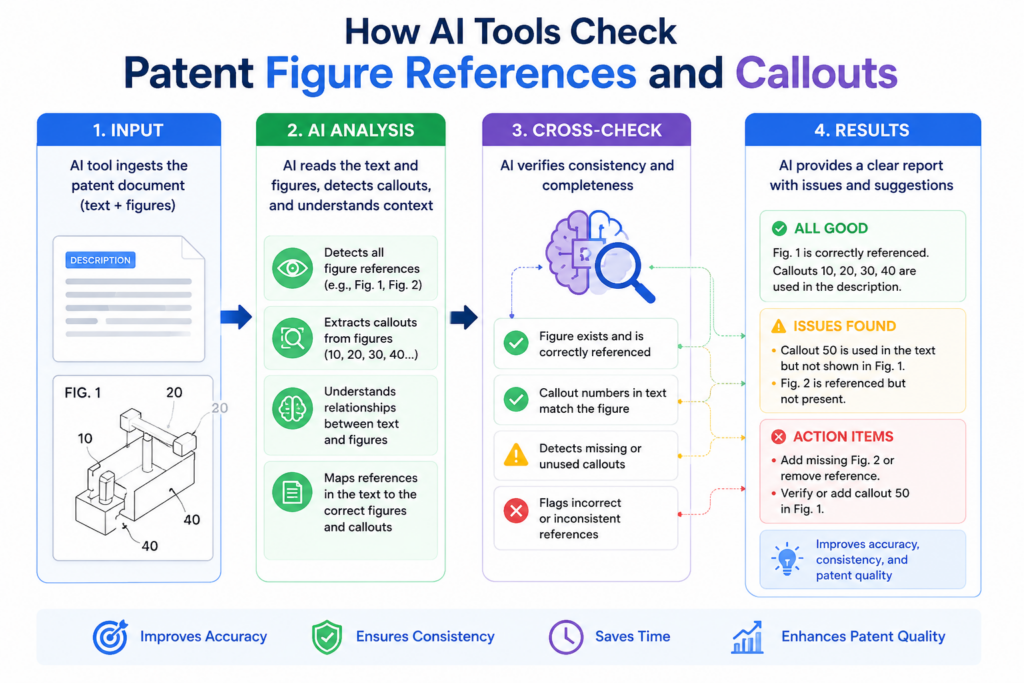
They can study the figure labels. They can compare the two. Then they can point out places where the draft may need attention.
The value is not magic. The value is speed, structure, and repeat checks.
AI can build a callout table from the full patent draft
A strong AI review starts by pulling out every reference number from the written patent draft. The tool looks for terms like “processor 102,” “memory 104,” “model 120,” or “step 306.”
It then builds a table in the background that shows each number, the name tied to that number, and where that number appears.
This makes hidden problems easier to see.
For example, the tool may notice that “network interface 110” appears in one paragraph, while “communication interface 110” appears later. That may be fine if they mean the same thing.
It may also be a sign that the wording drifted during editing. A human reviewer can then decide whether the terms should be cleaned up.
The tool may also notice that “training engine 132” appears only once and is never explained. That could mean the draft needs more detail.
Or it could mean that the part was removed from the invention but left behind by mistake.
AI can compare figure labels against the written text
The next step is checking the drawings. This is harder because drawings are visual.
The AI may need to read labels from image files, drawing sheets, or PDFs. It can look for numbers placed near arrows, lines, boxes, flow steps, blocks, screens, circuits, or parts.
Once the AI finds those numbers, it can compare them against the text. This is where the review becomes very useful.
The tool can flag a number that appears in a figure but not in the written text. It can flag a number that appears in the text but not in any figure.
It can flag a figure that is mentioned in the text but missing from the drawing set. It can flag a drawing label that looks unclear, cropped, duplicated, or too close to another label.
For founders, this can save a lot of time. Instead of reading every page with a ruler and a red pen, you can focus on the issues that matter most. You still want attorney oversight.
But now the attorney and team can spend more time on meaning, strategy, and strength instead of hunting for basic mismatches.
The most common callout errors AI can help catch
Most figure reference errors follow patterns. Once you know those patterns, you can look for them early. AI tools are useful because they can check for the same patterns again and again without losing focus.
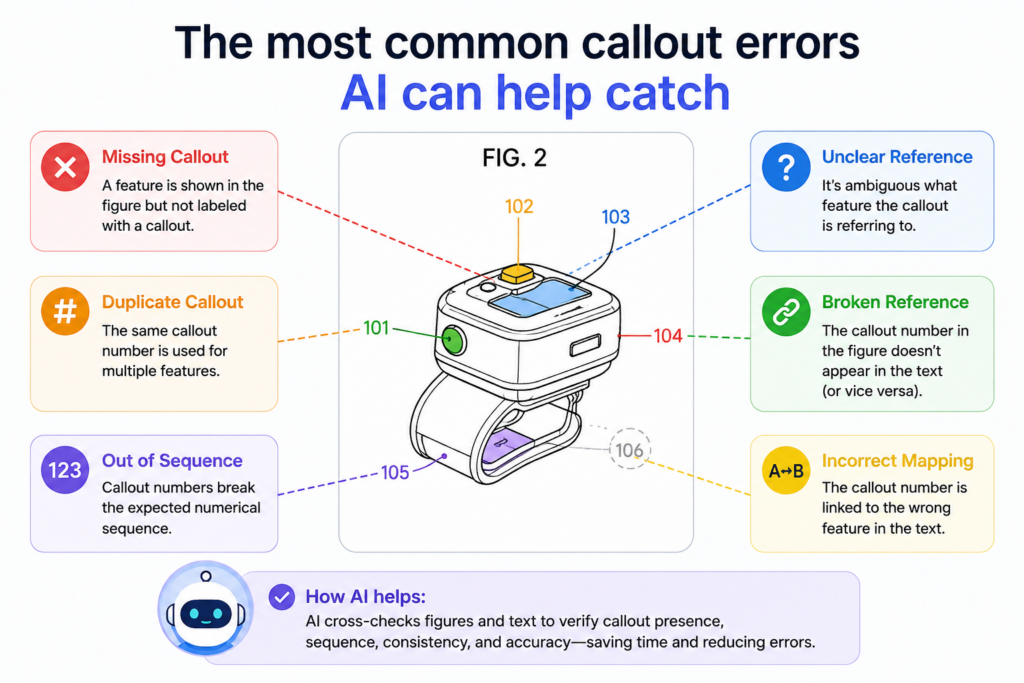
The goal is not to make the draft look neat. The goal is to make the invention easier to understand and harder to misread.
Missing references are often the first warning sign
A missing reference happens when a number appears in one place but not where it should.
A figure may show “controller 108,” but the written text may never explain controller 108. Or the text may describe “sensor array 142,” but no drawing shows sensor array 142.
This creates a gap. The reader may wonder whether the part is important, optional, old, or simply forgotten. A clean patent draft should not force that guess.
AI can catch these missing links by comparing the number set from the drawings with the number set from the text. It can then flag the gaps.
The team can review each gap and decide what to do. Sometimes the fix is to add a short explanation. Sometimes the fix is to remove an old label. Sometimes the figure needs an update.
Duplicate numbers can make the invention harder to follow
Another common problem is duplicate numbering. This happens when one number is tied to more than one item.
For example, “118” may refer to a user profile in one part of the draft and a rules engine in another. In a long document, this may be missed by a human reviewer.
AI can spot this by checking each number and all the words used near it. If one number has more than one name, the tool can flag it.
The reviewer can then decide whether the terms are truly different or just different names for the same thing.
There is also a softer version of this problem. The same part may have labels that are not exactly the same but are close.
For example, “analysis module 126,” “analytics module 126,” and “analysis engine 126” may refer to the same thing. This can be okay, but it can also create noise. A clear patent often benefits from steady naming.
This is where AI can help the draft feel more polished. It does not just catch obvious errors. It can also find small naming shifts that make the patent harder to read.
PowerPatent helps teams clean up these rough edges while still keeping the process founder-friendly. Startups can see how the platform supports faster patent work here: https://powerpatent.com/how-it-works
How AI helps with figure numbers in software and AI patents
Software and AI patents can be especially hard to check because the invention may not be a physical object. The figures often show data flows, system blocks, model steps, user interfaces, or training pipelines.
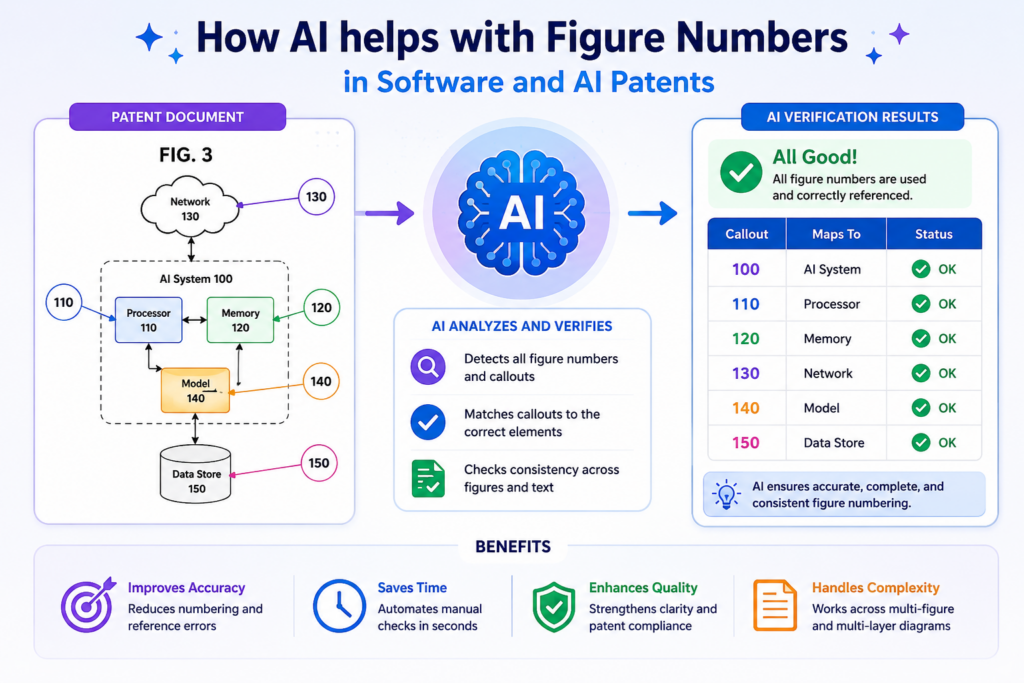
These drawings can change often, and the words used by the team may shift as the product evolves.
This is exactly where figure reference review matters.
Software figures often mix systems, steps, and screens
A software patent may include one figure for the full system, another for the user flow, another for the backend process, another for model training, and another for the user interface. Each figure may use different types of numbers.
A system figure may have numbers like “client device 102,” “server 104,” and “database 106.” A method figure may have step numbers like “receiving input 302,” “generating output 304,” and “updating a model 306.”
A screen figure may have “input field 402,” “result panel 404,” and “feedback control 406.”
All of these must be checked in context. The AI tool needs to understand that a system part, a method step, and a screen element may follow different numbering patterns. It should not treat every number the same way.
AI can help track changes across fast-moving technical drafts
For AI startups, the invention may include a model, a training set, a scoring layer, a feedback loop, a vector store, a prompt builder, a safety filter, a ranking engine, or an agent workflow.
These parts may be renamed during product work. The patent draft needs to stay aligned with the final story.
AI tools can compare older and newer drafts to see which figure numbers changed. They can flag when a model was renamed in the text but not in the drawings.
They can also catch when a flow step was added to one section but not reflected in the figure description.
This helps founders move with more control. You do not have to choose between speed and care. You can move fast while still catching the small issues that make a patent draft look unfinished.
That is the kind of balance PowerPatent is built to support. It gives founders a faster way to protect technical work, while real patent attorneys help guide the process. Learn how it works here: https://powerpatent.com/how-it-works
AI review should start before the drawings are treated as final
Many teams wait too long to check figure references. They finish the draft, polish the claims, clean up the drawings, and only then look for callout problems.
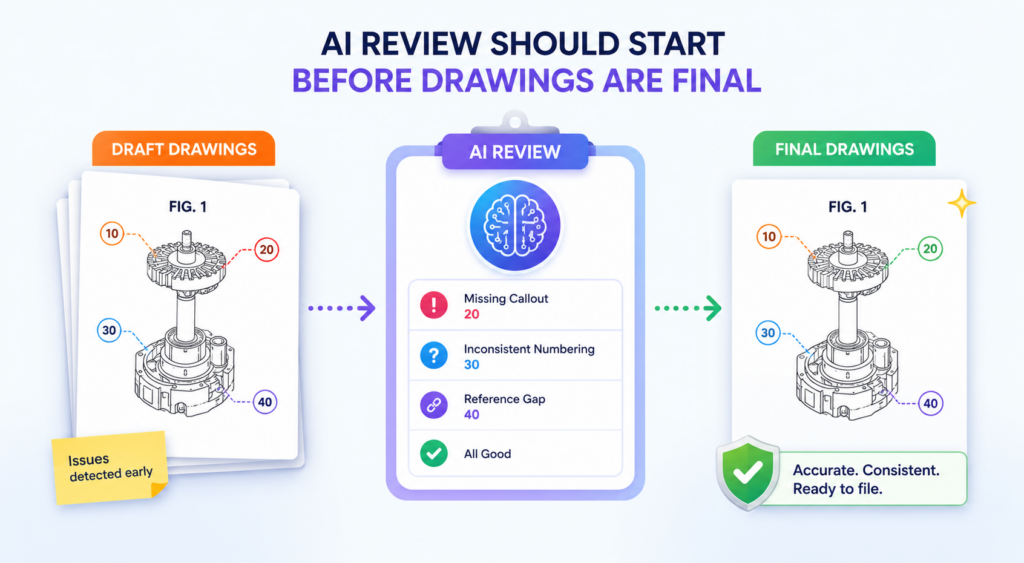
That feels normal, but it creates extra work. By that point, every small fix may touch many pages.
A better way is to check references while the draft is still alive. This gives your team more room to catch problems early, before they spread across the full patent application.
Early checks help prevent messy cleanup later
When an invention is still being shaped, the drawings often change. A new module may be added. A system block may be split into two parts.
A method step may move to a different place. A figure may be deleted because it no longer fits the story. Each change can affect callouts.
This is why an early AI scan can be useful. The tool can create a simple map of all figure numbers and names. Then, when a new draft is uploaded, it can compare the new map with the old one. This makes changes easier to see.
For example, say your first draft uses “prediction engine 126.” Later, your team changes the product name to “decision engine.”
The AI tool may notice that the text now says “decision engine 126,” while some figures still say “prediction engine 126.” That may not be a huge issue, but it is worth checking.
The key is not to chase perfection too early. The key is to avoid silent drift.
A good AI check gives your team a living reference map
Think of the AI review as a live map of your patent draft. It tells you which numbers exist, where they appear, what words are tied to them, and which ones may be out of sync.
This is helpful because patent drafts can become hard to hold in your head. Even if the invention is simple, the draft may still include many parts.
A founder may know the product deeply, but that does not mean they can remember whether “API gateway 114” appears in Figure 1, Figure 3, or both.
A living map makes the review easier. It also helps the team talk clearly. Instead of saying, “I think that part is in one of the drawings,” the team can see where it appears and whether the text matches.
This kind of workflow is especially useful for technical founders who are short on time. You do not need to become a patent drafting expert.
You need a clean way to catch issues, ask better questions, and move the draft forward with confidence.
PowerPatent gives founders a faster way to turn technical work into stronger patent filings, with smart software and real attorney oversight built into the process. See how it works here: https://powerpatent.com/how-it-works
The best AI checks look at meaning, not just numbers
A basic tool can search for numbers. That is useful, but it is not enough. Patent figure review needs more than a number match. It needs context.
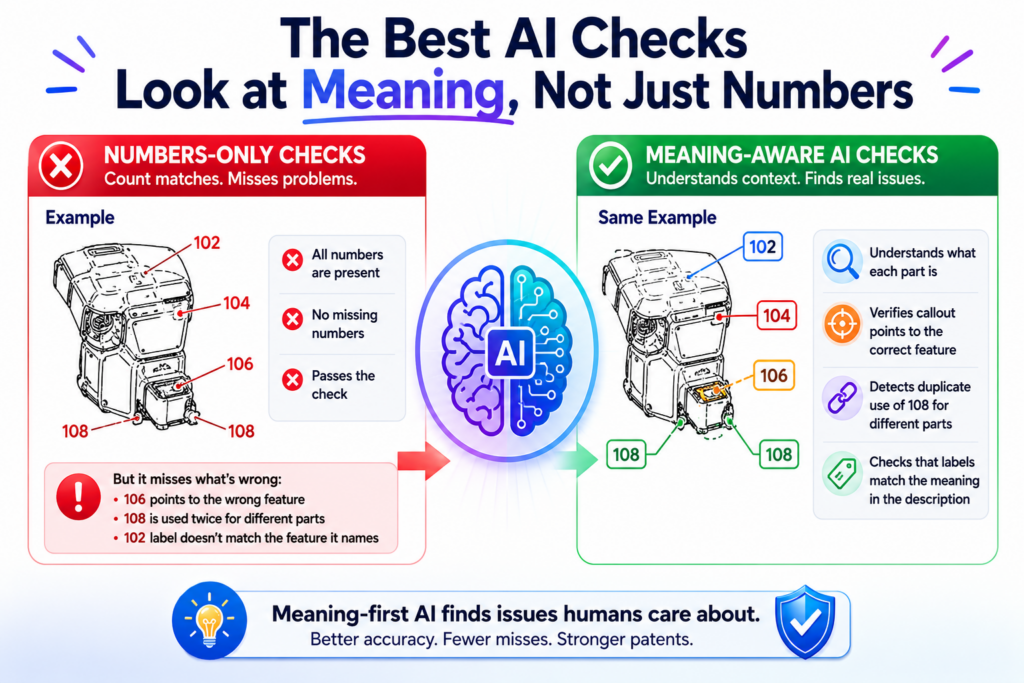
The same number may appear in many places. The tool should understand what the number is tied to.
It should look at nearby words, figure names, part names, and the way the invention is explained. This helps the review find deeper issues that a simple search might miss.
A number match is only the starting point
Imagine a draft says “controller 108” in one paragraph and “control unit 108” in another. A basic search may say the number is fine because “108” appears in both places. But a better AI tool should ask whether those names mean the same thing.
Sometimes they do. Sometimes they do not.
If the draft uses both terms on purpose, no problem. But if the terms drifted during editing, the patent may become harder to read.
A reader may wonder whether the controller and the control unit are the same part or different parts. That small doubt can weaken the flow of the application.
The same issue can happen with software parts. A draft may use “classification model 132,” “AI model 132,” and “machine learning model 132.”
Those terms may all point to the same thing, but they may also carry different meaning. A smart review should bring that to the surface.
AI can flag weak naming before it becomes a bigger issue
Good naming makes a patent easier to follow. This does not mean the draft must sound plain or dull.
It means the same part should usually be named in a steady way. When the words keep changing, the reader has to work harder.
AI can help by grouping names that are tied to the same number. It can show that number 120 is called a “data store” in one place, a “database” in another place, and a “memory” somewhere else. The review team can then decide whether the words should be cleaned up.
This matters because strong patents are not just about broad ideas. They are also about clear support.
The application should give enough detail so the invention feels real, complete, and easy to understand. Clean figure references support that goal.
For a founder, this is a big deal. You may be trying to protect a model, system, workflow, sensor, device, or platform that took months or years to build.
You do not want small naming problems to make the invention look less clear than it is.
AI helps by catching the boring stuff before it becomes expensive. Attorney review helps decide what to fix and how to fix it in a way that supports the patent strategy.
That is why PowerPatent combines software with real patent attorneys. The software helps move fast. The attorney oversight helps keep the work thoughtful. You can explore the process here: https://powerpatent.com/how-it-works
AI can help check whether every figure is actually used well
A figure can be present in a patent and still not do enough work. This is a subtle problem. The drawing may be included.
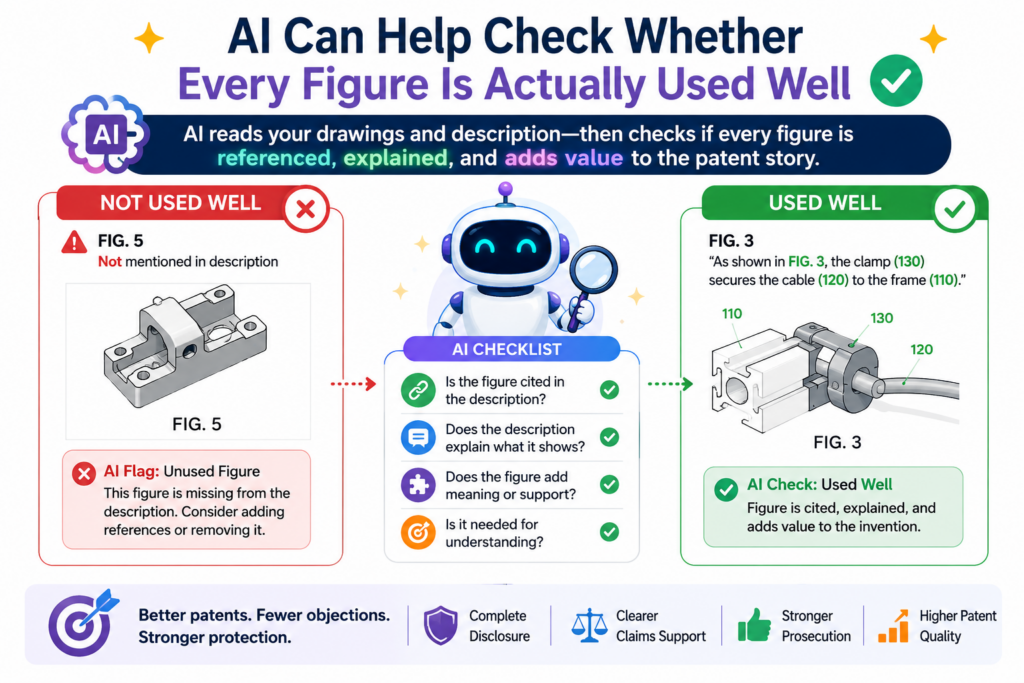
The callouts may be numbered. The figure may even be mentioned in the text. But the patent may not explain the figure in a clear or useful way.
AI tools can help find this by checking how each figure is introduced, described, and used across the draft.
Every figure should earn its place in the application
A patent figure should help explain the invention. It should not be there just because someone had a diagram available. If a figure is included, the text should tell the reader what the figure shows and why it matters.
For example, if Figure 4 shows a model training flow, the draft should not only say that Figure 4 is a flowchart. It should explain the key steps in that flow. It should connect the steps to the invention.
It should make clear how the system receives data, prepares data, trains or updates the model, checks output, and uses the result.
If Figure 5 shows a user interface, the draft should explain the important screen elements.
It should describe how the user interacts with them and how those actions affect the system. A figure without enough explanation can feel like a loose end.
AI can scan the draft and check whether each figure is mentioned in the brief figure description and in the detailed description.
It can also check whether the callouts in the figure are discussed in the text. If Figure 5 has twelve labeled parts but the text explains only three, the tool can flag that for review.
A useful figure check asks whether the drawing supports the invention story
The best figure review does not stop at “Does the number appear?” It also asks, “Does this figure help tell the story?”
This is where human review still matters. AI can find gaps, but a person must decide what the gaps mean.
Maybe a figure only needs a short explanation. Maybe it needs more detail. Maybe it should be removed. Maybe it should be split into two figures so the invention is easier to follow.
For startups, this can be a smart way to improve the quality of the application without slowing everything down.
Instead of asking a founder to read every line and guess what is missing, the AI tool can point to weak spots. Then the founder, engineering team, and patent attorney can focus on the parts that matter.
This also helps avoid wasted work. A patent drawing can take time to prepare and revise. If a figure does not support the invention clearly, it is better to know that before filing.
PowerPatent helps founders move through this kind of review in a cleaner way. You bring the invention.
The platform helps organize the patent work. Real attorneys help shape it into something stronger. Learn more here: https://powerpatent.com/how-it-works
AI can catch broken links between figure descriptions and detailed text
Most patent applications have a short section that describes the drawings.
This section may say things like “Figure 1 shows an example system” or “Figure 3 shows an example method.” Later, the detailed description explains the figures in much more depth.
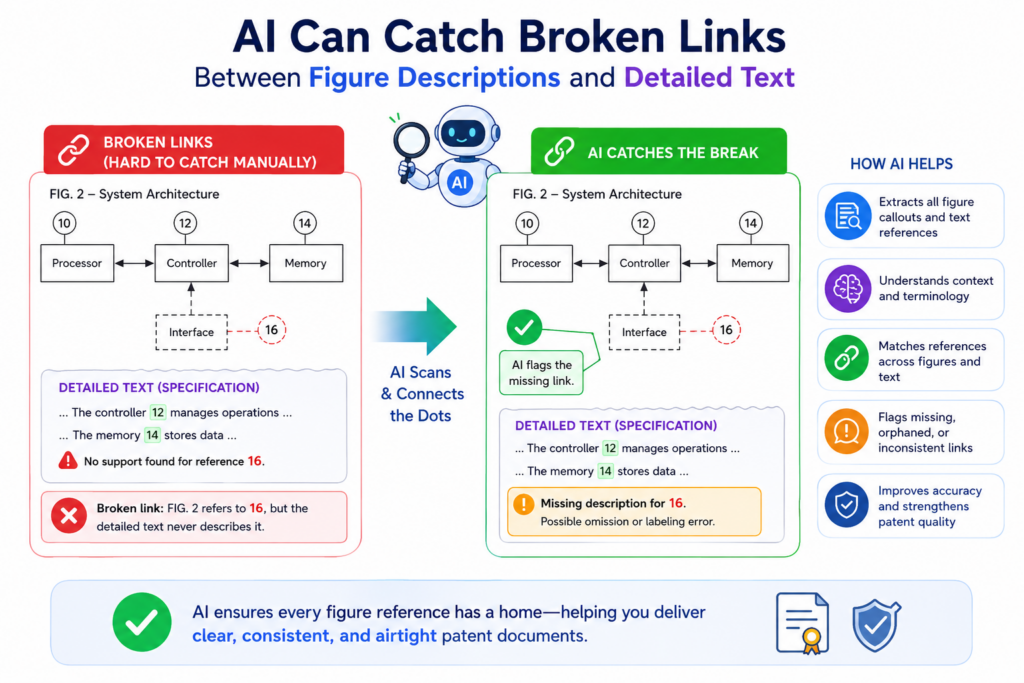
The two sections need to match. When they do not, the draft can feel sloppy or confusing.
Figure titles often reveal hidden draft problems
Figure descriptions are easy to overlook because they are short. But they can reveal a lot about the health of the patent draft.
A figure may be described as a “system diagram” in one place and a “method flow” in another. A figure may be called “Figure 6” in the short description but “Figure 7” in the detailed text.
A draft may say “Figures 2A and 2B show a process,” but only Figure 2A is actually discussed later. These are small mistakes, but they can create confusion.
AI can check figure names, figure numbers, and figure mentions across the application. It can find when a figure is skipped.
It can flag when figures are discussed out of order. It can catch when a figure is mentioned in the text but not listed in the drawing description section.
This is important because patent applications often go through many edits. A figure may be added late. A figure may be removed. A figure may be renamed. A simple AI scan can catch these mismatches before they reach the final review stage.
Clean figure descriptions make the whole patent easier to read
A good figure description is not long. It is clear. It tells the reader what the drawing shows and sets up the detailed text that follows.
When the figure descriptions are clean, the reader can move through the application with less effort.
AI tools can help by checking whether the figure descriptions use consistent names. If Figure 1 is called a “computing environment” in one place and a “network system” in another, the tool can flag it.
The attorney or drafting team can then decide whether one term should be used throughout.
This type of cleanup may seem small, but it improves the reading experience. A patent that reads cleanly feels more controlled.
It gives the sense that the invention has been thought through. That matters, especially for founders who want their patent work to reflect the quality of their product.
A strong patent application should not feel like a pile of disconnected parts. It should feel like a clear path from problem to solution. Figures, callouts, and descriptions all help build that path.
PowerPatent is designed to help founders create that kind of patent work without getting buried in old, slow processes.
The platform brings smart AI tools and real attorney review together so you can move faster with more confidence. See how it works here: https://powerpatent.com/how-it-works
AI can check whether method step callouts line up with the process
Method figures are common in software, AI, robotics, medical devices, fintech systems, and almost every deep tech patent. They usually show steps in a process.
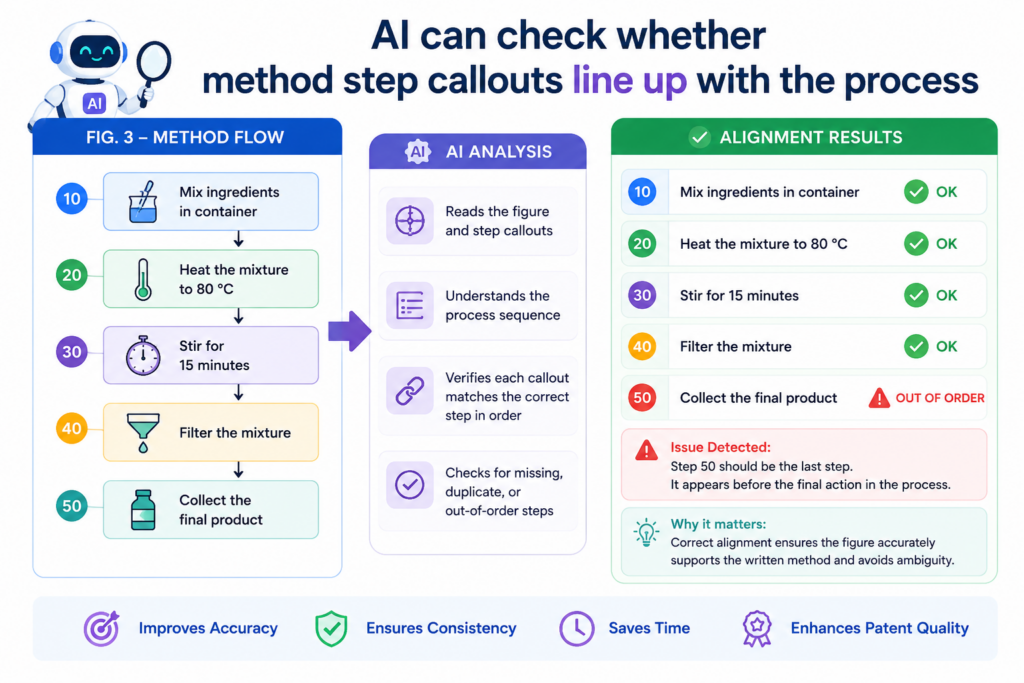
These steps may be labeled with numbers like 302, 304, 306, and 308. The written text then explains what happens at each step.
This sounds clean, but method figures are easy to break during editing. When the team adds a new step, removes a step, or changes the order, the figure and text can drift apart.
Method steps need the same care as system parts
A system figure shows parts. A method figure shows actions. Both need clear callouts.
For example, a method figure may include a step labeled “receiving sensor data 302.”
Later, the text may describe “receiving image data at step 304.” That may be a real change, or it may be a mistake. The AI tool can flag the mismatch so a human can check it.
This matters because method steps often carry the heart of the invention. In many technical patents, the value is not only in the parts. The value is in what the system does, how it does it, and the order in which actions happen.
If the figure shows one order and the text describes another, the patent can become hard to follow.
AI can help spot broken process flow
A strong AI tool can compare the method figure to the written method description. It can check whether each step number is explained.
It can check whether the steps appear in the same order. It can also notice when the text adds a step that is not shown in the figure.
This helps founders avoid a common late-stage problem. Someone reads the method section right before filing and says, “Wait, where did step 310 go?” Now the team has to rush through the drawings, the text, and the figure descriptions.
An early AI check can reduce that risk. It gives your patent team a cleaner way to review method flow while there is still time to make smart edits.
For AI startups, this is especially useful. A model workflow may include receiving data, cleaning data, creating embeddings, sending a prompt, ranking output, applying a safety filter, and updating a feedback loop.
If one of those steps changes, the method figure should be checked right away.
PowerPatent helps founders protect these kinds of technical workflows without turning the process into a slow maze. You can see how the platform works here: https://powerpatent.com/how-it-works
AI can help clean up reference numbers across related figures
Many patent applications use related figures. These may be shown as Figure 2A, Figure 2B, and Figure 2C.
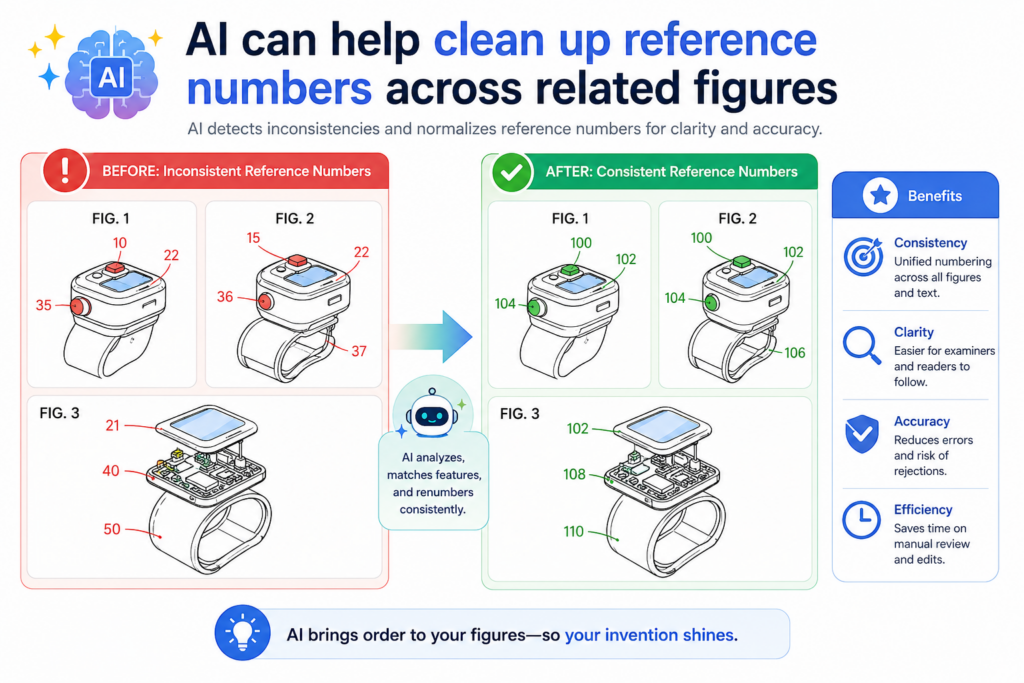
They may show different views of the same system, different stages of the same process, or different versions of the same design.
Related figures are helpful, but they can also create numbering trouble.
Similar figures can hide small but costly mistakes
When figures look similar, the human eye can miss small changes. A callout may appear in Figure 2A but not in Figure 2B.
A part may be numbered one way in a front view and another way in a side view. A screen element may be renamed between two interface figures.
These errors are easy to create because related figures are often copied and changed. A team may duplicate an earlier drawing and update only part of it. That can leave old labels behind.
For example, a first figure may show “authentication module 112.” A later version may replace that module with “identity verification module 118.”
If the old callout remains in one figure, the draft may now contain both names and both numbers. That might be intentional, but it needs review.
AI tools can compare related figures and look for numbering patterns. They can flag parts that seem to match visually but have different labels.
They can also flag labels that appear in only one view when they may need to appear across several views.
Related figures should feel like one clear family
When a patent has related figures, the reader should feel that the figures belong together.
The numbering should help the reader move from one view to the next. It should not force the reader to restart from zero each time.
That does not mean every figure must use the same labels. Sometimes a later figure shows a different version of the invention. Sometimes it adds new parts. Sometimes it removes parts. But those choices should be clear.
AI can help by showing which labels are shared across related figures and which labels are unique. This gives the reviewer a fast way to ask better questions.
Is this new number meant to show a new part? Is this old number still needed? Should these two terms be made consistent?
This type of review is not glamorous, but it is powerful. It makes the patent feel more controlled. It lowers the chance of confusion. It also helps the attorney focus on the parts of the application that carry real weight.
PowerPatent is built for founders who want that kind of control without losing speed. The software helps find issues. Real patent attorneys help shape the filing. Learn more here: https://powerpatent.com/how-it-works
AI can help review callouts in user interface figures
User interface figures are common in modern patents. They may show an app screen, dashboard, web page, device display, setup flow, control panel, or admin view.
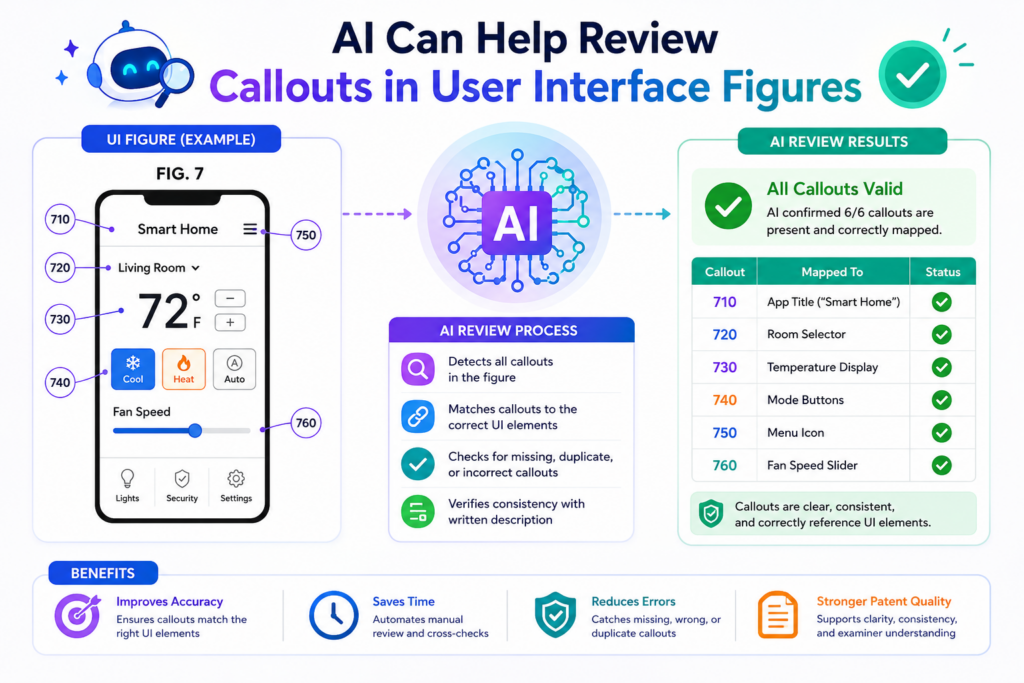
These figures are useful because they show how a person interacts with the invention.
But user interface figures can become outdated fast. Product teams change screens often. Buttons move. Labels change.
Features are renamed. Screens are simplified. If the patent figures do not keep up, the draft can feel off.
Interface callouts should match the product story, not every product detail
A patent does not need to copy every tiny part of the live product. In fact, it often should not. The goal is to explain the invention, not freeze one exact screen forever.
Still, the callouts in a user interface figure should match the patent story. If the patent says the user selects a “risk score control 412,” the figure should show something that makes sense as that control.
If the figure labels a “recommendation panel 406,” the text should explain how that panel helps the invention work.
AI tools can help by reading screen labels and callout numbers from interface drawings. They can compare those labels to the written text and flag mismatches.
They can also catch old product words that stayed in a figure after the draft changed.
For example, a startup may rename a feature from “Smart Review” to “AI Review.” The patent text may be updated, but a figure may still show the old label. That might be fine if the patent uses it as an example, but it should be checked.
AI can separate useful interface details from noise
A user interface figure can become crowded. Too many callouts can make it hard to see what matters.
Too few callouts can make the figure weak. The right balance depends on what the invention is trying to protect.
AI can help by showing which interface callouts are actually discussed in the text. If a figure has many labeled items that are never explained, the team can decide whether to add support or simplify the drawing.
This is practical for founders because interface patents often change as the product matures.
Your first patent draft may be based on an early mockup. By the time you file, the screen may look different. AI review can help catch the parts that need alignment.
Attorney oversight is still important here. A real patent attorney can help decide whether a screen change matters legally or whether it is just product polish. The goal is not to chase every pixel. The goal is to protect the core idea clearly.
PowerPatent helps founders keep that focus. It combines smart software with attorney guidance so your team can protect what matters without getting buried in tiny details.
See how it works here: https://powerpatent.com/how-it-works
AI can help spot drawing labels that are hard to read
Some callout problems are not about the wrong number. They are about the drawing itself. A label may be too small.
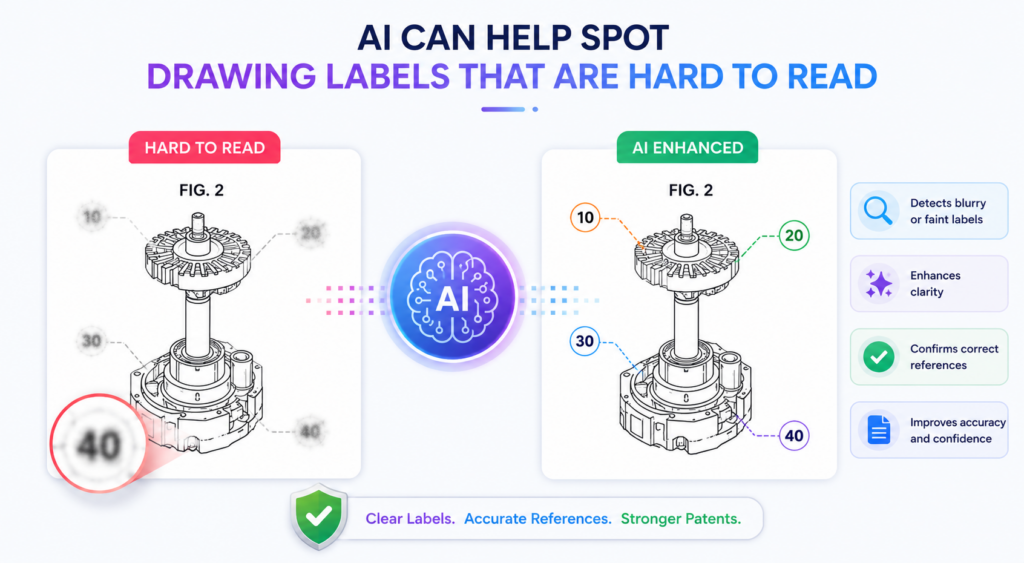
A line may point to the wrong place. Two numbers may sit too close together. A callout may be cut off near the edge of the page.
These issues can make a figure harder to understand, even when the text is correct.
Readability is part of patent quality
A patent drawing should be easy to follow. The reader should not have to zoom in, guess, or trace messy lines to understand what a number points to. When labels are hard to read, the patent feels less polished.
AI image review can help by checking the visual quality of callouts. It can flag labels that are too small, unclear, overlapping, or placed in strange spots.
It can also catch leader lines that cross too many other lines or point to unclear areas.
This is useful because founders and engineers often review figures on large monitors. A drawing may look fine on screen but become hard to read when placed into a formal patent format. An AI tool can help spot those risks earlier.
Clear callouts reduce friction for every reader
A clean drawing helps everyone. It helps the founder review the draft faster. It helps the attorney check the invention story. It helps the examiner understand the application. It also helps future readers see what the patent is about.
This is not about making the drawings pretty. It is about making them clear.
For example, if a figure shows a robot arm with several joints, the callout lines should make it easy to see which joint is which.
If a figure shows a data flow between modules, the arrows and labels should not fight each other. If a figure shows a screen, the numbered elements should not hide the screen content.
AI can flag the visual issues, but a human still makes the final call. Some drawings are complex because the invention is complex. The goal is not to remove all detail. The goal is to make the detail usable.
PowerPatent helps startups move through this kind of cleanup faster. The platform gives teams a smarter way to organize patent work, while attorney oversight helps keep the final filing strong. Learn how it works here: https://powerpatent.com/how-it-works
AI can help founders review patent drafts without slowing the team
Patent work often feels slow because it pulls founders away from building. You may want protection, but you do not want to spend days checking drawings, chasing draft edits, or trying to decode patent style.
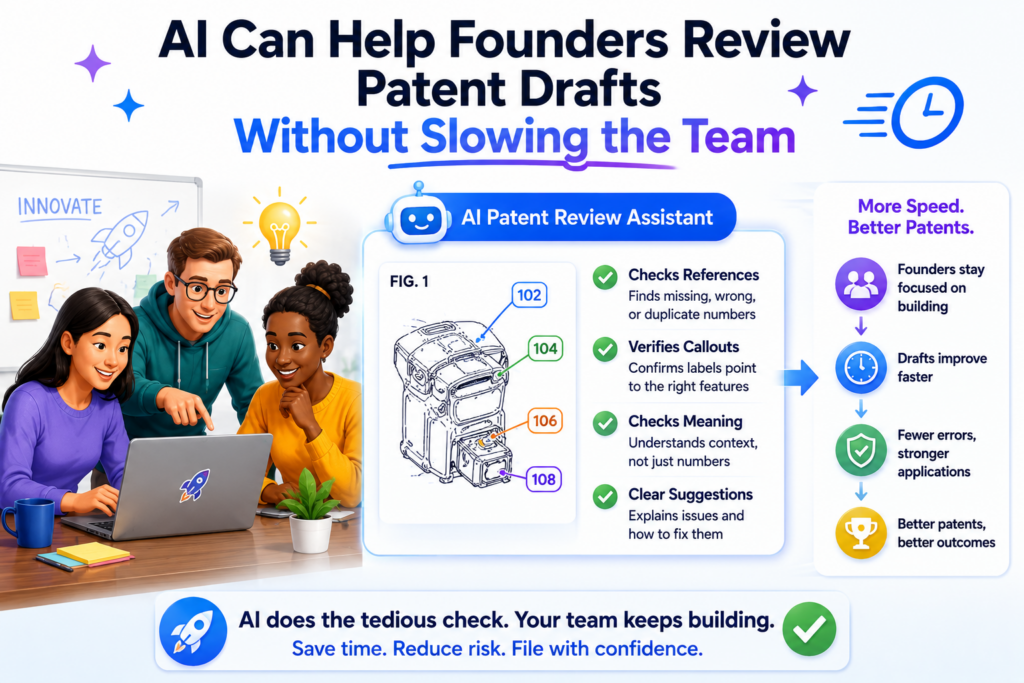
AI changes the workflow. It lets founders review more with less strain. It helps the team see the problem areas instead of reading the full draft from scratch every time.
Faster review does not mean careless review
The best use of AI is not to rush through the patent process. It is to make the right review easier.
When AI checks figure references, it can give the team a focused list of issues. Maybe five callouts are missing from the text.
Maybe two figure numbers are out of order. Maybe one method step has changed. Maybe a screen label uses an old product name.
That kind of review is much easier for a founder to act on. Instead of reading eighty pages with no clear path, the founder can answer direct questions.
Is this module still part of the invention? Should this step be renamed? Is this figure still accurate?
This saves time and improves quality at the same time.
The founder’s job is to confirm the invention story
A founder does not need to become a patent formatting expert. The founder’s most important job is to make sure the patent tells the right invention story.
AI can help surface the places where the story may be unclear. The attorney can help shape the language. The founder can confirm what is true about the product, what changed, and what matters most.
That is a better use of everyone’s time.
For technical teams, this can also reduce stress. Engineers do not want to review patent drafts full of unclear references. They want to answer focused questions and keep building. AI-powered checks make that possible.
PowerPatent was built around this idea. Founders should not have to choose between moving fast and protecting their work.
With smart software and real patent attorneys, the process becomes clearer, faster, and easier to trust. You can explore it here: https://powerpatent.com/how-it-works
AI can help create a cleaner handoff between engineers and patent teams
A strong patent starts with real technical detail. That detail usually lives with the engineers, founders, product leads, and research teams.
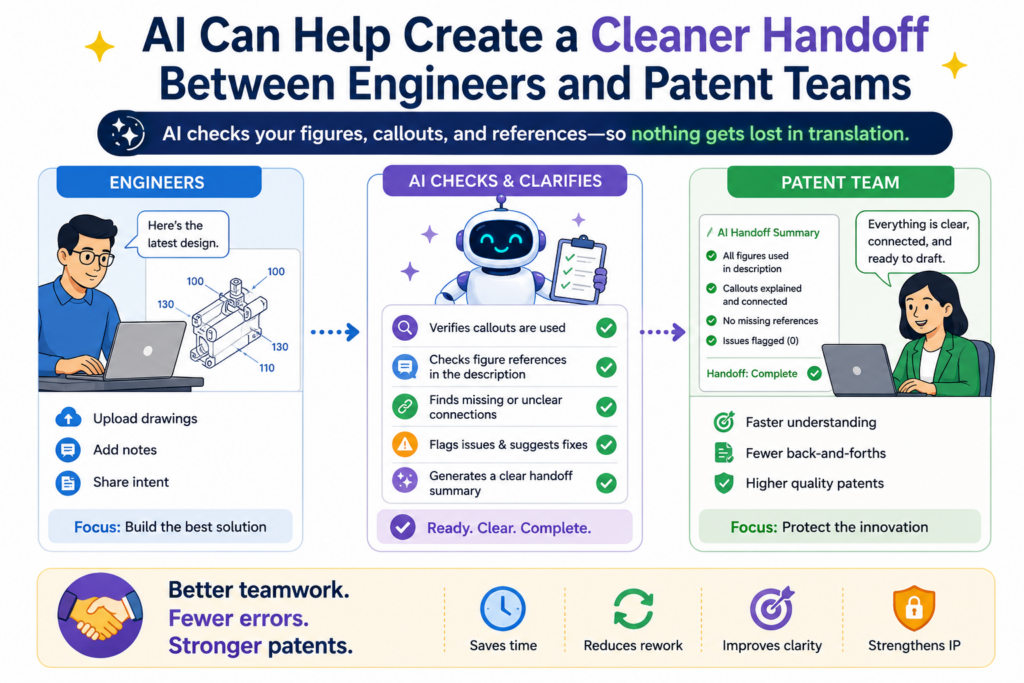
The problem is that those people often think in code, diagrams, model flows, and product specs. Patent teams think in figures, parts, steps, claims, and support. AI can help connect those worlds.
When figure callouts are checked early, the handoff becomes much smoother. The patent team does not have to guess what each box means.
The engineering team does not have to explain the same thing again and again. Everyone works from a cleaner map.
A shared callout map helps both sides talk clearly
In a normal patent workflow, the engineering team may send a system diagram with labels like “agent layer,” “policy engine,” “retrieval store,” or “device hub.”
Later, the patent draft may turn those into numbered parts such as “agent layer 112,” “policy engine 114,” “retrieval store 116,” and “device hub 118.”
That step sounds simple, but it is where many errors begin. If one name changes, the number may not change with it.
If a new part is added, the figure may be updated but the text may not be. If an old part is removed from the product, it may still appear in the patent draft.
AI can reduce this gap by creating a shared callout map. This map can show each number, each part name, each figure where it appears, and each place it is described in the text.
The team can then review the invention using one clear source instead of scattered notes.
A clear handoff saves founder time and lowers draft confusion
Founders should not need to hunt through patent pages to answer simple questions. They should be able to see what the draft says the invention includes, then confirm whether that story is right.
For example, the AI tool may show that “ranking model 124” appears in Figure 2 and Figure 5, but the engineer says the ranking model is no longer part of the main workflow.
That is a useful catch. The team can decide whether to remove it, keep it as another version, or explain it in a better way.
This kind of review is more useful than a vague request like “please review the patent.” It gives the founder a focused task. It also helps the attorney ask better questions.
PowerPatent helps make this handoff easier by combining smart tools with real patent attorney oversight.
That means founders can stay close to the invention without getting buried in patent cleanup. You can see how it works here: https://powerpatent.com/how-it-works
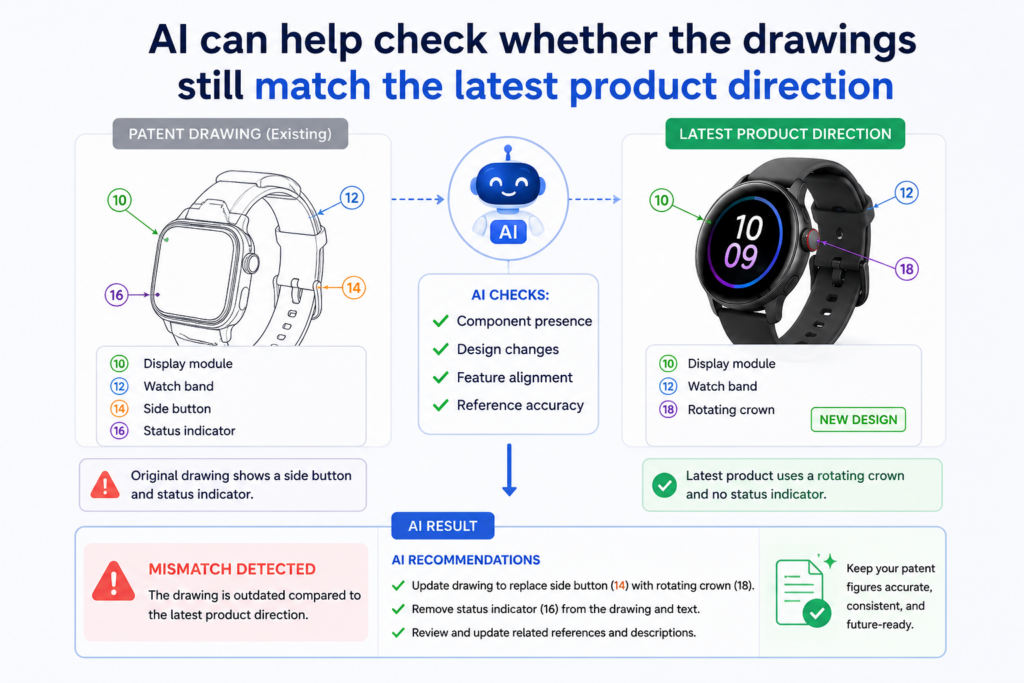
AI can help check whether the drawings still match the latest product direction
Startups change fast. The product you started with may not be the product you are building now. The market may push you in a new direction.
A customer may ask for a feature that becomes central. A technical problem may force a better design.
Patent drawings need to keep pace with that change. They do not need to show every product update, but they should still support the invention story you want to protect.
Product drift can quietly break figure references
Product drift happens when the product changes but the patent draft stays partly frozen in an older version.
This is common. It is not a sign that the team did anything wrong. It is simply what happens when building and filing happen at the same time.
A figure may show a cloud server, but the product now runs part of the process on the device. A method figure may show a manual approval step, but the new system uses an automated rule.
A user interface may show a “review” button, while the product now calls it “validate.” Small changes like these can make the draft feel less aligned.
AI can help by comparing newer product notes, diagrams, or technical summaries against the patent figures and callouts.
It can flag terms that appear in the current product material but not in the patent draft. It can also flag patent callouts that no longer appear in the current technical story.
The goal is not to chase every product change
A patent should not become a mirror of the latest product screen or codebase. That would make the process slow and unstable. The goal is to protect the core invention in a way that still makes sense as the product grows.
AI helps by showing where the draft may be out of sync. The team can then decide what matters. Some differences may not need any change. Others may be important because they affect how the invention works.
This is where attorney judgment matters. A real patent attorney can help decide whether a product change should lead to a drawing update, a text update, both, or neither. The AI tool brings the issue into view. The attorney helps guide the decision.
That balance is powerful for founders. You can move fast without losing track of the patent story. You can keep building while still protecting the work that gives your startup an edge.
PowerPatent is designed for this kind of fast-moving patent work. It helps founders protect inventions without forcing old, slow, confusing steps into the process. Learn more here: https://powerpatent.com/how-it-works
AI can help prepare a better review packet before attorney review
Attorney time is valuable. The more focused the review is, the better the output can be. AI figure checks can help by preparing a cleaner review packet before the attorney does the deeper work.
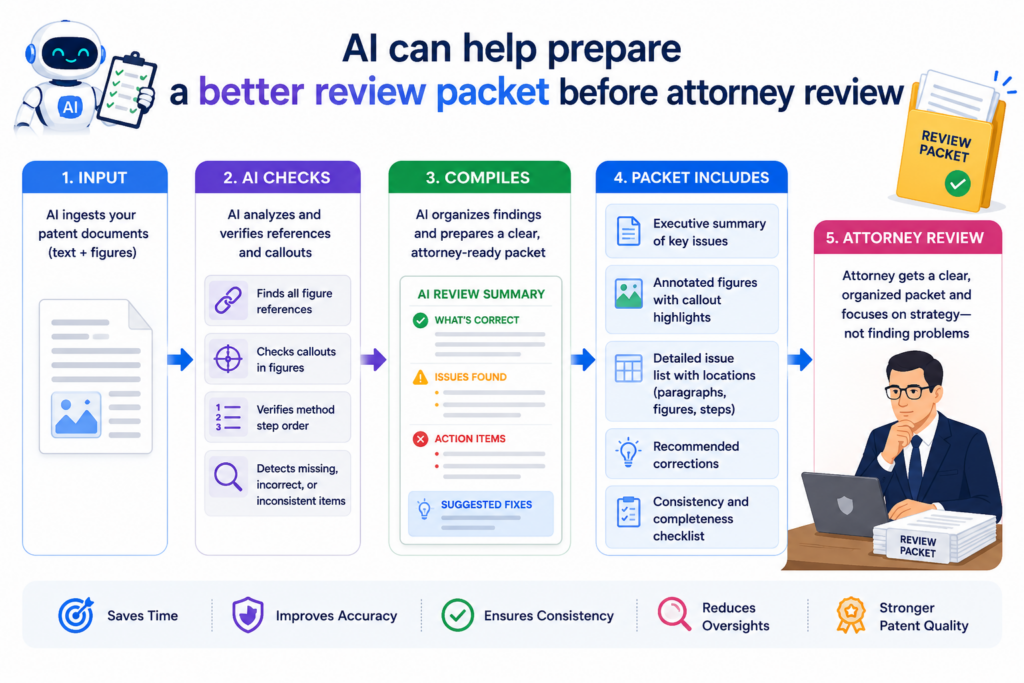
This does not replace the attorney. It gives the attorney a better starting point.
A review packet should show the issues that need judgment
A useful AI review packet does not just say, “There are errors.” It should show what was found in a way that helps people act.
For example, it may show that reference number 130 is used for two different names. It may show that Figure 4 is mentioned in the brief figure section but not discussed later.
It may show that step 306 appears in the method text but is missing from the flowchart. It may show that the drawing labels use “training module” while the draft uses “model update module.”
These are not final answers. They are review points. The attorney can decide which ones matter and how they should be handled.
A strong packet can also include context. It can show nearby text, the figure where the callout appears, and the section of the draft where the mismatch occurs. That saves time because the attorney does not need to search from scratch.
Better inputs lead to cleaner attorney decisions
Patent attorneys are most valuable when they are thinking about the invention, the claim strategy, and the best way to protect the business. They should not have to spend most of their time hunting for simple callout errors.
AI can handle much of the first pass. It can find the numbers, compare the labels, and surface possible mismatches. Then the attorney can focus on what those issues mean.
For founders, this can make the process feel less like a black box. You can see the issues. You can understand the decisions. You can take part in the review without learning every detail of patent practice.
This is one reason PowerPatent brings software and attorney oversight together. The software helps organize and check the work.
The attorney helps make sure the filing is thoughtful, clear, and aligned with your goals. See the workflow here: https://powerpatent.com/how-it-works
AI can help reduce revision loops during patent drafting
Revision loops are one of the most frustrating parts of patent work. A draft goes out. Comments come back.
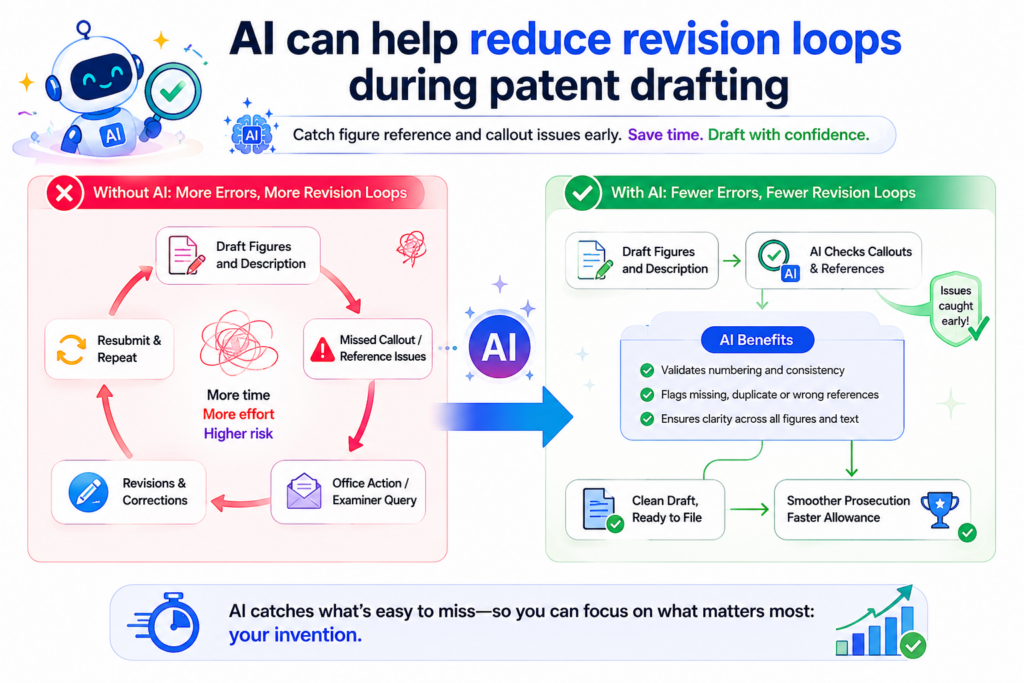
Drawings are changed. The text is changed. Then someone finds another mismatch. The draft goes back again. The process repeats.
Some revision is normal. But many loops happen because small figure issues are found too late.
Early callout checks can cut down on repeated edits
Every time a drawing changes, the text may need to change too. Every time the text changes, the drawings may need another look. If these checks happen only at the end, the team may get stuck in a loop.
AI can help by running callout checks after each major draft update. It can show what changed since the last version.
It can point out new mismatches created by the latest edit. This turns review into a steady process instead of a final scramble.
For example, say the team adds a new “confidence scoring engine 136” to the detailed description. The AI tool can check whether 136 appears in the drawings.
If it does not, the team can fix that right away. If the drawing includes 136 but calls it something else, that can be cleaned up before the draft moves forward.
Less rework means more focus on the invention
When founders spend less time on cleanup, they can spend more time on the real question: does this patent protect what matters?
That is the question that should drive the work. Not whether a number was missed. Not whether Figure 3 was renamed in one section but not another. Not whether a callout line points to the wrong box.
AI can remove much of that noise. It helps the team see draft health in a practical way. It also lowers the chance that small errors will distract from bigger strategy.
This matters for startups because time is not free. Every hour spent untangling draft mistakes is an hour not spent with customers, investors, product, or team. Good patent tools should protect the founder’s attention.
PowerPatent helps founders file better patents faster by making the workflow cleaner from the start.
Smart software helps catch issues. Real attorneys help guide the final work. You can explore the process here: https://powerpatent.com/how-it-works
AI can help make patent figure review repeatable instead of stressful
A good patent process should not depend on one heroic final review. It should not depend on someone staying up late to catch every tiny figure error. It should use a repeatable system that catches issues early and often.
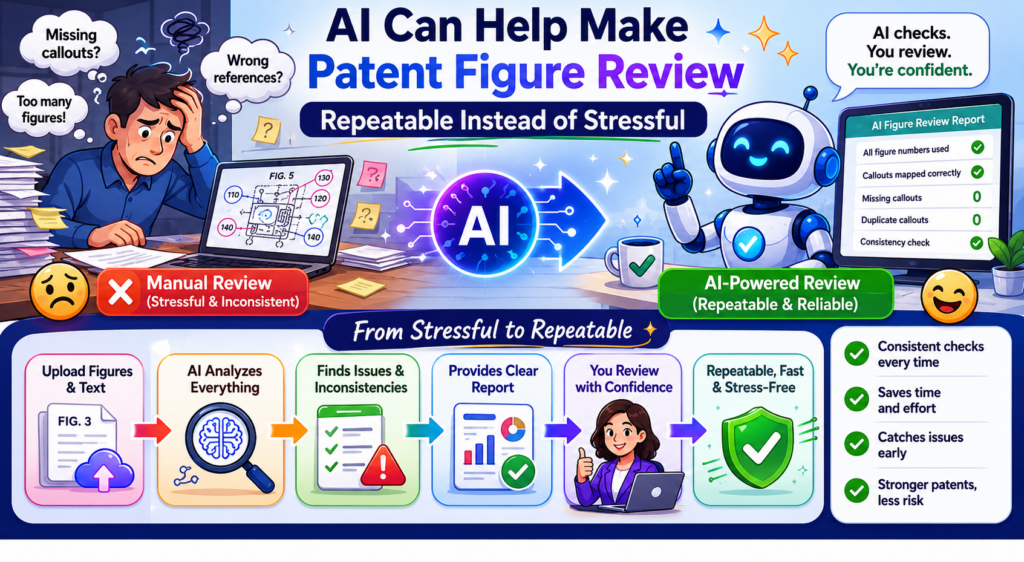
AI makes that possible.
Repeatable checks create more confidence before filing
When the same checks run at each stage, the team gains confidence.
The AI can scan for missing callouts, reused numbers, unmatched figure mentions, weak naming, unreadable labels, and broken links between figures and text. Each pass makes the draft cleaner.
This does not mean the draft will be perfect just because AI reviewed it. It means the team is less likely to miss common issues.
It means the attorney can review from a stronger base. It means the founder can feel more in control.
A repeatable process is also easier to improve. If the team keeps seeing the same issue, they can fix the source. Maybe engineers need a better drawing template.
Maybe product names need to be locked before drafting. Maybe figure numbers should be assigned earlier. AI makes these patterns visible.
The best patent workflow gives founders speed with guardrails
Founders need speed, but speed without guardrails can create risk. A patent draft that moves fast but contains messy references may need extra cleanup later. A draft that is reviewed carefully but too slowly may hold the business back.
The better path is speed with guardrails.
AI tools provide the first guardrail by checking the details that are easy to miss.
Attorney oversight provides the second guardrail by making sure the patent is shaped with care. Together, they help founders move forward without feeling alone in the process.
This is the heart of what PowerPatent offers. It helps technical founders turn inventions into stronger patent filings with smart software, clear workflows, and real patent attorneys watching the important parts.
Learn how PowerPatent works here: https://powerpatent.com/how-it-works
Conclusion
AI tools will not replace smart patent judgment, but they can remove the slow, painful checking that drains founder time. Clean figure references, clear callouts, steady names, and matched drawings help your patent tell a stronger invention story.
That matters when you are protecting software, AI systems, devices, models, workflows, or deep tech ideas that took real work to build. The best path is not doing everything by hand or trusting software alone. It is using smart AI checks with real attorney oversight. PowerPatent gives founders that faster, safer path. See how it works here: https://powerpatent.com/how-it-works
Leave a Reply