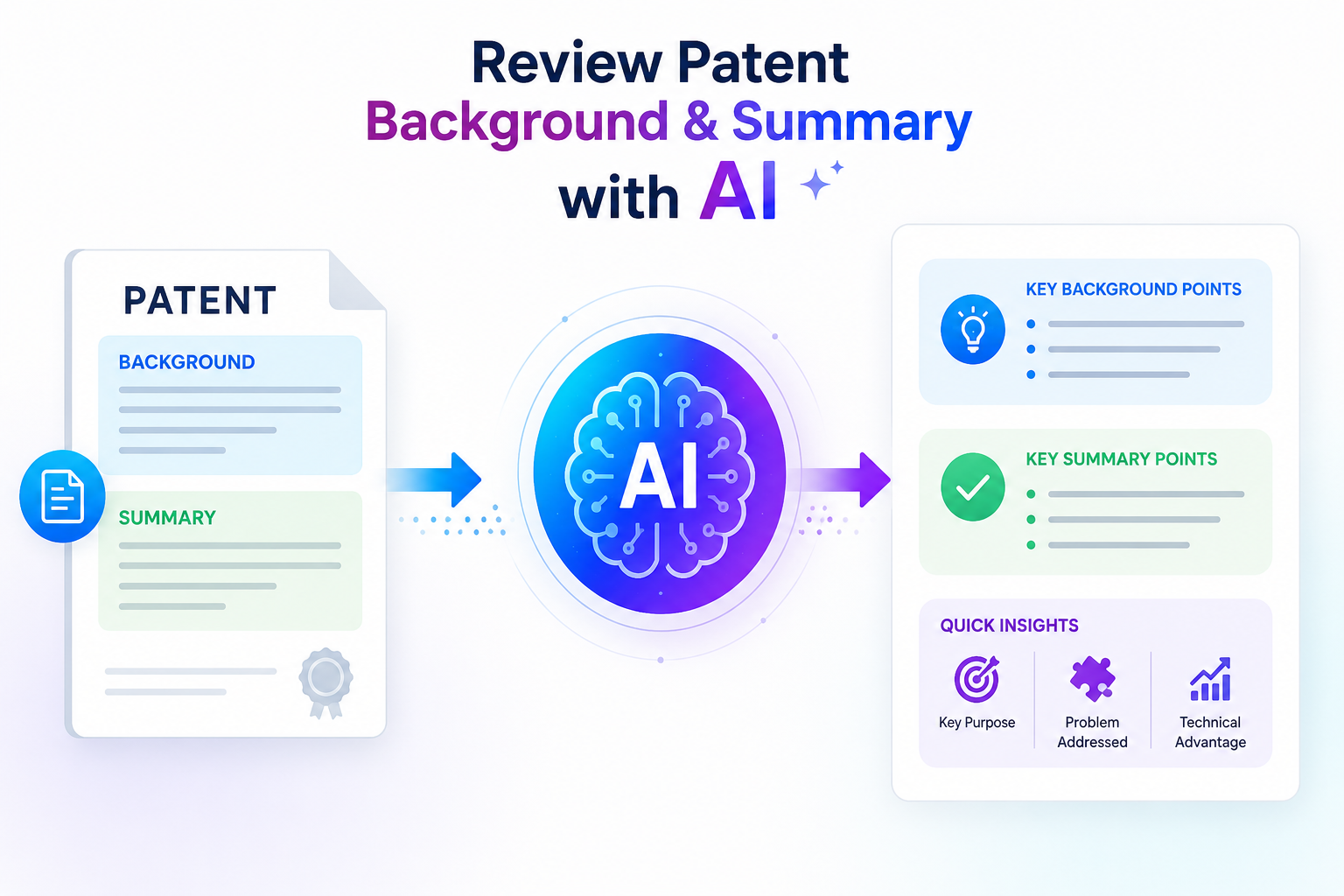
The background and summary sections may look simple, but they can shape how your invention is understood. If these parts are weak, unclear, too broad, or too narrow, they can make the whole patent harder to defend later.
Start by testing whether the background explains the real problem clearly
The background section should not sound like a history lesson. It should help the reader see why the invention matters.
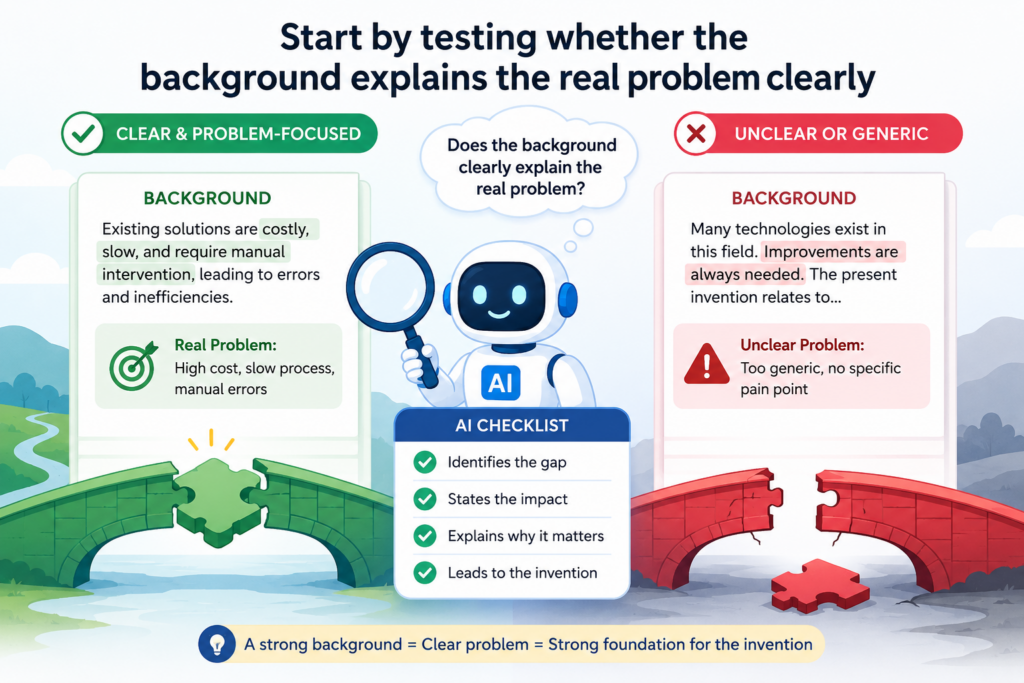
When you review it with AI, your first job is to check whether the problem is clear, real, and tied to the field of the invention.
A good background does not need to say too much. It needs to give enough context so the reader understands what was hard, slow, costly, risky, or missing before your invention came along.
Many founders make the same mistake here. They describe the market, the product, or the company story instead of the technical problem. That can weaken the patent draft.
A patent background should not read like a sales page. It should show the gap your invention helps address. AI can help you find places where the draft drifts away from the problem and starts sounding too broad, too promotional, or too vague.
Use AI to check if the background is about the invention, not the startup
A strong review starts with a simple prompt. You can ask AI to read the background section and tell you what problem it thinks the invention solves. This is a fast way to test clarity.
If the AI gives back an answer that feels off, too broad, or not close to your real invention, that is a sign the background may not be doing its job.
For example, if your invention is about reducing latency in a machine learning inference pipeline, but AI says the background is about “improving software performance,” the draft is likely too general. “Improving software performance” could mean almost anything.
It does not show the real pain. It does not guide the reader toward the specific technical issue. It may also make the later summary feel loose.
This is where you need to push the background closer to the real work. The background should help someone understand the setting of the invention.
It should explain the old way in plain terms, then show why that old way has limits. The point is not to attack every prior system. The point is to frame the problem in a clean and careful way.
Ask AI what the background makes the invention seem like
One very useful review step is to ask AI, “Based only on this background, what do you think the invention is likely about?” This question forces the section to prove itself.
If the answer points in the right direction, your background is probably working. If the answer feels like it could apply to a hundred different ideas, the background needs more focus.
You can also ask AI to mark each sentence as useful, unclear, too broad, or possibly risky. This is not a final legal review, but it helps you see the draft with fresh eyes.
Engineers often know the problem so well that they skip key context. AI can catch those jumps. It can show where the reader may feel lost.
PowerPatent is built for this kind of review because founders should not have to guess whether their patent draft is strong.
With smart software and real attorney oversight, PowerPatent helps teams move from rough invention notes to clearer patent work without losing speed. You can see how the process works here: https://powerpatent.com/how-it-works
Make the problem specific enough without trapping the invention
A background section should be specific, but not so narrow that it boxes in the invention. This balance matters.
If the background only talks about one small use case, the rest of the patent may feel tied to that use case. If it is too wide, the invention may feel thin or unclear.
AI can help you find this balance. Ask it to identify terms that are too narrow and terms that are too broad. A phrase like “mobile banking app” may be too narrow if the invention works across many secure data systems.
A phrase like “computer technology” may be too broad if the invention is really about cryptographic access control. The best wording often sits between those two extremes.
Use plain words before polished words
When reviewing with AI, do not start by asking for fancy writing. Ask for plain meaning first.
A clear background is better than a polished but empty one. You want simple words that explain the technical setting, the known problem, and why that problem creates friction.
A good AI prompt might ask for a rewrite at a simple reading level while keeping the technical facts accurate. This can be very helpful because many patent drafts get heavy fast.
Long sentences, layered clauses, and abstract phrases can hide the point. Simple writing can reveal whether the logic is strong.
The background should make the reader think, “Yes, I understand why this invention was needed.” That is the goal. Not drama. Not hype. Just clear ground under the invention.
Review the background for risky statements that can hurt you later
The background section can create problems when it says too much, admits too much, or describes old systems in a careless way.
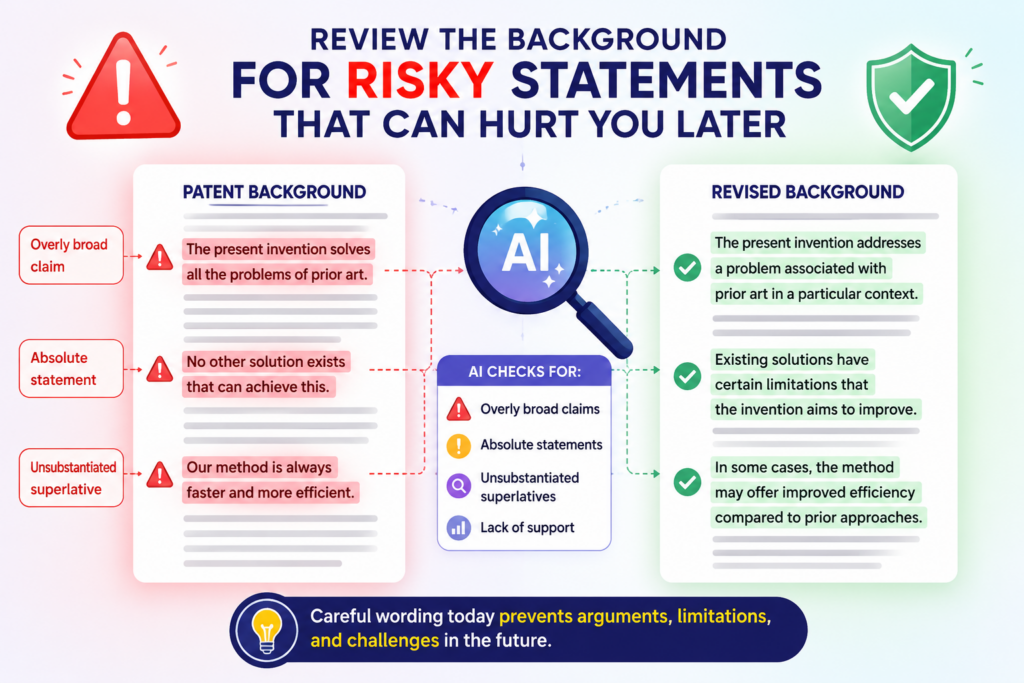
This is one reason AI review is useful. It can help spot words that sound absolute, broad claims about what others have done, and statements that may not be fully supported.
These parts are easy to miss because they often sound normal during drafting.
Founders and engineers are used to speaking directly. They might say, “No existing system can do this,” or “Current tools always fail when data volume grows.”
That may feel true from your work, but patent writing needs more care. Words like “no,” “always,” “never,” “all,” and “only” can create trouble if they are not accurate. AI can quickly flag these words and ask whether the draft should be softened.
Use AI to find overstatements before they become problems
A good prompt is simple: “Find any statements in this background section that sound too absolute, too broad, or hard to prove.”
This gives you a fast first pass. You are not asking AI to make legal calls. You are asking it to find language that deserves a closer look.
For example, a sentence that says, “Existing neural network systems cannot process real-time sensor data efficiently,” may be too broad. Some systems may do this in certain settings.
A safer sentence may say that certain approaches can face delays, high compute cost, or scaling issues in particular environments.
That kind of wording is more careful. It still explains the problem, but it does not make a sweeping claim that may be easy to challenge.
This is very important because the background should help your patent, not give others easy ways to push back.
You want the section to be useful, calm, and accurate. It should not sound like a fight. It should not make bold claims just to make the invention look better.
Ask AI to separate facts from opinions
One smart review step is to ask AI to split the background into two groups: statements that sound like facts and statements that sound like opinions or claims.
This helps you see where the draft may need support, softer wording, or a narrower frame.
A fact might be that a system receives sensor data from multiple devices. An opinion might be that the system is too slow for all users.
The second statement may still be true in your use case, but it should be written with care.
The better version may explain that some systems can experience delay when they process large streams of data under certain conditions.
That small change can make the section feel more precise. It also keeps the focus on the technical issue, not on broad attacks against older tools.
Watch for hidden admissions about what was already known
The background often explains what came before. That is normal. But it should not accidentally describe your own invention as if it was already common.
AI can help find these hidden issues by checking whether any sentence gives away too much.
You can ask AI, “Does this background describe any feature that sounds like it may be part of the invention?” If yes, review that sentence with extra care. Sometimes a draft places too much detail in the background.
The background should explain the setting and the problem. It should not fully teach the solution if that solution is what you are trying to protect.
This is where many technical teams need guidance. Engineers want to be complete. They want to explain every detail. But patent drafting is not the same as writing a design doc.
The structure matters. What belongs in the background may not belong in the summary. What belongs in the summary may need to match the claims. And what belongs in the detailed description may need more depth.
Use PowerPatent to avoid guessing where content belongs
AI can help you flag content placement issues, but attorney oversight matters. A smart tool can point out that a sentence may be risky. A real patent professional can help decide what to do with it. That blend is the key.
PowerPatent gives founders a better way to move fast without treating patents like a side quest. The platform helps turn invention details into stronger patent drafts while keeping real patent attorneys in the loop.
That means you get speed and support at the same time. You can learn more here: https://powerpatent.com/how-it-works
When reviewing the background, your goal is not to make the section sound impressive. Your goal is to make it safe, clear, and useful. AI can help you clean the language, but you still need judgment.
The best background gives context without giving away too much. It shows the problem without making wild claims. It supports the rest of the patent without trying to do the whole job by itself.
Use AI to test whether the summary matches the real invention
The summary section is where many patent drafts start to drift.
The background may explain one problem, the invention may solve it in a specific way, but the summary may describe something broader, narrower, or slightly different.

This mismatch can weaken the draft. It can also confuse the reader. AI is very useful here because it can compare sections quickly and point out gaps.
The summary should give a clean view of the invention. It should not be a random repeat of the background. It should not be a product pitch. It should not introduce features that are not explained later.
It should act like a bridge between the problem and the detailed invention. When done well, it helps the reader understand the shape of the invention before the deeper details begin.
Compare the summary against the background before editing the words
Before you ask AI to rewrite anything, ask it to compare. This matters. If you rewrite too early, you may make the section smoother without making it stronger.
A clean sentence can still be wrong. A polished summary can still miss the invention.
A useful prompt is, “Compare the background and summary. Does the summary solve the problem described in the background?” This simple question can reveal a lot.
If the background says the problem is slow processing across distributed devices, but the summary focuses on user interface changes, something is off.
If the background says the issue is secure model updating, but the summary talks mostly about data storage, the draft may need realignment.
AI can also help identify missing links. It can tell you whether the summary explains how the invention responds to the problem.
It can point out where the summary uses words that were never set up in the background. It can show when the summary jumps into details too soon.
Ask AI to write the invention in one plain sentence
One of the best tests is to ask AI to describe the invention in one plain sentence based only on the summary. Then read that sentence and ask yourself whether it matches what your team actually built.
If the sentence feels wrong, the issue may not be the AI. The issue may be that the summary is unclear. This is a fast way to find weak wording.
It is also a helpful way to align founders, engineers, and patent counsel. Everyone should be able to agree on the plain meaning before the draft gets more complex.
For example, a strong plain sentence may say, “The invention helps a system choose where to run a machine learning task based on delay, cost, and device limits.”
That is simple, but it gives shape. A weak sentence may say, “The invention improves computing systems.” That tells the reader almost nothing.
The summary does not need to reveal every detail at once. But it should give a clear and truthful view of what makes the invention useful.
Check whether the summary is too narrow for the invention
A common problem is that the summary sounds like one product version instead of the broader invention.
This happens when the draft uses the exact terms from your current product, your current codebase, or your current customer use case. That may feel natural, but it can limit the way the invention is described.
AI can help flag narrow terms. You can ask it to find words tied to one platform, one device type, one industry, one workflow, or one user group.
Then you can decide whether those words should stay. Sometimes they matter. Sometimes they are just leftovers from product thinking.
For example, if the invention works for many types of connected devices, the summary may not need to say “smartwatch” every time. It may be better to say “wearable device” or “client device,” depending on the invention.
If the invention works across many types of trained models, the summary may not need to name one model type unless that model type is central.
Keep the summary broad in the right way
Broad does not mean vague. This is a key point. A vague summary says the invention improves something. A strong broad summary explains the main idea in a way that can cover real variations.
AI can help by creating two versions of the same summary. One version can be very narrow and tied to the current product.
The other can be broader while still staying true to the technical idea. Comparing those versions helps your team see what should be protected now and what may matter later.
This is where PowerPatent can make the process much easier. Founders should not have to choose between moving fast and building strong protection.
PowerPatent helps you capture the invention, review the draft, and work with real patent attorneys so the final result is not just fast, but careful. See how it works here: https://powerpatent.com/how-it-works
The summary should make the invention feel clear, useful, and flexible. It should match the problem in the background. It should point toward the real technical solution.
It should avoid product-only wording unless that wording is needed. With AI, you can test all of this faster. With attorney review, you can make better final choices.
Review whether the summary gives enough support for future claim choices
The summary section should help the patent stay useful as the invention grows. This is very important for startups because the first version of a product is rarely the final version.
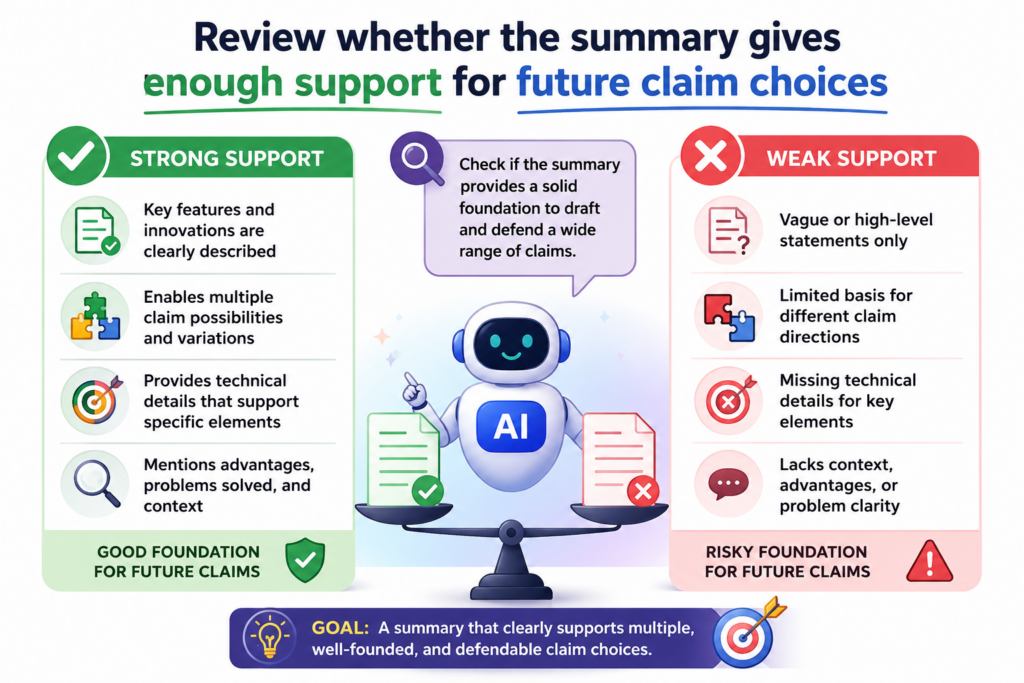
Your system may start with one workflow, one customer type, or one model design, then change as your team learns more. A good summary should protect the core idea without locking the invention to today’s exact build.
When you review the summary with AI, you are not only checking grammar. You are checking whether the section gives enough room for the claims that may come later.
The claims define the legal edge of the patent, but the summary helps frame what the invention is. If the summary is too thin, the rest of the draft may feel unsupported. If it is too narrow, it may make the invention seem smaller than it really is.
AI can help you see this early. You can paste the summary into AI and ask what parts of the invention seem central, what parts seem optional, and what parts seem missing.
This is a practical way to test whether the summary reflects the true value of the invention.
Check whether the summary covers the main technical parts without overloading the reader
A strong summary usually points to the main pieces of the invention in a clean way. It may mention the input, the process, the decision step, the output, or the result.
It does not need to explain every small detail. That comes later. But it should give enough shape so the reader knows what kind of invention is being described.
For example, if your invention is a system that routes AI tasks across edge devices and cloud servers, the summary should probably say more than “a system for improving task processing.”
That phrase is too empty. The reader needs to know that the invention involves receiving task data, checking limits, selecting a place to run the task, and returning a result. Those ideas may not all need long detail, but they should appear in some clear form.
AI can help by pulling out the technical steps from the summary. Ask it to identify the main operation described in each sentence.
If AI cannot find clear operations, the summary may be too vague. If it finds too many small operations, the summary may be too crowded.
Use AI to mark core features and optional features
One helpful review method is to ask AI to separate the summary into core features and optional features.
This helps you see whether the draft treats every detail as required. That matters because a patent should often cover the main idea as well as useful versions of it.
A core feature may be something the invention needs in order to work. An optional feature may be one way to make the invention better, faster, safer, or easier to use.
If the summary makes optional parts sound required, it may shrink the invention. If the summary leaves out core parts, it may become unclear.
Think about a startup building an AI tool for automated code review. The core invention may involve detecting code changes, mapping them to risk patterns, and creating review guidance.
An optional feature may be a dashboard, a certain programming language, or a certain type of alert. If the summary focuses too much on the dashboard, the patent may start to feel like it is about the interface instead of the deeper technical method.
This is why human review still matters. AI can flag patterns and suggest cleaner wording, but your team and patent attorney need to decide what is truly core.
PowerPatent helps with this exact kind of work by combining smart AI review with real attorney guidance, so founders do not have to make these choices alone.
You can see how PowerPatent helps teams move from idea to protected invention here: https://powerpatent.com/how-it-works
Make sure the summary leaves room for different versions of the invention
Founders often describe the invention based on the version they just built. That is natural. But your patent may need to cover future versions too.
The summary should not be so tied to one product release that it leaves better versions outside the frame.
AI can help by asking a simple question: “What variations of this invention appear to be covered by this summary?” If the answer is very small, your wording may be too narrow.
If the answer is huge and unclear, your wording may be too loose. The goal is a useful middle ground.
For instance, if the summary says the invention uses a mobile phone camera, but the invention could use any sensor that captures image data, the summary may need broader words.
If it says the invention uses a specific database when many storage systems could work, the draft may need to shift toward a more flexible term.
The point is not to make every word broad. The point is to keep the invention from being trapped by details that are not essential.
Test the summary against what your team may build next
A very practical AI prompt is, “Assume the product changes in three future ways. Which parts of this summary would still apply, and which parts would break?” This gives you a useful stress test.
It helps you see whether the summary protects the invention or just the current product screen.
This is especially helpful for deep tech startups. Your model architecture may change. Your hardware may change. Your customer workflow may change.
Your deployment method may change. A patent draft should respect that reality. It should not be frozen around one demo.
The summary should give the invention room to breathe. It should be clear enough to matter now and flexible enough to stay useful later. AI helps you find where the draft may be too stiff.
Attorney review helps you decide how to fix that stiffness in a way that still fits patent rules and the rest of the application.
Use AI to check whether the background and summary speak the same language
The background and summary should feel like they belong to the same invention. This sounds simple, but it is one of the most common problems in patent drafts.
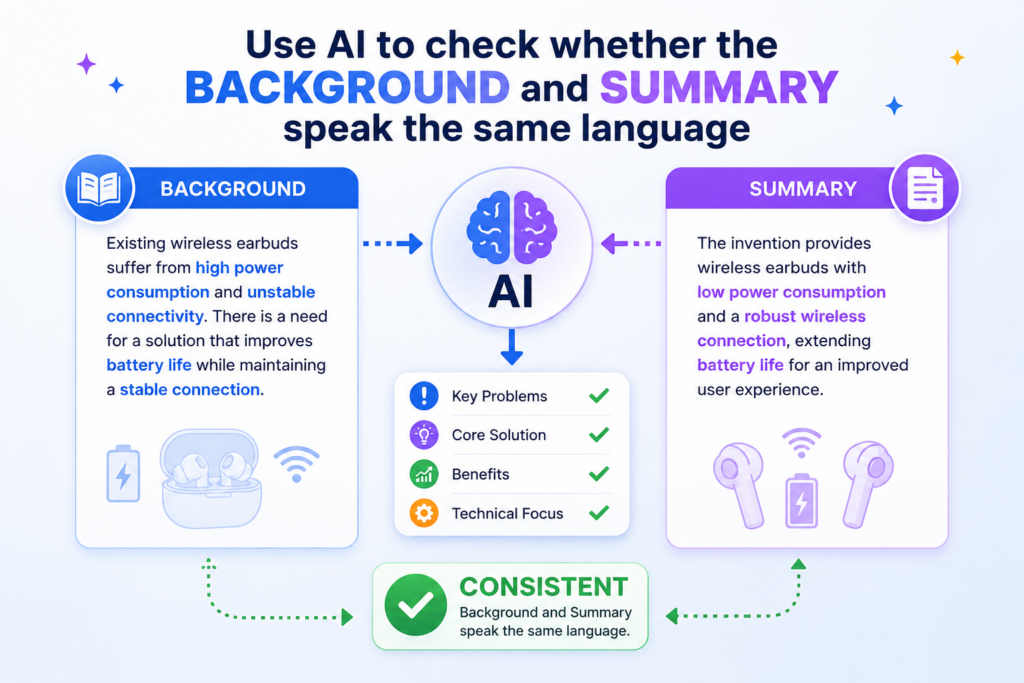
The background may use one set of words, while the summary uses another. The background may describe one technical pain, while the summary points to a different result. The draft may still sound smart, but the reader feels a gap.
AI is very good at finding these gaps because it can compare terms across sections. It can show whether the same concept is named in different ways.
It can catch when the background says “training data” but the summary says “input records” without making clear whether those are the same thing. It can also notice when the background describes a network issue but the summary focuses mostly on user behavior.
This review step matters because patent drafts need steady meaning. The reader should not have to guess whether two words mean the same thing. The invention should feel clear from section to section.
Ask AI to find terms that may confuse the reader
Start by asking AI to make a term map from the background and summary. The goal is not to create a public glossary. The goal is to see whether the draft uses terms in a steady way.
For example, your background may talk about “remote devices,” “edge nodes,” “client systems,” and “local machines.” These may all refer to the same general thing, or they may refer to different parts of the system.
If the draft does not make that clear, the reader may get lost. AI can flag these terms and ask whether they should be aligned.
This is not about making the writing boring. It is about making the invention easy to follow. A patent can be technical and still be readable.
In fact, clear writing often makes the invention look stronger because the reader can see the logic without fighting the words.
Keep the same idea under the same name unless there is a reason to change it
A good review rule is simple. When the same thing appears in both the background and the summary, use the same name unless there is a clear reason not to. If two things are different, make the difference clear.
AI can help you find places where the draft uses different words for the same thing. It can also help you find places where the same word may mean different things. Both problems can hurt clarity.
Think about an invention that improves how an AI model is updated after new data arrives.
If the background says “model refresh,” the summary says “model retraining,” and the detailed description later says “parameter update,” the draft may need more care.
Those phrases might overlap, but they are not always identical. A reader may wonder whether the invention requires full retraining or only a smaller update. That kind of confusion can matter.
PowerPatent helps teams catch these issues earlier. When founders bring code, workflows, diagrams, or invention notes into the patent process, the platform helps organize the invention so the language stays clearer.
And with real attorney oversight, teams get more than a quick AI rewrite. They get a smarter path from invention to stronger patent work. Learn more here: https://powerpatent.com/how-it-works
Make sure the summary answers the problem raised in the background
The summary should feel like a direct response to the background. If the background says current tools are slow because they process too much data in one place, the summary should explain how the invention changes that.
Maybe it filters data earlier. Maybe it splits work across devices. Maybe it selects a better processing path. Whatever the answer is, the link should be clear.
AI can test this link well. Ask it, “For each problem described in the background, where does the summary respond to that problem?” This can reveal missing connections.
Sometimes the background mentions three problems, but the summary only addresses one. Sometimes the summary introduces a benefit that the background never set up. Neither issue is always fatal, but both deserve review.
The goal is not perfect symmetry. The background does not need to list every benefit. The summary does not need to solve every broad industry problem.
But the main thread should be easy to follow. The reader should see why the invention exists and how it helps.
Remove side problems that the invention does not really solve
AI may also show that the background includes problems your invention does not actually address. This is more common than many teams expect.
A founder may include every pain in the market because they want the invention to sound important. But a patent background should not become a complaint list.
If the invention solves latency but not data privacy, be careful about making privacy a major background problem unless the invention has a real privacy feature.
If the invention improves model deployment but not model accuracy, do not make accuracy the main pain unless the summary supports that point. Extra problems can make the draft feel scattered.
A tight draft is more persuasive. It respects the reader’s time. It makes the invention easier to understand. AI can help you trim the side paths and keep the main path strong.
Use AI to improve clarity without changing the invention
AI can make patent text easier to read, but it can also accidentally change meaning. This is why review matters.

You should not treat AI rewrites as final. You should treat them as drafts that need careful checking. The goal is not prettier writing. The goal is clearer writing that still says the right thing.
This matters most in the background and summary because these sections set expectations.
If AI changes a technical term, adds a benefit, removes a condition, or makes a feature sound required, the draft may shift in a risky way. The writing may look smoother, but the invention may no longer be the same.
A smart review process uses AI in stages. First, use it to diagnose problems. Then use it to suggest edits. Then use it again to compare the edited version against the original meaning. This keeps the process controlled.
Ask AI to simplify sentence structure before changing key terms
Many patent drafts are hard to read because the sentences are too long. AI can help shorten them. But you should tell AI not to change key terms unless it explains why. This keeps the invention language stable.
A useful prompt is, “Rewrite this section in simpler words, but preserve all technical terms unless you flag them for review.”
This gives AI room to clean up the structure while protecting important meaning. It can break long sentences into shorter ones. It can remove empty phrases. It can make the flow easier to follow.
For example, a draft may say, “In view of the foregoing, there exists a need for improved systems and methods for facilitating enhanced processing of data in computing environments.”
That sentence sounds like patent writing, but it says very little. A clearer version may say, “Some computing systems need a better way to process data when speed, cost, or device limits matter.” That is easier to read and more useful.
Compare the edited version against the original for meaning changes
After AI rewrites a section, ask it to compare the rewrite against the original. The key question is, “Did the meaning change?” AI can point out added ideas, removed limits, softer claims, stronger claims, and changed technical terms.
This step is simple but powerful. It prevents quiet drift. Quiet drift happens when each edit feels small, but the final version no longer matches the invention. A word like “selecting” may become “ranking.”
A phrase like “based on device state” may become “based on user preference.” Those changes may not be harmless. They can alter what the invention appears to do.
The safest habit is to make AI show its changes. Do not accept a rewrite just because it reads better. Check what moved. Check what disappeared. Check what was added. Then decide what belongs.
PowerPatent is built around this idea: move faster, but do not lose control. Founders and engineers can use smart tools to speed up patent work, while real attorneys help review the parts that need judgment.
That means your team can protect the hard work behind your product without getting buried in slow, old-school back-and-forth. See how PowerPatent works here: https://powerpatent.com/how-it-works
Keep the writing simple enough for fast review by the whole team
The patent process should not force engineers and founders out of the room. When the language is too dense, the people who understand the invention best may stop reviewing closely.
That is dangerous. The team may miss a wrong assumption, a missing feature, or a narrow phrase that does not match the actual system.
AI can help make the background and summary simple enough for the team to review. This does not mean making the patent weak.
It means making the text clear. Simple words can still describe serious inventions. In many cases, simple words make the invention easier to protect because everyone can see what is being said.
Ask AI to create a plain-language version for internal review. Then ask your team to compare that version against the technical reality.
Does it match the architecture? Does it match the data flow? Does it match the model behavior? Does it leave out something important? This kind of review is fast and practical.
Use simple review notes before making final edits
When your team reviews AI-assisted text, do not start by arguing over perfect wording. Start with simple notes.
Mark what is correct, what is wrong, what is missing, and what feels too narrow. Then bring those notes into the next draft.
This keeps the process moving. It also helps avoid endless wordsmithing. The background and summary need to be strong, but they do not need to become poetry. They need to explain the problem, frame the invention, and support the rest of the application.
AI is best used as a helper in this work. It can find weak spots, suggest better flow, and test whether the section is clear. But the final draft should still be checked by people who understand both the invention and patent strategy.
That is why PowerPatent combines AI with attorney oversight. It gives startups a faster way to protect what they are building while staying careful where it counts.
Use AI to find missing details before the draft moves forward
A patent background and summary can look complete even when key details are missing. This is common because founders and engineers often carry the missing facts in their heads. They know why the old method failed.
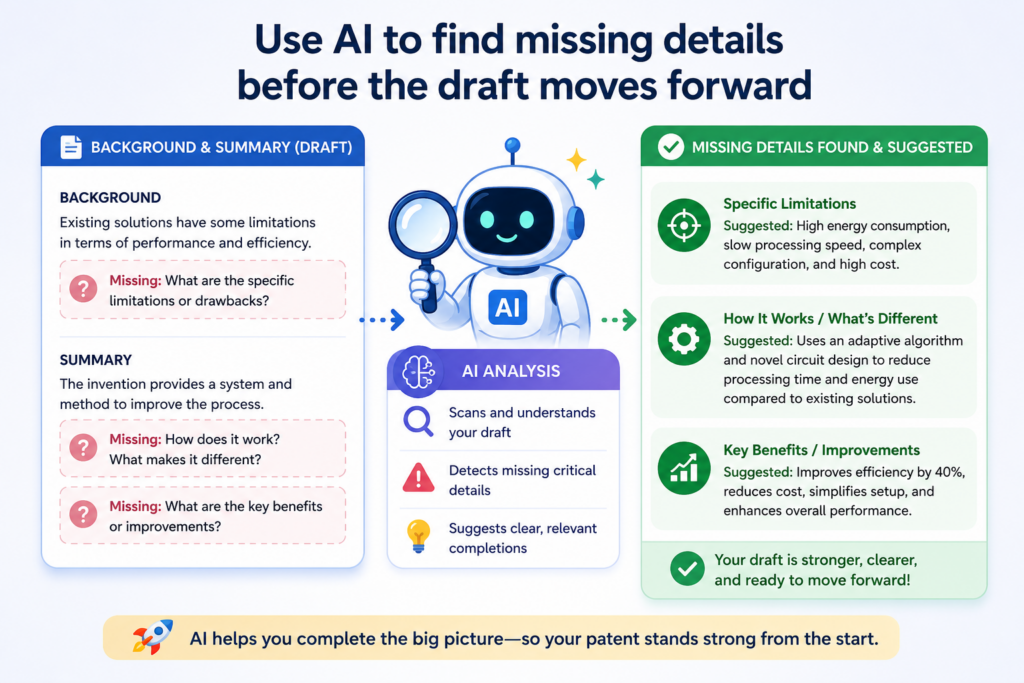
They know what the invention changes. They know what makes their approach different. But the draft may not say those things clearly enough. AI can help find these gaps before the draft moves into deeper review.
The goal is not to stuff the background and summary with every detail. That would make the draft heavy and hard to read. The goal is to make sure the right details are present.
The background should explain the problem in enough detail to make the invention feel needed. The summary should explain the invention in enough detail to show how it responds to that problem.
When either section skips too much, the reader has to guess. Guessing is bad for patents.
Ask AI what questions a reader would still have
One of the best ways to review these sections is to ask AI to play the role of a careful reader.
Give it the background and summary, then ask, “What important questions are still unanswered?” This can show where the draft is thin.
For example, the background may say that existing systems are slow. But slow in what way? Slow during data collection? Slow during model training? Slow during live use? Slow when many users connect at once?
Each answer points to a different technical problem. If the background does not make that clear, the summary may feel weak even if the invention is strong.
The same applies to the summary. A summary may say that the invention selects a processing path. But based on what? Device load? Network delay? Data type? Model size? User rules? Security needs?
The summary does not need to explain every formula, but it should give enough information to show that the invention has a real shape.
Turn missing questions into useful review notes
When AI gives you unanswered questions, do not treat every question as something that must be added. Some questions belong in the detailed description.
Some may not matter. Some may point to optional features. The value is in seeing where the draft may leave the reader unsure.
A strong way to use AI is to ask it to sort the missing questions by importance. You can ask which questions affect the main problem, which affect the core invention, and which are only extra detail.
This keeps the review focused. It also helps your team avoid turning a short summary into a long technical manual.
This is where PowerPatent gives founders a real edge. The platform helps teams capture invention details from the start, then shape those details with smart AI support and real attorney review.
That means your team can move faster without leaving important facts behind. You can see how PowerPatent helps here: https://powerpatent.com/how-it-works
Use AI to compare the sections against your invention notes
Your invention notes, code comments, design docs, diagrams, test results, and product specs may include details that never made it into the background or summary.
AI can help compare those materials against the draft. This does not mean copying everything into the patent. It means checking whether the draft reflects the real invention.
For example, your engineering notes may show that the invention works because it changes the order of steps in a workflow. But the summary may only say that the system improves speed.
That misses the heart of the invention. Or your notes may show that the system uses a special rule to decide when to send data to the cloud. If the summary does not mention that type of decision at all, the draft may be too vague.
This kind of review is very useful before attorney review because it gives the attorney better input. It also saves time.
Instead of asking the attorney to guess what matters, your team can bring clearer notes and a stronger draft.
Keep the missing details tied to the invention’s purpose
When adding missing details, stay close to the purpose of each section. The background should add details that make the problem clearer.
The summary should add details that make the invention clearer. Do not add details just because they sound impressive.
A simple test is to ask AI, “Does this added detail help explain the problem, the invention, or neither?” If the answer is neither, the detail may not belong in these sections. It may belong later, or it may not belong at all.
Good patent review is not about adding more words. It is about adding the right words. AI helps you see what is missing, but your team must decide what matters.
The best drafts feel complete without feeling crowded. They give the reader enough to understand the invention and leave the deeper teaching for later sections.
Use AI to remove hype and make the patent sound stronger
Startup teams are trained to sell. That is useful when pitching customers and investors. But patent writing needs a different voice.
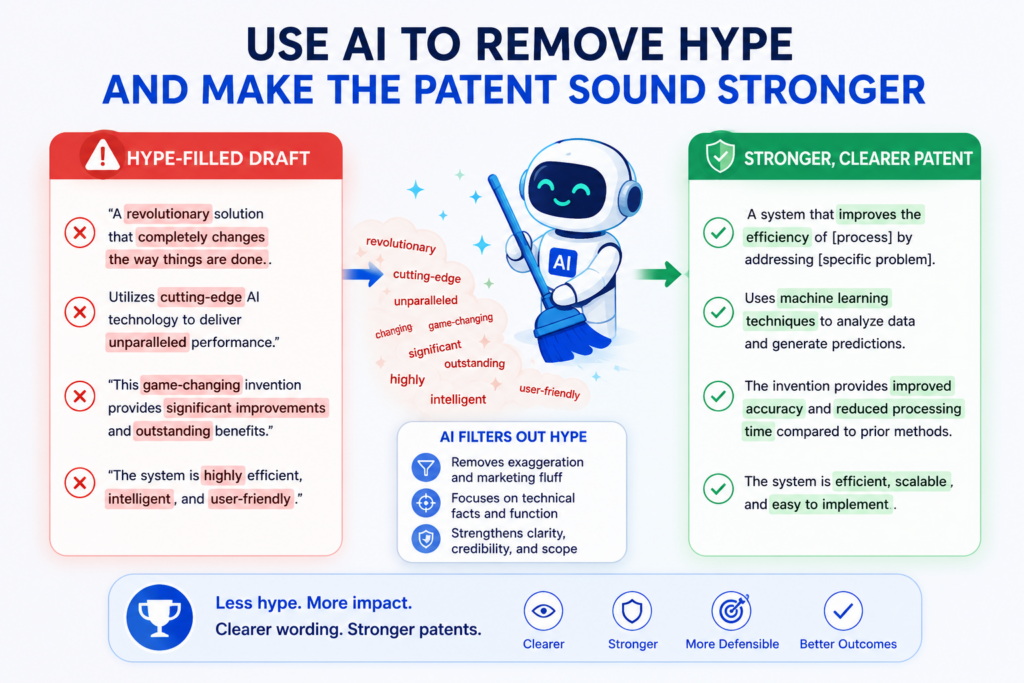
The background and summary should not sound like a landing page, a funding deck, or a product launch post.
They should sound clear, careful, and grounded. AI can help remove hype from the draft while keeping the invention strong.
This does not mean the writing should be dull. It means the strength should come from the invention itself. A patent draft does not need words like “revolutionary,” “world-class,” “game-changing,” or “best-in-class.”
Those words do not explain how the invention works. They can also make the draft feel less serious. The better move is to show the technical problem and explain the useful improvement in plain terms.
Ask AI to flag marketing language in the background and summary
A useful AI prompt is, “Find any phrases that sound like marketing instead of patent drafting.” This will often reveal words that feel strong but do little work.
Many drafts include phrases like “seamless user experience,” “advanced platform,” or “powerful technology.” These phrases may be fine in a sales deck, but they are usually weak in a patent section unless they are tied to a clear technical feature.
For example, instead of saying the invention provides a “seamless AI workflow,” the summary may say that the system reduces manual transfer of data between tools by creating a shared processing path.
That is more concrete. It tells the reader what changes. It also helps the invention feel more real.
AI can help rewrite hype into substance. Ask it to replace promotional words with plain technical meaning.
The draft should explain what the system receives, checks, changes, selects, sends, stores, updates, or outputs. These action words usually do more work than broad praise.
Make every benefit connect to a feature
A benefit is useful only when the draft connects it to how the invention works. If the summary says the invention improves speed, the reader should see what causes that speed improvement.
If it improves security, the reader should see what part of the system changes how access, data, keys, models, or permissions are handled.
AI can help by checking every benefit and asking, “What feature supports this?” If no feature supports the benefit, the benefit may need to be removed, softened, or explained later. This keeps the draft honest and clear.
This is important for founders because strong patents are not built on big claims. They are built on clear invention details.
PowerPatent helps teams turn those details into better patent work with smart software and real attorney oversight, so your draft does not rely on hype or guesswork.
You can learn how the process works here: https://powerpatent.com/how-it-works
Keep the tone formal without making it hard to read
Patent writing can be formal and still be simple. Many people think formal writing means long words and stiff sentences. That is not true.
Formal writing means careful writing. It means the draft avoids slang, exaggeration, and loose claims. It does not mean the reader should suffer through tangled sentences.
AI is helpful here because it can rewrite a section in a calm, direct voice. You can ask it to keep the tone formal but make the words simple.
This is a strong move for startup teams because everyone can review the draft more easily. The founder can understand it. The engineer can check it. The attorney can refine it.
For example, a heavy sentence may say, “Conventional mechanisms fail to adequately facilitate optimal allocation of computational resources in heterogeneous environments.”
A simpler formal version may say, “Some systems have difficulty assigning computing work across different types of devices.” The second version is easier to read and still serious.
Use AI to reduce word noise
Word noise is text that sounds official but does not add meaning. Patent drafts often include too much of it.
Phrases like “in order to,” “with respect to,” “it should be appreciated that,” and “various embodiments may be configured to” can make a section slow. Some patent style may still use these phrases in certain places, but many can be trimmed.
Ask AI to find words that can be removed without changing meaning. Then review each change carefully. This is not about making the section casual. It is about making the section clean.
A clean background helps the reader see the problem. A clean summary helps the reader see the invention. That is what makes the draft feel stronger. Not bigger words.
Not louder claims. Clear thinking, clear structure, and steady language make the patent easier to review and harder to misunderstand.
Build a simple AI review workflow your team can use every time
The best AI review process is repeatable. You should not start from scratch every time your team drafts a new background or summary section.
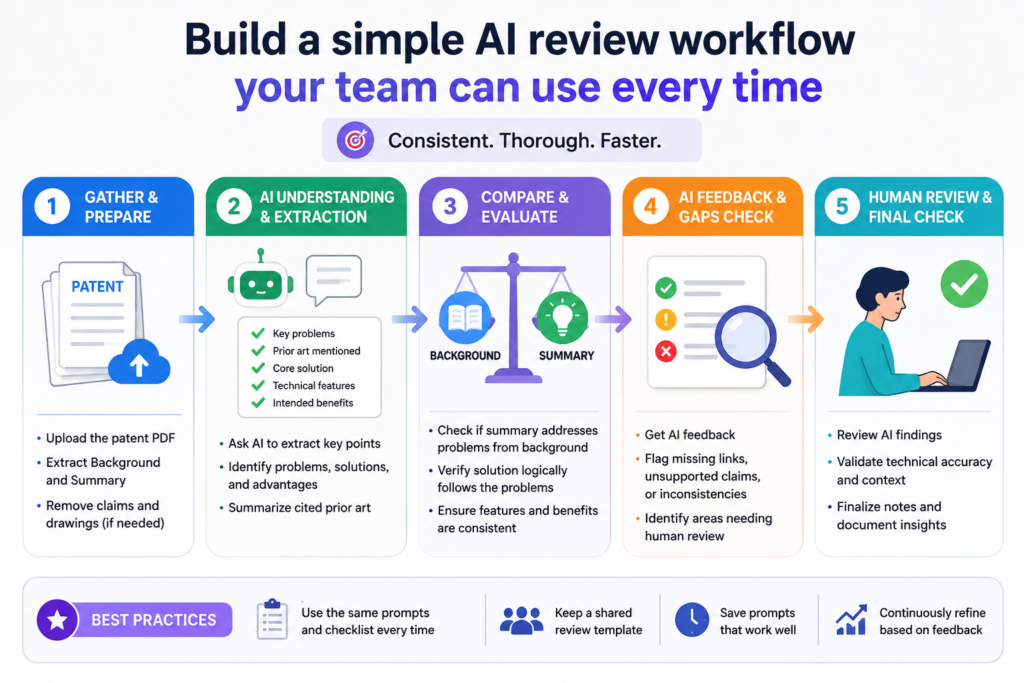
A simple workflow helps founders, engineers, and attorneys work from the same page. It also reduces mistakes because each draft goes through the same checks before it moves forward.
This is especially useful for startups filing more than one patent. Once your team has a review pattern, patent work becomes less confusing.
You know what to check. You know what questions to ask. You know when a section is ready for deeper attorney review. AI becomes a steady helper instead of a random writing tool.
Start with meaning before style
The first pass should always test meaning. Do not ask AI to polish the draft right away. Ask it what the background says the problem is.
Ask it what the summary says the invention is. Ask it whether those two answers match. If the meaning is wrong, better wording will not fix the draft.
This step should be simple. Paste the background and summary into AI and ask for a plain-language reading. Then compare that reading to what your team knows.
If AI misunderstands the invention, ask why. The answer may show that the draft skipped a key step, used a vague term, or mixed two ideas together.
Once the meaning is clear, move to risk. Ask AI to flag broad claims, absolute words, unsupported benefits, hidden admissions, and terms that may confuse the reader.
This gives your team a practical issue list. You can then decide what to fix before the draft goes to a patent attorney.
Move from diagnosis to rewrite only after the issues are clear
AI rewrites are most useful after the problem is known. If the issue is vague wording, ask AI to make it more specific.
If the issue is narrow product language, ask AI to suggest broader wording that still fits the invention. If the issue is hype, ask AI to replace it with concrete technical language.
After the rewrite, run a final comparison. Ask AI what changed in meaning. Ask what was added. Ask what was removed.
Ask whether any feature now sounds required when it should be optional. This final pass helps catch drift before the draft moves forward.
This workflow does not replace a patent attorney. It makes attorney review better. It gives the attorney a cleaner draft and clearer notes.
It also keeps the founder and engineer closer to the process, which is important because they understand the invention best.
PowerPatent brings this workflow into a faster and more guided process. Instead of juggling raw notes, messy drafts, and long email chains, founders can use smart tools with attorney oversight to protect their work with more confidence.
See how PowerPatent helps technical teams file better patents here: https://powerpatent.com/how-it-works
Create a review habit before your team is ready to file
The best time to review patent language is not the night before filing. It is when the invention is still fresh.
When your team finishes a hard technical build, capture what changed, why it matters, and how the system works. Then use AI to shape those notes into a clear problem statement and a clean invention summary.
This habit saves time later. It also protects details that may be forgotten as the product moves forward. Engineers move fast. Code changes.
Models change. Systems get rebuilt. If the invention story is not captured early, the patent process becomes harder than it needs to be.
AI can help turn rough notes into review-ready text. But the strongest results come when your team builds a habit around it.
After a major technical breakthrough, write down the old problem, the new approach, and the key result. Then use AI to test clarity, remove hype, find missing details, and compare the sections for consistency.
Treat AI review as a control system for patent quality
A good AI review workflow works like a control system. It checks the draft before errors grow. It helps the team spot weak signals early.
It keeps the writing aligned with the real invention. It also helps avoid the two big startup patent mistakes: waiting too long and filing something too thin.
The point is not to make founders become patent experts. The point is to give them a smarter way to stay involved. When founders and engineers can understand the draft, they can catch mistakes.
When attorneys get better input, they can do better work. When the whole process is supported by the right software, the patent path becomes faster and less painful.
That is the promise behind PowerPatent. You get AI that helps organize and review invention details, plus real patent attorney oversight to help protect what matters.
For deep tech teams that want strong IP without slowing down, that mix can make all the difference. Learn how PowerPatent works here: https://powerpatent.com/how-it-works
Review the background for the right amount of prior context
A background section should give enough context to make the invention feel needed, but it should not try to prove every detail about the past. This is a fine line. Too little context makes the invention feel random.
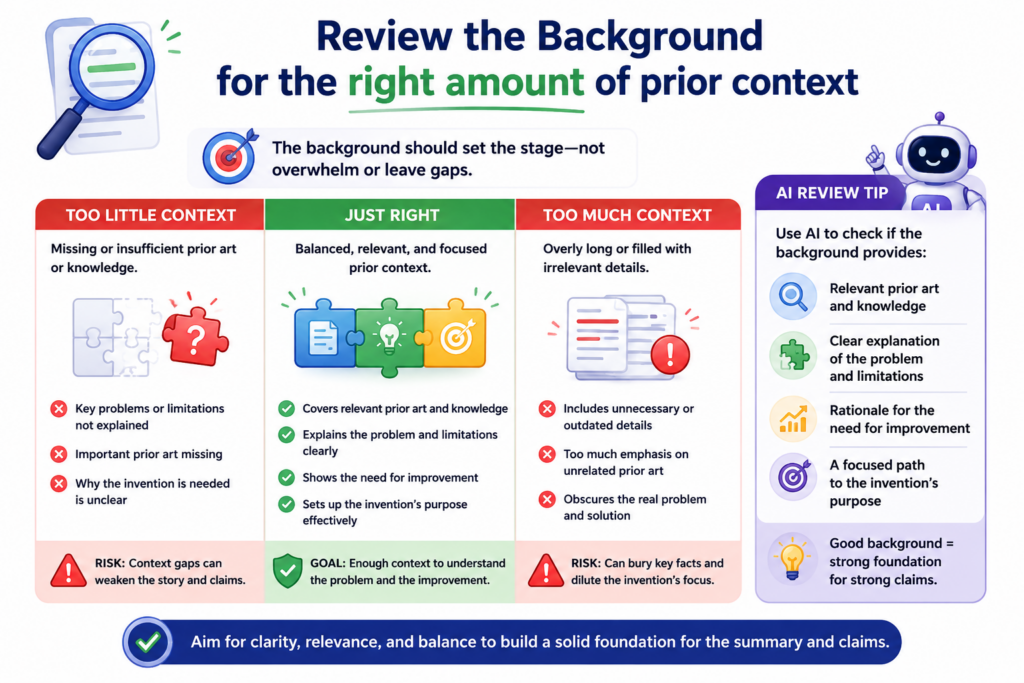
Too much context can create risk, confusion, or long text that does not help. AI can help you find the right middle point by showing which parts of the background support the invention and which parts pull the reader away from it.
This matters because many startup patent drafts begin with a broad story. The team may start by talking about a whole market, a whole industry, or a large shift in technology.
For example, an AI startup may begin with a long note about how artificial intelligence is changing the world. That may be true, but it usually does not help the patent.
The patent needs to know what technical problem existed before the invention. The story should be close to the invention, not far above it.
How AI can help you trim context without losing meaning
When you use AI to review the background, ask it to identify the main problem, the supporting context, and any extra context that does not help. This gives you a clean view of the section.
If AI finds a full paragraph that does not connect to the invention, that paragraph may need to be cut or moved.
A useful background often starts with the technical setting. It tells the reader where the invention lives.
Then it explains what older systems may struggle with. Then it points to a need for a better way. This does not need to be long. It needs to be clear.
For example, if the invention improves how software detects security risks in code changes, the background should not spend too much time talking about the entire history of cybersecurity.
It should focus on the review process, the limits of manual review, the challenge of changing code, and the problem your invention helps address. That kind of context gives the summary a strong base.
Why too much background can weaken the draft
A long background can feel safe because it looks complete. But long does not always mean strong. Extra context can create more places for error. It can also bury the real issue.
If the reader has to move through several broad paragraphs before seeing the problem, the section is not doing its job.
AI can help by marking each sentence as close to the invention, partly related, or not needed for the invention story.
This is a simple review step, but it can make the section much stronger. You may find that the best version is shorter, sharper, and easier to connect to the summary.
The background should not try to win the whole case by itself. It should set the stage. It should make the reader understand why the invention has a reason to exist. The more direct it is, the more useful it becomes.
How AI can help you avoid naming the wrong prior limits
Another issue is that the background may describe older systems in a way that is not fair or accurate.
A founder may say that past systems cannot do something, when the real issue is that they do it slowly, expensively, or only under certain conditions.
AI can help find this by asking whether the limitation is stated as a total failure or as a practical challenge.
The difference matters. Saying that old systems “cannot” do something may be too strong. Saying that some systems “may have difficulty” under certain conditions can be more careful. It still explains the problem, but it does not overclaim.
This kind of review is important for teams that move fast. When engineers describe problems, they often speak in clear, direct terms.
That is useful in meetings. Patent text needs more care. The draft should explain the pain without making claims that are too broad.
Why PowerPatent helps founders review faster without losing care
PowerPatent helps founders and engineers bring their real invention details into a smarter patent process. AI can help find weak spots in the background, but real attorney oversight helps decide what should change.
That mix gives teams speed without asking them to gamble on a draft they do not fully understand.
When you use AI to review prior context, your goal is simple. Keep what helps. Cut what distracts. Soften what is too broad.
Clarify what is too vague. Make sure the problem lines up with the invention. That is how the background becomes a strong opening move instead of a pile of words.
You can see how PowerPatent helps teams protect deep tech inventions with smart software and real patent attorney support here: https://powerpatent.com/how-it-works
Check whether the summary clearly shows what changes because of the invention
The summary should make the reader see the change. Before the invention, the system worked one way. After the invention, something works better, faster, safer, more reliably, or with less waste.
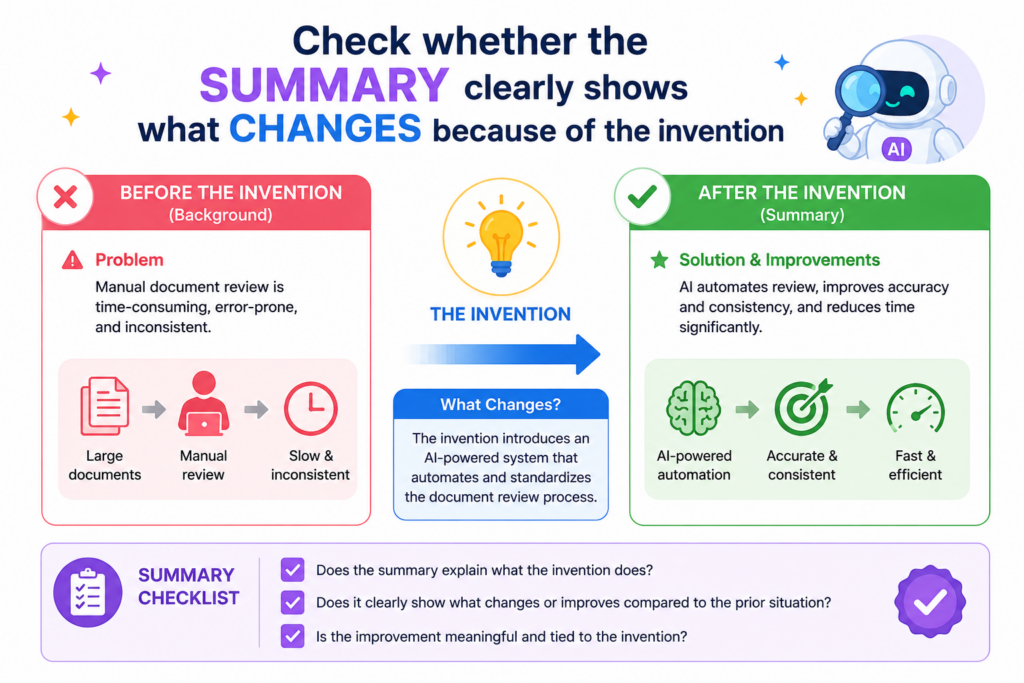
That change should be easy to spot. If the summary only says that the invention is “improved,” the reader still does not know what improved or why it matters.
AI is useful because it can help you test whether the summary shows a real technical change. You can ask it to explain what the invention receives, what it does, and what result it creates.
If AI cannot answer those questions from the summary, the section may be too thin. If it answers with broad phrases that could apply to any software tool, the summary needs more detail.
How AI can find the action inside the summary
A good summary often has clear action. The system receives something. It checks something. It chooses something. It changes something. It creates something. It sends something.
These action points help the reader understand the invention without getting lost in small details.
Ask AI to pull out every action in the summary. Then review whether those actions reflect the real invention. This is very helpful because patent summaries often hide action behind abstract words.
A phrase like “enhancing operational efficiency” does not show action. A phrase like “selecting a processing node based on available memory and network delay” shows action.
This does not mean every summary needs to read like a step-by-step recipe. It means the invention should not disappear behind empty claims. The reader should be able to see the core move the invention makes.
Why the summary should not only describe results
Results matter, but they are not enough. A summary that says the invention reduces delay, improves accuracy, or saves computing cost is not complete unless it gives some idea of how that happens.
Otherwise, the summary sounds like a wish.
AI can help by checking every result phrase and asking what supports it. If the summary says the invention improves model accuracy, what feature is linked to that improvement?
If it says the invention reduces bandwidth, what part of the system reduces data transfer? If it says the invention improves security, what changes about access, storage, keys, identity checks, or data flow?
This review keeps the summary grounded. It turns vague benefit claims into useful invention language. It also helps the whole team see whether the draft truly reflects the work they built.
How AI can help show the invention without overexplaining it
The summary should show the invention, but it should not explain every detail. This is where many founders struggle. They either say too little or dump in too much.
AI can help find that middle ground by creating a short version, a medium version, and a more detailed version of the summary. Then your team can compare them.
The short version may be useful for checking the core idea. The medium version may be closer to what belongs in the draft.
The detailed version may reveal points that belong later in the application. This is a very practical way to decide what goes where.
For example, if the invention is about updating a machine learning model using live device feedback, the summary may need to mention receiving feedback, deciding whether an update is needed, adjusting model data, and sending updated settings.
It may not need to describe every field in the feedback record or every line of the update logic. That detail can come later.
Why the best summary feels clear but not crowded
A strong summary gives enough shape to understand the invention. It does not overwhelm the reader. AI can help by finding sentences that carry too many ideas at once.
It can suggest splitting a long sentence into two clear ones. It can also flag details that may be better saved for the detailed description.
This kind of clean review is one reason founders like using AI in patent work. It helps them see the invention from the reader’s side.
But the final call should still involve human judgment. The draft must match the invention, the claims, and the filing strategy.
PowerPatent helps make this easier. Founders can move from rough notes to clearer patent work with smart AI tools and real attorney support, so the process does not feel like a black box.
Your team stays involved, and the patent work gets stronger because the people who built the invention can review what is being said.
See how PowerPatent helps startups file better patents faster here: https://powerpatent.com/how-it-works
Use AI to prepare better questions for attorney review
AI is not a replacement for a patent attorney. It is a way to get more value from attorney review.
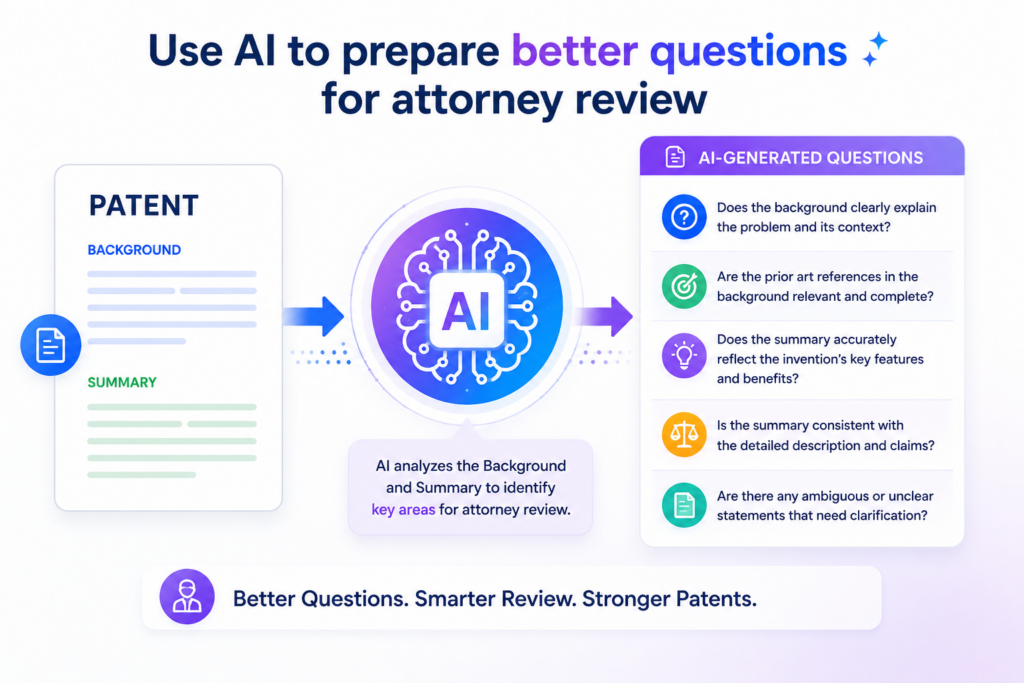
When your background and summary have already been checked for clarity, consistency, missing details, narrow language, broad claims, and hype, your attorney can focus on higher-value decisions.
That saves time and helps the final draft become stronger.
Many founders wait too long to involve patent help because they think the process will be slow or hard. But a better approach is to use AI to prepare the draft and prepare your questions.
Then attorney review becomes more direct. Instead of asking, “Is this good?” you can ask clearer questions about risk, scope, wording, and strategy.
How AI can turn draft issues into attorney-ready questions
After AI reviews the background and summary, ask it to create a list of questions for attorney review. Then rewrite those questions in your own words.
The point is not to let AI decide legal strategy. The point is to make sure your team brings the right concerns to the conversation.
For example, AI may flag that the summary uses the word “mobile device” many times.
Your attorney-ready question may be, “Should this invention be described as working with client devices more broadly, or is mobile device the right scope?” That is a useful question. It is specific. It helps the attorney understand the concern.
AI may also flag that the background says “existing systems cannot perform real-time updates.” Your question may be, “Should this be softened to avoid an absolute statement?” That is another strong question.
It helps the attorney focus on a real drafting issue instead of hunting through the whole section from scratch.
Why better questions lead to better patents
A patent attorney can do stronger work when the founder and engineering team bring clear input.
The attorney understands patent strategy. The team understands the invention. When both sides meet in the middle, the draft improves.
AI helps create that middle ground. It translates a rough draft into clearer review points. It helps founders see what may be too broad, too narrow, unclear, or unsupported.
It helps engineers check whether the text matches the actual system. This makes the whole process faster and less painful.
This is exactly where PowerPatent shines. It gives startups a way to work with smart software and real patent attorneys in one process, so founders do not have to choose between speed and quality.
You can protect your invention while keeping your team focused on building. Learn how it works here: https://powerpatent.com/how-it-works
How to keep control of the invention story during review
The invention story should not get lost as the draft moves from AI review to attorney review.
Keep a simple record of the core problem, the core solution, the key technical change, and the most important variations. This helps everyone stay aligned.
AI can help maintain that record. Ask it to create a plain-language summary of the background and summary after each major edit.
Then compare that summary against your team’s understanding. If the plain-language version starts to drift, the draft may be drifting too.
This habit is especially useful when multiple people review the draft. A founder may care about business value.
An engineer may care about system accuracy. An attorney may care about claim support and scope. A clear invention story keeps those views connected.
Why PowerPatent gives technical teams a smoother path
Patent work should not feel like sending your invention into a black box and hoping it comes back right. Founders and engineers should be able to understand what is being filed.
They should be able to see how their technical work is being framed. They should be able to move quickly without making avoidable mistakes.
PowerPatent was built for that. It helps technical teams capture invention details, use AI to improve the process, and work with real patent attorneys who help guide the final result.
That gives founders more confidence, more control, and a faster path to protection.
When you use AI to prepare for attorney review, you are not trying to do the attorney’s job. You are making the review smarter.
You are bringing clearer facts, cleaner drafts, and better questions. That is how startups protect hard technical work without slowing down the whole company.
Conclusion
AI can make patent review faster, cleaner, and less stressful, but it works best when it helps people think, not when it replaces them. Use it to test the background, sharpen the summary, catch weak words, find gaps, and prepare better questions for attorney review. The real goal is simple: make sure the patent tells the right invention story in clear, careful words.
For founders and engineers, this means more control, fewer delays, and a stronger path to protection. PowerPatent brings smart AI tools and real attorney oversight together so you can protect what you are building with confidence: https://powerpatent.com/how-it-works
Leave a Reply