
Inventor comments can make a patent draft stronger. They can also turn it into a mess. Learn how PowerPatent helps teams protect inventions with less chaos here: https://powerpatent.com/how-it-works
Treat Every Inventor Comment Like Part Of The Patent Record
Inventor comments are not casual notes. They may look small, but they often hold the real value of the invention. A short comment from an engineer can explain why the invention works better than older tools.
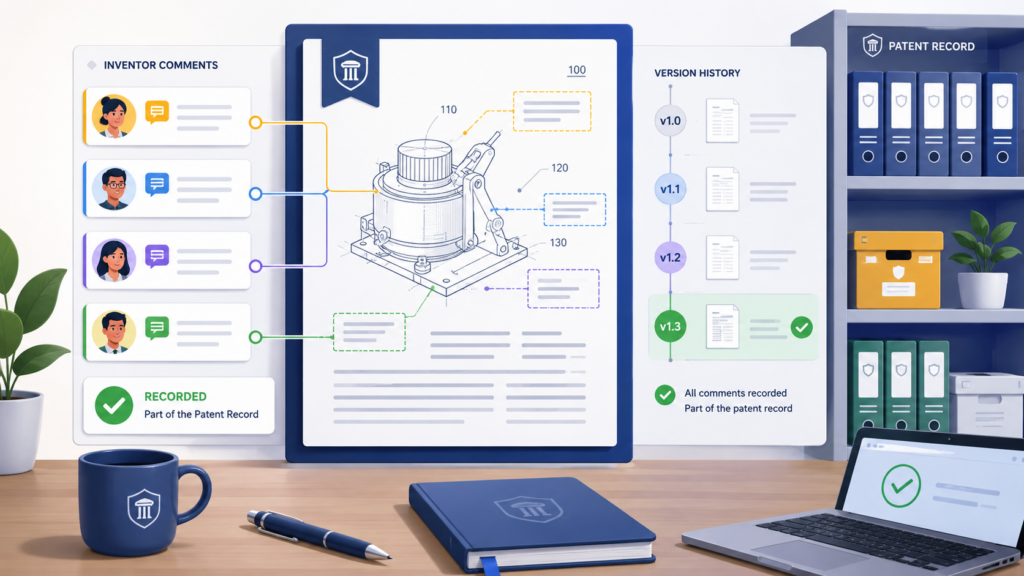
A quick note from a founder can show the business use case. A correction from a developer can stop the patent draft from saying something that is not true.
This is why every comment needs a clear home. If comments live in email, chat, document margins, meeting notes, and old files, the team loses control fast.
The draft may still look clean, but the thinking behind it becomes scattered. That is where mistakes begin.
Inventor comments should never float outside the draft process
The first rule is simple. A comment should always connect to a specific draft, a specific section, and a specific decision. Without that link, the comment becomes noise.
Someone may read it later and wonder whether it was already handled. Someone else may make the same change twice. Another person may ignore it because they cannot tell if it still matters.
Patent drafts are full of moving parts. The title, background, summary, drawings, claim terms, examples, and technical details all depend on each other. When an inventor comments on one part, it may affect another part too.
For example, an inventor may say, “The model does not only rank results. It also filters bad inputs first.” That one comment may change the summary, the flow chart, the claim language, and the examples.
Every comment needs context before action
A strong version control process starts by forcing context around every comment.
The team should know who made the comment, when it was made, which draft it applies to, and what part of the invention it touches. This does not need to be complex. It just needs to be clear.
The worst way to handle comments is to copy them into a new document without their history. When that happens, the comment loses its source.
Later, if the attorney or founder needs to ask a follow-up question, no one knows where the note came from. This can slow the patent process at the exact moment the team needs speed.
A better way is to keep inventor comments inside one controlled workspace. That workspace can show the latest draft, the open comments, the resolved comments, and the history of changes.
The key point is that the team should not need to hunt across five tools to understand what happened.
Do not treat all comments the same way
Some inventor comments are simple fixes. A spelling change, a wrong part number, or a small wording issue can be handled quickly. Other comments are much more serious.
They may change the scope of the invention. They may add a new feature. They may show that the draft misses an important step. These comments need more care.
If every comment gets handled in the same way, important notes can get buried. A founder may think the attorney reviewed a key technical change when it was only marked as “done” by someone else.
An engineer may think a comment was accepted when it was actually skipped because it conflicted with another part of the draft.
Tag comments by risk, not just by status
Many teams only track comments as open or resolved. That is not enough. A comment can be resolved in the document but still create a strategic issue.
For example, changing one term from “server” to “system” may seem small. But in a patent draft, that wording can affect how broad or narrow the protection feels.
A smart process separates simple edits from invention-level comments. Simple edits can move fast. Invention-level comments need review by the right person.
That may be the lead inventor, the founder, or the patent attorney. The point is not to slow the team down. The point is to make sure the right eyes review the right change.
This is where PowerPatent can help teams stay organized. Modern patent software should make it easier to collect technical input, keep drafts under control, and involve real attorney oversight at the right moments.
When the workflow is clear, founders do not need to become patent process experts just to avoid chaos. See how PowerPatent works here: https://powerpatent.com/how-it-works
Create one source of truth before comments begin
The best time to fix version control is before comments start. Once five people begin editing five files, the damage is already happening.
Before sending a draft to inventors, decide where comments belong and which file is the real draft.
This sounds basic, but it is where many teams fail. Someone sends a Word file by email. Another person uploads it to a shared folder.
A third person converts it to Google Docs. Then comments split across tools. The team may still be working hard, but the process is now unsafe.
The latest draft should be obvious to everyone
A strong process makes the current version impossible to miss. The file name should show the date and draft stage.
The workspace should show who owns the draft. Old versions should be locked or clearly marked as old. Inventors should not need to guess which document to open.
The goal is not to create more admin work. The goal is to remove doubt. Doubt is what causes rework.
Doubt is what makes attorneys spend time comparing files instead of improving the patent. Doubt is what makes founders feel like the process is out of their hands.
When the latest draft is clear, comments become easier to manage. The team can see what changed, why it changed, and whether the change came from an inventor, attorney, or internal reviewer.
That kind of control saves time and protects the quality of the filing.
Set A Comment Workflow Before The First Draft Goes Out
A patent draft should never be sent to inventors with a vague note like “please review.” That sounds harmless, but it invites messy feedback.
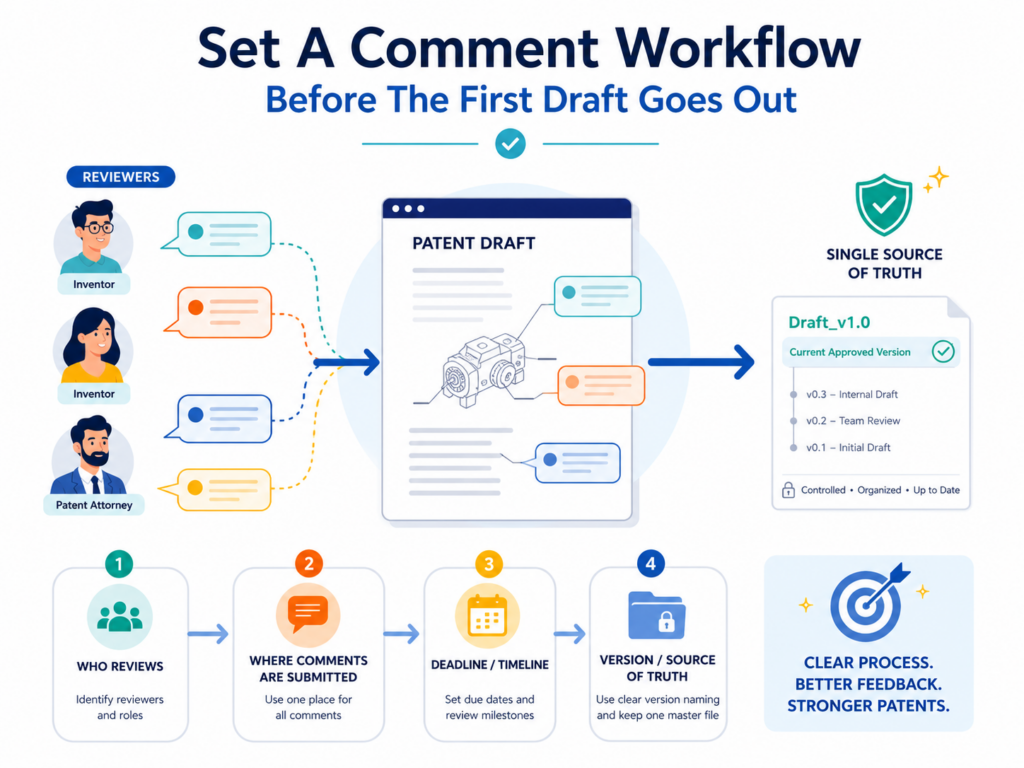
One person may rewrite paragraphs. Another may leave broad thoughts. Someone else may focus only on grammar. The result is a pile of comments that are hard to sort and even harder to trust.
A better move is to give inventors a clear review job. Tell them what to check, where to comment, and what kind of feedback matters most. This keeps the review focused and protects version control from the start.
Inventors need clear review rules, not open-ended requests
Most inventors are busy. They are building products, fixing bugs, meeting customers, and shipping work.
If you ask them to review a patent draft without clear direction, they may skim it quickly or over-edit the wrong parts. That is not because they do not care. It is because the task is unclear.
The review request should explain what the inventor is responsible for. They should check whether the invention is technically correct. They should confirm that the main steps are accurate.
They should point out missing options, edge cases, system parts, and real-world uses. They do not need to polish legal wording or rewrite attorney language unless something is wrong.
A focused review saves attorney time and founder energy
When inventors know what to look for, their comments become sharper. Instead of saying, “This section feels wrong,” they can say, “The data is not cleaned after the model runs. It is cleaned before scoring.” That kind of comment is useful. It tells the team exactly what to fix.
Focused comments also help the attorney. A patent attorney can do much better work when technical feedback is clear and tied to the invention.
The attorney does not need to guess what the engineer meant. They can turn the feedback into stronger draft language, better examples, and cleaner claim support.
This is one of the reasons PowerPatent is built around a better way to move from invention details to patent-ready work.
The goal is not just to write faster. The goal is to capture the right details, keep control, and help real attorneys review what matters. You can see the workflow here: https://powerpatent.com/how-it-works
Use review windows so comments do not arrive forever
One hidden cause of version control pain is late feedback. A draft goes out on Monday. Two inventors comment by Wednesday.
The attorney makes updates on Thursday. Then another inventor replies the next week with comments on the old version. Now the team has to compare old feedback against a new draft.
Late comments are not always bad, but they must be controlled. If comments can arrive anytime, the draft never settles. The team keeps reopening finished sections. That creates delay and risk.
A review window gives the team a clean decision point
Set a clear review window for each draft. For example, inventors may have two business days to review the technical description, then one more day to answer follow-up questions.
After that, the draft moves to the next stage. Any new comments must be marked as late and checked against the latest version.
This does not mean the team should ignore late comments. Some late comments are important.
But late comments should not silently enter the draft. They need to be reviewed with extra care because the draft may have changed since the comment was made.
A clean review window gives everyone a shared rhythm. Inventors know when feedback is needed. Attorneys know when they can revise.
Founders know when the project is moving forward. That rhythm is what keeps the patent process from feeling endless.
Make one person responsible for comment intake
Version control breaks when everyone has equal power to merge changes. In a small startup, this often happens by accident. A founder edits the draft. An engineer adds comments.
A patent attorney revises claims. A product lead adds examples. No one is doing anything wrong, but no one is guarding the process.
There should be one person responsible for comment intake. This person does not need to make every decision. Their job is to make sure comments are collected, sorted, assigned, and tracked. They are the gatekeeper for clean review.
The comment owner protects the draft from confusion
The comment owner checks whether feedback is on the current draft. They make sure duplicate comments are grouped.
They ask inventors to clarify unclear notes. They confirm that resolved comments are truly handled. They also keep old drafts from coming back into the workflow by mistake.
In a founder-led company, this role may belong to the founder, chief of staff, product lead, or patent operations person.
In a law firm, it may be a patent attorney, agent, or trained paralegal. The title matters less than the control.
The mistake is letting the document manage itself. Documents do not manage themselves. Comments pile up. Versions multiply. People assume someone else handled the issue. Then a key change gets missed.
A strong comment owner reduces that risk. They help the team move faster because they remove confusion before it spreads.
Build A Simple Naming System That No One Can Misread
A file name can either protect your team or confuse it. In patent drafting, a weak file name is not a small issue. It can make the wrong draft look current.
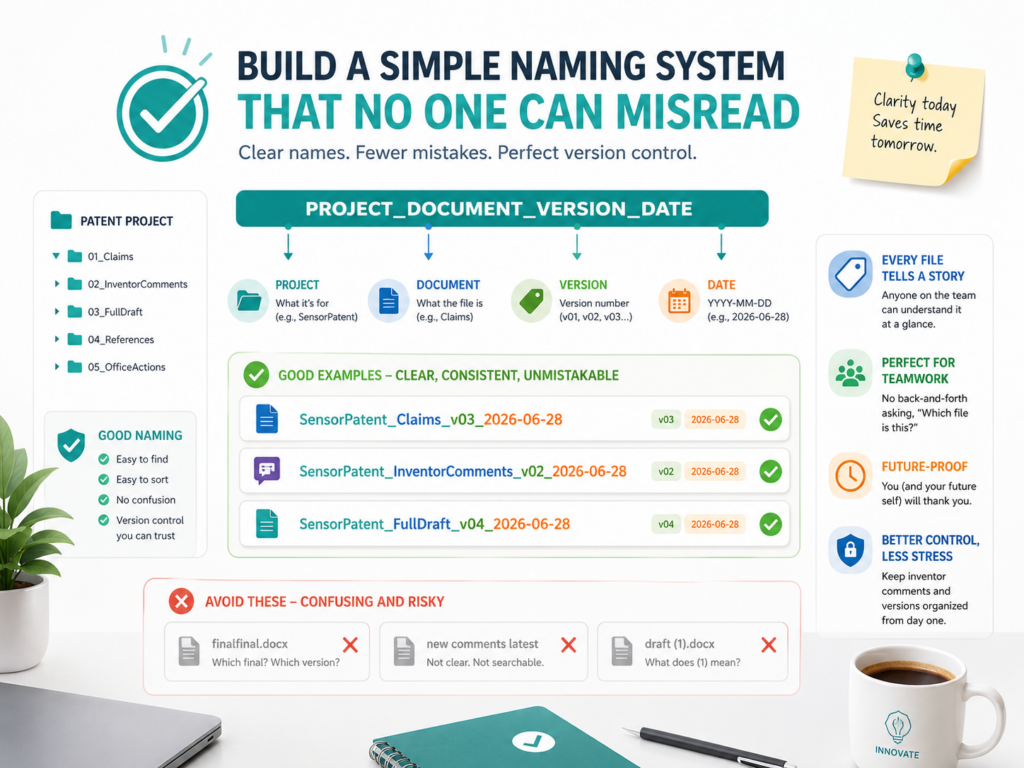
It can cause inventors to comment on old language. It can make attorneys waste time checking what changed. It can also create a false sense of progress when the team is really working in circles.
The best file naming system is boring, clear, and hard to break. It should not depend on memory. It should not depend on one person knowing where things are saved.
It should tell any reader what the file is, what invention it covers, what stage it is in, and whether it is safe to edit.
A good file name should answer the first three questions instantly
When someone opens a patent draft folder, they should not have to guess. The name should answer three simple questions right away.
What invention is this? Which draft is this? What is its current status? If the file name cannot answer those questions, people will create their own system. Once that happens, version control starts to slip.
A strong naming system uses plain words. It may include the invention name, draft date, draft number, and review stage.
For example, a draft name may show that it is the “AI Data Filter Patent Draft,” that it is version three, and that it is currently with inventors for review. That is much safer than a file called “patent draft final edits new.”
The word “final” should be used with great care. Many teams create files called “final,” then “final revised,” then “final final,” then “final attorney comments.”
This sounds funny until a filing deadline is close and no one knows which file should be used. A better system uses stages instead of emotion.
A draft can be “inventor review,” “attorney review,” “ready for approval,” or “approved for filing.” Those names tell the team what to do next.
Version numbers should move in one direction only
Version numbers should never restart inside the same project. If draft one has been reviewed, the next working draft should become draft two. If draft two is revised, it becomes draft three.
This sounds obvious, but many teams accidentally create side versions. Someone downloads a file, edits it offline, and sends it back as “version two,” even though the team is already on version four.
That is how good comments get trapped in old files.
To avoid this, the team should decide that only the comment owner or draft owner can create a new main version. Inventors can comment.
Attorneys can suggest changes. Founders can approve. But the main version number should be controlled. This keeps the chain clean.
The goal is not to slow anyone down. The goal is to make sure the team can always tell the story of the draft. Draft one was the first attorney draft. Draft two included inventor comments.
Draft three included attorney revisions. Draft four was approved for filing. That story is useful because it gives the team confidence. It also makes future work easier when the startup files related patents later.
Keep old drafts visible but not active
Deleting old drafts may feel clean, but it can create problems. Old drafts can show what changed and why. They can help the attorney compare language.
They can also help the team understand whether a comment was already handled. But old drafts should not be easy to edit by mistake.
A smart system keeps old versions in an archive folder or locked area. The current draft stays in the active workspace.
Old drafts are still available, but they are clearly marked as old. This gives the team history without confusion.
Old drafts should be read-only whenever possible
The safest old draft is one that can be opened but not changed. When old drafts can still be edited, people may accidentally add comments to them.
They may think they are helping, but they are creating hidden work. The team then has to pull those comments forward or decide whether they no longer apply.
Read-only archives reduce this risk. They make it clear that old drafts are for reference, not action.
If someone finds an issue in an old draft, they should raise it in the current workspace, not edit the old file. This one rule can save hours of cleanup.
For startups, this matters because founder time is expensive. Every hour spent chasing version issues is an hour not spent building, selling, hiring, or raising. Patent work should protect momentum, not drain it.
This is where a modern patent workflow can help. PowerPatent gives teams a cleaner way to move invention details, draft review, and attorney oversight through one process, so founders are not stuck managing patent chaos by hand. See how it works here: https://powerpatent.com/how-it-works
Do not let file names carry the whole system
File names are helpful, but they are not enough by themselves. A team also needs a clear workspace, clean permissions, and a simple rule for where comments belong. File names are the label on the door. They are not the whole building.
If the team relies only on file names, people can still make mistakes. They may save copies locally. They may email drafts.
They may rename files. They may upload a draft to a new folder. Good naming helps, but the deeper fix is process control.
The system should make the right action easy
The best version control process does not depend on people being perfect. It makes the safe path easy and the risky path harder.
The current draft should be easy to find. The comment box should be easy to use. The archive should be clear. The owner should be obvious. The next step should be visible.
When the process is simple, people follow it. When it is complex, they work around it. That is why your naming system should be clean enough for a busy engineer to understand in ten seconds.
A strong patent process should not require a training manual. It should feel natural. The inventor should know where to comment.
The attorney should know what changed. The founder should know what is ready. That is the point of good version control.
Separate Technical Comments From Wording Comments
Not every comment has the same weight. Some comments fix how the patent draft reads. Others change what the invention is.
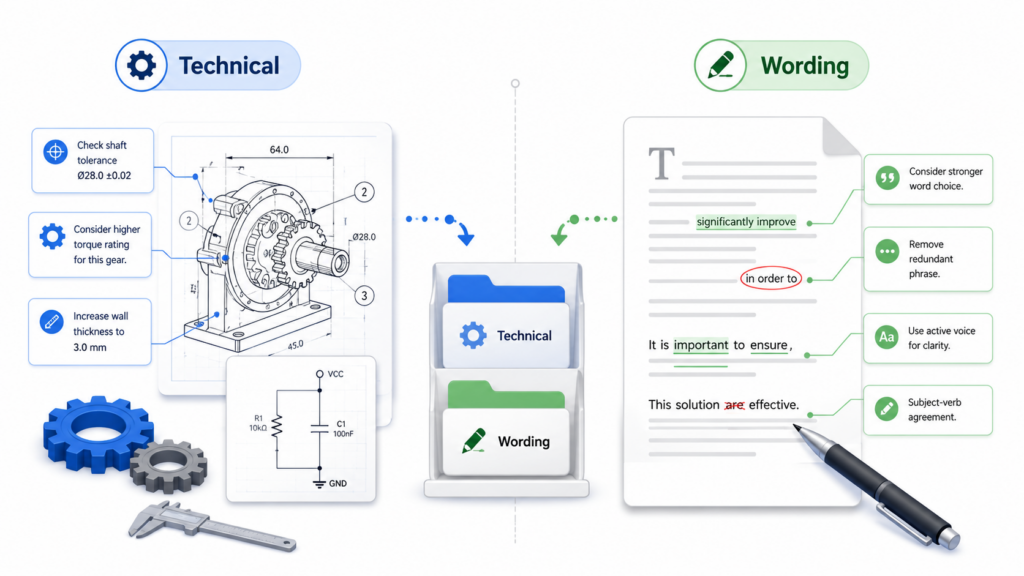
Those two types of feedback should never be mixed together without care. When they are mixed, teams can spend too much time on word choice while missing the technical point that really matters.
A wording comment may say, “This sentence is hard to read.” A technical comment may say, “The system does not train the model at this step.” Both are useful.
But they should not be handled the same way. One improves clarity. The other may change the entire draft.
Technical comments need deeper review
Technical comments are the most important comments inventors give. They tell the team whether the draft matches the real product, system, model, method, device, or workflow.
These comments can reveal missing details that make the patent stronger. They can also catch errors before they become expensive.
An inventor may notice that the draft skips a pre-processing step. Another may explain that the system works on the device, not only in the cloud.
A third may point out that the invention has a backup mode when data quality is poor. These are not small edits. These are invention details.
If a technical comment is accepted too quickly, the draft may become inconsistent. If it is ignored, the patent may miss the best part of the invention.
So technical comments need a clear review path. They should be checked by someone who understands both the invention and the patent goal.
Technical comments should be tied to claim support
A patent draft is not just a description. It supports the claims. The claims define what the team is trying to protect.
When an inventor adds a technical comment, the team should ask whether the comment affects claim scope, examples, drawings, or fallback language.
For example, suppose an engineer comments that the system can use sensor data, user behavior data, and third-party data.
That may help broaden the draft. But the attorney needs to decide how to describe those options in a useful way. The comment may belong in the detailed description, the examples, and possibly the claims.
This is why technical comments should not be buried in a general comment thread. They deserve attention. They may be the difference between a narrow patent and a more useful one.
PowerPatent helps founders capture technical invention details in a more structured way, then pairs that with real attorney oversight.
That matters because strong patents often come from small technical details that older, messy processes miss. You can explore the process here: https://powerpatent.com/how-it-works
Wording comments should improve clarity without changing meaning
Wording comments are still important. A patent draft should be clear. If an inventor cannot understand a section, that may be a sign that the language needs work. But wording changes can be risky when they quietly change meaning.
An inventor may rewrite a sentence to make it sound more natural. That may help. But it may also narrow the invention without anyone noticing.
For example, changing “one or more processors” to “the server” may sound simpler, but it could make the draft feel more limited. Changing “may include” to “includes” may make an optional feature sound required.
This is why wording comments should be reviewed for meaning, not just style.
Plain language matters, but precision still matters
The best patent drafts are not full of needless complexity. They explain the invention in a way that is broad, accurate, and useful.
A good attorney can often keep the draft clear while still protecting the invention. But the team should be careful when inventors rewrite sections without knowing how those words affect scope.
The review owner should ask a simple question for each wording change. Does this change only make the text easier to read, or does it change what the invention covers? If it only improves clarity, it may be easy to accept. If it changes meaning, it needs attorney review.
This is not about making the process slower. It is about keeping control. The team should welcome clear wording, but not at the cost of protection.
Use separate lanes for different comment types
A clean system gives different types of comments different paths. Technical comments go through invention review.
Wording comments go through clarity review. Filing questions go to the attorney. Business questions go to the founder. This keeps feedback from becoming a single tangled pile.
When every comment goes into one bucket, the team has to sort it later. Sorting later is always harder. The comment may lose context.
The person who wrote it may forget what they meant. The draft may have changed. The issue may now touch three sections instead of one.
The comment lane should show who must act next
A comment is only useful if someone knows what to do with it. Each comment should have an owner. That owner may not be the person who will make the edit, but they are responsible for getting the issue closed.
For example, a technical comment may be assigned to the lead engineer for confirmation. Once confirmed, it may go to the attorney for drafting.
A wording comment may go straight to the draft owner. A claim-related question may go directly to the attorney. This keeps the workflow clean.
The most dangerous comments are the ones that sit in the middle. Everyone sees them. No one owns them. They stay open until the deadline gets close. Then the team rushes. Rushing is where version control breaks.
A clear comment lane helps prevent that. It makes the next action visible. It also helps the founder see where the bottleneck is without reading every line of the draft.
Use Comments To Capture Invention Detail, Not Just Fix Errors
Many teams think inventor review is only about correcting mistakes. That is too small. Inventor comments are one of the best chances to make the patent stronger.
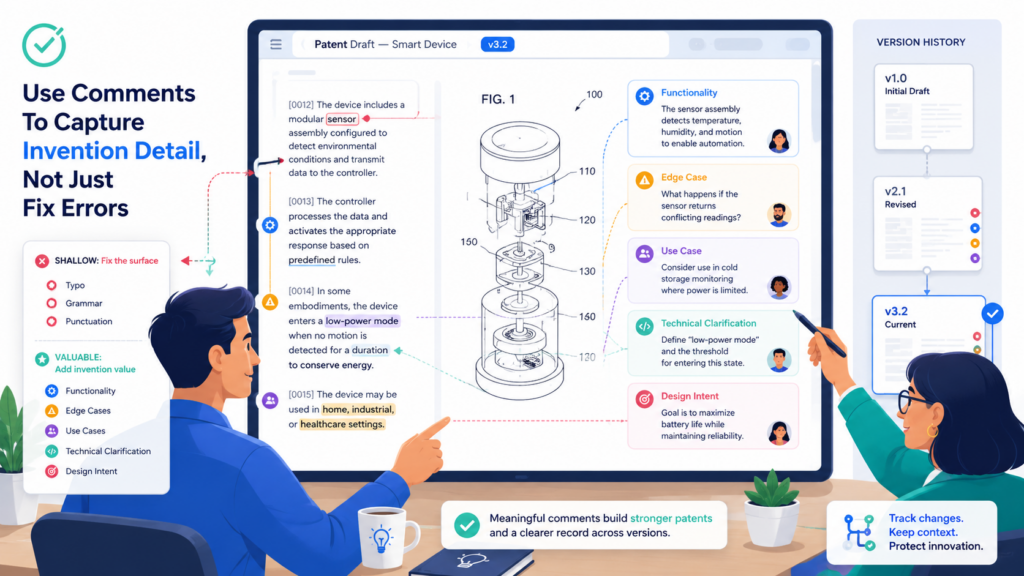
The first draft may describe the invention well, but inventors often know edge cases, design choices, tradeoffs, and real-world uses that are not obvious at first.
Those details can matter a lot. They can help show why the invention is different. They can support broader language.
They can create backup positions. They can help future patents. They can also stop the draft from sounding generic.
The best inventor comments explain why the invention works
A weak comment says, “Add more detail here.” A strong comment says, “We do this step before ranking because it removes low-quality signals and makes the output more stable.”
That second comment gives the attorney real material. It explains cause and effect. It shows the problem and the improvement.
When inventors review a draft, they should be encouraged to explain the reason behind their changes. If they say a step is wrong, they should say what actually happens.
If they add a feature, they should explain when it is used. If they mention a variant, they should explain why the team built it that way.
This helps the patent draft move from surface-level description to deeper protection.
Comments should answer the hidden “so what” question
Every technical detail should pass a simple test. So what? Why does it matter? What problem does it solve? What happens if the system does not do it? What gets faster, safer, cheaper, more accurate, more stable, or easier?
Inventors often assume these answers are obvious. They are not. The attorney may understand the words, but not the product pain behind them.
The founder may understand the market value, but not the deep technical choice. A good comment can bridge that gap.
For example, an inventor may say the system “clusters events before running the alert engine.”
That is useful, but it becomes much stronger when the inventor adds that clustering reduces false alerts and helps the system work in noisy environments. Now the draft has a clearer story.
Strong patents are often built from this kind of detail. The invention is not just what the system does. It is how the system improves something that was hard before.
PowerPatent is built to help teams surface these details instead of losing them in scattered notes.
By combining smart software with attorney review, it helps founders turn real technical work into stronger patent filings. See the process here: https://powerpatent.com/how-it-works
Ask inventors to add examples from the real product
A patent draft becomes stronger when it includes useful examples. These examples should not expose private secrets that do not need to be shared, but they should help explain how the invention can work.
Inventors are often the best source of these examples because they know the real product.
An inventor may know how the system handles bad data. They may know what happens when a user skips a step. They may know how the model behaves when input is missing.
They may know which parts are optional and which parts are core. These details can be hard to invent later.
Real examples make the draft more useful
A good example does not need to be long. It just needs to make the invention easier to understand. In patent work, examples can show different ways to build or use the invention.
They can also help support broader protection by showing that the idea is not limited to one exact setup.
For instance, if the invention uses a machine learning model to detect risk, the draft may include examples across finance, health, logistics, and security if those uses are truly supported.
If the invention controls hardware, examples may show different sensors, devices, networks, or control modes. These examples help the draft feel less locked to one product version.
This is important for startups because products change. The thing you file today may become a platform later. Your patent draft should not be trapped inside the first version of the product if the invention is broader than that.
Turn resolved comments into reusable knowledge
Once a comment is resolved, most teams forget it. That is a missed chance. Resolved comments can become a knowledge base for future patent work. They can show how the team defines key terms.
They can explain why certain language was chosen. They can reveal features that may deserve follow-on patents.
This is especially useful for deep tech startups. One invention often leads to many others. A comment that seems small today may point to a second filing later.
If those comments vanish after the first draft, the team may lose valuable IP ideas.
Comment history can help build the next patent
After a draft is approved, the team should review the most important resolved comments. Some may explain major technical choices.
Some may identify alternate designs. Some may describe future features. Some may show problems the team solved but did not fully claim in the current filing.
These should not just disappear. They should be captured in an invention backlog or patent roadmap. This gives founders more control over their IP strategy.
Instead of treating each patent as a one-off project, the team can build a growing protection plan around the product.
This is a strategic move. It turns patent drafting from a reactive task into a repeatable company process. That is how startups protect more of what they build without slowing down.
Control Who Can Edit And Who Can Comment
One of the fastest ways to lose version control is to let too many people edit the main draft. Editing feels helpful, but it can create hidden risk. A person may delete language that supports a claim.

Another may rewrite a section in a way that changes meaning. A third may accept changes without understanding why they were made.
In a patent workflow, not everyone needs the same access. Some people should comment. Some should suggest. Some should approve. Very few should directly edit the controlled draft.
Editing rights should be limited by role
Inventors should usually comment on technical accuracy. Founders should review business fit and filing goals.
Attorneys should control legal drafting. The draft owner should manage versions. When these roles blur, the process becomes harder to trust.
This does not mean inventors should be kept away from the draft. They are essential. It means their input should enter the draft through a controlled path.
The attorney or draft owner can then apply the comment while preserving consistency across the document.
A patent draft is not like a product spec where many team members can freely adjust sections. It is more connected than that.
A change in one paragraph can affect a claim. A term in a drawing can affect the description. A detail in an example can affect how broad the invention appears.
Direct edits can hide important decisions
Comments are visible. Direct edits can be harder to track, especially if someone accepts changes too early or works in a copied file.
A comment explains intent. A direct edit may only show the final wording. That can make it harder to understand why the change happened.
For example, if an inventor comments, “This should say the model updates after each batch, not after each user action,” the attorney can understand the technical point and revise the draft properly.
But if the inventor silently rewrites the sentence, the attorney may not see the full reason behind the change.
Good patent work depends on knowing why something changed. That is why comments are often safer than direct edits during inventor review.
PowerPatent helps keep invention work structured so the right people can add the right input without turning the draft into a mess.
Founders can move faster while still getting real attorney oversight. Learn more here: https://powerpatent.com/how-it-works
Permissions should match the stage of the draft
Access should change as the draft moves forward. Early in the process, more comments may be useful because the team is still gathering technical detail.
Later, the process should tighten. Once the draft is near approval, new edits should be handled carefully.
A common mistake is keeping the same open access from start to finish. That may seem simple, but it creates risk near the filing stage.
Someone may add a late comment to a section that has already been reviewed. Someone may reopen a settled issue. Someone may change a term that appears throughout the draft.
Later-stage drafts need stronger control
When the draft is close to final, the team should move from open review to controlled approval.
At this stage, comments should be limited to true errors, missing critical details, or approval questions. Style comments and small preferences should not keep the draft moving in circles.
This is important because every late change has a cost. The attorney may need to check related sections.
Drawings may need updates. Claims may need review. The summary may need adjustment. A small change may not stay small.
The team should not block important feedback, but it should require late feedback to clear a higher bar. The closer the draft is to filing, the more disciplined the workflow should become.
Keep approval power separate from comment power
A person who leaves comments is not always the person who should approve the final draft. This distinction matters. Inventors can confirm technical accuracy.
Founders can confirm business alignment. Attorneys can confirm legal readiness. These approvals work together, but they are not the same thing.
If approval is unclear, the team may assume the draft is ready when only part of it has been reviewed. An inventor may think they approved the technical section only.
The founder may think the whole draft is approved. The attorney may still be waiting on a final answer. This causes delays and confusion.
Final approval should be explicit and recorded
Final approval should not be implied from silence. It should be clear, dated, and tied to a specific draft version.
The approval should say which version was approved and for what purpose. This prevents later disputes about whether the correct draft was filed or whether a late comment was included.
For a startup, this is not about creating paperwork for its own sake. It is about protecting the company’s work. When the team knows exactly what was approved, it can move with confidence.
Version control is really decision control. The file matters, but the decisions matter more. Who changed what? Who reviewed it? Who approved it?
Why was the change made? A strong process answers those questions without drama.
Resolve Comments With Decisions, Not Just Checkmarks
A resolved comment should mean more than “someone clicked done.” It should mean the team made a clear decision.
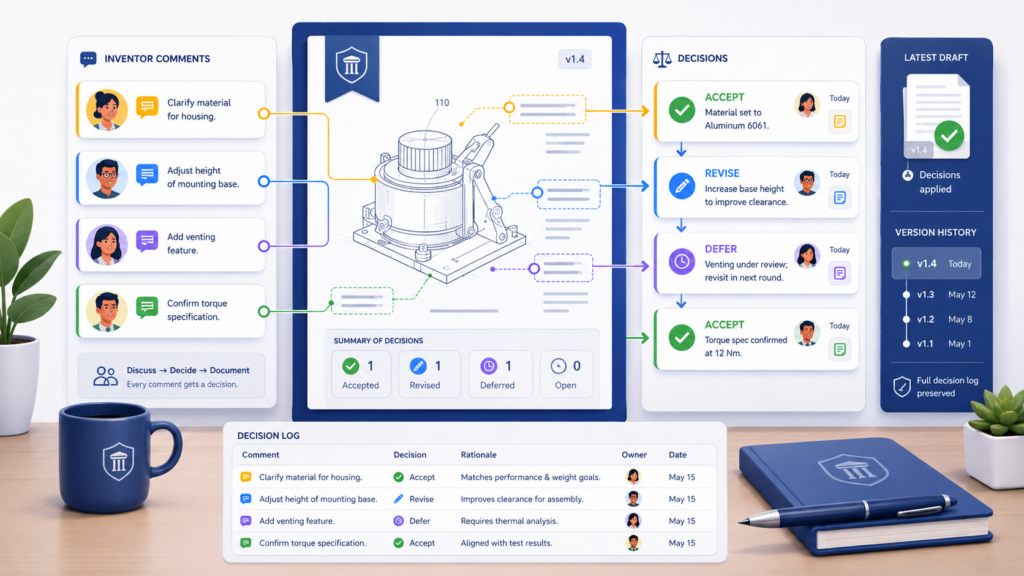
The comment was accepted, rejected, changed, moved, or turned into a follow-up item. Without that decision, the checkmark can be misleading.
Many version control problems happen because comments are marked resolved too quickly. The thread disappears from view, but the issue was not truly handled.
Later, someone asks why a detail is missing. The team then has to dig through old comments, emails, and drafts to understand what happened.
Every resolved comment should leave a trail
A good comment resolution tells the next reader what happened. It does not need a long note. It just needs enough context to show the decision. For example, a comment may be resolved because the language was added to the detailed description.
Another may be resolved because the attorney handled it in the claims. Another may be rejected because it described a future feature that is not ready to file yet.
The point is to avoid silent closure. Silent closure makes the process feel clean while hiding risk. The comment count goes down, but the team may not know whether the draft improved.
A short decision note can prevent later confusion
When resolving important comments, the reviewer should add a short note. It may say that the detail was added.
It may say that the issue was addressed in another section. It may say that the attorney will handle it separately. It may say that the team chose not to include it in this filing.
This matters because patent drafts often go through several rounds. A comment that seems obvious today may be confusing two weeks later.
People forget. Drafts change. Team members switch tasks. A clear decision note keeps the history intact.
For example, if an inventor says, “We also use this method for image data,” and the comment is resolved with no note, the team may not know whether image data was added.
But if the resolution says, “Added as optional input type in detailed description and example section,” the decision is clear.
That level of clarity makes review faster and safer.
Do not hide rejected comments
Rejected comments can be just as important as accepted ones. If a team decides not to include something, that decision should remain visible in the history.
Otherwise, the same idea may come back again and again. Or worse, someone may assume it was forgotten and add it later without review.
There are many valid reasons to reject a comment. The comment may be outside the invention. It may describe a product idea that is not built yet.
It may create confusion. It may narrow the draft too much. It may belong in a future patent. It may not be technically accurate.
Rejection should feel like strategy, not dismissal
Inventors may feel frustrated if their comments are rejected without explanation. A short reason helps. It shows that the comment was considered. It also helps the team learn what belongs in this filing and what should be saved for later.
For example, a founder may comment that the patent should include a future dashboard feature. The attorney may decide not to include it because the current invention is really about the data processing engine.
That does not mean the dashboard idea is bad. It may mean the dashboard should be tracked as a future filing idea.
This is a powerful move. Instead of losing the comment, the team turns it into strategy.
PowerPatent can help startups move from scattered patent ideas to a cleaner, more controlled process with smart software and attorney review.
That helps founders protect more of what they are building without drowning in document chaos. See how PowerPatent works here: https://powerpatent.com/how-it-works
Review resolved comments before final approval
Before a draft is approved, the team should review the most important resolved comments. This is not the same as reopening every issue.
It is a final check to make sure key technical comments were handled correctly.
The review owner should focus on comments that changed the invention description, added new examples, affected claim scope, corrected technical flow, or raised attorney questions.
These are the comments most likely to matter later.
The final comment review should confirm the story of the draft
By the time a draft is ready for approval, the team should be able to tell a clean story. The inventors reviewed the technical details. Key corrections were added. Optional features were captured where useful.
Unready ideas were moved to a future roadmap. The attorney reviewed changes that affected scope. The founder approved the filing direction.
That story gives the team confidence. It also creates a cleaner record for future work. When the startup files the next patent, the team can look back and understand what was included, what was saved, and why.
A comment process is not just about getting to zero open comments. It is about making the right decisions in the right draft with the right people involved. That is how you protect the invention without losing speed.
Use A Change Log So The Team Can See What Really Happened
A patent draft can change in many small ways before it is ready. Some changes come from inventor comments. Some come from attorney review. Some come from founder direction.
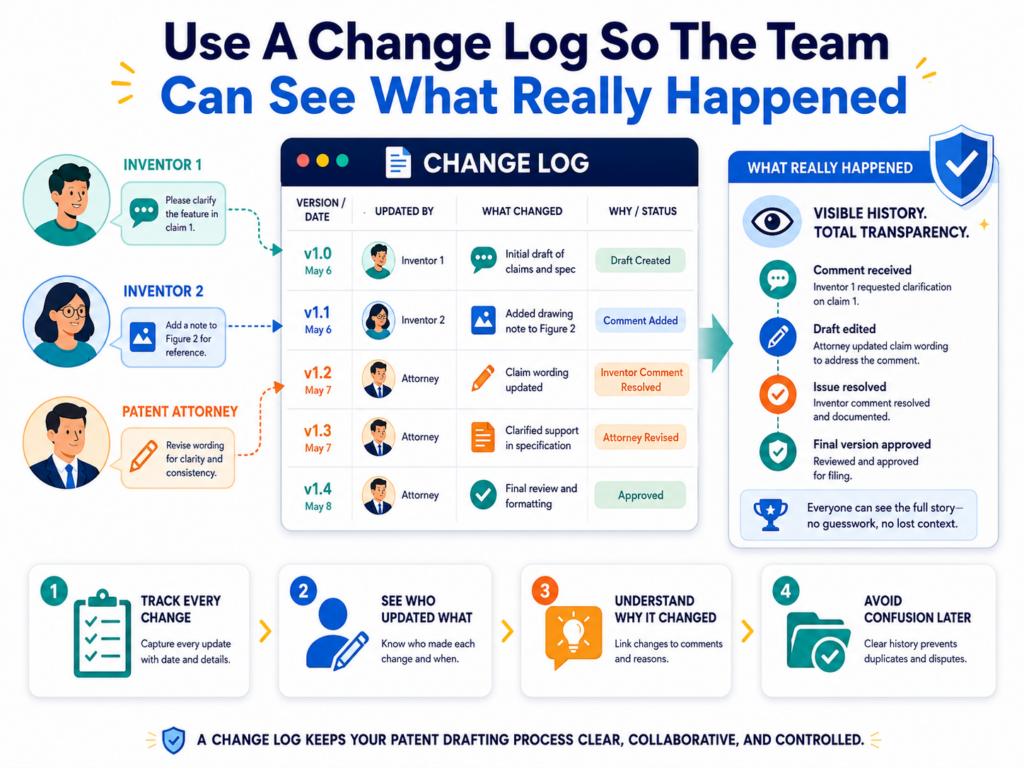
Some come from new product facts that were not known when the first draft was written. If those changes are not tracked in a clear way, the team may only see the newest words, not the reason behind them.
That is risky because the reason behind a change often matters more than the change itself. A paragraph may be rewritten because an inventor corrected the technical flow.
A claim term may change because the attorney wants broader coverage. A drawing label may change because the product team renamed a feature. If no one records that reason, later readers have to guess.
A change log is the simple fix. It gives the team a clear record of what changed, when it changed, who requested it, and why it was changed. It does not need to be long or formal. It needs to be useful.
A change log keeps the draft history clean
The biggest value of a change log is that it separates the story of the draft from the draft itself. The draft should be clean enough to read.
The change log should explain how it got there. This keeps the main document from becoming crowded with old comments, side notes, and long debates.
For example, the draft may simply say that a system filters sensor signals before scoring them.
The change log can show that this was added after the lead inventor explained that the filter step is what reduces false alerts. That context may help the attorney later when revising claims or preparing another filing.
A good change log also helps when multiple inventors are involved. One inventor may ask why a term changed.
Another may wonder why a feature was removed. Instead of reopening the whole draft, the comment owner can look at the log and explain the decision.
The change log should focus on meaningful changes
Not every tiny edit needs a full note. Fixing a typo does not need a record. Replacing a comma does not need a record.
But any change that affects technical meaning, claim scope, drawings, examples, inventor input, or filing direction should be captured.
This matters because patent drafts are not normal business documents. A small wording change can have a big effect. Changing “may” to “must” can make a feature sound required.
Changing “device” to “mobile phone” can make the invention sound narrower. Removing an example can reduce support for a future claim. These are the kinds of changes that deserve a note.
The change log should not become a diary. It should be a decision map. It should help the team understand the changes that matter.
The change log should live near the draft
A change log loses value when it lives in a separate place that no one checks. It should be close to the draft, easy to open, and part of the normal review process.
If the team uses a patent workspace, the log should sit inside that workspace. If the team uses a document folder, the log should be in the same folder as the active draft.
The key is habit. Each time a major comment is resolved, the change log should be updated.
Each time a new version is created, the change log should explain what changed from the prior version. Each time the draft moves to a new stage, the change log should show the decision.
Version changes should be easy to compare
A useful change log lets a busy founder understand progress in minutes. It should show that version two added inventor comments, version three included attorney revisions, version four updated the drawings, and version five was approved for filing. That kind of simple record prevents confusion.
Without a change log, teams often rely on memory. Memory is weak under pressure.
It gets worse when deadlines are close, when teams are remote, or when inventors are working across different time zones. A written log gives the team a shared memory.
This is also helpful after filing. Startups often come back months later to file another patent or update their IP plan.
A clean change log helps them understand what was already covered and what may still need protection.
Use the change log to reduce meetings
A strong change log can replace many status calls. Instead of asking everyone to explain what changed, the team can review the log.
Instead of asking whether a comment was handled, the team can check the record. Instead of pulling the attorney into every small question, the founder can see the status clearly.
This does not remove the need for real discussion. Some issues still need a call. But many update meetings exist only because the process is unclear.
When the log is clear, the team can spend less time talking about the document and more time improving it.
Clean records help real attorneys move faster
Patent attorneys do their best work when they can see the technical facts and the history of decisions.
If they have to hunt through emails, chats, and old drafts, their time gets spent on cleanup instead of strategy. A change log gives them a better starting point.
This is the kind of workflow PowerPatent is built to support. Founders should not have to manage patent drafts with scattered files and guesswork.
With smart software and real attorney oversight, the process can be faster, cleaner, and far less stressful. See how PowerPatent helps here: https://powerpatent.com/how-it-works
Stop Using Email As The Main Place For Patent Comments
Email is useful for sending updates. It is a poor place to manage patent comments. The problem is not that email is bad.
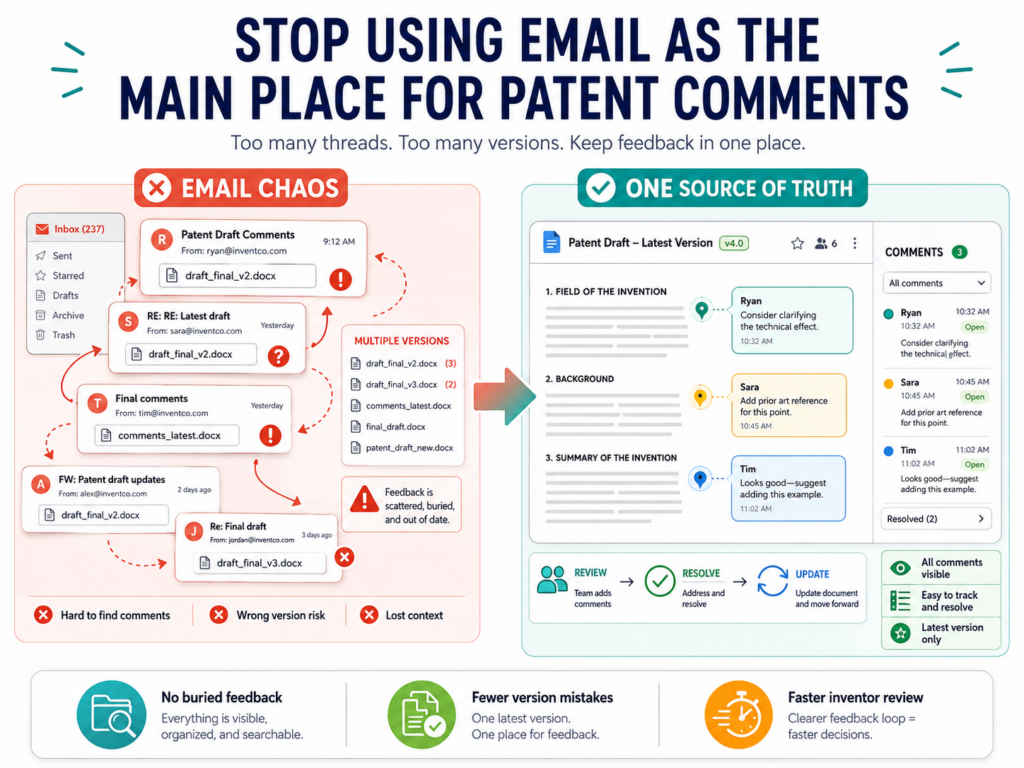
The problem is that email was not built for controlled drafting. It hides context, splits threads, creates attachments, and makes old files look current.
This is how version problems grow. An attorney sends a draft by email. A founder forwards it to two engineers. One engineer replies to the attorney. Another replies only to the founder.
Someone adds notes inside the document and attaches a new file. Someone else writes comments in the email body. Now the team has feedback in different places, with no clean way to know what has been handled.
Email feels easy at first. It becomes expensive later.
Email makes it hard to know what is current
The biggest problem with email is that it treats every attachment like a living file. A draft sent on Monday still looks open on Friday, even if the team has already moved to a newer version.
An inventor may download the Monday file, add comments, and send it back after the draft has changed. That creates extra work because the team now has to compare old feedback with the current draft.
This is especially painful when the late comments are important. The team cannot ignore them, but they also cannot safely accept them without checking whether they still fit. Every old attachment becomes a possible trap.
A controlled workspace solves this by making one draft the active draft. Inventors do not have to search old emails.
Attorneys do not have to merge random files. Founders do not have to ask which copy is right. The current draft is clear.
Email comments often lose their location
Another problem is that email comments are often not tied to a specific part of the draft. Someone may write, “The part about training is wrong.”
That may be true, but where exactly is the issue? Which paragraph? Which drawing? Which claim? Which example?
When comments are made inside the draft workspace, they can sit next to the exact text they refer to. That makes them easier to understand and faster to resolve. In email, the comment may float without a clear target.
The reviewer then has to guess, ask follow-up questions, or search the document.
That guesswork costs time. It also increases the chance of handling the comment in the wrong place.
Use email only for alerts and summaries
The best role for email is notification, not review. Email can tell inventors that a draft is ready. It can remind them of the review deadline.
It can share a short summary of what changed. It can confirm when a draft has been approved. But the actual comments should go into the controlled workspace.
This keeps the team from fighting the tool. Email can still do what it does well. It can get attention. It can move people to action. But it should not be the place where the patent record lives.
The review link should always point to the active draft
When sending a review email, the most important part is the link. That link should take the inventor to the active draft or review workspace.
It should not attach a copy of the file unless there is a very specific reason. Attachments create copies. Copies create risk.
The email should make the action clear. The inventor should know that comments belong in the linked workspace, not in a reply thread.
The message should also state the review window and the kind of feedback needed. This simple move reduces messy feedback before it starts.
For example, the email can explain that the inventor should focus on technical accuracy, missing steps, real examples, and places where the draft does not match how the system works. That gives the inventor a clear job and keeps comments useful.
When email comments happen, move them quickly
Even with good rules, someone will still send comments by email. That is normal. The goal is not perfection.
The goal is control. When comments arrive by email, they should be moved into the main review system as soon as possible.
The comment owner should copy the substance of the comment into the active workspace, connect it to the right section, and note who made the comment.
If the email included an attachment, the owner should check whether it was based on the current draft. If it was not, the feedback should be marked as coming from an old version.
Do not let email become a second review track
The danger is not one stray email. The danger is letting email become a second place where decisions happen.
If an attorney answers a question in email and the decision never reaches the draft record, the team may lose that context.
If a founder approves something in email but the draft system does not show approval, the team may be unsure later.
Every meaningful email decision should be brought back into the controlled process. That may feel like an extra step, but it saves far more time than it costs.
PowerPatent helps teams avoid this kind of scattered review by giving founders a more organized way to move from invention input to attorney-reviewed patent work.
You can see how the process works here: https://powerpatent.com/how-it-works
Make Inventor Review Easy Enough That Busy People Actually Do It
Inventor review fails when it feels heavy. Founders and engineers already have full days.

They are shipping product, fixing issues, meeting customers, reviewing code, and making hard calls. If the patent review process feels slow or unclear, it will get pushed aside.
That delay can hurt the whole filing timeline. The attorney waits. The founder follows up. The draft sits. Then everyone rushes near the deadline.
Rushed review is where version control breaks, because people stop following the process and start sending quick comments wherever they can.
The answer is not to pressure inventors harder. The answer is to make review easier.
Give inventors a clear starting point
When an inventor opens a patent draft, they may not know where to begin. Patent drafts can be long.
They can include sections that feel strange to engineers. If you ask an inventor to “review the whole thing,” they may not know what matters most.
A better approach is to guide them to the sections where their input has the most value. That may be the technical description, the workflow, the system diagram, the examples, and the parts that explain what makes the invention different.
They should know that they do not need to edit every sentence. Their job is to check whether the draft is true, complete, and useful.
This lowers the mental load. It also improves the quality of comments.
The review request should tell them what good feedback looks like
Inventors often leave better comments when they see what kind of comment is helpful.
Instead of saying, “Please add comments,” the review owner can explain that useful feedback points out wrong steps, missing parts, optional designs, edge cases, real examples, and reasons the invention works better.
That kind of guidance turns a vague task into a clear one. It also helps prevent low-value comments.
The inventor is less likely to spend time rewriting formal language and more likely to add the technical details that make the patent stronger.
This is especially important for software, AI, hardware, robotics, biotech tools, and other deep tech areas.
The best details are often inside the inventor’s head. The review process should pull those details out without making the inventor feel buried in paperwork.
Break review into smaller passes
One long review round can be hard to finish. A smarter process breaks review into smaller passes. The first pass may focus on technical accuracy.
The next pass may focus on missing examples. A later pass may confirm that updates were made correctly. This makes the work easier and reduces messy comments.
Smaller passes also reduce version risk. When everyone is reviewing everything at once, comments overlap.
One person may rewrite a section while another person comments on the older wording. The team then has to untangle both. Smaller passes keep each review round focused.
Each pass should have one main goal
A review pass with one goal is easier to complete. If the goal is technical accuracy, inventors should check whether the system steps are correct.
If the goal is examples, they should add real use cases. If the goal is final approval, they should look for true errors, not personal style preferences.
This keeps the draft moving forward. It also prevents endless review loops. Without clear pass goals, teams can keep polishing forever.
That may feel productive, but it often delays filing without making the patent much stronger.
The right goal at the right time helps the team know when to stop.
Reduce tool switching for inventors
Every extra tool creates friction. If inventors have to find the file in one place, leave comments in another, answer questions in Slack, and approve by email, the process will feel harder than it needs to be.
Tool switching also creates version risk because comments can land in the wrong place.
A better process keeps review as close to one place as possible. The inventor should open the active draft, leave comments, answer questions, and see status without hunting across tools.
The simpler the path, the more likely the review gets done well.
The best workflow protects speed and quality at the same time
There is a false choice in many patent processes. Teams think they must choose between moving fast and being careful. That is not true. A clean workflow lets the team do both.
Inventors can give useful input without managing files. Attorneys can review changes without chasing context. Founders can see progress without sending ten follow-up messages.
That is the kind of experience PowerPatent is designed to create. It helps technical teams turn inventions into stronger patent filings with smart software and real attorney support, so founders can protect what they are building without losing speed. Learn more here: https://powerpatent.com/how-it-works
Handle Conflicting Inventor Comments Before They Break The Draft
When more than one inventor reviews a draft, comments may conflict. One engineer may say a step happens before scoring. Another may say it happens after scoring. One founder may want broad language.
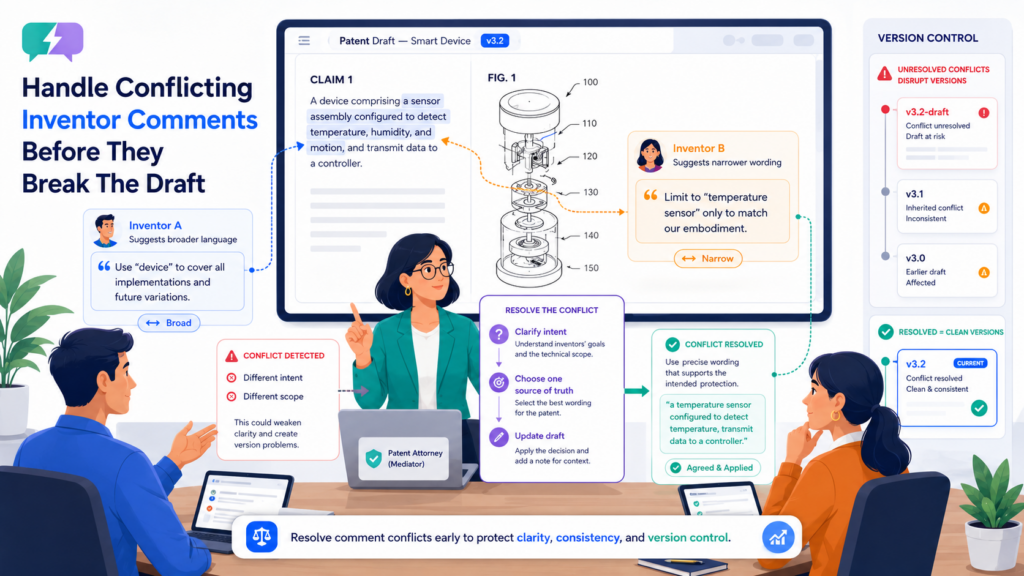
One technical lead may want the draft to match the current product exactly. One inventor may describe the system as cloud-based. Another may say it can run on a local device.
Conflicts are normal. They do not mean the team is broken. In fact, conflicting comments can be useful because they reveal hidden assumptions. The real problem is when conflicts are resolved silently or merged carelessly.
A patent draft should not become a compromise made by accident. Conflicts need clear decisions.
Treat conflicts as signals, not blockers
A conflict often means the invention has more than one version, more than one use case, or more than one way to describe the same thing. That can be valuable.
The team should not rush to choose one inventor’s comment and delete the other. The better move is to understand why both comments exist.
For example, one inventor may be describing the current product. Another may be describing a planned architecture. The patent may be able to support both if the invention truly covers both.
Or the attorney may decide to describe one as the main example and the other as an optional version.
This can make the patent stronger. But only if the conflict is handled on purpose.
The first question is whether both comments can be true
When comments conflict, the team should ask whether the comments describe different modes, different product versions, different customer settings, or different levels of detail.
If both comments can be true, the draft may need broader language or separate examples.
For instance, a system may process data locally in one setup and in the cloud in another. If the invention is not limited to one setup, the draft should not force that limit by mistake.
The attorney may describe both options and choose claim language that does not get trapped in one implementation.
This is why conflicting comments deserve careful review. They may point to broader protection.
Give one person authority to settle technical truth
Some conflicts are not about scope. They are about facts. If two inventors disagree about how the system actually works, the team needs a clear way to settle the truth.
That may require the lead engineer, architect, product owner, or founder to make the call.
The decision should not be made by whoever comments last or writes with the most confidence. Patent drafts should reflect the real invention.
If the team is unsure, they should check the product, code, design notes, model pipeline, lab data, or system architecture before deciding.
The decision should be recorded in the comment history
Once a conflict is resolved, the decision should be written down. The note should explain which view was accepted and why.
If both views were included, the note should explain how. If one view was moved to a future filing idea, that should be captured too.
This prevents the same conflict from returning later. It also helps the attorney understand the reasoning. A clean decision note may save a long call later.
For example, the note may say that local processing is included as an optional deployment, while cloud processing remains the main example. That tells the team the conflict was not ignored. It was used.
Bring the attorney in before conflicts change scope
Some conflicts are purely technical. Others affect patent strategy. If a conflict changes how broad the invention is, what features are required, or which versions are supported, the attorney should review it before the draft is changed.
This is especially true when a comment might narrow the invention. Inventors often describe the system based on the product they know best. That is natural.
But a patent draft may need to cover more than the current build if the invention supports broader use. The attorney can help decide how to describe the invention without overclaiming or undercutting the filing.
The goal is not to win the comment debate
The goal is to protect the invention well. That means the best answer is not always the most detailed answer.
It is not always the broadest answer. It is not always the current product answer. It is the answer that is accurate, useful, and aligned with the filing strategy.
PowerPatent’s mix of smart tools and real attorney oversight helps teams handle these judgment calls with more control.
Instead of letting scattered comments shape the draft by accident, founders can move through a cleaner process. See how it works here: https://powerpatent.com/how-it-works
Keep Drawings, Figures, And Text In Sync
Version control is not only about the written draft. Patent drawings and figures can create their own version problems. A figure may show one workflow while the text describes another.
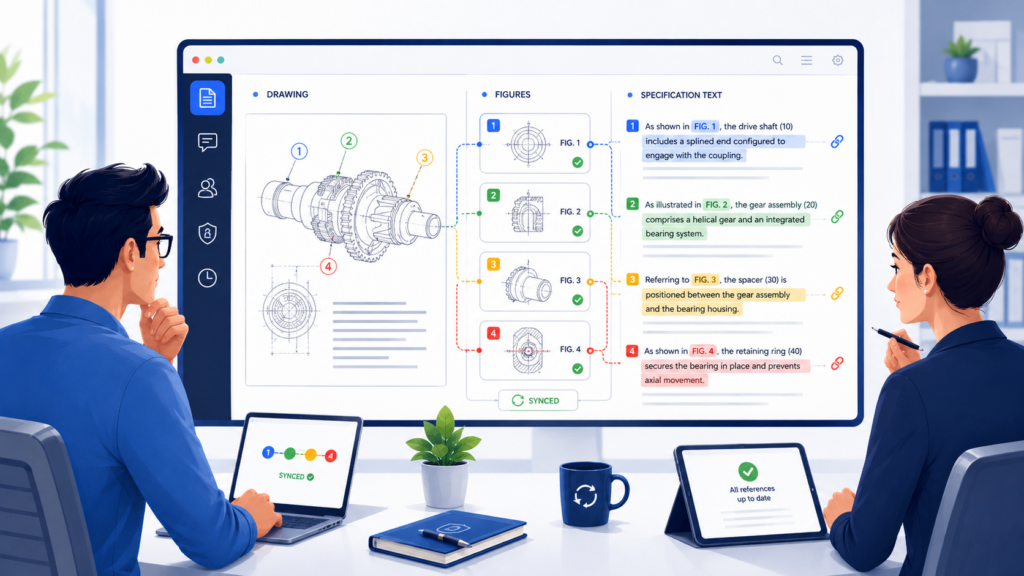
A label may use an old term. A step number may not match the written description. An inventor may comment on the text but forget that the figure also needs an update.
These issues are easy to miss because drawings often feel separate from the draft. But they are connected. If the text changes and the drawings do not, the patent can become confusing.
Every technical text change should trigger a drawing check
When an inventor adds, removes, or changes a system step, the team should ask whether any figure needs to change. If a new module is added in the text, the system diagram may need that module too.
If the order of steps changes, the flow chart may need revision. If a term changes in the claims or description, the drawing labels may need to match.
This does not mean every comment requires drawing work. But technical changes should always raise the question.
Skipping this check can create a draft that looks complete but is internally inconsistent.
Drawing mismatches can weaken clarity
A reader should not have to guess whether “input cleaner,” “data filter,” and “signal processor” are the same thing. If the text uses one term and the figure uses another, the draft may become harder to follow.
That can create confusion for the attorney, the inventors, and anyone who later reviews the filing.
Consistency does not mean the draft must use robotic language. It means key terms should be controlled.
If a component has a name, that name should be used carefully across the text and figures. If different names are needed, the draft should explain the relationship.
This is one of the quiet parts of patent quality. It is not flashy, but it matters.
Drawings need their own version control
Many teams track draft versions but forget figure versions. They may have a current document and old drawings sitting in another folder.
Or they may update a flow chart but not rename the file. Later, the attorney may insert the wrong image into the draft.
Drawings should have version names too. They should be tied to the draft version they support.
If draft four includes updated figures, the figure set should show that it belongs with draft four. Old figures should be archived like old drafts.
Figure files should not float outside the process
Figures often come from design tools, whiteboards, screenshots, or engineering diagrams. These source files can be useful, but they should not float around without control.
If someone updates a diagram in a design tool but the patent draft still uses an older export, the team may not notice.
The comment owner or draft owner should know which figure files are active. They should also know whether the patent draft has been updated with the latest figure exports. This is simple but important.
A good practice is to treat the figure set like part of the draft, not an add-on. When the draft moves to a new version, the figure set should be checked too.
Use inventor comments to improve figures
Inventors can make drawings much better. They can spot missing modules, wrong arrows, bad labels, and flows that do not match the product.
They can also explain what should be shown at a higher level so the figure does not become too narrow.
A patent figure does not need to be a perfect product diagram. In many cases, it should show the invention clearly without locking the draft to one exact interface or system layout.
That is a judgment call, and attorney review matters. But inventor input is still valuable because inventors know what the system actually does.
Figures should explain the invention without overfitting the product
Startups often make the mistake of turning product screens or internal architecture diagrams into patent figures without enough thought.
That can make the filing feel tied to one product version. A better figure often shows the main parts and steps in a cleaner way.
For example, instead of copying a full internal pipeline with every service name, the figure may show data intake, filtering, scoring, decision output, and feedback update. That can explain the invention while leaving room for product changes.
This is where smart patent drafting needs both technical input and legal judgment. PowerPatent helps bring those pieces together through software built for invention capture and attorney-backed review.
Learn how PowerPatent helps founders protect deep tech inventions here: https://powerpatent.com/how-it-works
Conclusion
Managing inventor comments without losing version control comes down to one thing: control the path from idea to decision. Keep one active draft, guide comments into one place, separate technical input from wording edits, track major changes, lock old versions, sync drawings with text, and make every approval clear.
This is how teams avoid rework, missed details, and filing delays. For founders, the win is simple: better patents with less chaos. PowerPatent helps make that easier by combining smart software with real attorney oversight, so your team can protect what it is building without slowing down. See how it works here: https://powerpatent.com/how-it-works
Leave a Reply