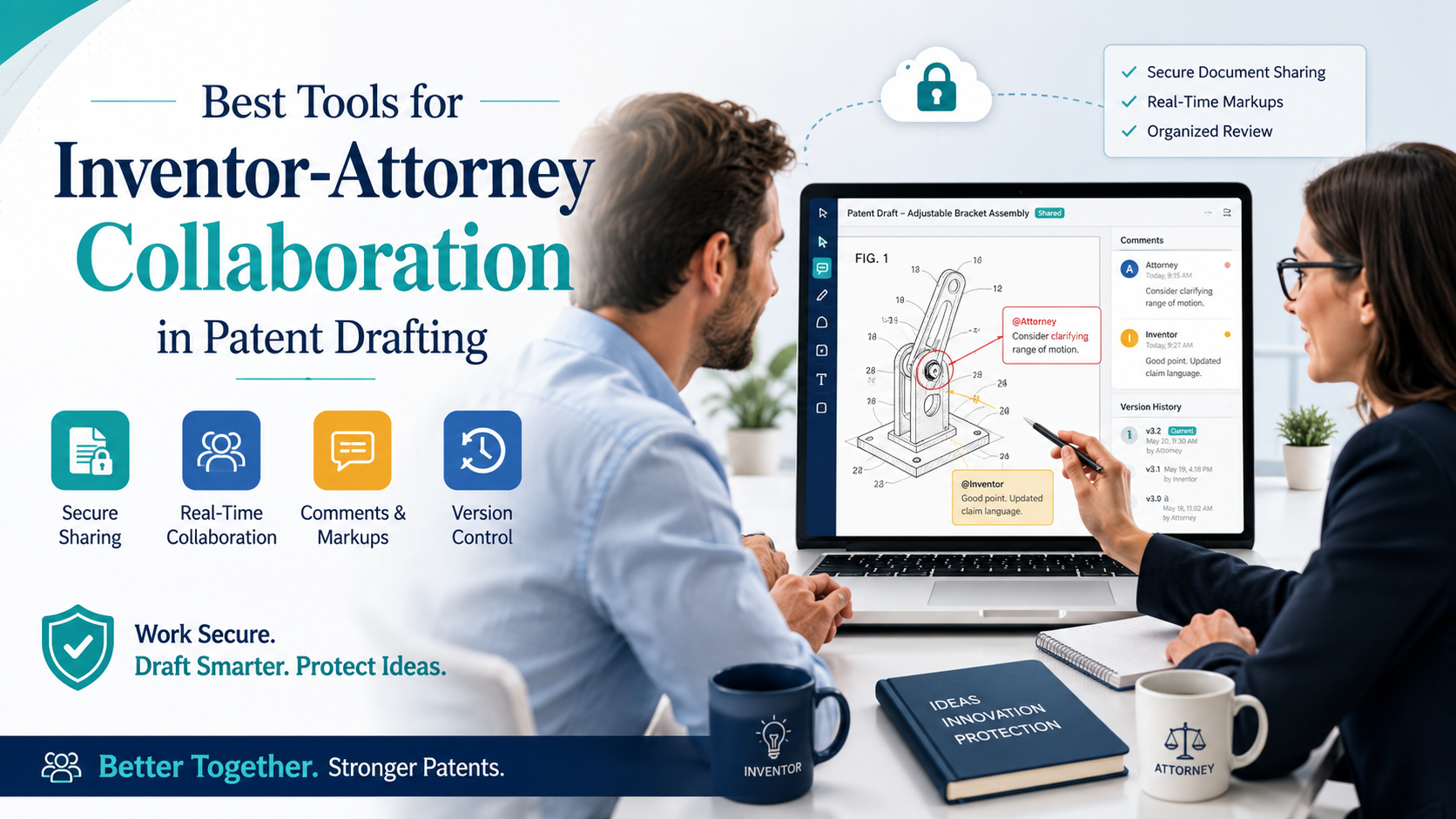
Patent drafting works best when inventors and attorneys build the application together. The inventor knows the idea deeply. The attorney knows how to turn that idea into strong patent language. But when the work happens through scattered emails, messy notes, lost drawings, long calls, and late feedback, good ideas can get weak fast.
The Best Collaboration Tool Is Not Just a Place To Put Files
A patent draft is not a normal document. It is not like a blog post, a pitch deck, or a product spec.

A good patent draft has to explain the invention, show how it works, cover the right versions of the idea, and give the attorney enough detail to protect what matters. That means the tool used by the inventor and attorney must do more than hold files in a folder.
A normal file-sharing tool can store invention notes. It can hold drawings. It can keep PDFs in one place. That is useful, but it is not enough.
Patent drafting needs a shared workspace where the inventor and attorney can see the same facts, ask better questions, track changes, and build the application step by step.
The biggest mistake many founders make is thinking the patent process starts when the attorney begins writing. It starts much earlier.
It starts when the inventor explains the idea for the first time. If that first explanation is weak, rushed, or scattered across random emails, the whole draft can suffer.
That is why the best collaboration tool is the one that turns raw invention knowledge into clean drafting fuel.
Why File Storage Alone Creates Weak Patent Drafts
File storage tools are helpful, but they are passive. They wait for the user to know what to upload. They do not ask what is missing. They do not know whether a drawing matches the written text.
They do not help the inventor explain why the invention is different. They do not guide an engineer through the parts of the invention that an attorney needs most.
This matters because inventors often explain their idea in the way they think about it. That is natural. An engineer may focus on code flow, model behavior, system design, or hardware setup.
A founder may focus on the market problem, user benefit, or product story. An attorney needs all of that, but also needs to understand the core technical edge.
A basic folder cannot pull that out.
For example, an inventor may upload a slide deck, a GitHub readme, a diagram, and a few meeting notes. The attorney then has to dig through each file, guess what matters, and send questions back.
That may work for a simple idea. It breaks down fast when the invention has many parts, many versions, or a fast-moving product roadmap.
This is where purpose-built patent tools become powerful. PowerPatent, for example, is built to help turn invention summaries, claims, and figure notes into stronger first drafts while keeping attorney review in the loop.
Its own product page describes the platform as using AI to create detailed first drafts from summaries, claims, and figure annotations, so legal teams can spend more time on higher-value review and strategy.
The Real Job Of A Patent Collaboration Tool
The real job of the tool is to lower confusion.
That sounds simple, but it is a big deal. Confusion is what causes delay. Confusion is what causes missing details.
Confusion is what makes an attorney send the same question three different ways. Confusion is what makes an inventor say, “That is not what I meant,” after the draft is already far along.
A strong collaboration tool keeps the invention clear from the start. It helps the inventor explain the problem, the old way of doing things, the new way, the key steps, the system parts, the data flow, the user flow, and the versions that may come later.
It also helps the attorney see where the invention may be broad, where it may be narrow, and where the draft needs more support.
This is important because a patent application should not only describe the product as it exists today. It should also describe smart variations, future versions, and fallback ideas that may matter later.
That cannot happen if the inventor and attorney are only trading messy files.
What Founders Should Look For Before Choosing A Tool
Founders should look for a tool that helps them move fast without hiding the hard parts.
The tool should make it easy to collect invention details, add drawings, mark what changed, and give feedback inside the draft. It should also make attorney review simple, because AI alone is not enough for high-quality patent work.
This point matters more now because AI drafting tools are growing fast. Current patent AI tools can help generate claims, descriptions, abstracts, and other parts of an application from invention disclosures, but the best results still depend on good input and expert review.
Recent legal tech commentary also notes that these tools remove routine work, not attorney judgment.
That is the right way to think about it. A tool should not replace the attorney. It should make the attorney more effective.
It should help the inventor share better raw material. It should make the draft easier to review. It should give both sides a clear place to work.
A good tool should also protect context. In patent drafting, context is everything. When an inventor explains why one method works better than another, that detail may become very useful later.
When a founder says, “We tried the normal way and it failed because of latency,” that sentence may help the attorney understand the real value of the invention. When an engineer says, “This part can run locally or in the cloud,” that may open up broader coverage.
If these notes live only in call transcripts, Slack messages, or someone’s memory, they are easy to lose.
The Hidden Cost Of Poor Collaboration
Poor collaboration feels cheap at first. A founder may think, “We can just send the attorney our deck.” An attorney may think, “I can figure it out from the notes.” Then the real cost shows up later.
The draft takes longer. The attorney has to ask more questions. The inventor has to stop building to explain old details.
The first draft misses key points. The second draft fixes some things but creates new questions. By the time the application is ready, the team may have lost weeks.
For startups, that time matters. Product moves. Fundraising moves. Competitors move. Public launches happen.
Customer calls happen. New releases ship. A slow patent process can make founders feel like patents are a drag on the business.
They should not be.
With the right workflow, patent drafting can run beside product work instead of blocking it. That is the whole point of using a modern platform like PowerPatent.
It helps founders move from invention notes to attorney-reviewed patent work with less friction, so the team can protect the idea while still building the company. You can see the workflow here: https://powerpatent.com/how-it-works
Why Inventor-Attorney Collaboration Needs A System, Not Just Software
Software alone does not fix a messy process. The team also needs a simple system. The system should answer a few key questions every time a new invention is being drafted.
What is the core idea? What problem does it solve? What is different from the old way? What parts are required?
What parts are optional? What are the best examples? What could a competitor change while still copying the heart of the idea?
These questions are simple, but they are powerful. They help the inventor move from “Here is what we built” to “Here is what must be protected.” That shift is where strong patent work begins.
The best collaboration tools make these questions part of the workflow. They do not rely on the attorney to chase every answer by email.
They do not rely on the inventor to know what a patent drafter needs. They guide both sides into a cleaner process.
This is especially important for deep tech teams. In AI, robotics, biotech tools, chips, advanced software, climate tech, and complex systems, the invention may not be easy to explain in one page.
The value may live in a small technical choice. It may be a better data structure, a model training flow, a sensor setup, a control loop, or a way of joining many parts into one system.
A general document tool does not know how to pull that out. A patent-focused collaboration tool is built for that job.
The Best Tools Help Attorneys Ask Better Questions
A strong tool does not only help inventors explain. It helps attorneys think.
When invention material is organized well, the attorney can spot gaps faster. They can see whether the draft needs more examples.
They can ask sharper questions. They can spend less time sorting files and more time shaping the patent strategy.
This changes the relationship between inventor and attorney. Instead of a slow question-and-answer loop, the work becomes more like a shared build. The inventor brings the technical truth.
The attorney turns that truth into protection. The tool keeps both sides aligned.
That is why the best collaboration tool is not the fanciest one. It is the one that helps the team make better decisions faster.
Invention Capture Tools Help Turn Raw Ideas Into Strong Drafting Material
Most patent problems begin at the capture stage.
The inventor has the idea, but the idea is still living in many places. Part of it is in the product. Part of it is in code. Part of it is in a whiteboard photo. Part of it is in a Slack thread.
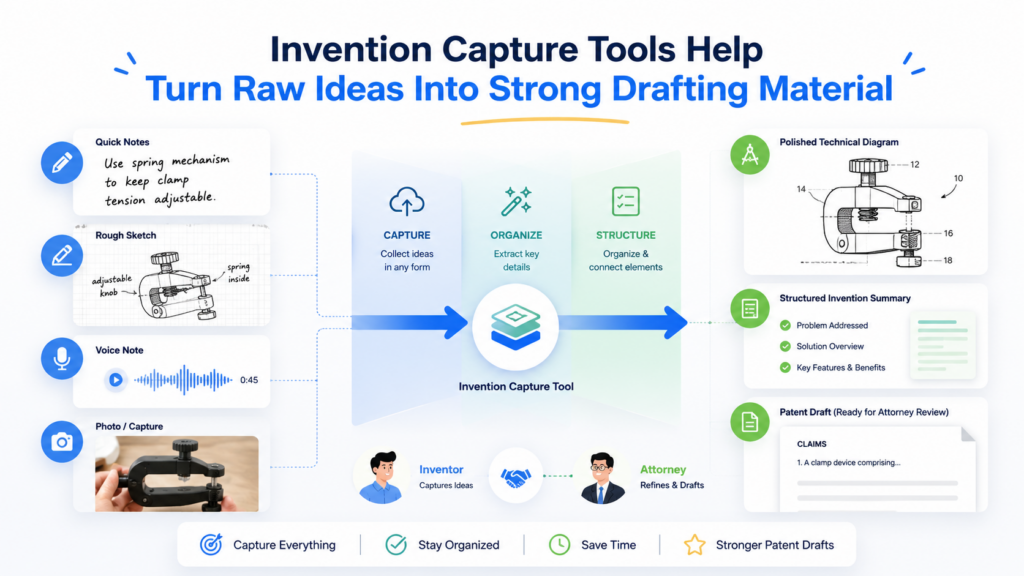
Part of it is in the founder’s head. Part of it may be buried in a customer problem that pushed the team to build something new.
If the capture step is weak, the patent draft will feel thin. The attorney may write what they can see, but they cannot protect what they never learned.
That is why invention capture tools are one of the most important parts of inventor-attorney collaboration. These tools help inventors explain the invention before formal drafting begins.
They make the work less painful because the inventor does not have to write like a lawyer. They just need to explain the idea clearly.
A Good Capture Tool Should Feel Like A Smart Interview
The best invention capture tool does not feel like a blank form. Blank forms are hard. They make inventors freeze. They also tend to collect shallow answers because busy founders want to finish quickly.
A better tool feels like a smart interview. It asks one clear question at a time. It lets the inventor explain in plain language. It asks for examples.
It invites the inventor to upload drawings, code snippets, screenshots, product notes, or system flows. It helps the attorney see not only what the invention is, but why it matters.
This is where AI can be useful. AI can help turn rough notes into a more structured disclosure. It can find missing areas. It can suggest places where more detail may be needed.
It can help convert engineer language into a draft-ready format. But the inventor still needs to check the meaning, and the attorney still needs to guide the final patent strategy.
This balance matters. The best tools do not pretend that AI magic can replace clear thinking. They use AI to reduce busywork and make the expert work easier.
Research and industry writing around patent drafting AI show a clear pattern: AI can help create patent sections from structured invention input, but quality depends heavily on the input, review, and fit with the drafting workflow.
The Capture Stage Should Find The “Inventive Center”
Every invention has a center. It is the part that matters most. It is the reason the invention is not just another product feature. It is the thing a competitor would want to copy.
Many inventors do not describe that center at first. They describe the whole product. That is normal. Founders think in products.
Engineers think in systems. Patent attorneys need to find the protectable heart inside that product or system.
A good capture tool helps uncover that heart.
It may ask what the team tried before. It may ask what failed. It may ask what result improved. It may ask which part is hardest to copy.
It may ask what the invention does that a normal approach does not do. It may ask what could be changed without breaking the idea.
Those answers can shape the whole draft.
For example, a founder may first say, “We built an AI tool that reviews support tickets.” That is too broad and too vague.
A better capture process may reveal that the real invention is a special way to group tickets based on user intent, product state, and past fix success, then route only certain cases to a model with a narrower prompt. That is much more useful for drafting.
The tool did not invent the idea. It helped reveal it.
Why Founders Should Capture More Than The Current Product
A common founder mistake is describing only what the product does today. That can make the patent too narrow.
The attorney needs to know the current version, but also the possible versions. Could the system work with other inputs? Could the model be replaced by a rules engine?
Could the process happen on a device instead of a server? Could the same method work in another industry? Could the steps happen in a different order? Could one part be optional?
These questions matter because competitors rarely copy in a simple way. They change small things. They rename parts.
They move steps around. They use a different vendor, model, database, or interface. If the patent draft only covers one narrow product setup, it may not give the company the protection it expected.
A strong capture tool helps the inventor describe variations early. This does not mean the patent should claim everything under the sun. It means the attorney should have enough detail to make smart choices.
The Best Capture Tools Create Better Attorney Calls
When invention capture is done well, attorney calls become much more valuable.
Instead of spending the first call trying to understand the basics, the attorney can go deeper. They can ask about edge cases.
They can test the boundaries of the idea. They can ask what competitors might do. They can discuss what should be broad, what should be narrow, and what should be saved for another filing.
This is a better use of everyone’s time.
For a startup, this also makes the patent process feel less scary. The inventor does not feel judged for not knowing legal terms. The attorney does not have to fight through scattered notes. The work becomes practical and direct.
That is the kind of workflow PowerPatent is designed to support. It helps founders and technical teams move from raw invention material into structured patent work, while still keeping real attorney oversight in the process. Learn how the process works here: https://powerpatent.com/how-it-works
The Right Capture Tool Should Connect Notes, Drawings, And Claims
In patent drafting, drawings are not decoration. They help explain the invention.
They can show system parts, method steps, data flows, user screens, hardware layouts, model pipelines, and relationships between components.
A strong capture tool should let inventors connect notes to drawings. If the inventor uploads a system diagram, the tool should make it easy to explain each part.
If the inventor adds a flowchart, they should be able to describe what happens at each step. If the draft mentions a module, the drawing should support it.
This is important because patent drafts often break when the text and drawings do not match. The attorney may describe one version, while the drawing shows another.
The inventor may review the draft and realize a key step is missing from the figure. These issues are fixable, but they cost time.
Modern patent drafting tools are moving toward richer use of text and drawings together. Recent research into multimodal patent drafting has explored using both text and visual inputs, such as claims and drawings, to generate fuller patent specifications.
That direction makes sense because real inventions are rarely only words. They are systems, flows, parts, and actions.
Capture Should Be Easy Enough To Use During Product Work
The best capture tool is the one the team will actually use.
If the process is too heavy, inventors avoid it. If it feels like homework, founders delay it. If it asks legal questions too early, engineers may give weak answers or skip the task.
A good capture workflow should fit into the way builders already think. It should let them upload what they have. It should help them explain in their own words.
It should guide them without slowing them down. It should make the attorney’s job easier without forcing the inventor to become a patent expert.
That is the key.
Inventors should not have to learn patent drafting to protect their ideas. They should have a clear path to share what they know, get smart help, and work with an attorney who can shape the final application.
Shared Drafting Workspaces Keep The Patent Moving Without Losing Control
A shared drafting workspace is where the patent starts to become real.
This is the place where the attorney turns invention details into a draft, and the inventor checks whether the draft still matches the invention. It is also where many patent projects slow down.
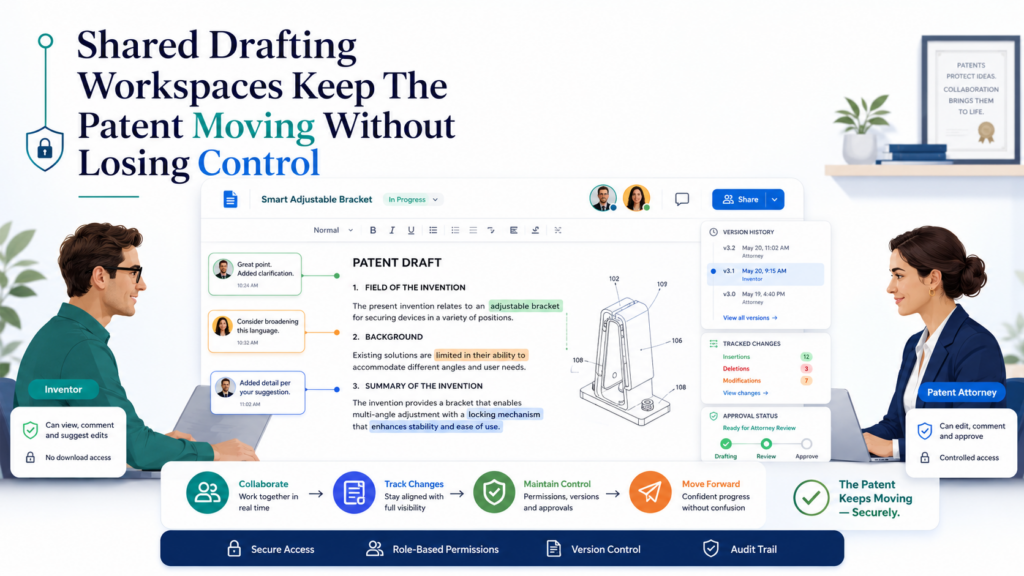
The draft gets sent as a file. The inventor adds comments. The attorney replies in email. A second version appears. Then a third. Soon, nobody is fully sure which version is current.
That may sound like a small problem, but it can hurt the quality of the work. Patent drafting needs tight control. A small wording change can shift meaning.
A missing example can make the application weaker. A deleted sentence may remove support for a future claim. This is why the drafting workspace matters so much.
A good shared workspace gives both sides one clear place to work. The attorney can write. The inventor can comment.
Changes can be tracked. Old versions can be reviewed. Questions can stay attached to the exact part of the draft they relate to.
Why Version Control Is More Than A Nice Feature
Most teams know version control from software. Engineers use it because code changes fast, and every change matters.
Patent drafts are similar. A draft may move from rough outline to detailed spec to claim review to final filing version. Each stage has a purpose.
When version control is weak, the team wastes time asking basic questions. Which version has the latest claim set? Which version includes the new flowchart?
Did the attorney already add the cloud version? Did the inventor approve the fallback example? Was that comment handled or forgotten?
These questions create drag. They also create risk.
Google Docs and Microsoft Word can help with common document work because they support comments, suggested edits, and version history.
Google says its real-time editing tools let teams comment, suggest changes, see version history, and accept or reject edits in shared files. That is useful for early review and simple collaboration.
But patent work often needs more than normal document review. The team may need to connect claims to the specification. They may need to make sure drawings match written parts.
They may need to track which invention features are supported where. They may need to review whether every important version of the idea has enough detail.
That is where patent-focused workspaces become stronger.
The Draft Should Always Show What Needs Inventor Input
Inventors are busy. Founders are building. Engineers are shipping. They do not have time to read a long draft and guess where help is needed.
The best shared drafting tools make inventor input obvious. The attorney should be able to flag exact places where the inventor needs to confirm, correct, or expand. The inventor should not have to review everything with the same level of effort.
For example, the attorney may need the inventor to confirm whether a model training step is required or optional. That question should sit right next to the step in the draft.
The inventor may need to explain whether a data store can be local, remote, or split across systems. That question should be linked to the system description, not buried in email.
When questions stay close to the draft, answers are better. The inventor sees the context. The attorney sees the answer in the right place. The draft moves forward with less confusion.
A Strong Workspace Keeps The Claims Connected To The Story
The claims are the part of the patent application that defines the legal edge of the invention.
But inventors do not need to think in claim language to give useful feedback. They need to help the attorney make sure the claims match the real invention.
This is where a shared workspace can make a big difference.
A weak workflow treats the claims as a separate legal section that only the attorney touches. A stronger workflow lets the inventor understand the claim idea in plain words.
The attorney can explain what a claim is trying to cover. The inventor can say whether that matches the key technical idea. The attorney can then adjust the wording.
The goal is not to turn the inventor into a patent lawyer. The goal is to let the inventor catch technical gaps before filing.
WIPO’s Patent Drafting Manual explains patent drafting as a process that covers preparing, drafting, filing, amending, and prosecuting applications, including claims and descriptions.
That is a helpful reminder that a patent draft is not one block of text. It is a connected system of parts that must support each other.
Draft Review Should Not Feel Like Legal Homework
Many inventors avoid patent draft review because the document looks hard. Long sentences, formal terms, figure numbers, claim language, and repeated phrases can make the draft feel heavy.
A good workspace reduces that pain. It lets the attorney guide the review. It lets the inventor focus on meaning. It gives the team a simple way to answer, “Is this correct?” and “What is missing?”
This is important because the inventor’s review is one of the most valuable quality checks in the whole process.
The attorney may understand the strategy, but the inventor knows the invention. If the inventor does not review carefully, technical errors can slip through.
A well-built workspace helps the inventor review without slowing the company down.
Why PowerPatent Fits This Workflow Better Than Generic Tools
Generic tools can help with comments and files. PowerPatent goes further because it is built around patent drafting itself.
PowerPatent describes its platform as AI-powered patent drafting software for patent professionals, with tools for drafting, reviewing, analyzing, and managing patent applications.
That matters because patent drafting is not just writing. It is structured thinking. It is turning invention material into claims, figures, descriptions, and review notes. It is keeping attorney judgment in the loop while using software to remove slow manual work.
For founders, this means the process feels more direct. You do not have to chase files, wonder what the attorney needs, or spend hours trying to format patent language.
You can focus on explaining the invention and making sure the draft matches the real product.
For attorneys, it means more time can go into the parts that matter most: scope, accuracy, strategy, and review.
The Best Workspace Creates A Faster Feedback Loop
Speed in patent drafting does not mean rushing. It means removing dead time.
Dead time happens when the attorney waits for missing details. It happens when the inventor is unsure what to review. It happens when comments sit in the wrong document.
It happens when drawings are updated but the draft is not. It happens when a claim changes but no one checks whether the description still supports it.
A shared drafting workspace should cut that dead time down. It should help the team move from question to answer, from answer to draft, and from draft to review without losing the thread.
That is how strong patents get drafted faster.
When you combine a clean workspace with real attorney oversight, patent drafting becomes less of a burden and more of a business process.
It gives founders more control. It gives attorneys better inputs. It helps the company protect important work before it becomes public, copied, or forgotten.
PowerPatent was built to make this kind of collaboration easier. You can see the full process here: https://powerpatent.com/how-it-works
Drawing And Figure Tools Help Inventors Explain What Words Cannot
Many strong patent drafts are built around strong figures. A figure can show a system faster than a paragraph can.
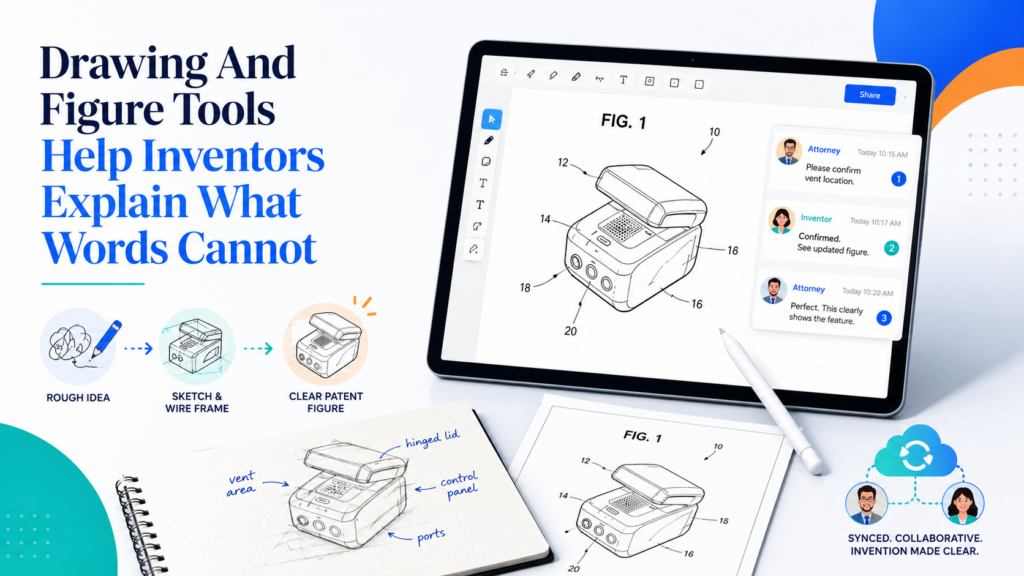
It can explain how parts connect, how data moves, how a user action triggers a process, or how a machine changes state.
For complex inventions, figures are not just helpful. They are often the easiest way for the attorney to understand what is really going on.
The problem is that many inventor-attorney teams treat drawings too late. The inventor sends notes first.
The attorney starts drafting. Then, near the end, someone asks for figures. This creates extra work because the text and drawings may not line up.
A better workflow brings drawings in early. The attorney can use them to shape the draft. The inventor can use them to explain the system. The tool can keep the figures tied to the words.
Why Drawings Should Start Before The First Full Draft
A patent figure does not have to be beautiful at the start. A rough sketch can be enough. A whiteboard photo can be enough. A block diagram can be enough. What matters is that the drawing shows structure.
For a software invention, a figure may show user devices, servers, databases, models, APIs, and decision steps.
For a hardware invention, it may show parts, sensors, connections, and movement. For an AI invention, it may show input data, feature extraction, model training, inference, feedback, and output handling.
The attorney can use those visuals to ask better questions. What happens first? Which part is required? Which part can be replaced? Where does the improvement happen? What is new about this flow? What would a competitor copy?
These are the questions that turn a draft from thin to strong.
The WIPO Patent Drafting Manual identifies drawings as a typical part of a patent application, alongside the request, description, claims, and abstract.
That matches what strong drafting teams already know: the drawings and written text should support each other from the start.
Simple Drawings Often Work Better Than Fancy Ones
Inventors sometimes think they need polished drawings before talking to an attorney. They do not.
At the early stage, simple is better. A clean box diagram can be more useful than a detailed product screenshot.
A basic flowchart can be more useful than a polished marketing image. A rough architecture sketch can show the attorney the core of the system.
Fancy drawings can even distract the team. They may show product design instead of the invention. They may focus on user interface details instead of the technical flow. They may make one version look fixed when the invention is broader.
The best figure tools make it easy to create simple, clear visuals. They help inventors explain the invention without turning the drawing step into a design project.
Figure Tools Should Link Each Drawing To The Draft
The real value comes when figures and text work together.
A figure should not sit alone in a folder. It should be connected to the part of the draft that describes it. If Figure 1 shows the system, the draft should explain the parts shown in Figure 1.
If Figure 2 shows a method, the method steps should match the figure. If Figure 3 shows an optional variation, the draft should make clear that this is one example, not the only way.
This is where many patent drafts get messy. A figure changes, but the text does not. A step number changes, but the claim still uses the old flow. A block is added, but the description does not explain it. These issues can be caught, but only if the team has a good review process.
A figure-aware drafting tool can help by keeping drawing notes, labels, and explanations close to the written draft.
Figures Help Find Missing Variations
Good figures can also reveal what is missing.
When the inventor and attorney look at a system diagram together, they may notice optional parts. They may see that one module could be split into two.
They may realize the process could run on a mobile device, an edge device, a server, or a hybrid setup. They may see that the input could come from a sensor, a user action, another system, or a stored record.
These variations can matter. They help the attorney write a fuller description. They may also help the company cover future versions of the product.
This does not mean the patent should become bloated. It means the attorney should know the realistic ways the invention can work. A strong drawing tool helps bring those versions into view.
The Best Tools Let Inventors Add Notes In Plain Words
An inventor should not have to write formal patent text under each figure. Plain words are better at first.
A founder might write, “This part ranks alerts based on urgency and predicted user impact.” An engineer might write, “This service filters out duplicate events before sending data to the model.”
A product lead might write, “The user only sees the final recommendation, but the system also stores the confidence score.”
Those notes are gold for the attorney.
They explain what the figure means. They help prevent wrong guesses. They give the attorney real language to build from. They also capture the inventor’s intent while the idea is still fresh.
A good tool makes these notes easy to add. The inventor should be able to point to a block, step, screen, or flow and explain it in normal language. The attorney can then turn that into patent-ready text.
Drawing Review Should Happen Before Final Review
Waiting until the final draft to review drawings is a mistake.
By that point, the application may already be built around a certain structure. Changing figures late can force changes across the whole draft. It can also create stress because filing timelines are often tight.
A better move is to review drawings early, then again after the first full draft. Early review checks whether the figures show the right system. Later review checks whether the text and figures match.
This is especially important for startups moving fast. The product may change while the patent is being drafted. A workflow that keeps figures visible helps the team spot changes before they create bigger problems.
PowerPatent helps teams move more smoothly from invention material into attorney-reviewed patent work, including the kinds of structured inputs that make drafting easier.
For founders who want to protect technical ideas without getting trapped in slow document loops, this matters. See how PowerPatent works here: https://powerpatent.com/how-it-works
AI Drafting Tools Are Best When They Help Attorneys Think Faster, Not When They Replace Them
AI drafting tools have changed the patent workflow. They can turn structured invention notes into draft sections. They can help create summaries. They can suggest claim language.
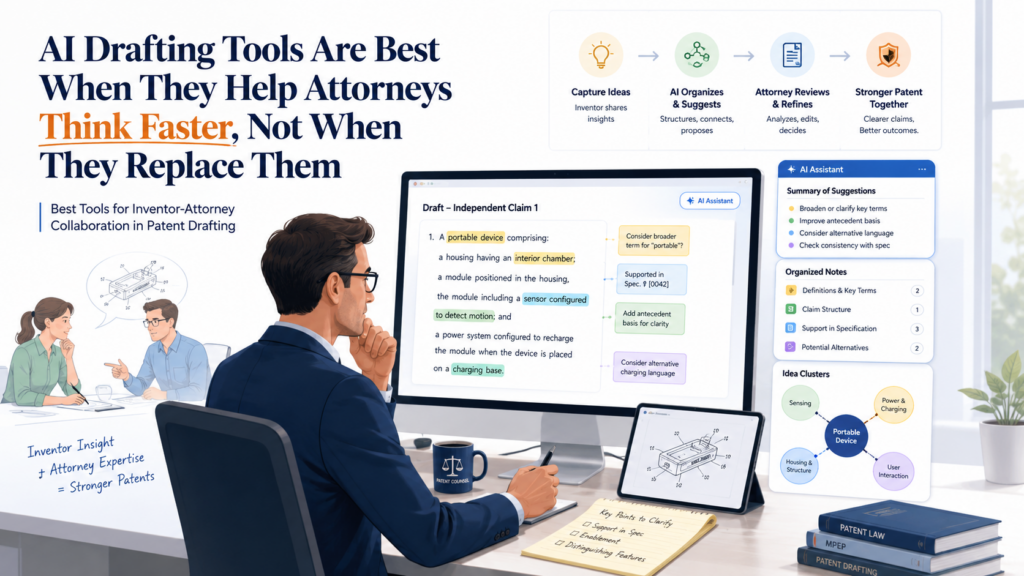
They can organize technical detail. They can reduce the amount of blank-page work that slows many patent projects.
But AI should not be treated like a complete patent attorney. That is the wrong frame. The better frame is simple: AI should help the attorney and inventor work faster, with more context, and with fewer missed details.
When used well, AI can make the process smoother. When used poorly, it can create confident text that sounds good but misses the real invention.
AI Is Strong At First Drafts, But Weak At Knowing What Matters Most
AI tools are useful because patent drafting has many repeated patterns. Applications often need a background, summary, figure descriptions, detailed examples, and claim-like structure.
A tool trained or guided for this work can help produce early text from good inputs.
This is valuable. Starting from a rough but organized draft is much better than starting from a blank page.
But the hardest part of patent drafting is not filling pages. The hardest part is deciding what to protect.
It is knowing which feature is central, which detail is optional, which example supports a broad idea, and which wording may create problems later.
That judgment still needs skilled human review.
Recent research on patent drafting with large language models shows that AI can perform useful drafting tasks, such as generating patent abstracts from claims, but the research also focuses on testing quality, robustness, and usefulness rather than treating AI output as automatically final.
That is the right lesson for founders. AI can help move faster, but review matters.
Bad Input Still Creates Bad Drafts
AI does not fix unclear invention material. It may make unclear material sound polished, which can be worse.
If the inventor gives shallow input, the AI may produce a shallow draft. If the inventor describes only the current product, the AI may miss broader variations.
If the notes do not explain what is different from old systems, the draft may fail to highlight the real edge. If the drawings are unclear, the written description may drift.
This is why the capture process and attorney review are still key.
A strong AI tool should not just generate text. It should help gather better facts. It should ask for missing details. It should make assumptions visible.
It should help the attorney see what needs review. It should keep the inventor involved where technical truth matters.
AI Should Reduce Drafting Friction For Founders
For founders, the patent process often feels slow because it pulls them away from building.
They have to explain the invention, review dense drafts, answer legal-sounding questions, and manage files. AI can reduce that friction.
A good tool can help turn normal founder language into a structured invention record. It can help create an early draft that the attorney can refine. It can make it easier for the inventor to see what is being said. It can shorten the feedback cycle.
This matters because timing is important. Startups often need to file before a launch, investor demo, public release, conference talk, customer pilot, or partner meeting. A slow process can create stress and risk.
The USPTO’s Patent Center is the official place for electronic filing and management of patent applications in the United States, but Patent Center is not a drafting collaboration tool. It comes later in the workflow, when the application is ready to file and manage.
That means founders still need a strong drafting workflow before filing. AI tools can help there, especially when paired with attorney oversight.
The Human Review Step Is Where Strategy Happens
A patent application is not only a technical document. It is a business tool.
The attorney needs to think about what competitors may do, what the company may build next, what investors may care about, and what technical ground is worth protecting.
AI can help surface options, but it does not know the startup’s full strategy unless the humans provide it.
This is why real attorney oversight is so important.
PowerPatent’s value sits in that middle ground. It uses smart software to speed up the patent process, while keeping real patent professionals involved.
For deep tech founders, that combination is far more useful than a tool that simply generates legal text and leaves the founder to hope it is good.
You can learn how PowerPatent combines software and attorney-backed review here: https://powerpatent.com/how-it-works
The Best AI Tools Make The Attorney More Valuable
The goal of AI is not to make the attorney disappear. It is to remove low-value work so the attorney can spend more time on high-value judgment.
A great attorney should not spend most of the time retyping invention notes or cleaning up rough text. The attorney should be thinking about scope, coverage, support, fallback positions, claim strategy, and technical accuracy.
AI can help by creating a first pass, organizing source material, drafting routine sections, and pointing out places that may need more detail. Then the attorney can shape the work.
That is a better division of labor.
Founders Should Ask How The AI Is Used
Not all AI patent tools are the same. Some are simple text generators. Some are form-based tools. Some help with prior art searching.
Some focus on claims. Some help attorneys review drafts. Some connect invention capture, drafting, figures, and attorney workflow.
Founders should care about the workflow, not just the AI label.
The right question is not, “Does this tool use AI?” The right question is, “Does this tool help my attorney and me create a stronger draft faster?”
That is the standard that matters.
Communication Tools Must Keep Context Close To The Patent Draft
Every patent project depends on communication. The inventor explains. The attorney asks. The inventor clarifies.
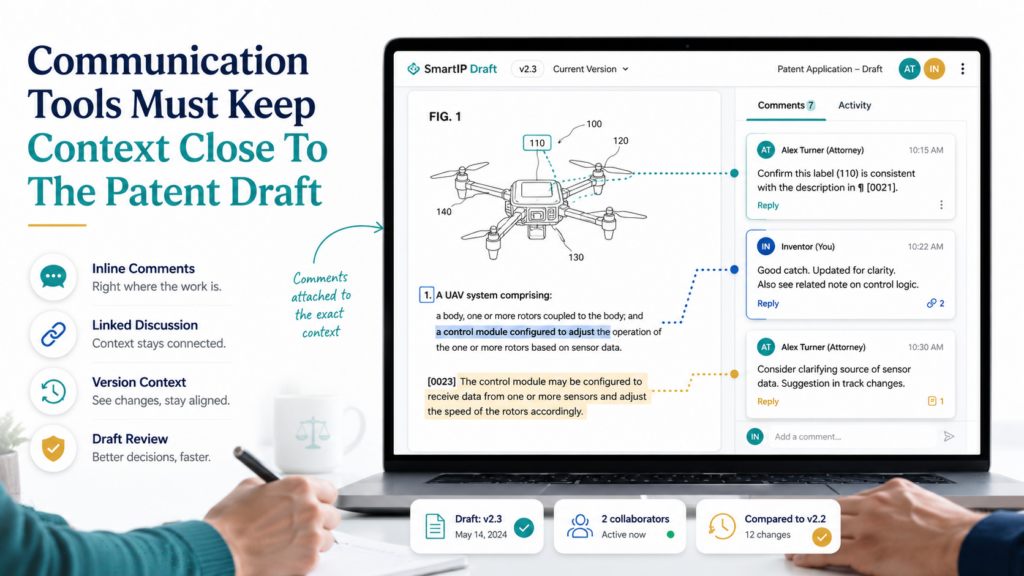
The attorney writes. The inventor reviews. The attorney revises. This loop can be smooth, or it can become a mess.
The problem is not communication itself. The problem is communication without context.
A Slack message may answer a question, but later no one remembers which part of the draft it applied to. A Zoom call may be useful, but the important point may never make it into the file.
An email may include a key technical detail, but it may be buried under ten replies. A meeting note may describe an optional version, but the attorney may not see it during claim drafting.
The best collaboration tools keep communication close to the draft.
Why Email Alone Is A Weak Patent Workflow
Email is useful, but it is not a strong patent drafting system.
Email spreads context across threads. It makes attachments hard to track. It can hide old answers.
It makes it easy for one person to reply to the wrong version. It also forces the attorney to move information manually from messages into the draft.
That manual step creates risk. Important details can be missed. Answers can be misunderstood. New information can arrive after the related section has already been written.
For simple projects, email may be enough. For technical inventions, it usually is not.
A better system keeps questions and answers tied to the exact part of the invention. If the question is about a model pipeline, it should sit near the model pipeline description.
If the answer explains a sensor signal, it should connect to the sensor figure. If the inventor confirms that a step is optional, that answer should be visible when the attorney reviews the claims.
Comments Should Be Clear Enough To Act On
A bad comment says, “Please clarify.”
A better comment says, “Can this ranking step happen before filtering, after filtering, or both?”
A bad comment says, “Is this right?”
A better comment says, “The draft says the device sends raw sensor data to the server. In the product, does the device send raw data, processed data, or both?”
Good collaboration tools help attorneys ask better comments because the comment is attached to the relevant text. They also help inventors give better answers because the question is specific.
This saves time and improves quality.
Meeting Tools Should Capture Decisions, Not Just Record Calls
Calls are still useful in patent drafting. Sometimes a live conversation is the fastest way to understand a complex invention.
The attorney can ask follow-up questions. The inventor can explain tradeoffs. The team can talk through claim direction.
But calls should not become the only record.
A recording is not the same as a decision. A transcript is not the same as a clear drafting note. The team needs a way to capture what was decided and move it into the patent workspace.
For example, the team may decide that a certain module is optional. That decision should appear in the draft notes. The team may decide that a second embodiment is important.
That should be added to the drafting plan. The team may decide not to include a product feature because it is not part of the invention. That should also be clear.
If decisions stay only in calls, the draft can drift.
The Best Tools Turn Conversation Into Drafting Tasks
Good communication creates action.
After a call, the attorney should know what to write. The inventor should know what to provide. The team should know what is still open. The draft should move forward.
This is why task-based communication is useful. A question can become a task. A missing drawing can become a task. A claim review can become a task. A final technical check can become a task.
But the task should be close to the patent work. Generic task tools can help, but they often create another place to check.
A founder may already be using Linear, Jira, Asana, Notion, or Slack for product work. Adding a separate patent task list can become noise unless it connects back to the draft.
The best patent collaboration tools reduce places to check. They bring tasks, comments, files, figures, and draft sections into one shared flow.
Communication Should Protect Speed And Accuracy At The Same Time
Fast communication is not enough. Accurate communication is the goal.
A quick answer that creates confusion is not helpful. A long answer that arrives too late is also not helpful. The best workflow makes it easy for inventors to give short, accurate answers at the right time.
This is especially useful for engineers. Engineers often want precise questions. They do not want broad legal prompts. They want to know what is being asked and why it matters.
A patent-focused workspace can support that. The attorney can explain the issue in plain words. The inventor can answer with technical detail. The tool can keep that answer connected to the draft.
A Clean Communication Loop Builds Trust
Trust matters in patent drafting.
The inventor needs to trust that the attorney understands the invention. The attorney needs to trust that the inventor will flag technical mistakes.
The founder needs to trust that the process is moving and that the company is not wasting time.
A clean communication loop builds that trust. Everyone can see what is open, what has been answered, and what has changed. The process feels controlled instead of scattered.
This is one of the reasons PowerPatent is valuable for startups. It brings structure to a process that often feels messy.
It helps founders share the right information, work with real patent experts, and move faster toward a stronger filing.
To see how PowerPatent supports a smoother path from invention to patent work, visit: https://powerpatent.com/how-it-works
Review And Quality Check Tools Help Catch Gaps Before Filing
The review stage is where a patent draft gets stronger. This is not just proofreading. It is not only checking spelling, grammar, or formatting.
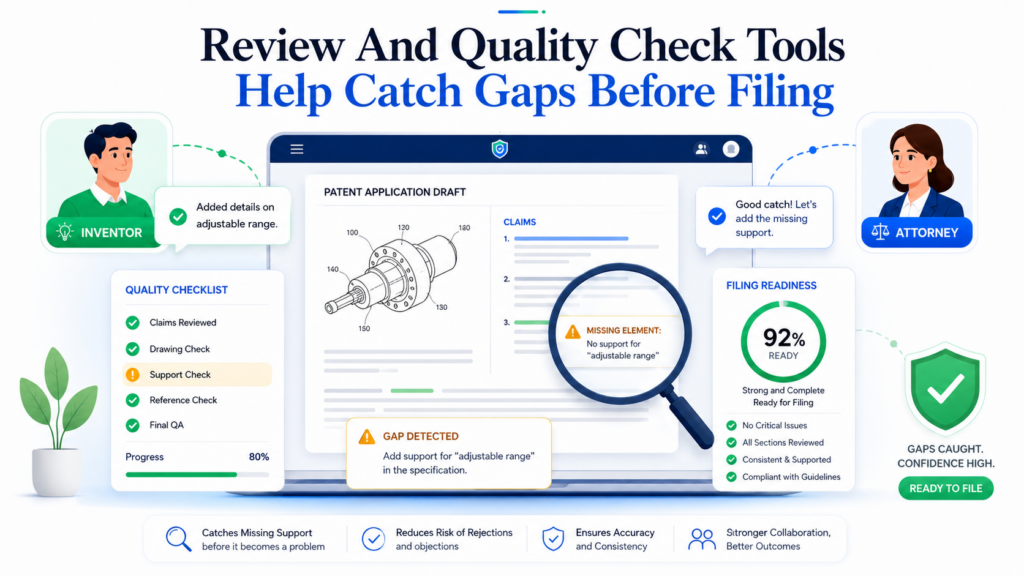
Patent review is about asking whether the draft fully supports the invention, explains the right versions, matches the figures, and gives the attorney enough room to protect what matters.
Many weak patent filings happen because review is rushed. The founder is busy. The attorney is trying to hit a deadline. The inventor skims the draft. Everyone assumes the important details are there.
That is a risky way to work.
A better workflow uses review and quality check tools before filing. These tools help the team find missing pieces while there is still time to fix them.
A Good Review Tool Checks Support, Not Just Style
Style matters, but support matters more.
A patent draft can sound polished and still be weak. It may describe the current product but miss future versions.
It may mention a feature in the claims but not explain it deeply in the description. It may show a figure without enough text. It may use a term in different ways across the draft.
These are the issues that quality checks should catch.
The review tool should help the attorney ask whether each important claim idea is backed by the description.
It should help confirm that the figures are explained. It should help spot terms that may be unclear. It should help find places where the inventor needs to add more examples.
This is the kind of review that improves real patent quality.
Inventor Review Should Focus On Technical Truth
Inventors should not try to review like attorneys. That is not the best use of their time.
The inventor should review for technical truth. Does the draft describe the invention correctly? Are the steps in the right order?
Are any parts missing? Are optional features shown as required by mistake? Are required parts shown as optional by mistake? Does the draft make the invention sound narrower than it is?
These questions are simple, but they are powerful.
A good review tool should guide the inventor through this kind of check. It should not dump a long legal document on them and hope they catch everything. It should point them to the places where their input matters most.
Quality Checks Should Happen Before The Final Rush
The worst time to find a major gap is the day before filing.
By then, everyone is tired. The deadline may be close. Drawings may need updates. Claims may need revision. The inventor may be hard to reach. The attorney may have limited room to reshape the draft.
This is why review should happen in stages.
The first review should happen after invention capture. Did the team collect enough detail? The second review should happen after the outline or first draft. Does the structure match the invention?
The third review should happen after claims and figures are aligned. The final review should confirm that the draft is ready.
This staged process reduces panic.
It also makes the patent stronger because the team fixes issues when they are still easy to fix.
Automated Checks Should Support Human Judgment
Automated checks are useful. They can flag missing figure references. They can find inconsistent terms. They can identify sections that look thin.
They can help compare claims to the description. They can spot places where a draft may need more detail.
But automated checks should not make the final call.
The attorney still needs to decide what matters. The inventor still needs to confirm technical accuracy. The founder still needs to think about business goals.
The best tools use automation to surface issues, not to replace judgment.
That is exactly the kind of mindset founders should look for in patent software. The goal is not to create a fast document. The goal is to create a stronger patent application with less wasted time.
Review Tools Are Also Strategic Tools
A strong review process can reveal business insights.
During review, the team may realize that the invention has more than one protectable idea. They may see that one feature deserves its own filing later.
They may find that a future product version should be captured now. They may decide that a certain claim direction is not worth pushing.
That is useful strategy.
Patent drafting should not be separate from startup planning. It should connect to the product roadmap, fundraising story, and competitive edge. A strong review tool helps founders see those links.
PowerPatent is especially helpful here because it is not just about making patent text. It is about helping teams move through the patent process with smart software and attorney oversight, so important decisions are not lost in the rush.
The Best Review Process Gives Founders Confidence
Founders do not need to know every rule of patent law. They need confidence that the important things have been checked.
They need to know the draft was reviewed by someone who understands patents. They need to know the invention was explained clearly.
They need to know the team looked for gaps before filing. They need to know the process did not depend on scattered files and crossed fingers.
That confidence is valuable.
It lets the founder keep building. It helps the company move toward launches, investor meetings, and customer deals without wondering whether the invention was handled carelessly.
PowerPatent gives founders a cleaner way to work with patent experts and modern software in one process. See how it works here: https://powerpatent.com/how-it-works
Prior Art Search Tools Help The Team Draft With Eyes Open
Prior art search tools help the inventor and attorney understand the space around the invention before the draft gets too far along.
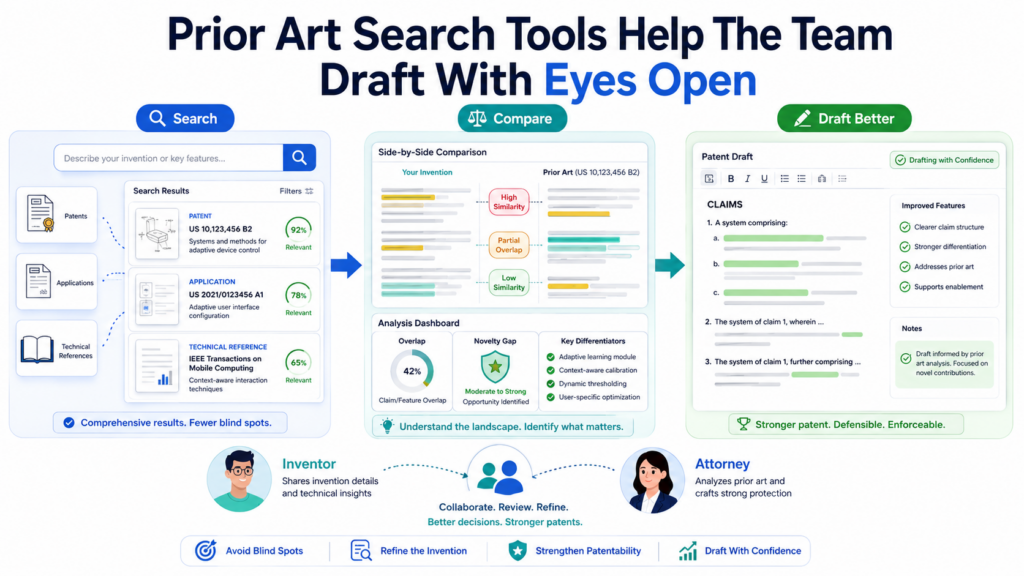
Prior art is a simple idea. It means earlier public information that may be related to the invention.
It can include patents, published patent applications, papers, product pages, open-source projects, videos, manuals, and other public material. For founders, the point is not to become a search expert. The point is to avoid drafting in the dark.
A patent draft gets better when the team knows what is already out there. The attorney can shape the claims with more care. The inventor can explain the true difference more clearly.
The founder can make better choices about what to file now, what to save, and what may need more technical detail.
Search Should Happen Early Enough To Change The Draft
A prior art search is most useful before the draft is locked.
If the search happens too late, the team may discover that the first claim idea is too close to something old. Then the attorney has to revise in a hurry.
The inventor may need to explain new details. Drawings may need changes. The draft may need more examples. This can slow everything down.
When search happens earlier, it can guide the work.
The attorney may see that the broad idea is crowded, but one technical path is stronger. The inventor may realize the invention is not just “a better scheduling tool,” but a specific way of using real-time device state to change scheduling rules. That sharper view can shape the whole draft.
This is where search tools become collaboration tools. They are not only for finding references. They help the inventor and attorney talk about difference.
Founders Should Not Treat Search Results Like A Yes Or No Answer
Many founders want a simple answer: “Can we get a patent or not?”
A search tool usually cannot answer that by itself. It can show related material. It can help the attorney compare ideas.
It can reveal crowded areas. It can point to old systems that may matter. But the final view needs careful judgment.
That is why inventor-attorney collaboration is so important at this stage.
The inventor can explain how the new system is different from what the search found. The attorney can decide whether that difference is meaningful for the patent draft. The tool helps both sides see the same information and discuss it clearly.
The Best Search Tools Let Inventors Explain Differences In Plain Words
Search results can be hard to read. Patent documents often use formal language. Technical papers may be dense.
Product pages may describe features in broad marketing terms. The inventor may feel unsure what matters.
A good workflow makes the comparison simple.
The attorney may point to a prior patent and say, “This reference seems to rank tasks based on priority. Your system also ranks tasks.
What is different?” The inventor may answer, “Our system changes the ranking based on live sensor confidence and a predicted failure window, not just a preset priority score.”
That answer is extremely useful. It may become part of the drafting strategy. It may lead to better examples. It may help the attorney write claims that focus on the real edge.
A search tool that lets the team attach these comments to references can save time and preserve context.
Search Can Reveal Hidden Invention Value
Sometimes search makes the invention look stronger, not weaker.
A founder may think the invention is the whole product. Search may show that many people have built similar products. But then, during comparison, the team finds the real value in one small part.
Maybe the old systems collect data, but they do not clean it the same way. Maybe they use a model, but they do not update it based on user correction. Maybe they automate a workflow, but not under the same real-time constraints.
This is where patents can become much more strategic.
A strong search process helps the team move away from vague product claims and toward sharp technical protection. That is good for the attorney, and it is good for the business.
Search Tools Should Connect To Drafting, Not Sit Alone
A prior art search should not live in a separate silo.
If the search results stay in a PDF report that no one opens again, the value is limited. The search should connect to the draft.
The attorney should be able to use the results while shaping claims. The inventor’s comments should be visible when explaining differences. The team should know which references caused claim changes.
This does not mean every reference must be discussed forever. It means important insights should not disappear.
A connected workflow helps the attorney draft with more care. It also helps the founder understand why certain wording choices matter.
A Strong Search Workflow Saves Attorney Time
Attorneys can spend a lot of time trying to understand whether an invention is different from earlier work. If the inventor helps explain differences early, that time is used better.
The inventor does not need to do legal analysis. They simply need to explain the technical facts. What does the old system do?
What does our system do differently? What result changes because of that difference? Is the difference required or optional? Could a competitor copy that part?
These answers help the attorney make better choices.
PowerPatent helps founders work with smart software and real patent professionals so this kind of information can move into the patent process more cleanly.
Instead of guessing what an attorney needs, founders can follow a more guided path. See how it works here: https://powerpatent.com/how-it-works
Claim Drafting Tools Help Turn The Invention Into A Strong Protection Plan
Claims are the most important part of a patent application.
They define what the patent is trying to protect. For inventors, claims can feel strange because they do not read like normal writing.
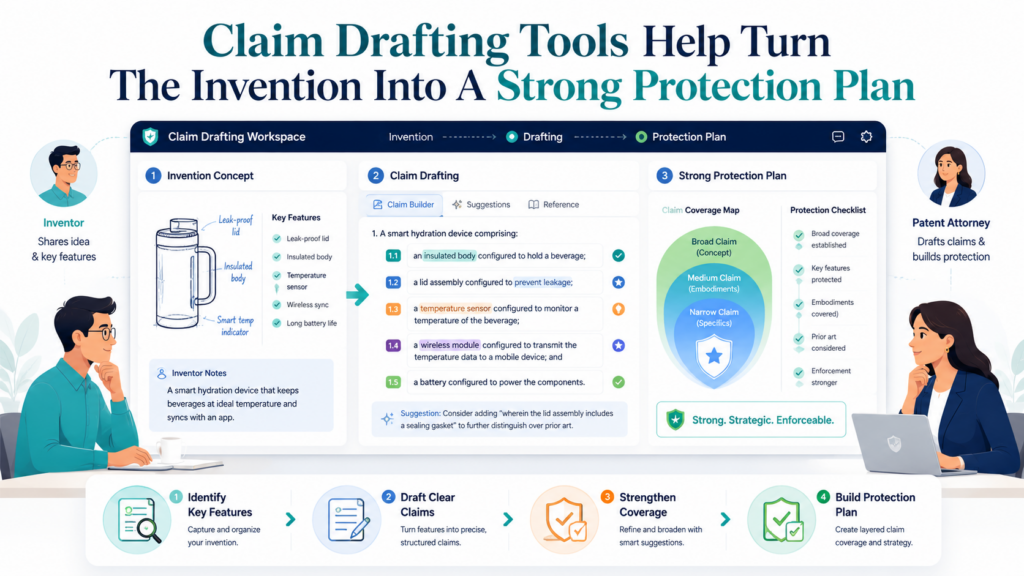
They are careful, formal, and often hard to follow. But the idea behind them is simple. A claim describes the invention in a way that can be used to mark the boundary around it.
Claim drafting tools can help attorneys work faster and help inventors understand what is being protected. But they must be used with care. A claim is not just a sentence. It is a strategy.
Claims Should Start From The Core Invention, Not The Product Screen
A common mistake is to draft claims around the product as seen by the user.
That can make the claims too narrow. The product screen is only one expression of the invention. The deeper value may be in the system behind it, the data flow, the model behavior, the hardware interaction, or the control method.
A good claim drafting tool should help the attorney pull the claim toward the core technical idea.
For example, a product may show a dashboard that recommends maintenance actions. The claim should not focus only on the dashboard if the real invention is a method for predicting failure by joining sensor drift, past repair results, and operating context.
The dashboard is an output. The invention may live in the way the recommendation is generated.
This is where inventor input is critical. The attorney may draft a claim based on the captured material, but the inventor should confirm that the claim points to the real engine of the invention.
Inventors Should Review Claims For Meaning, Not Legal Style
Inventors do not need to fix claim wording. That is the attorney’s job.
But inventors should review the meaning. They should ask whether the claim still describes the invention after the legal wording is stripped away. They should ask whether a required part is missing.
They should ask whether an optional part is being treated as required. They should ask whether the claim would still make sense if the product changes next quarter.
A good tool can make this easier by showing a plain-language version of the claim idea next to the formal claim. This helps the inventor give better feedback without getting stuck on legal form.
The best review question is simple: “Would this cover what we actually care about?”
Claim Tools Should Help Build Layers Of Protection
A strong patent application usually does not rely on one idea stated one way.
It often uses layers. One claim may be broader. Other claims may add more detail. Some may cover system form.
Some may cover method form. Some may cover a device, server, or computer-readable medium. Some may cover fallback versions if the broadest idea is challenged later.
Founders do not need to know all the forms. But they should understand the reason for layers.
Layers help the company avoid an all-or-nothing approach. If one broad version is too hard to get, another version may still matter.
If a competitor avoids one detail, another claim may still be useful. If the product changes, the application may still support future claim direction.
A claim drafting tool can help organize these layers. It can help show how each claim relates to the others. It can help the attorney see whether the description supports each layer.
A Tool Should Never Push Speed Over Scope
Fast claim drafting can be dangerous if it skips strategy.
A tool may generate a claim quickly, but that does not mean the claim is good. It may be too narrow. It may include extra details that limit the invention. It may miss the part that matters.
It may use words that do not match the description. It may sound complete while leaving out the best version.
This is why attorney oversight matters so much.
AI and automation can help draft options. They can help compare versions. They can help find missing support. But the attorney must decide how to shape the claim set.
The inventor must confirm the technical truth. The founder must make sure the patent direction matches the business.
PowerPatent is built around this balance: smart tools to speed the process, with attorney-backed review to help protect quality. You can see how that works here: https://powerpatent.com/how-it-works
Claim Drafting Is Also A Competitive Exercise
A good claim asks, “How would someone copy this?”
This is one of the most useful questions in the whole patent process. It moves the conversation away from internal product detail and toward market protection.
A competitor may not copy your interface. They may not use your vendor. They may not use the same database.
They may not use the same model name. But they may copy the technical move that makes the product work.
That is what the claim strategy should focus on.
Inventors Can Help By Thinking Like A Competitor
Inventors often know the easiest ways to design around their own work. That knowledge is valuable.
An engineer might say, “They could replace this model with a rules engine and still get the same result.” A founder might say, “A competitor would not copy our whole system, but they would copy the scoring method.”
A product lead might say, “The key is not the alert itself. It is how we decide when to show it.”
Those comments can shape the claim set.
A good claim drafting tool should create space for this kind of thinking. It should not treat the claim as a private attorney-only document until the end. It should help the inventor and attorney talk about what protection should actually mean.
Security And Access Tools Protect Sensitive Invention Work
Patent drafting involves sensitive information. The team may share product plans, code details, technical diagrams, model designs, customer use cases, unreleased features, and future roadmap ideas. This is not casual data. It may be some of the most important information the startup owns.
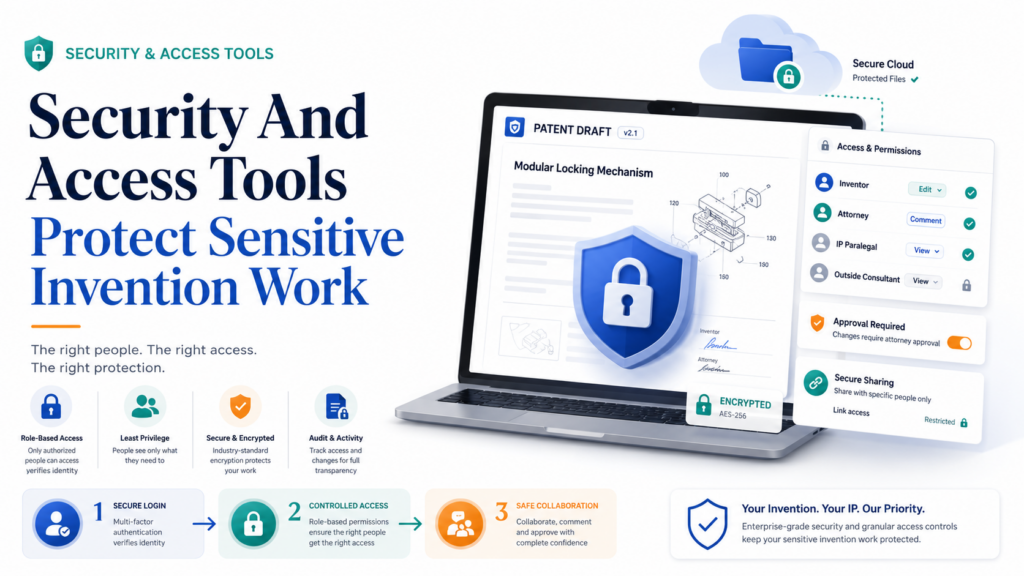
That means collaboration tools must be secure. It is not enough for a tool to be easy. It must also help the team control who sees what, who can edit, and how information is handled.
Access Control Should Be Clear And Simple
In a patent project, not everyone needs the same access.
The inventor may need to upload notes and review technical sections. The founder may need to see strategy, deadlines, and final drafts. The attorney needs access to the full working file.
A paralegal or patent professional may need to manage documents. An outside technical reviewer may need only a small section.
A good tool should make this easy.
If access control is confusing, teams either over-share or block the wrong people. Over-sharing creates risk.
Under-sharing creates delay. The best system makes permissions clear enough that a busy founder can use them correctly.
Sensitive Drafts Should Not Float Around In Random Attachments
Email attachments are convenient, but they can create problems.
A draft may get forwarded. A file may sit in someone’s inbox for years. A wrong version may be downloaded.
A sensitive diagram may be sent to a personal account by mistake. These things happen because email was not built as a secure invention workspace.
A better workflow keeps drafts inside a controlled system. Users can access what they need without spreading copies everywhere. The team can track changes and reduce confusion.
For startups, this matters because early invention details may connect directly to future product advantage. The company should treat them with care.
Security Also Means Keeping Work Organized
Security is not only about hackers or outside threats. It is also about internal control.
If the team cannot find the final draft, that is a control problem. If nobody knows who approved a change, that is a control problem.
If drawings are stored in one folder and the draft in another, that is a control problem. If invention notes are spread across personal drives, that is a control problem.
Good organization supports security because it makes the work easier to manage.
A strong collaboration tool gives the team a single source of truth. It shows the current draft. It tracks key materials. It keeps comments and answers attached to the work. It helps the team avoid messy handoffs.
Audit Trails Help The Team Understand What Happened
An audit trail is a record of actions. It may show who edited a file, when a comment was resolved, when a document was uploaded, or when a draft was approved.
For patent drafting, this can be useful. It helps the team understand how the project moved. It can reduce confusion if questions come up later. It also helps law firms and companies maintain better internal process.
A founder may not care about every small log entry, but they should care that the tool creates order. Order makes the process more reliable.
Founders Should Ask About Confidentiality Before Uploading Invention Details
Before sharing sensitive material with any tool, founders should understand how the information is handled.
They should know who can access it. They should know whether the platform is meant for professional patent work. They should know whether attorneys are part of the process.
They should avoid dropping important invention details into random consumer AI tools without understanding the risks.
This does not mean founders should fear technology. It means they should use the right technology.
Patent drafting is a high-trust workflow. The tool should be built for that level of trust.
The Best Security Feels Invisible
Great security should not make the process painful.
If a tool is too hard to use, people work around it. They download files, send side emails, use personal drives, or paste details into other tools. That defeats the purpose.
The best secure tools make the safe path the easy path. They let the team collaborate quickly while keeping invention material controlled.
PowerPatent helps founders work in a more focused patent process instead of scattering sensitive invention details across disconnected tools.
With software built for patent work and real attorney oversight, teams can move faster while staying more organized. Learn more here: https://powerpatent.com/how-it-works
Project Management Tools Keep Patent Drafting From Slipping Behind Product Work
Patent drafting has many moving parts. The inventor must provide details. The attorney must draft. Drawings may need review. Claims may need revision.
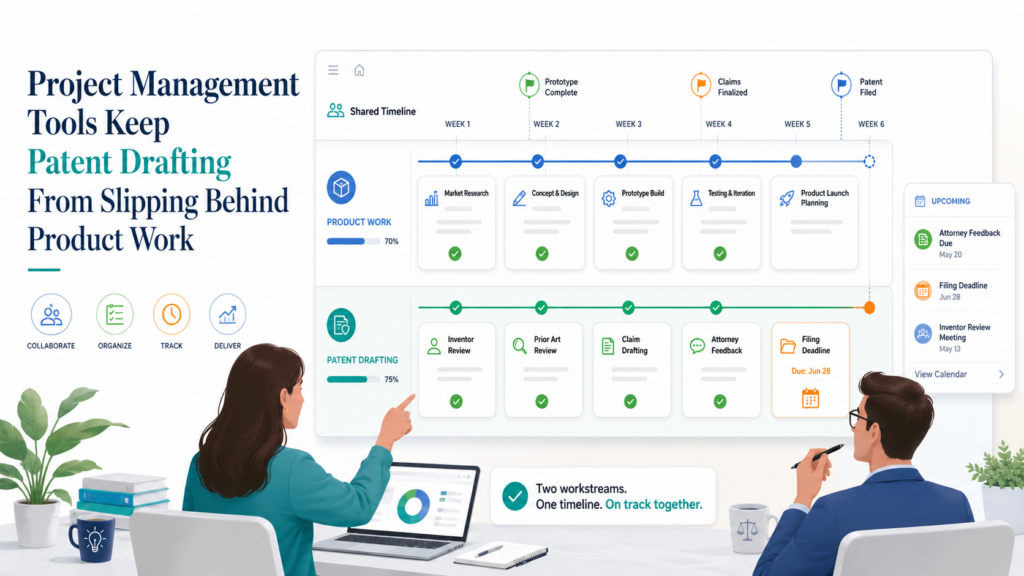
Filing dates may matter. Public launch plans may affect timing. Founders may need updates before investor meetings. Engineers may be hard to reach because product work never stops.
Without project management, the patent can drift.
This is one of the biggest reasons startups delay filing. It is not always because they do not care. It is because nobody owns the next step. The attorney is waiting for the inventor.
The inventor is waiting for a draft. The founder assumes the process is moving. Then a launch date gets close and everyone rushes.
A good project management tool prevents that.
Patent Tasks Should Be Clear, Small, And Owned
Big tasks create delay.
“Review patent draft” sounds simple, but it is not. The inventor may not know where to start. The founder may put it off because it feels heavy. The engineer may skim it and miss key details.
A better task is smaller and clearer.
The attorney might ask the inventor to confirm whether the ranking step can happen before or after filtering.
The founder might review whether the draft covers the next planned product version. The engineer might check whether Figure 2 matches the real data flow.
Small tasks get done faster because they feel doable.
The Best Tools Show What Is Blocking The Filing
A patent project should always make blockers visible.
If the attorney needs a drawing, the founder should know. If the inventor has not answered a key question, the team should know. If the claims are ready but the figure labels are not, the team should know.
This helps avoid false comfort. A project may look almost done, but one missing technical answer can stop progress.
Good project management tools make these issues obvious. They help the team focus on the next highest-value action instead of searching through messages.
Patent Timelines Should Match Business Timelines
Patent work does not happen in a vacuum.
A startup may be planning a product launch, a demo day, a sales pilot, a conference talk, a fundraising round, or a partner announcement. These business moments can affect patent timing.
The team may want to file before public disclosure. They may want to show investors that IP is being handled. They may want to protect a new feature before it becomes part of a customer rollout.
This is why project management should connect patent work to business events.
The founder should not treat patent drafting as a side quest. It is part of the company’s protection plan. If the patent workflow is not tied to the roadmap, it can lag behind the real business.
Founders Should Build A Patent Review Rhythm
A patent review rhythm does not need to be complex.
The team should have a simple way to check whether new inventions are being captured, active drafts are moving, and filing decisions are being made in time. For a fast-moving startup, this may be part of a monthly product or leadership review.
The point is not to create more meetings. The point is to stop invention protection from depending on memory.
When founders build this rhythm, they catch ideas earlier. They reduce last-minute panic. They give attorneys better material. They also make IP feel like a normal part of building the company.
Patent Project Management Should Reduce Founder Stress
A founder should not have to chase every patent task manually.
The tool should show what is happening. It should show what is needed next. It should make it easy to invite the right inventor, upload the right material, and approve the right draft. It should reduce uncertainty.
Uncertainty is what makes patent work feel heavy. A founder wonders whether the attorney has enough detail. The attorney wonders whether the inventor saw the question. The inventor wonders whether their answer was used. Everyone is half-informed.
A strong project workflow fixes this.
PowerPatent Helps Make Patent Work Feel Like A Clear Process
PowerPatent is built for founders who want strong patent work without the old slow process.
It gives teams a clearer path from idea capture to drafting to attorney review. That structure matters because most startups do not have extra time to manage scattered legal workflows. They need a process that fits the pace of building.
With PowerPatent, founders can use smart software and attorney oversight to move faster with more confidence. The goal is not just to file something. The goal is to protect what makes the company valuable.
See how PowerPatent works here: https://powerpatent.com/how-it-works
Product And Engineering Tools Can Feed The Patent Drafting Workflow
Some of the best patent material already exists inside the startup. It lives in product specs, design docs, code comments, architecture diagrams, bug reports, experiment logs, model cards, sprint tickets, customer feedback, test results, and internal memos. The problem is that this material is rarely written for patents.
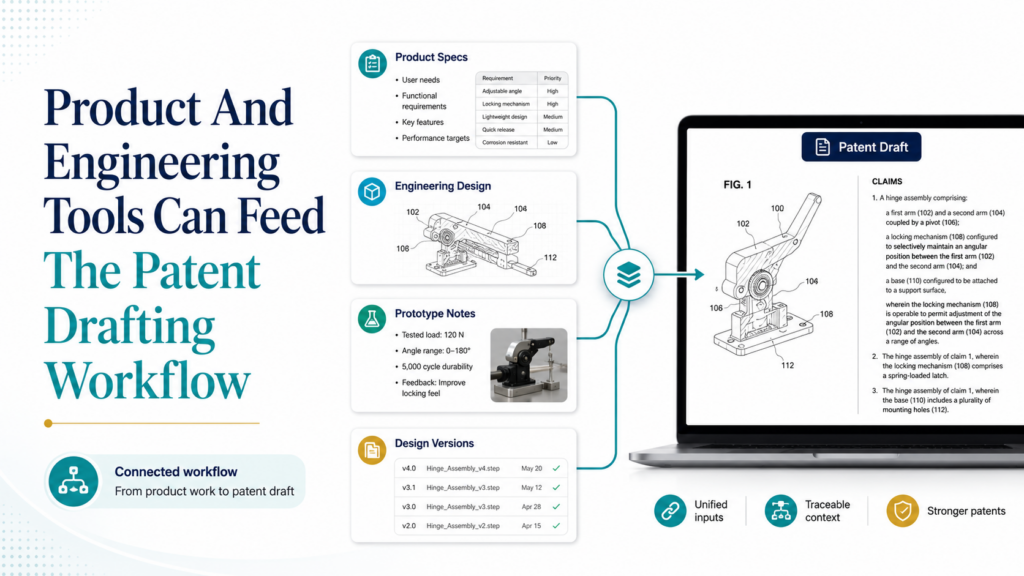
That does not make it useless. It makes it raw.
A strong collaboration workflow helps the attorney and inventor turn engineering material into patent-ready insight.
This is especially important for technical founders because the invention often appears first as a product decision, not as a formal invention disclosure.
Product Specs Can Reveal The Real Problem
A product spec often explains why a feature exists.
That “why” can be useful for patent drafting. It may describe the pain in the old workflow, the failure of existing tools, or the reason a new system was built. These details help the attorney understand the invention in context.
For example, a spec might say that users ignored alerts because old systems created too many false positives.
That tells the attorney something important. The invention may not just be “generating alerts.” It may be a better way to decide which alerts deserve attention.
That difference can shape the draft.
Engineering Notes Can Show What Was Hard
Patent value often lives in what was hard to solve.
Engineering notes may show failed approaches, performance limits, edge cases, latency issues, data quality problems, or hardware constraints. These details help the attorney understand why the invention matters.
A founder may forget these details after the product works. Engineers may think they are too obvious to mention. But they can be very useful during drafting.
A good collaboration tool should make it easy to bring this material into the patent workflow without forcing the attorney to dig through every internal system.
Code And Architecture Can Support Better Technical Detail
For software inventions, code and architecture notes can be rich sources of detail.
The attorney usually does not need every line of code. They need to understand the structure, flow, and technical choices. What data comes in? What steps are performed? What changes the output? Which parts are required? Which parts could be swapped? What result improves?
Engineering tools can help answer these questions.
A clean architecture diagram may become the base for patent figures. A code comment may explain why a step exists. A design review may capture tradeoffs. A test report may show that the invention improves speed, accuracy, reliability, or cost.
The Tool Should Translate Engineering Context Into Drafting Context
Attorneys and engineers often speak different languages.
An engineer may say, “We debounce noisy events before the pipeline fan-out.” The attorney may need to understand that the system filters repeated or unstable signals before sending data to multiple processing paths. Both versions are useful, but they serve different purposes.
A good collaboration tool helps translate without losing meaning.
It should let the engineer explain in natural technical terms, then help organize that explanation for drafting. It should also let the attorney ask for clarification in plain language.
This reduces the chance that important engineering detail gets flattened or misunderstood.
Product Roadmaps Help Attorneys Draft For The Future
A patent application should not only describe what is live today.
The product roadmap can show where the invention may go next. This helps the attorney include reasonable variations that the company may build later. It also helps identify whether more than one filing may be needed.
For example, the first product version may run in the cloud. The roadmap may include edge deployment. If the invention can work in both forms, the attorney should know early.
The first version may support one type of sensor. The roadmap may include more sensor types. If the invention is not tied to one sensor, that should be reflected.
This kind of future-aware drafting can be valuable.
Founders Should Not Wait Until Launch To Think About Patents
The best time to capture invention detail is while the team is building.
That is when the technical choices are fresh. That is when engineers remember what failed.
That is when the product team knows why a feature matters. Waiting until after launch makes the process harder because people forget the path that led to the invention.
PowerPatent gives startups a way to bring invention work closer to the building process. It helps turn technical material into a guided patent workflow with attorney review, so founders do not have to choose between moving fast and protecting what they build.
See the process here: https://powerpatent.com/how-it-works
Conclusion
The best inventor-attorney collaboration tools do one thing very well: they turn scattered invention knowledge into a clear, strong patent draft. The right stack helps capture ideas early, connect drawings to text, guide claim strategy, manage reviews, protect sensitive details, and keep the work moving without slowing the startup down.
But tools alone are not enough. The strongest results come when smart software supports real attorney judgment and inventor insight. That is why PowerPatent is built for founders who want speed, control, and confidence without the old patent headache. See how PowerPatent works here: https://powerpatent.com/how-it-works
Leave a Reply