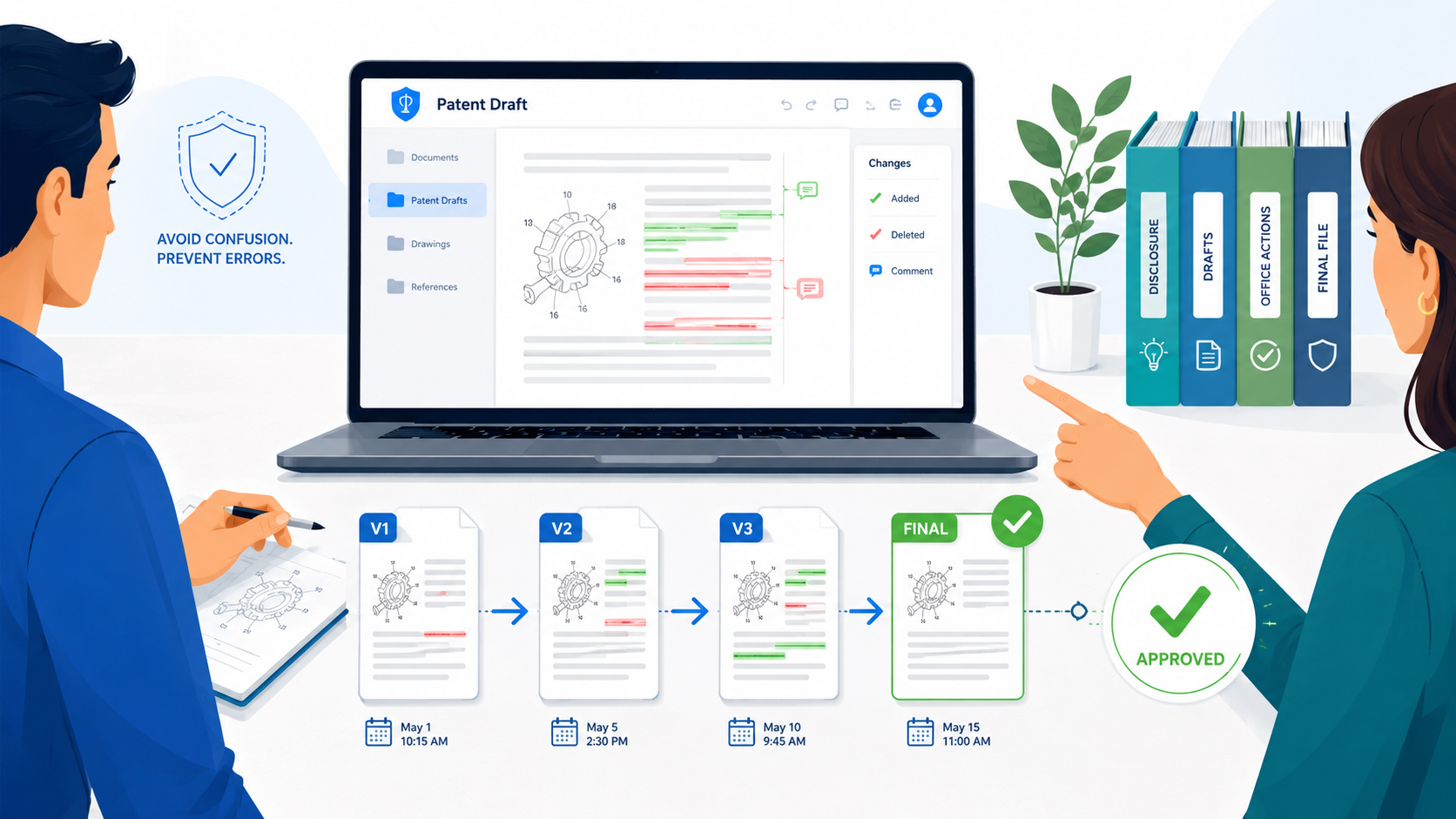
A patent draft can change fast. PowerPatent helps founders, engineers, and patent teams keep the process moving with smart software and real attorney oversight, so draft work stays clear instead of chaotic. You can see how it works here: https://powerpatent.com/how-it-works
Why Patent Draft Version Control Breaks Down So Fast
Patent draft version control breaks down because a patent draft is not a normal document. It is not like a short memo, a pitch deck, or a product note.
It is a living record of a new idea, and that record is often being shaped by many people at the same time.
A founder may know the business value. An engineer may know the technical details. A patent attorney may know how to shape the protection.
A product lead may know what will be built next. Each person sees a different part of the invention, and each person may touch the draft at a different time.
That is where confusion starts.
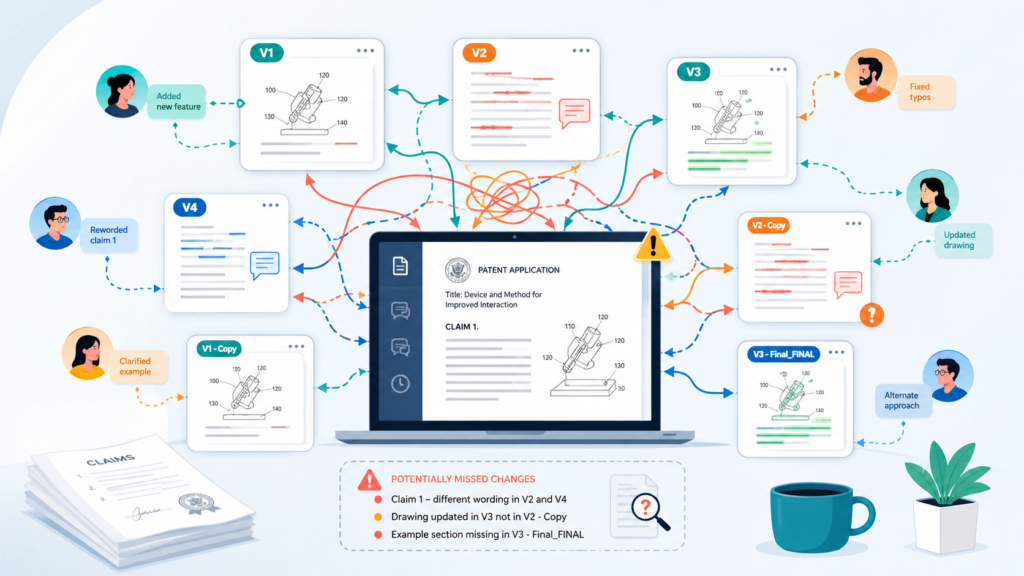
A team may begin with one clean draft. Then someone saves a copy with a new file name. Someone else adds comments to an older version.
A new set of claims gets written in a separate file. A figure is changed but not updated in the written text.
An email thread contains an important note, but that note never makes it into the draft. After a few rounds, the team may have five versions, three comment threads, two folders, and no clear owner.
This is not rare. It happens because patent work has many moving parts. A strong patent draft must explain what the invention does, how it works, what makes it different, and how it may be used in more than one way.
That means the draft must be both technical and clear. It must be broad enough to protect the big idea, but detailed enough to support that protection. Every change matters.
The Real Problem Is Not Just File Names
Many teams think version control means naming files better. That helps, but it is not enough.
A file name can tell you when a document was saved, but it cannot tell you why a change was made, who approved it, what still needs review, or whether the latest version includes every key update.
A file named “final patent draft” may not be final. A file named “attorney edits” may include only one person’s view.
A file named “v3 clean” may have removed comments that still needed action. A file saved in the wrong folder may never be reviewed by the right person.
This is why patent draft version control must be treated as a working system, not just a naming habit. The goal is to make the draft history easy to follow.
Anyone on the team should be able to open the system and understand what changed, who changed it, what still needs input, and which version is safe to use.
That kind of clarity saves time. It also protects the quality of the filing.
A Good System Makes the Right Draft Obvious
The best version control system makes the correct draft easy to spot. There should be no guessing.
Nobody should need to search through old emails or message threads to find the latest copy. Nobody should need to ask, “Is this the one we are using?” right before a filing deadline.
A good system gives every draft a clear place, a clear status, and a clear owner. It also keeps older versions available without letting them compete with the current one.
This matters because older versions may contain useful details, but they should not be mistaken for the active draft.
For a startup, this is even more important. Founders are moving fast. Engineers are building. Product plans are changing. Investor calls, launches, and customer pilots may all be happening at once.
Patent work can easily feel like one more task in a crowded week. Without version control, the draft becomes messy. With version control, the draft becomes easier to manage.
PowerPatent is built around this kind of clarity. It helps teams turn invention details into stronger patent drafts while keeping the process guided by smart software and real attorney oversight.
That means founders and engineers do not have to manage patent chaos alone. You can see how PowerPatent helps teams move from idea to protected invention here: https://powerpatent.com/how-it-works
Why Small Draft Mistakes Can Create Large Problems
A missed change may seem small at first. Maybe an engineer added a better example, but the example stayed in a comment thread. Maybe a founder clarified the main use case, but the clarification was made in the wrong version.
Maybe an attorney changed a claim term, but the description still uses the old wording. These may look like simple document issues. In patent work, they can affect the strength and clarity of the final application.
A patent draft needs internal consistency. The words used in the claims should match the way the invention is described. The figures should match the text. The examples should support the broad idea.
If the draft says one thing in one section and something different in another, the reader may get confused. Later, that confusion can cause delays, extra review, or weaker protection.
Good version control helps prevent this by making every change visible. It gives the team a way to review updates with care instead of relying on memory.
It also helps the attorney see the full story of the invention, not just the last file someone happened to send.
The Hidden Cost Is Lost Focus
The biggest cost of poor version control is not only the risk of error. It is the loss of focus.
When a team spends time asking which file is current, who made which edit, or whether a key change was included, that time is not being spent improving the patent.
This matters because the best patent drafts are shaped through smart decisions. What is the core invention? What are the fallback versions?
What future product paths should be covered? What technical details prove the idea is real? These questions need clear thinking. A messy draft process steals that thinking time.
Version control gives the team room to think. It lowers the noise. It lets each reviewer focus on the substance instead of the file trail.
For founders, this means less stress. For engineers, it means fewer repeat explanations. For attorneys, it means better inputs and cleaner review. For the company, it means a stronger path to protection.
Set One Source Of Truth Before Anyone Edits The Draft
A patent draft should never live in five places at once. That sounds simple, but this is one of the main reasons teams lose changes. A founder saves the draft on a laptop. An engineer comments in a cloud file. An attorney sends a redline by email.
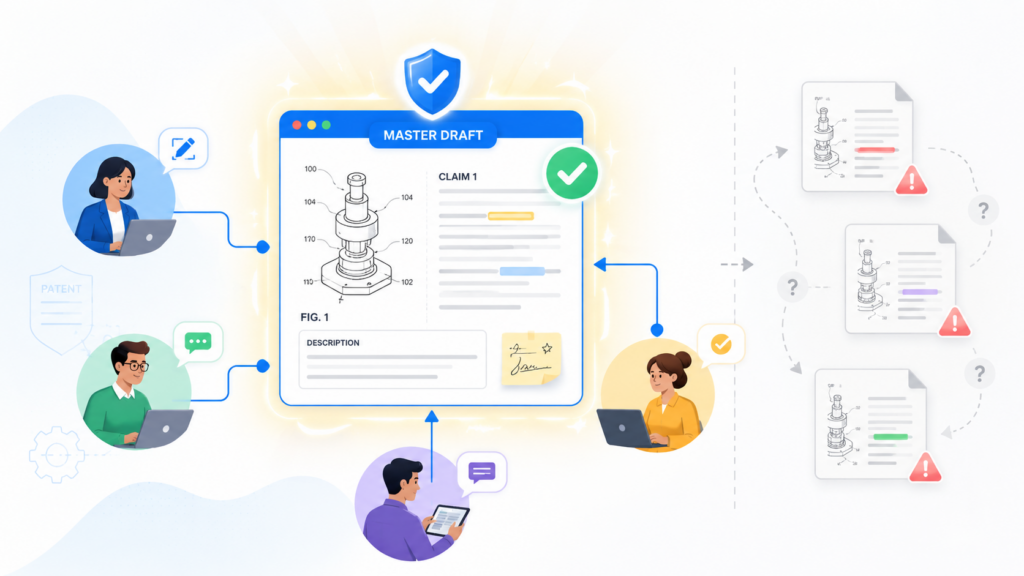
A product lead copies text into a shared folder. Soon the team is not working on one draft. The team is working on several versions of the same idea, and each version has a different piece of the truth.
The fix is to create one source of truth before the first major review begins.
One source of truth means there is one main place where the active patent draft lives. It does not mean old versions vanish.
It does not mean people cannot make notes. It means there is one official draft location, one official current version, and one clear path for making changes.
When someone needs the latest draft, they know exactly where to go. When someone wants to add a comment, they know where it belongs. When someone sends input outside the system, that input must be brought back into the main draft trail.
This is not just a document habit. It is a quality control habit. It makes the draft easier to trust.
The Active Draft Must Be Easy To Identify
The active draft should be obvious the moment someone opens the workspace.
Nobody should need to compare file sizes, dates, names, or email threads to guess which draft matters. If there are three files that all look current, your system has already failed.
The active draft needs a clear status. It may be in founder review, technical review, attorney review, pre-filing review, or ready for filing.
The exact words matter less than the habit. The team should know what stage the draft is in and who is supposed to act next.
This keeps work from piling up in the wrong place. It also stops people from editing old copies. When the active draft is clear, review becomes calmer. People stop asking where to comment.
They stop sending private edits that later need to be merged. They stop creating side files that pull the team away from the real draft.
A clean version control system is not about being strict for no reason. It is about making the next right action easy.
Keep Old Drafts, But Do Not Let Them Compete
Old drafts can be useful. They may show why a change was made. They may include technical details that were removed too early.
They may contain an earlier claim path that becomes useful later. You should not delete draft history without care.
But old drafts should not sit next to the active version in a way that creates doubt. They need to be stored in a clear archive area.
The current draft should be in one place. The archive should be somewhere else. That small separation prevents a lot of mistakes.
The archive should also be read-only when possible. People can review old drafts, but they should not keep editing them.
When old drafts remain editable, someone may add a comment to the wrong place without noticing. That comment may be important, but no one will see it during the next review. This is how key invention details get missed.
A simple archive habit helps your team learn from past edits without letting past versions slow down the present version.
Bring Email And Chat Notes Back Into The Main Draft
Patent teams often lose important details because people share them in the wrong channel. An engineer may explain a key system behavior in Slack. A founder may answer a claim question by email.
A technical lead may send a screenshot with notes from a demo. Those details may be excellent. But if they do not enter the main draft process, they are easy to forget.
A good rule is this: useful patent input should not stay trapped in chat or email.
That does not mean every message must be copied word for word into the draft. It means someone must pull the useful point into the official review path. Maybe it becomes a comment.
Maybe it becomes a new example. Maybe it becomes a note for the attorney. Maybe it belongs in a figure update. The form can change, but the information must not be left behind.
This is where founders often need help. They know the invention. Their engineers know the details. But the process of turning scattered input into a strong patent draft can be hard to manage while also running a company.
PowerPatent helps make that process easier by combining smart software with real patent attorney review.
It gives teams a clearer path from invention notes to draft-ready content, so good ideas are not buried in messy threads. See how the process works here: https://powerpatent.com/how-it-works
Make Ownership Clear At Every Stage
One source of truth still needs one person who owns the next step. If everyone is responsible for the draft, no one is responsible for the draft.
That does not mean only one person can edit. It means one person should know the current status, the next action, and the open issues.
For a startup, this owner may be a founder, a chief of staff, an engineering lead, or a patent lead. In a law firm, it may be a patent attorney, agent, paralegal, or docketing person. The title is less important than the duty.
The owner makes sure comments are resolved, changes are captured, old files are archived, and the active draft remains clear. The owner also makes sure the right people review the right parts.
Engineers should not have to review every legal phrase. Attorneys should not have to guess at technical facts. Founders should not get buried in small wording issues when their real job is to confirm business value and product direction.
When ownership is clear, the team moves faster with fewer mistakes. The draft stops being a shared mess and becomes a guided workflow.
Name Each Draft So The File Tells A Clear Story
File names are not the whole version control system, but they still matter. A weak file name creates doubt.
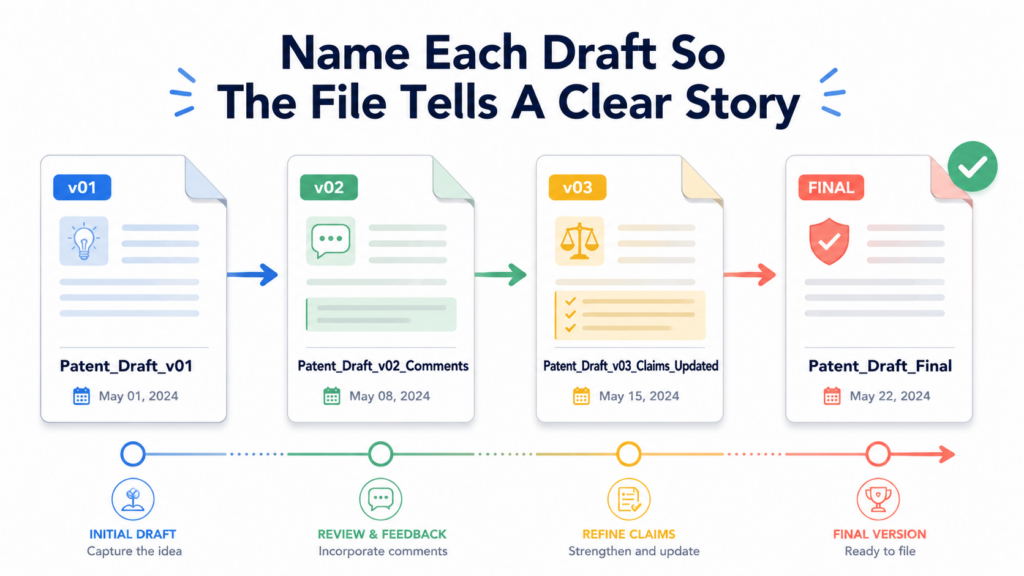
A strong file name gives context before anyone opens the document. It tells the team what the draft is, where it fits in the review path, and whether it should be used.
The worst file names are the ones that sound final when they are not. “Final,” “final final,” “real final,” and “use this one” are signs that the system is already broken.
These names may feel quick in the moment, but they do not age well. A week later, nobody remembers what made that file final. A month later, it may be impossible to tell whether the draft was reviewed by the attorney, the founder, or the engineering team.
A better name does not need to be long. It needs to be clear. It should include the invention name, the draft stage, the version number, and the date. When useful, it can also include who made the latest major change.
The goal is not to create a perfect code. The goal is to make the file easy to understand without opening ten other files.
The Draft Stage Matters More Than The Word Final
Many teams rush to label drafts as final because they want closure. But patent drafts usually move through several kinds of review. A draft may be complete enough for technical review but not ready for attorney review.
It may be attorney-reviewed but still waiting for inventor approval. It may be ready in substance but not yet checked against the figures. Each stage is different.
This is why the draft stage should be part of the version story. A file that says “technical review” is different from a file that says “attorney review.”
A file that says “founder approval” tells the team that business and product judgment is needed. A file that says “pre-filing check” tells everyone that casual edits should stop unless they are truly needed.
This reduces accidental chaos. People act differently when they understand the stage. An engineer reviewing an early draft may leave broad comments about missing details.
The same engineer reviewing a pre-filing draft may focus only on clear errors. That difference matters. Without a stage label, reviewers may give the wrong kind of feedback at the wrong time.
Dates Help, But Dates Alone Are Not Enough
Dates are useful because they show timing. But a date alone does not explain meaning. A file from June 12 may not be better than a file from June 10.
It may simply be a side copy. It may contain only a small comment. It may be an old draft saved later by mistake.
That is why dates should support the version system, not replace it. A clear version number tells the team how drafts relate to each other.
A clear status tells the team what the draft is for. A date tells the team when that status was recorded.
For example, a draft marked as version 4 for attorney review on a specific date gives more useful information than a draft with only that date in the name.
It tells you that this is part of a sequence, that it has reached a certain stage, and that it was prepared at a certain time.
This kind of naming is simple, but it lowers risk. It helps the team move without stopping to ask basic questions.
Version Numbers Should Reflect Meaningful Draft Changes
Not every small edit needs a major new version. If someone fixes a typo or adjusts spacing, that may not need a new numbered draft.
But if someone changes claim scope, adds a new embodiment, removes a technical example, updates figures, or accepts a round of attorney edits, that should be tracked as a meaningful version.
The key is to avoid both extremes. If you create a new version for every tiny change, the history becomes noisy.
If you rarely create new versions, important changes get buried. A good version control system treats a new version as a marker of meaningful progress.
This is especially important for claim changes. Claims are often the heart of the patent application. When claim language changes, the rest of the draft may need to be checked.
The description should support the new wording. The figures should still make sense. The examples should line up with the new scope. If the claim version changes but the rest of the draft does not get reviewed, hidden mismatch can slip in.
PowerPatent helps founders and technical teams work through these details with a more guided patent workflow. The goal is not just to make a document.
The goal is to help capture the invention clearly, review it with real patent attorney oversight, and avoid the common mistakes that slow teams down. You can explore the process here: https://powerpatent.com/how-it-works
Never Let A Private Copy Become The Real Draft By Accident
Private copies are dangerous when they become useful. Someone may download the active draft, make edits offline, and then send it back with a note saying, “Use this.”
That may be fine if the team has a clear merge process. But if that private copy suddenly becomes the active draft without review, other comments may be lost.
The safest habit is to treat private copies as input, not as the new truth. Any offline edits should be merged into the active draft by the draft owner or another clear reviewer.
After the merge, the system should show what changed and why. The private copy can then be archived or deleted according to the team’s process.
This may feel like extra work, but it prevents bigger work later. Rebuilding lost edits is painful. Comparing multiple drafts by hand is slow.
Asking busy engineers to repeat comments is frustrating. Clean naming and controlled merging protect the team from all of that.
Use A Change Log So The Team Knows What Actually Changed
A patent draft can look calm on the surface while hiding many important changes underneath. A paragraph may be moved. A claim term may be replaced.
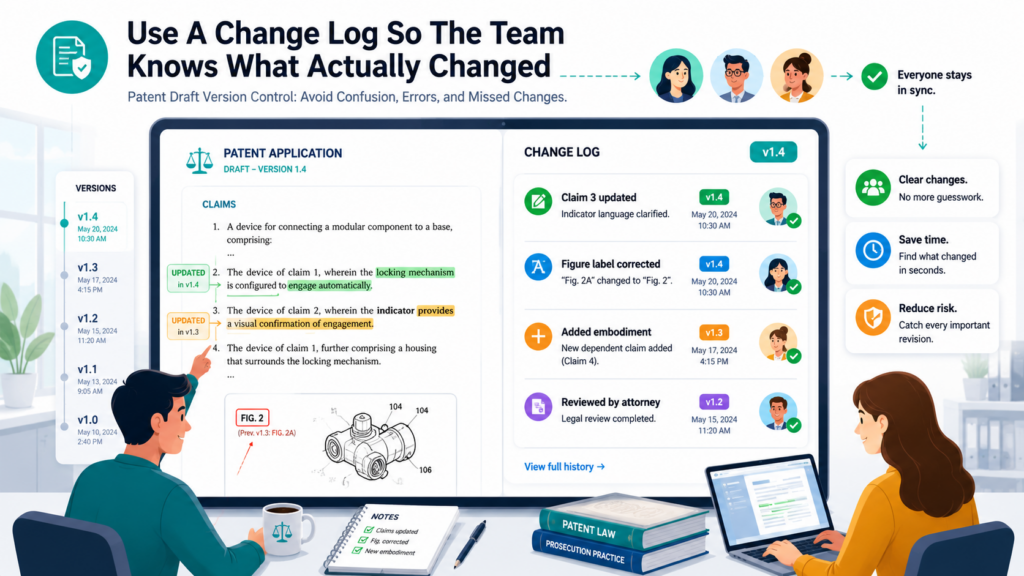
A figure description may be updated. A new example may be added. A sentence may be removed because it was too narrow. Without a change log, the team may not know what happened or why.
A change log is a simple record of the main edits made to the draft. It does not need to capture every comma. It should capture the changes that affect meaning.
When a reviewer opens the latest draft, the change log tells them where to focus. Instead of reading the whole document from scratch every time, they can understand what changed since their last review.
This is one of the best ways to save time during patent drafting. It also helps prevent missed changes. A founder can quickly see that the claims were broadened.
An engineer can see that a technical example was added. An attorney can see that a new product feature was included. Everyone gets a clearer view of the draft’s movement.
A Change Log Creates Memory For The Draft
People forget why edits were made. That is normal. Patent drafting can take days, weeks, or longer, and many other things happen during that time.
A founder may review a draft after a funding call. An engineer may comment between product sprints. An attorney may revise after a search, an inventor interview, or a strategy discussion.
Without a record, the same questions come back again and again. Why did we remove this limitation? Why did we add this example?
Why did the wording change from “model” to “system”? Why did Figure 3 get replaced? These questions waste time when the answers are buried in old threads.
A change log gives the draft a memory. It does not replace legal judgment or technical review. It simply keeps the story visible. It lets the team see how the application became what it is.
Focus On Meaning, Not Noise
The best change logs are short enough to read and clear enough to guide action. They do not list every small grammar fix. They do not turn into a second full draft. They focus on edits that matter.
A meaningful change is one that affects scope, technical accuracy, figure support, examples, claim language, inventor input, or filing readiness.
If a change could affect how the invention is understood, it belongs in the log. If a change is only formatting, it usually does not.
This is where judgment matters. A small word change can sometimes be important. For example, changing “must” to “may” can affect how broad the disclosure feels.
Changing “server” to “computing device” can affect how many systems are covered. Changing “training data” to “input data” can shift the technical meaning. These are not just wording edits. They are substance edits.
When the change log captures these moves, reviewers can respond with care.
Use The Change Log To Guide Review, Not Replace Review
A change log should not be used as a shortcut that lets people skip the draft. It should help them review smarter. If the log says the claims were updated, the reviewer should read the claims.
If the log says a new technical example was added, the engineer should check that example. If the log says figure labels changed, someone should compare the figures and descriptions.
The change log helps each person spend time in the right place. This is important because patent drafts can be long and dense. Even when written clearly, they have many sections that work together.
Asking every reviewer to reread every line after every edit is not practical. Asking reviewers to focus on the most changed areas is much better.
This also helps avoid review fatigue. When people are asked to review too much too often, they stop seeing details. They may skim. They may approve without noticing a mismatch.
They may assume someone else checked the hard parts. A change log helps reduce that risk by making the review task smaller and clearer.
PowerPatent is designed to make patent work feel more guided and less scattered. Instead of letting invention details, edits, and review notes drift across many files, it helps teams move through the drafting process with more structure and attorney-backed confidence. Learn more here: https://powerpatent.com/how-it-works
Record Why A Major Change Was Made
A change log should not only say what changed. For major edits, it should also say why. This is especially helpful when a draft is reviewed weeks later or when a new person joins the process.
For example, if a narrow hardware detail was removed, the reason may be that the invention should cover software and cloud versions too.
If an example was added, the reason may be to support a future product path. If a claim term was changed, the reason may be to match how the invention is described throughout the draft.
The “why” does not need to be long. One clear sentence can save hours later. It also helps the team avoid undoing good work by mistake.
Without a reason, a reviewer may see a change and think it was accidental. With a reason, the reviewer can judge it in context.
This is strategic version control. It does more than track edits. It protects thinking.
Control Comments Before They Become A Second Draft
Comments are helpful until they become a mess. In a patent draft, comments can hold key facts, hard questions, strategy notes, claim ideas, figure issues, and founder concerns.
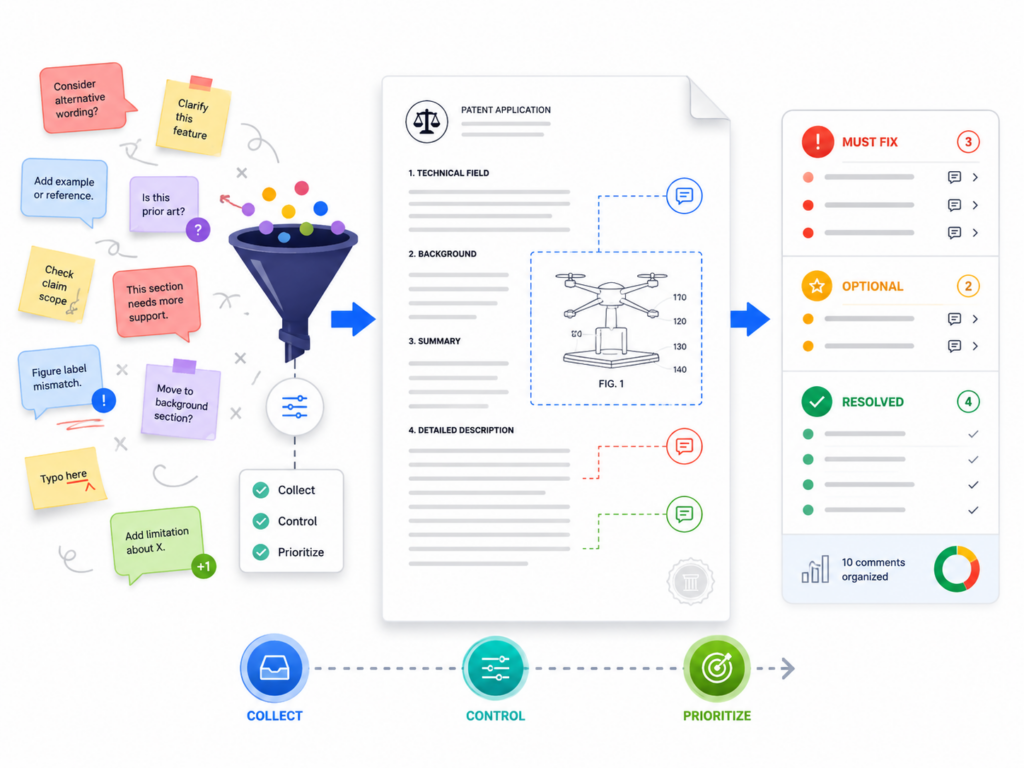
But if comments are not managed, they can become a second draft that no one fully reads.
A draft with too many open comments becomes hard to use. People stop knowing which comments still matter. Some comments are answered in later edits but left open.
Some comments ask questions that were already handled in a call. Some comments contain important technical detail that never gets moved into the text. Other comments are old disagreements that should have been resolved.
Comment control is a major part of version control because comments often contain the missing pieces of the invention. If they are not handled well, those pieces can vanish.
Every Comment Should Have A Clear Job
A comment should do one clear thing. It should ask a question, suggest an edit, flag a risk, request a fact check, or explain a decision. When comments try to do too much, they become hard to act on.
A vague comment like “check this” is not very useful. Check what? The wording? The technical accuracy? The claim scope? The figure number?
The business use case? A better comment names the issue clearly. That way, the right person can answer it without guessing.
Good comments also reduce back-and-forth. If an engineer sees a clear question, they can give a direct answer.
If an attorney sees a clear concern, they can decide whether the text should change. If a founder sees a clear strategy issue, they can weigh in quickly.
The goal is not to write perfect comments. The goal is to make comments easy to resolve.
Do Not Let Answered Comments Stay Open Forever
Open comments create mental weight. They make the draft feel unfinished even when many issues are already solved. If a comment has been handled, it should be closed or marked as resolved.
If the answer was important, the useful part should be added to the draft or recorded in the change log before the comment disappears.
This habit matters because comments can hide important decisions. If a founder says, “Yes, we plan to support that workflow next year,” that may matter for the patent.
If that answer stays only in a resolved comment, it may be hard to find later. The team should decide whether that future workflow belongs in the draft as an example or variation.
Resolved does not mean forgotten. It means the issue has been handled in the right place.
This is one reason a strong patent process needs more than a shared document. It needs a way to turn comments into action. It needs a way to capture invention details without making the team manage every tiny step alone.
Separate Technical Comments From Strategy Comments
Not all comments need the same reviewer. Technical comments often belong to engineers or inventors. They may ask whether a data flow is correct, whether a model step is described properly, or whether a figure matches the system.
Strategy comments may belong to founders or patent counsel. They may ask whether the patent should cover future product lines, partner use cases, or different deployment models.
When these comment types are mixed together, review slows down. Engineers may get pulled into business scope questions.
Founders may get stuck reading technical details that only the inventors can confirm. Attorneys may have to sort through everything before making progress.
A better approach is to make the comment’s purpose clear. The draft owner can route each issue to the right person. This does not require a complex system. It requires clear writing and disciplined review.
PowerPatent helps by giving founders and technical teams a more structured way to work with patent professionals. The process is built to turn technical input into useful patent material while keeping attorney oversight in the loop.
That helps teams avoid the common problem of scattered comments and unclear next steps. See how PowerPatent works here: https://powerpatent.com/how-it-works
Convert Important Comments Into Draft Text
A comment is not protection. A comment is only a note. If a comment contains a key technical detail, a key example, a key alternative, or a key use case, it may need to be moved into the patent draft itself.
This is one of the easiest places to lose value. An engineer may leave a great comment explaining how the system handles edge cases. A founder may describe a future market use.
A product lead may add a note about how customers will configure the tool. Those details can make the draft stronger. But if they stay in comments, they may not help the final application.
Someone must review important comments and decide whether they belong in the draft. This should happen before final review. Waiting until the end creates rush and increases the chance of missing something.
The best patent teams treat comments as raw material. They do not let comments pile up. They mine them for useful invention details, resolve them with care, and move the best content into the draft.
Review Claims Separately Because Small Claim Edits Carry Big Weight
Claims need special version control. They are often the most carefully shaped part of a patent draft, and small changes can have large effects. A single word can narrow the idea too much.
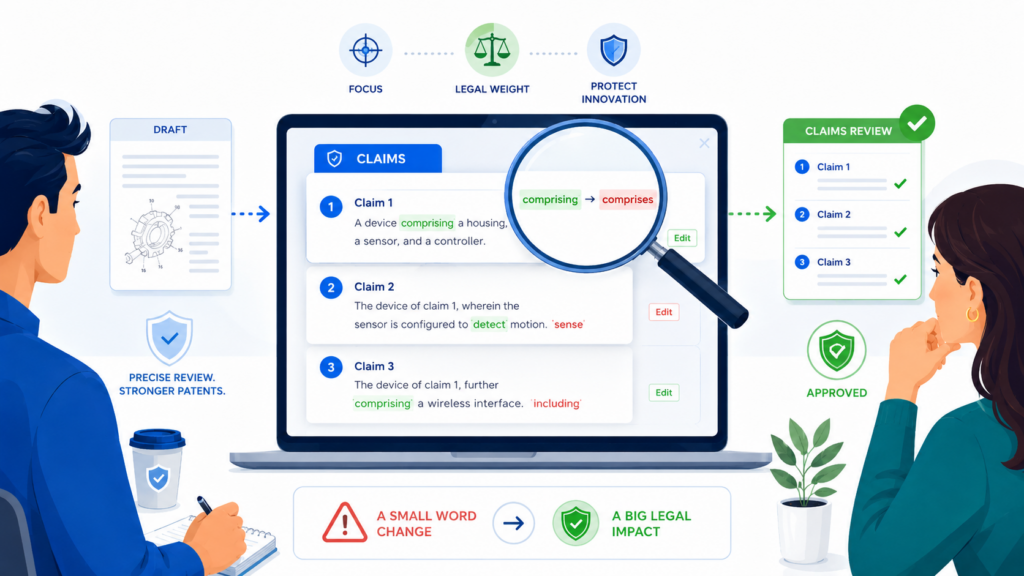
A missing step can create confusion. A new term can require support in the description. A changed order of steps can affect how the invention is read.
For this reason, claim edits should not be treated like normal text edits. They need a higher level of attention. The team should know when claims changed, why they changed, and whether the rest of the draft still supports them.
Founders and engineers do not need to become patent lawyers to help with claim review. They do need to understand that claims are not casual wording.
Claims are where the protection is shaped. When the claims change, the team should pause and check whether the change still matches the invention and the business goal.
Claim Terms Must Match The Draft
One common source of error is mismatch between the claims and the written description. The claims may use one term while the description uses another.
For example, the claims may say “prediction engine,” while the description says “machine learning model.” Those may be related, but the draft should make the connection clear.
This does not mean every word must be identical every time. It means the reader should not be left wondering whether two terms mean the same thing or different things.
Patent drafts should be broad, but they should not be sloppy. Clear terms help the attorney, the examiner, the inventors, and later readers understand the invention.
Version control helps here because it shows when claim terms changed. If the claims were updated, someone should check the description, examples, and figures. This review does not need to be slow, but it does need to happen.
Track Claim Changes As Strategy Moves
Many claim changes are strategy moves. A claim may be broadened to cover more ways of doing the invention. A fallback claim may be added to protect a narrower version.
A step may be removed because it is not required in every use. A system claim may be added next to a method claim. These are not random edits.
When a claim change reflects strategy, that strategy should be recorded in plain words. This helps the team avoid accidental reversals.
It also helps founders understand how the patent is being shaped around the company’s real product and future plans.
A founder may not care about every legal detail, but they should care whether the draft protects the main technical advantage. They should care whether it covers near-term and future versions.
They should care whether a competitor could avoid the patent by making a small change. Claim review is where those questions become very real.
PowerPatent brings smart drafting tools together with real patent attorney oversight to help teams make better decisions during this process.
For founders, this means less guesswork and more confidence that the draft is moving in the right direction. You can learn more here: https://powerpatent.com/how-it-works
Keep A Clean Claim Comparison Before Final Review
Before final review, the team should have a clean way to compare the current claims against the prior claim version.
This does not need to be fancy. It just needs to show what changed in a way that reviewers can understand.
A clean claim comparison helps inventors confirm that the claims still describe the invention correctly.
It helps founders check whether the protection still matches the business goal. It helps attorneys see whether any changes created support issues elsewhere in the draft.
This is especially useful when there have been several rounds of edits. After many small changes, the claims can drift. The team may not notice the drift unless they compare versions. A clean comparison brings the drift into view.
Do Not Approve Claims In A Rush
Last-minute claim approval is risky. When a team is close to filing, everyone wants to move fast. But claims deserve focused attention.
A rushed review can miss narrow wording, wrong terms, missing support, or a mismatch with the actual product.
A strong process gives claims their own review moment before filing. This does not mean the whole process must slow down. It means the right people should look at the right section with the right mindset.
Engineers should check technical truth. Founders should check business fit. Attorneys should check patent strength and filing strategy. When each person reviews through their own lens, the final draft gets stronger.
Good version control makes this possible. It gives everyone the current version, the change history, and the context they need. It removes the noise so the team can focus on what matters.
Lock The Draft At The Right Time Without Freezing Good Thinking
At some point, a patent draft must stop changing. This is hard for startups because ideas keep moving. The product changes. Engineers find better ways to explain the system.
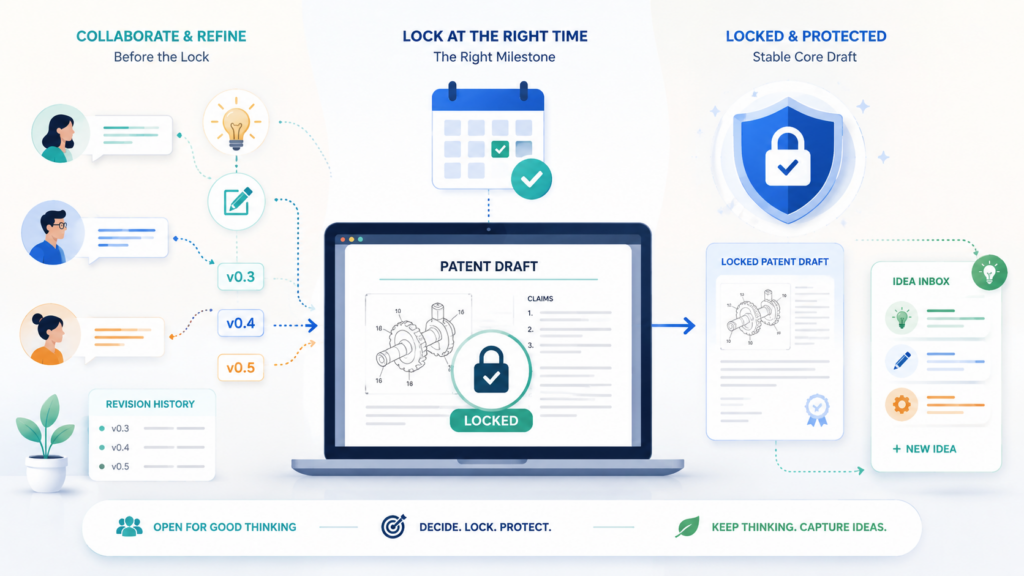
Founders think of new markets. The team may want to keep improving the draft until the last possible moment.
But endless editing creates risk. Every late change can create mismatch. Every new comment can delay review.
Every new file can confuse the filing path. A draft that never locks can become weaker, not stronger, because the team runs out of time to check it carefully.
Draft locking means the team agrees that the draft has entered a controlled stage. Changes can still happen, but only with clear reason and clear review. This protects the filing process without blocking truly important updates.
A Locked Draft Is Not A Dead Draft
Some teams fear locking because they think it means no one can fix anything. That is not the point. A locked draft can still be corrected. But changes should be intentional.
They should not be casual. They should not come from side comments, private copies, or late-night edits that no one reviews.
Once a draft is locked, changes should be limited to issues that matter for accuracy, clarity, support, claim strategy, or filing readiness. This helps the team avoid random polishing that creates new errors.
For example, changing a typo is usually fine. Adding a major new embodiment may be fine too, but it should trigger a deeper review. Changing a claim term should trigger a check across the draft.
Replacing a figure should trigger a figure-text comparison. Locking does not stop these changes. It makes sure they are handled with care.
Locking Creates Calm Before Filing
The final days before filing should not feel like a scavenger hunt. The team should not be searching for missing comments, comparing old files, or asking engineers to resend diagrams.
A locked draft creates calm because it tells everyone that the document is now in a controlled review stage.
This is good for founders. It lowers stress and gives them confidence. It is good for engineers because they can focus on targeted checks instead of open-ended review.
It is good for attorneys because they can prepare the filing with fewer surprises.
Calm matters. Patent filing is important work. The team should be thinking clearly, not rushing through preventable confusion.
PowerPatent helps teams move faster without losing structure. The platform is built for founders and inventors who want strong patent protection but do not want old, slow, confusing workflows.
With smart software and real attorney oversight, the process becomes easier to manage from draft to filing. Explore it here: https://powerpatent.com/how-it-works
Define What Counts As A Late Change
Late changes are not all equal. Some are harmless. Some are helpful. Some are dangerous if not reviewed. The team should define what counts as a late change that needs extra attention.
A late change may include any edit made after founder approval, after attorney review, or after the draft has entered pre-filing review.
It may also include any change to claims, figures, examples, technical definitions, inventor names, priority details, or filing documents. These edits are not bad, but they should not slip in quietly.
When the team knows what counts as a late change, people behave better. They do not make quiet edits and assume someone else will catch them. They raise the issue, explain the reason, and help the draft owner route it properly.
Keep A Final Change Window
A final change window helps prevent endless review. The team should create a clear period for last checks.
During that time, reviewers can raise issues. After that window closes, only critical changes should be allowed.
This habit works because it creates a real finish line. It also helps busy people act. When reviewers know the window is open, they understand that now is the time to speak. When the window closes, the team can move toward filing without fresh noise.
The key is to make the window practical. It should give reviewers enough time to check their part, but not so much time that the draft keeps drifting.
For a startup, this may be a short, focused review cycle. For a more complex invention, it may need more care.
The point is simple. Do not let the final draft remain endlessly open. A patent draft needs a moment where the team says, “This is the version we are filing,” and then protects that decision.
Create A Pre-Filing Version Control Check That Catches Hidden Errors
The pre-filing check is where version control proves its value. This is the moment when the team confirms that the draft, figures, claims, comments, and filing materials all match.
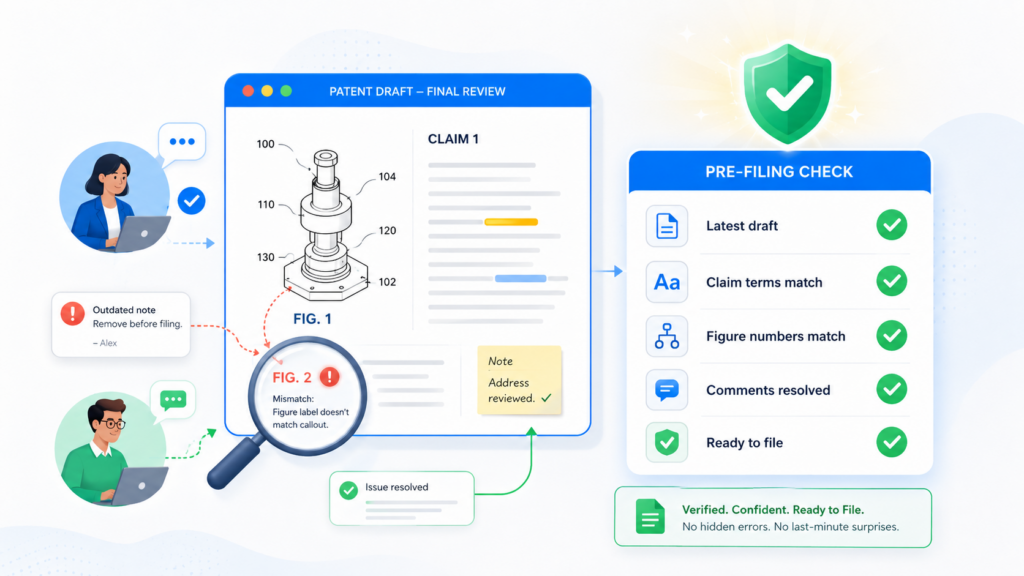
It is not the time to rethink the whole invention. It is the time to catch hidden errors before they become filed errors.
A good pre-filing check is simple, but it must be serious. The team should look for version mismatch, unresolved comments, inconsistent terms, missing figure labels, old file names, unmerged edits, wrong dates, and late changes that were not reviewed.
These problems are common because patent drafts pass through many hands. The final check gives the team one last chance to clean them up.
This step is especially important for fast-moving startups. Speed is a strength, but speed without a final check can create avoidable risk. A careful pre-filing check lets you move quickly while still acting with discipline.
Check That The Current Draft Is The Filing Draft
Before filing, the team must confirm that the draft being filed is truly the approved version. This may sound obvious, but it is one of the easiest mistakes to make when files move by email or across shared folders.
The filing draft should match the version approved by the right reviewers. If the attorney made final edits after approval, those edits should be clear. If the founder approved a clean copy, the filed copy should not be an older redline.
If figures were updated, the final document should point to the correct figures. If a claim change was made late, the description should still support it.
This check should be done against the system of record, not against memory. Memory is not reliable enough at this stage.
Resolve Or Carry Forward Every Open Issue
No open comment should be ignored before filing. Each issue should be resolved, moved into the draft, or clearly carried forward with a reason.
Sometimes an issue does not need to be fixed before filing. But that should be a decision, not an accident.
For example, a comment about a future product variation may not belong in the current filing if it is too undeveloped. But the team may want to capture it for a later filing.
A comment about a missing figure label should likely be fixed now. A comment about claim scope may need attorney review before moving forward.
The point is not that every comment must become text. The point is that every comment must be handled. Open issues should not be left behind simply because the team ran out of attention.
PowerPatent helps teams avoid these loose ends by giving invention capture, drafting, and attorney review a more organized path.
That structure matters when you are trying to protect deep tech without slowing the company down. See how PowerPatent helps founders file better patents faster here: https://powerpatent.com/how-it-works
Compare The Claims, Description, And Figures Together
A patent draft is not just separate sections. The claims, description, and figures support each other. If one changes, the others may need to change too. The pre-filing check should look at them together.
If the claims mention a component, the description should explain it. If the figures show a step, the text should describe it.
If the description includes several versions of the invention, the claims should be checked to see whether the right scope is being pursued. If the figures use labels, those labels should match the written explanation.
This is where many hidden errors appear. A figure may have been updated while the text still refers to an old label. A claim may have been broadened while the example remains too narrow.
A paragraph may refer to “the mobile device” even though the invention is now meant to cover many computing environments.
These are not just polish issues. They affect clarity.
Make The Final Version Easy To Prove Later
After filing, the team may need to know exactly what was filed and what led to it.
This can matter for future filings, investor questions, internal records, product planning, and later patent work. The final version should be easy to identify and easy to retrieve.
The team should keep the filed copy, the final clean copy, the final redline if useful, the figures, and key approval records in a clear archive.
The archive should not be mixed with old working drafts. It should be obvious which materials relate to the filing.
This creates a clean record. It also helps future patent work. When the company files another application, the team can look back and understand what was already covered, what was left out, and what new inventions should be captured next.
Good version control does not end at filing. It becomes part of the company’s long-term IP memory.
Build A Review Order So Edits Do Not Crash Into Each Other
Patent draft review should not feel like a crowd pushing through one small door. When too many people edit at the same time, the draft gets noisy. One person may rewrite a section while another person comments on the old wording.
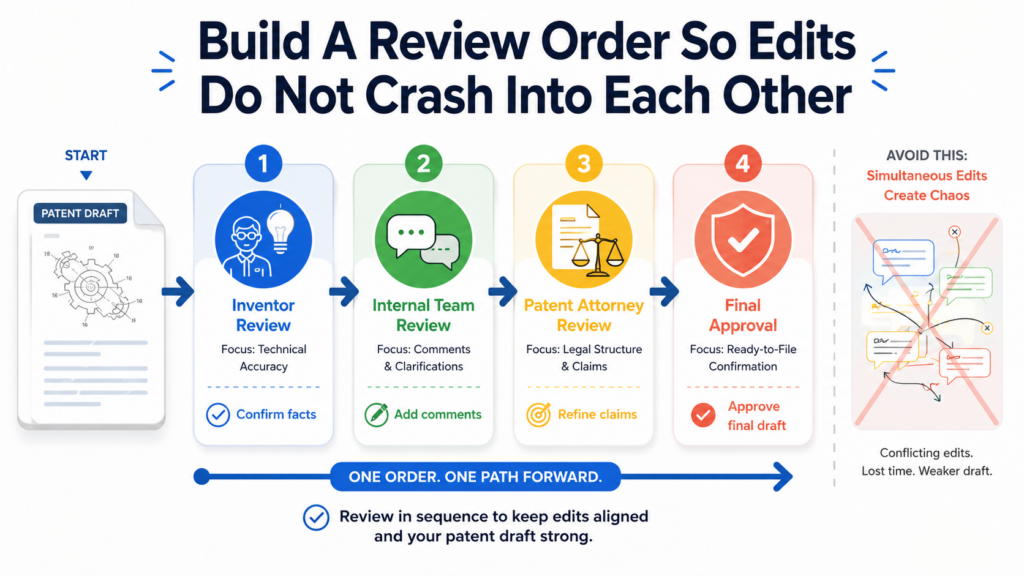
An engineer may answer a question that an attorney already removed. A founder may approve a version before the technical team has checked the details. This is how confusion grows, even when everyone is trying to help.
A strong review order fixes this. It gives each person the right moment to review, based on what they are best at.
It also keeps the draft from changing in too many directions at once. The goal is not to slow people down. The goal is to make each review count.
For most patent drafts, the best order starts with invention accuracy. The people closest to the technology should first confirm that the draft explains the invention correctly.
Then the founder or business lead can check whether the draft matches the company’s product path and market strategy.
After that, the patent attorney can shape the draft for protection, clarity, and filing. Once attorney edits are in place, the team can do a focused final review.
This order can change based on the team, but the idea stays the same. Do not ask everyone to review everything at once. Review in layers.
Technical Review Should Come Before Heavy Wordsmithing
The first serious review should answer a simple question: is the invention described correctly? If the answer is no, then polishing the language is a waste of time. Beautiful wording cannot save a draft that explains the technology wrong.
Technical reviewers should look at how the system works, what the steps are, what data moves through the system, what parts are optional, and what parts are required.
They should check whether examples are real enough and whether the figures match the actual design.
They should also look for missing versions of the invention. A startup may have one product today but several likely versions tomorrow. The patent draft should not be stuck in only one narrow build unless that is the right strategy.
This stage is where engineers add huge value. They can spot quiet errors that others may miss. They know when a word is too broad, too narrow, or simply wrong.
They know when a diagram skips an important step. They know when a draft describes the demo version but not the real system being built.
When technical review happens early, later edits become safer. The attorney is not forced to shape protection around shaky facts. The founder is not approving a draft that has hidden gaps. The whole team starts from a cleaner base.
Technical Review Should Be Focused On Facts, Not Style
Engineers should not be asked to act like copy editors. Their job is not to make the patent draft sound smooth.
Their job is to make sure it is true, complete, and useful. When technical reviewers spend too much time changing style, they may miss bigger issues.
A clean process tells technical reviewers what to look for. They should check whether the invention is explained in the right order. They should confirm that key terms are used correctly.
They should make sure the draft covers real alternatives, not just the first build. They should flag anything that sounds impossible, unclear, or too limited.
This keeps review sharp. It also makes engineers more willing to help. Busy technical teams do not want to spend hours debating wording that a patent attorney will later change anyway.
They want to know their input matters. A focused technical review shows them exactly where they can make the draft stronger.
PowerPatent helps make this easier by guiding invention capture in a way that works for technical teams, then pairing that with real attorney oversight.
That helps founders get better invention detail without forcing engineers into a painful legal process. You can see the workflow here: https://powerpatent.com/how-it-works
Business Review Should Check The Protection Goal
After the technical facts are solid, the founder or business lead should review the draft with a different question in mind: does this protect what matters to the company? A technically correct draft can still miss the business point.
It may describe the current product but ignore the future platform. It may focus on one customer use case while the real value is in a broader system. It may protect a small feature while leaving the main market advantage exposed.
This is why business review matters. Founders often see the company’s direction better than anyone else. They know which parts of the invention support growth.
They know what competitors may copy. They know which customer problems are worth protecting. They know what product lines may come next.
This does not mean founders should rewrite the patent draft themselves. It means they should check alignment. The draft should support the company’s plan, not just record one technical snapshot.
Attorney Review Should Come After The Team Has Given Strong Inputs
Patent attorneys can do better work when they receive clear, complete inputs. If the draft is missing technical facts or business context, the attorney may have to ask many follow-up questions.
That slows the process and increases the chance that something important gets lost.
When the technical and business reviews come first, attorney review becomes more powerful. The attorney can focus on shaping claim strategy, improving support, cleaning up terms, and preparing the application for filing.
The review is less about chasing missing facts and more about building stronger protection.
This is where a good version control process saves real time. The attorney sees the current draft, the major changes, the open issues, and the approved technical details. That clarity makes the whole process smoother.
Protect Figures And Diagrams From Version Drift
Figures are easy to overlook because many teams think of them as simple pictures. In a patent draft, figures are much more than that. They help explain the invention.
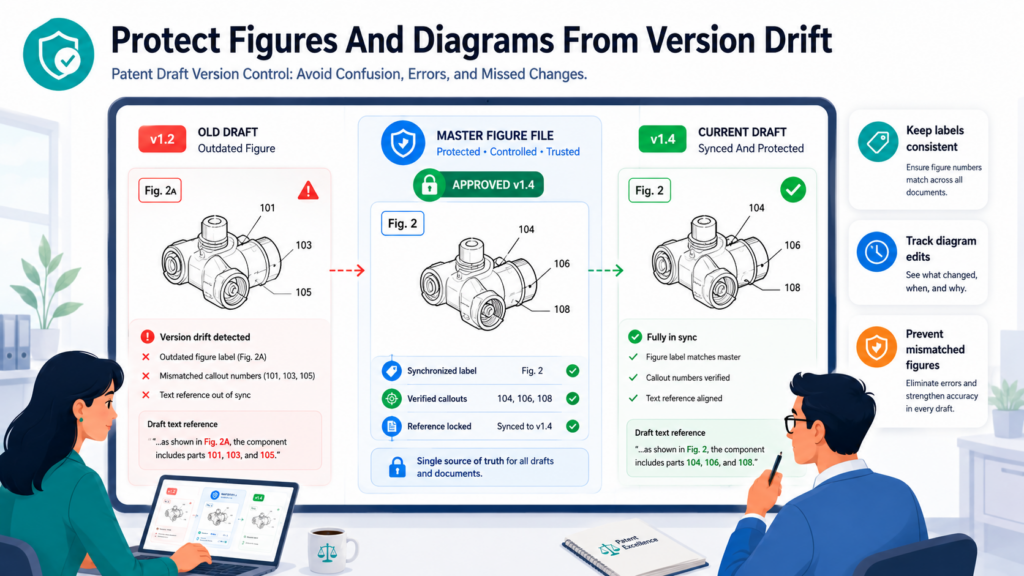
They show parts, steps, flows, screens, systems, and relationships. They can make a hard idea easier to understand. But figures can also create confusion when they drift away from the written draft.
Figure drift happens when the diagram changes but the text does not. It also happens when the text changes but the figure stays old. A label may be renamed in the draft while the figure keeps the old name.
A step may be removed from the claims but still appear in a flowchart. A new system component may be added in the description but not shown in the architecture drawing. These small mismatches can make the application look careless.
Version control for figures is just as important as version control for the written draft. In some cases, it is even more important because figures often move through separate files, separate tools, and separate people.
Every Figure Needs Its Own Version Story
A patent draft may have one main document, but it often has many figure files. Each figure should have a clear version path.
The team should know which figure file is current, which draft it belongs to, and what changed from the prior version.
This matters because figures are often updated late. An engineer may improve a system diagram. A designer may clean up labels. An attorney may request a more general version.
A founder may ask for a flowchart that better matches the product story. Each change may be helpful, but only if it is tracked.
A figure file named “diagram new” is not enough. A figure file saved in a message thread is not enough.
A screenshot pasted into a slide is not enough. The current figure set should live with the current draft, and the relationship should be clear.
When figures are handled separately, someone must still bring them back into the same version control system. The draft and figures should move together toward filing.
Figure Labels Should Match The Text
One of the simplest and most important checks is label matching. If the text refers to item 102 as a data processor, then the figure should not call item 102 a scoring engine unless the draft explains the relationship.
If the figure shows step 304 as “generate output,” the written description should not call the same step “classify input” without making the link clear.
This may sound small, but it matters because patent drafts depend on clear relationships.
A reader should be able to move from the text to the figure and back again without getting lost. When labels do not match, the reader has to guess. Guessing is bad for clarity.
A strong version process includes a figure-to-text check after any meaningful figure update. The check does not need to be hard.
It requires attention. The reviewer should look at each figure number, each label, and each main step, then confirm that the written description still fits.
PowerPatent helps teams bring invention details, figures, and draft review into a clearer workflow.
For founders building technical products, this can reduce the chance that important diagram updates get lost outside the main drafting path. Learn more here: https://powerpatent.com/how-it-works
Do Not Let Product Screenshots Narrow The Invention Too Much
Startups often want to use product screenshots because they are easy to understand. Screenshots can be helpful, but they can also be risky if they make the invention look too tied to one screen, one layout, or one current product version.
A patent draft should often describe the bigger idea behind the product, not just the exact interface on launch day. If a screenshot shows one button, one menu, or one workflow, the team should ask whether that visual is too specific.
Sometimes a more general diagram is better. It can show the function without locking the invention to one design.
Version control helps here because it lets the team track why a figure was changed from a specific screenshot to a broader diagram.
That reason matters. Later, someone may wonder why the actual product screen was not used. The version record can show that the change was intentional and strategic.
Keep The Final Figure Set Together
Before filing, the final figure set should be stored as one clear group. The team should not have to collect Figure 1 from one folder, Figure 2 from an email, and Figure 3 from a design tool export. That is how errors happen.
The final figure set should match the final draft. It should be easy to tell that these are the figures being filed. Older figure versions should be archived away from the active filing set.
The final figures should also be checked for numbering, labels, page order, and consistency with the text.
This is simple work, but it is high-value work. It catches errors that are easy to miss during content review. It also creates a cleaner record for future filings.
Use Redlines Carefully So Reviewers See The Right Changes
Redlines are useful because they show what changed. They can also become painful when they show too much, too little, or the wrong changes.
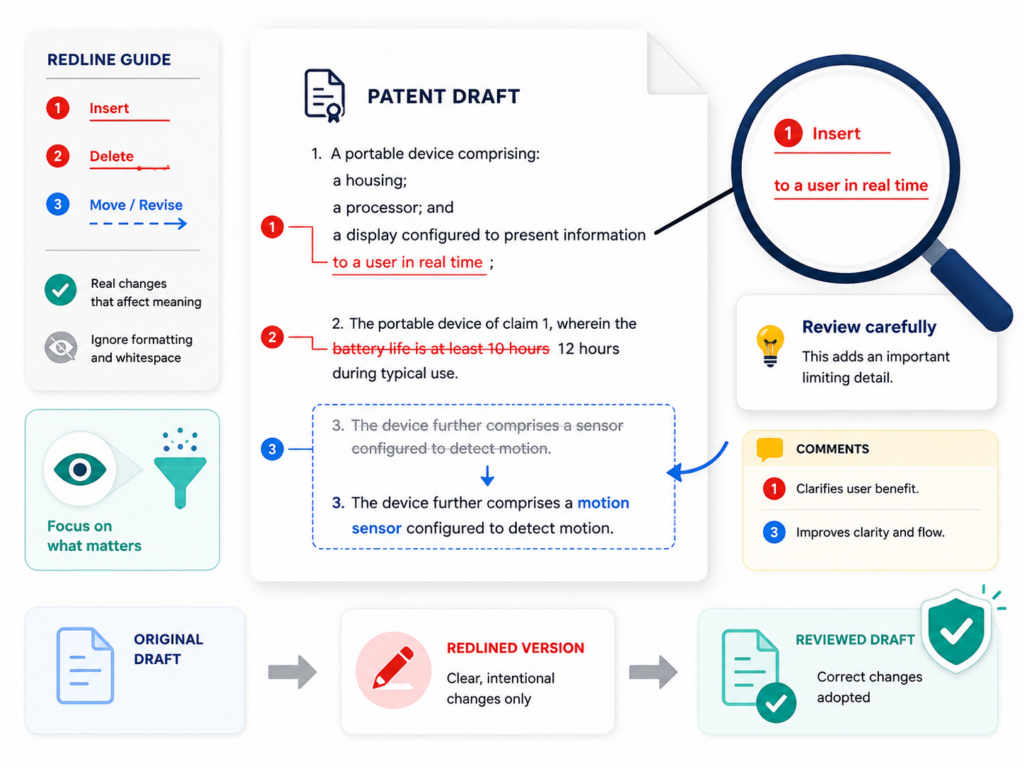
A messy redline can overwhelm reviewers. A weak redline can hide important edits. A redline against the wrong prior version can send the whole team down the wrong path.
Patent draft redlines need care. The point is not just to show edits. The point is to show the right edits to the right person at the right time. A founder may need to see changes to claim scope and business examples.
An engineer may need to see changes to technical steps and figures. An attorney may need to see everything. Each reviewer needs a view that helps them make a good decision.
When redlines are used well, review becomes faster and more accurate. When they are used poorly, they create more confusion than clarity.
A Redline Is Only Useful If The Baseline Is Clear
A redline compares one version to another. That means the baseline matters. If no one knows what the redline is compared against, the redline loses value.
The reviewer may think they are seeing all changes since their last review, but they may only be seeing changes since a different draft. This can lead to missed edits.
Every redline should make clear what version it compares from and what version it compares to. This does not need to be complicated. It just needs to be visible.
The reviewer should know whether they are looking at changes since the last technical review, since attorney review, or since the pre-filing draft.
This is especially important when many rounds of edits happen quickly. A redline from version 5 to version 6 may not show changes that happened between version 3 and version 5.
If the reviewer last saw version 3, they need a broader comparison. Otherwise, they may approve a draft without seeing all the changes that matter to them.
Too Much Redline Noise Can Hide Real Risk
Some redlines are hard to read because they show every tiny formatting change.
They mark spaces, punctuation, moved paragraphs, and style edits so heavily that the important changes disappear. Reviewers get tired. They skim. They miss the one phrase that actually matters.
A better approach is to create cleaner redlines when possible. If formatting changes are not important, they should not dominate the review.
If the main issue is claim scope, the redline should make claim edits easy to see. If the main issue is technical accuracy, the redline should help engineers find technical edits quickly.
The goal is not to hide changes. The goal is to make meaningful changes easier to review. A redline should support judgment, not bury it.
PowerPatent helps reduce this kind of review chaos by giving teams a more organized way to move from invention capture to draft review with attorney support.
When the process is clearer, redlines become part of a workflow instead of a pile of hard-to-read files. You can explore the process here: https://powerpatent.com/how-it-works
Use Clean Copies For Final Reading
Redlines are great for spotting changes, but they are not always good for final reading. A final patent draft should also be reviewed as a clean copy. This helps the team read it the way it will be filed. It also helps catch issues that redlines can hide.
When people read redlines, they focus on edits. That is useful, but it can make them miss flow. A clean copy shows whether the draft reads clearly from start to finish.
It shows whether terms feel consistent. It shows whether figures and text fit together. It shows whether a paragraph still makes sense after many rounds of changes.
The final review should often include both views. The redline shows what changed. The clean copy shows what the document now is.
Never File From A Redline By Mistake
This sounds obvious, but filing mistakes often come from rushed file handling. A team may have a clean copy and a redline copy in the same folder. Both may have similar names.
Someone may upload the wrong one. This is why final filing files should be clearly named, clearly stored, and separated from review files.
The filing version should be clean unless a specific filing format requires otherwise. It should not include comments, tracked changes, private notes, or unresolved markings. The final filing package should be checked before submission.
A clean final file is not just a formality. It is the end result of the whole version control process. Treat it with care.
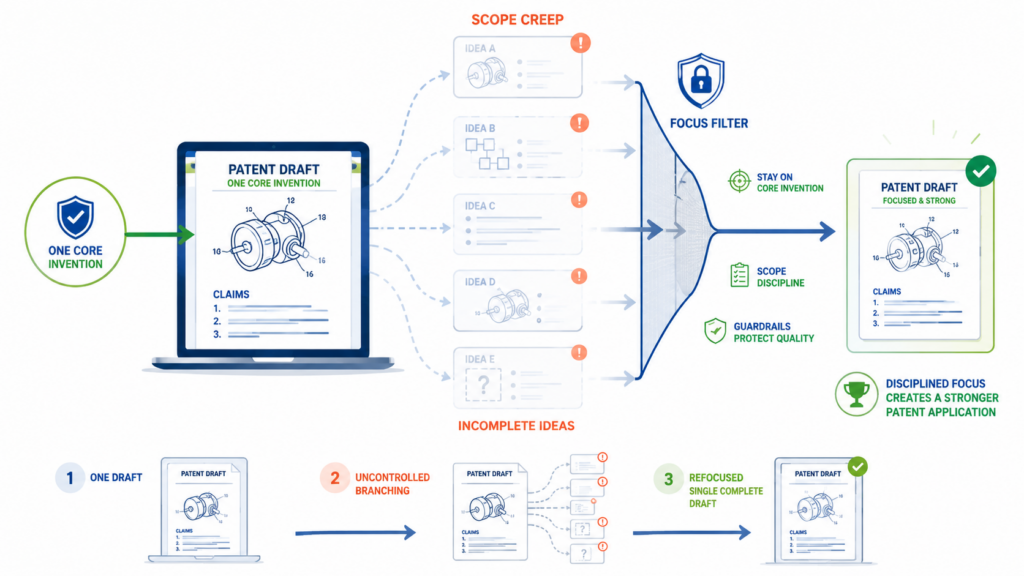
Stop Scope Creep From Turning One Patent Draft Into Five Incomplete Ideas
Patent drafts often grow because the team keeps thinking of more things the invention could cover. This is natural. Good inventions usually have many paths. A machine learning tool may work across several industries.
A hardware system may have many physical designs. A workflow tool may support different users, permissions, and data types. Once people start talking, the idea expands.
This can be good. Broad thinking can make a patent stronger. But it can also create scope creep. Scope creep happens when the draft keeps absorbing new ideas without a clear plan.
The result is a document that tries to cover everything but explains nothing deeply enough. It may become long, messy, and hard to review. It may also delay filing because the team keeps adding more.
Version control helps manage scope creep because it forces the team to decide what belongs in the current draft and what should be saved for later.
Not Every Good Idea Belongs In The Current Filing
A new idea may be valuable and still not belong in the current patent draft. It may be too early. It may be a separate invention.
It may need more technical support. It may belong in a later continuation or another application. The team should not treat every new thought as an automatic addition.
This is where strategy matters. The current filing should have a clear protection goal. It should capture the invention that is ready to file now.
It should include enough variations to support strong protection, but it should not become a storage bin for every future dream.
When a new idea appears during review, the team should decide whether it strengthens the current draft or distracts from it. If it strengthens the same core invention, it may belong.
If it opens a separate path, it may need its own record. If it is not developed enough, it may need more invention capture before being added.
Create A Parking Place For Future Patent Ideas
One of the best ways to stop scope creep is to create a safe parking place for future ideas.
This lets the team preserve good thoughts without forcing them into the current draft. A parked idea is not lost. It is simply not allowed to derail the filing in front of you.
The parking place can include future product paths, alternative designs, new technical problems, customer-specific use cases, and ideas that need more detail. What matters is that the team records them clearly enough to revisit later.
This is powerful for startups because invention does not happen in neat boxes. New ideas come during drafting, demos, customer calls, and engineering work.
A good patent process should catch these ideas, but it should also keep the current filing moving.
PowerPatent is built for this kind of founder-friendly patent work. It helps teams capture inventions and move toward filings without letting good ideas get buried or letting the process become a mess. See how PowerPatent works here: https://powerpatent.com/how-it-works
Use The Core Invention As The Filter
The easiest way to control scope is to keep asking what the core invention is. What problem does it solve? What is the key technical move? What makes it different? What must be described well for the patent to matter?
If a new edit supports that core, it may belong. If it distracts from that core, it may not. This filter keeps the draft strong. It prevents the application from becoming a loose collection of related ideas.
This does not mean the draft should be narrow. A strong patent draft can describe many versions of the invention.
But those versions should connect back to the same core idea. They should feel like branches from one tree, not pieces from five different trees.
Scope Discipline Helps You File Faster
Founders often delay patent filings because they want the draft to cover everything perfectly. But waiting too long can create its own problems. Products launch.
Details become public. Competitors move. The company’s story changes. A draft that never gets filed protects nothing.
Scope discipline helps you move. It lets you say, “This filing covers this invention well. The other ideas will be tracked for later.”
That is a stronger plan than trying to force every idea into one draft and missing the right filing window.
Good version control supports this by recording what was included, what was left out, and why. That record helps future patent work and gives the team confidence that decisions were made on purpose.
Conclusion
A patent draft is too important to manage with guesswork, scattered files, and unclear edits. Good version control keeps the right draft in front of the right people, makes every key change easy to track, protects comments from getting lost, and helps your team file with more confidence.
For founders and engineers, the goal is simple: protect the invention without slowing the company down. When your draft process is clear, your patent work gets faster, cleaner, and stronger. PowerPatent helps you do that with smart software and real attorney oversight. See how it works here: https://powerpatent.com/how-it-works
Leave a Reply