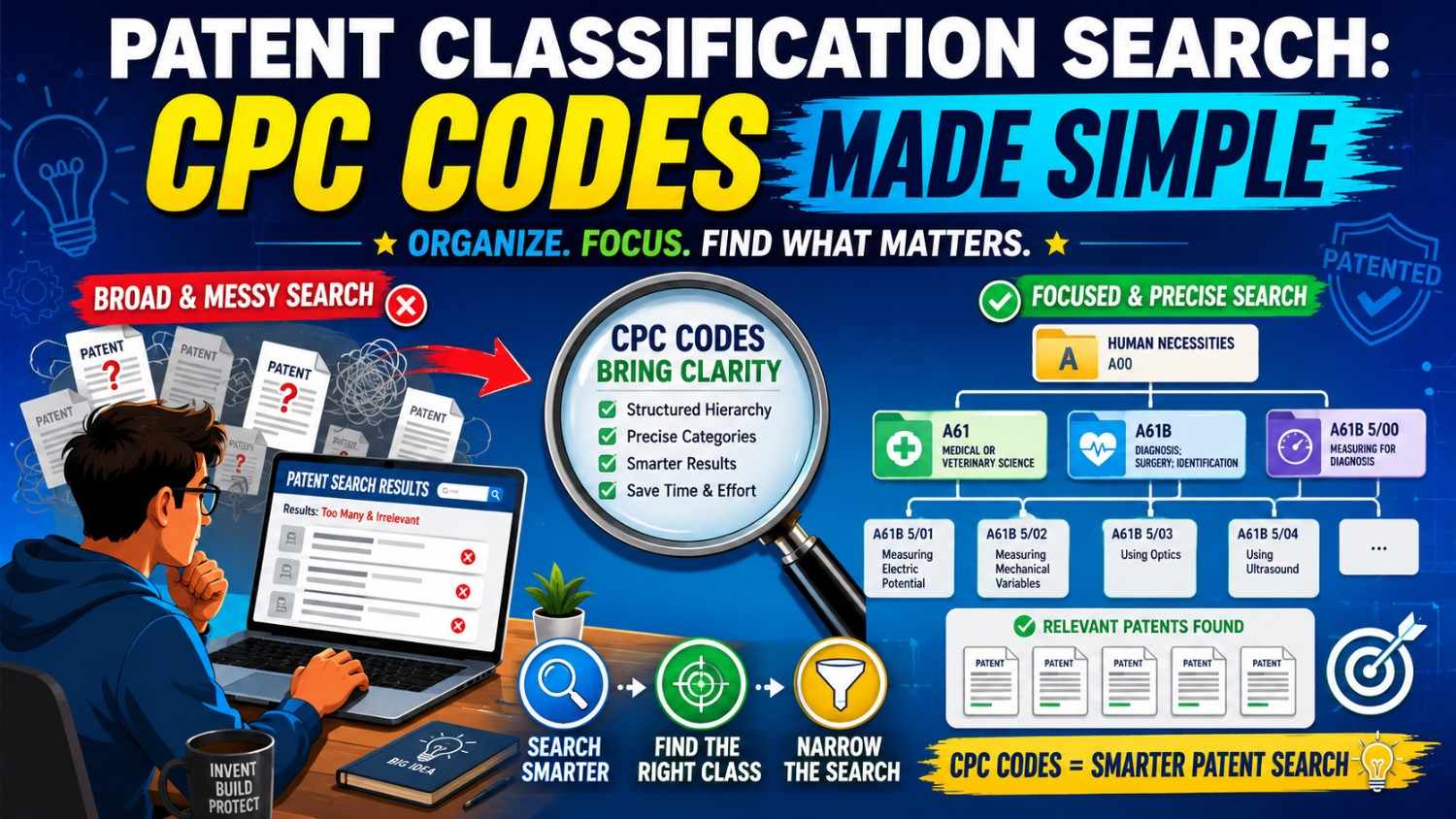
Patent search can feel hard at first. You type in a few words. You get thousands of results. Some look close. Some look far away. Some use words you would never use.
That is where CPC codes help.
CPC codes are like shelf labels for inventions. They help you find patents by what the invention does, not just by the words someone used to describe it. For founders, engineers, and inventors, this can save time, reduce guesswork, and help you see the real patent space around your idea.
And once you understand the basics, CPC search is not scary at all.
PowerPatent helps founders turn technical ideas into stronger patent filings with smart software and real attorney oversight. Explore how it works here: https://powerpatent.com/how-it-works
What Is a Patent Classification Search?
A patent classification search is a way to search patents by technology group.
Instead of searching only for words like “robot arm,” “AI model,” “battery cooling,” or “medical sensor,” you search by a code that patent offices use to group similar inventions.
This matters because inventors do not always use the same words.
One patent may say “robot arm.”
Another may say “manipulator.”
Another may say “automated gripping system.”
Another may say “end effector control device.”
If you search only “robot arm,” you may miss many patents that matter. A classification search helps you find them because the patents may share the same CPC code, even when the wording is different.
CPC stands for Cooperative Patent Classification. It is a patent classification system managed by the United States Patent and Trademark Office and the European Patent Office. It is used to organize technical documents, especially patent documents, by technology area.
In plain English, CPC codes help answer this question:
Where does this invention belong in the patent world?
That one question can make your patent search far more useful.
Why Founders Should Care About CPC Codes
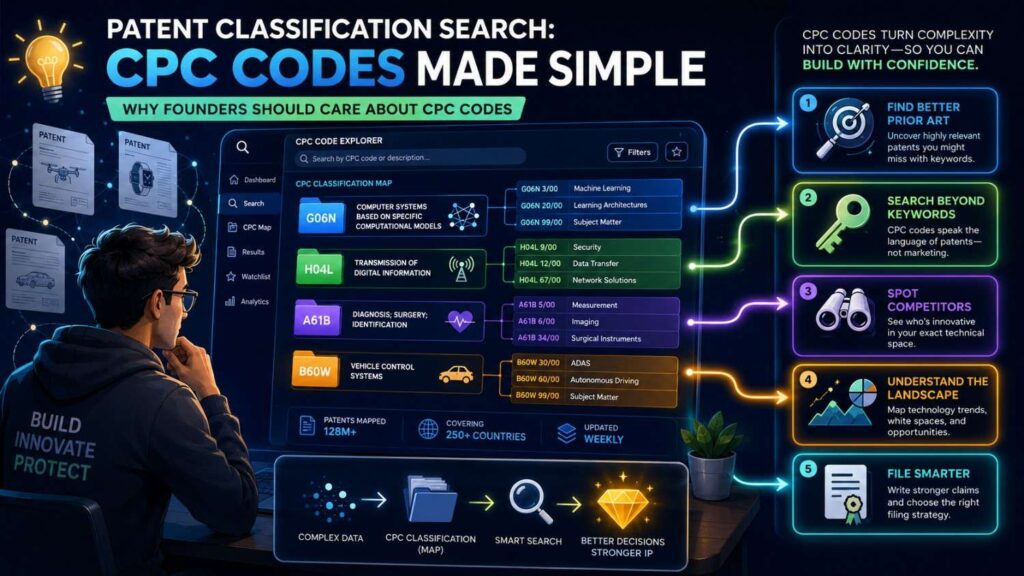
Most startup teams are busy. You are building, testing, hiring, selling, raising money, and trying to stay alive. Patent search can feel like a side quest.
But it is not a small thing.
A better patent search can help you see what has already been filed. It can help you spot crowded areas. It can help you find stronger ways to describe your invention. It can also help you avoid wasting time on claims that may be too broad or too close to old work.
This does not mean you need to become a patent lawyer.
It means you should know enough to ask better questions.
CPC codes help with that.
They give you a map. Not a perfect map. Not a magic map. But a real starting point.
When you know the CPC codes around your invention, you can search smarter. You can look at patents in the right technical area. You can see who is filing. You can see how others describe similar systems. You can see where your invention may be different.
That is powerful.
It gives you more control.
It also makes conversations with patent counsel much more productive. Instead of saying, “I searched Google and found some stuff,” you can say, “I found these CPC areas and these patents seem close, but our system differs here.”
That is a much stronger starting point.
PowerPatent was built for this kind of founder. The goal is not to slow you down with legal busywork. The goal is to help you capture what makes your invention special, move faster, and get real attorney support when it counts. See how PowerPatent works here: https://powerpatent.com/how-it-works
CPC Codes Are Like an Address for Technology
Think of CPC codes like an address.
A home address starts broad and gets more specific.
Country.
State.
City.
Street.
House number.
CPC codes work in a similar way.
They start with a broad technology section. Then they move into a class. Then a subclass. Then a group. Then a subgroup.
The deeper you go, the more specific the code gets.
The CPC system is divided into sections A through H, plus Y. These sections are then split into classes, subclasses, groups, and subgroups. The European Patent Office describes CPC as an extension of the International Patent Classification system, with about 250,000 classification entries.
Here is a simple way to see it.
A CPC code may look like this:
G06N 20/00
At first, that looks like random letters and numbers.
But it has structure.
The letter at the front points to a broad section. In this case, G means Physics.
The next two numbers create a class. G06 is a computing-related class.
The next letter creates a subclass. G06N relates to certain computer systems based on specific computational models.
The numbers after that move into groups and subgroups.
You do not need to memorize this.
You only need to know that the code gets more specific as it goes.
Once you understand that, CPC codes start to feel less like a secret language and more like a filing system.
Why Keyword Search Alone Is Often Weak
Keyword search feels natural.
You type the words you use every day.
You search “AI fraud detection,” “battery thermal management,” “drone navigation,” or “smart insulin pump.”
That is a good start.
But keyword search has problems.
People use different words for the same thing. Patent writers often use broad words. Some use older words. Some avoid common product terms. Some describe the invention in a strange way because they want broad coverage.
A founder may say “AI assistant.”
A patent may say “natural language processing interface.”
A product team may say “wearable patch.”
A patent may say “body-mounted sensing apparatus.”
An engineer may say “self-driving warehouse cart.”
A patent may say “autonomous material transport vehicle.”
All of these can point to the same general area.
If you only search your own words, you may miss the words used in patents. CPC codes help you jump past some of that language mismatch.
That does not mean keywords are bad.
The best searches often use both.
You start with keywords to find a few close patents. Then you look at the CPC codes on those patents. Then you search those CPC codes to find more patents. Then you refine again.
That loop is where the real value lives.
The Simple CPC Search Loop
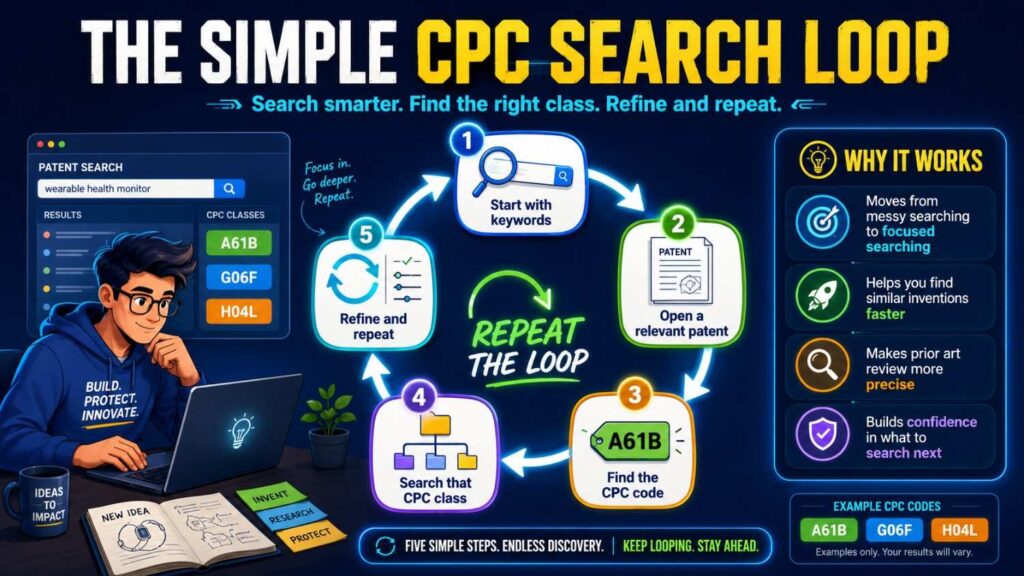
A strong CPC search often follows a simple pattern.
Start with the invention.
Search plain words.
Find close patents.
Look at their CPC codes.
Search those codes.
Review the results.
Adjust your search.
Repeat.
That is it.
The hard part is not the process. The hard part is staying calm and not getting buried in too many results.
For a founder, the goal is not to read every patent ever filed. The goal is to learn enough to understand the space around your invention.
You want to know what is close.
You want to know what is old.
You want to know what others have tried.
You want to know where your idea may stand apart.
This is where PowerPatent can help. Instead of forcing you to manage the whole patent process alone, PowerPatent combines smart software with real attorney review so your technical details do not get lost. Learn more here: https://powerpatent.com/how-it-works
What the Main CPC Sections Mean
The CPC system has broad sections. These are the top level of the system.
The official CPC sections include areas such as Human Necessities, Performing Operations and Transporting, Chemistry and Metallurgy, Textiles and Paper, Fixed Constructions, Mechanical Engineering, Physics, Electricity, and Y for newer or cross-section technologies.
Here is what that means in simple language.
Section A covers many things tied to human needs. This can include health, food, agriculture, personal items, and medical tools.
Section B covers making things, shaping things, printing, vehicles, transport, and physical operations.
Section C covers chemistry, materials, and metals.
Section D covers textiles and paper.
Section E covers buildings, drilling, mining, locks, doors, and similar areas.
Section F covers machines, engines, heating, lighting, pumps, and related systems.
Section G covers physics, measuring, computing, control, data processing, and many software-related inventions.
Section H covers electricity, communication, circuits, power systems, and many electronics-related inventions.
Section Y is special. It is used for newer or cross-cutting technologies, including technologies that span more than one area.
For many deep tech startups, you may spend a lot of time in G, H, B, C, or Y.
If you work on AI, robotics, chips, batteries, medical devices, climate tech, biotech tools, sensors, or advanced materials, your patents may sit across more than one section.
That is normal.
Modern inventions often touch many technical areas.
An AI medical device may involve G for computing, A for medical use, H for communication, and Y for certain cross-cutting technology tags.
A battery startup may involve H for electric power, C for chemistry, and Y for climate-related technology tags.
A robotics company may involve B for handling or transport, G for control, and H for electronics.
This is why CPC search is helpful. It lets you see the invention from more than one angle.
Do Not Hunt for One Perfect Code
One big mistake is thinking your invention has one perfect CPC code.
It may not.
A patent can have several CPC codes. Some point to the main invention. Others point to extra details.
This matters.
Your invention may have a main technical heart, but it may also include sensors, software, data processing, controls, user interfaces, machine learning, mechanical parts, materials, or communication links.
Each part may have its own search path.
For example, imagine your startup builds a drone that uses AI to inspect power lines.
You might search drone hardware.
You might search image processing.
You might search power line inspection.
You might search autonomous navigation.
You might search fault detection.
You might search AI model training.
That is not overkill. That is how you avoid blind spots.
The best CPC search is not about finding one code and stopping.
It is about building a small set of useful codes that help you search from different angles.
How to Read a CPC Code Without Feeling Lost
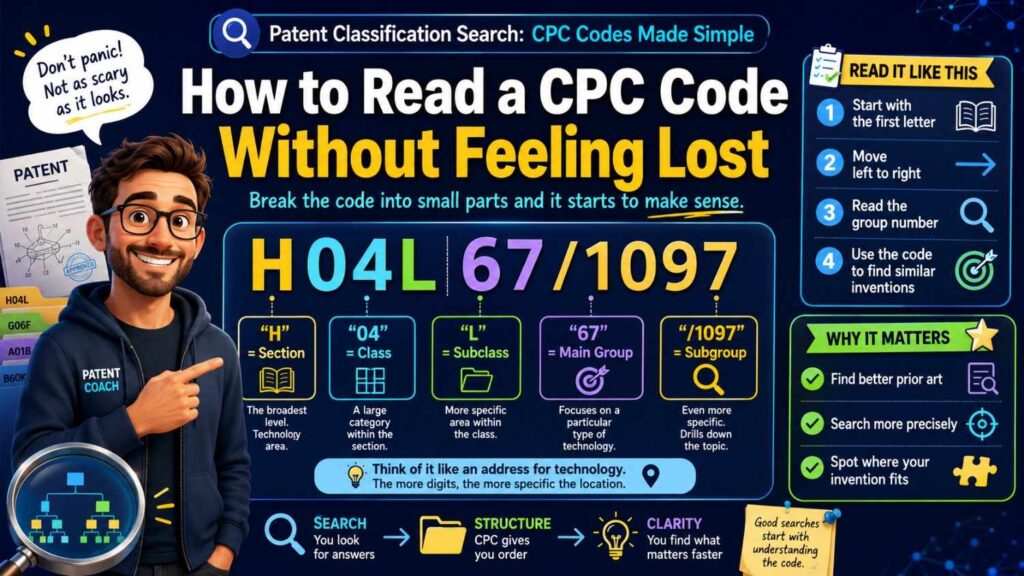
Let’s break down a CPC code in a plain way.
Take this example:
H04L 9/40
This is a real-looking CPC format often tied to secure communication areas.
You can read it like this.
H is the broad section. It means Electricity.
H04 is a class within that section. It points to electric communication technique.
H04L is a subclass. It points to transmission of digital information.
9/40 is a group or subgroup that narrows the subject.
Again, you do not need to memorize every piece.
You just need to know that each part narrows the field.
The first letter is broad.
The full code is specific.
When you search, a broader code gives more results. A narrower code gives fewer results.
If your results are too broad, move deeper.
If your results are too narrow, move up.
That simple move can save hours.
Broad Codes vs. Narrow Codes
A broad CPC code is like searching a whole neighborhood.
A narrow CPC code is like searching one street.
Both can be useful.
A broad code helps when you are just learning the space. You may see major players, common terms, and big patent families. But you may get too many results.
A narrow code helps when you already know the right area. It can show very close patents. But if it is too narrow, you may miss related inventions nearby.
Good searchers move between broad and narrow.
They do not stay stuck.
If you search a narrow code and find only five results, you may need to go one level higher.
If you search a broad code and find 50,000 results, you need keywords, date limits, assignees, or narrower groups.
That back-and-forth is normal.
Do not treat it as failure.
It is how patent search works.
How CPC Search Helps You Find Better Words
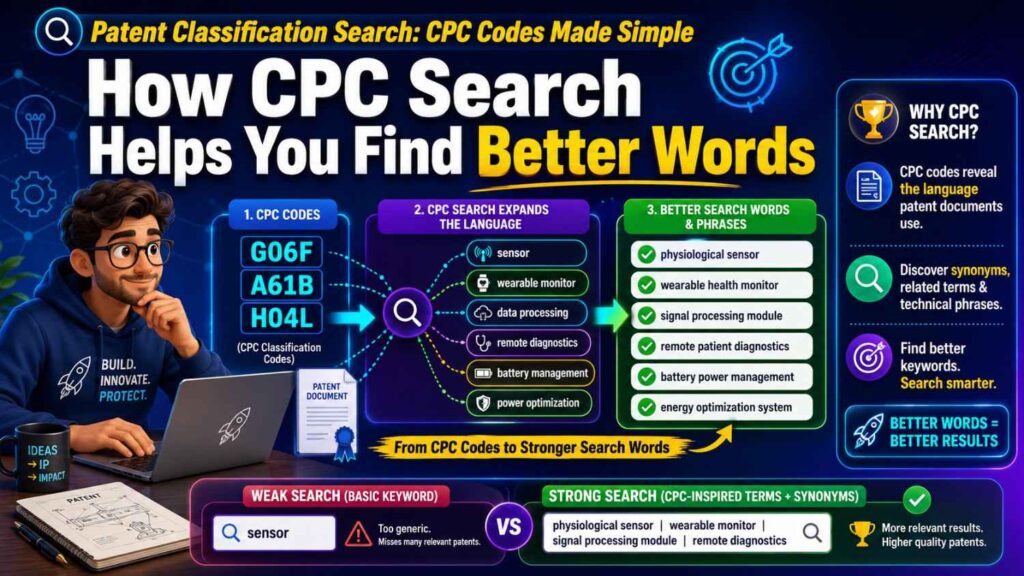
One of the hidden gifts of CPC search is vocabulary.
You may think you know the right words for your invention. But patents often use different terms.
When you search within a CPC code, you start to see repeated words. These words can teach you how the field talks.
Maybe you say “AI quality check.”
Patents may say “defect detection,” “visual inspection,” “anomaly detection,” “classification model,” or “machine vision.”
Maybe you say “battery health score.”
Patents may say “state of health,” “remaining useful life,” “degradation estimation,” or “charge capacity prediction.”
Maybe you say “robot hand.”
Patents may say “end effector,” “gripper,” “manipulator,” or “actuator assembly.”
These words matter.
They help you search better.
They also help you explain your invention in a way that maps to the patent world while still keeping your own story clear.
This is one reason PowerPatent focuses on turning technical details into strong patent material. Founders should not have to guess which words matter. The process should help pull out the right details and shape them into a stronger filing. You can see the workflow here: https://powerpatent.com/how-it-works
CPC Search Is Not Just for Patent Lawyers
Many founders think patent searching is only for lawyers.
Lawyers are important. Patent attorneys know how to judge legal issues, write claims, and guide filing strategy.
But founders still have a key role.
You know the invention better than anyone.
You know why it works.
You know what was hard.
You know what tradeoffs you made.
You know what competitors are building.
You know the product roadmap.
A CPC search can help you bring better raw material into the patent process.
You are not trying to replace counsel.
You are trying to give counsel better signal.
That can lead to better questions, better drafts, and fewer missed details.
When You Should Use CPC Search
CPC search is useful at many points.
It helps before you file a patent. It helps when you are shaping a new product. It helps before you pitch investors. It helps when you want to understand a competitor. It helps when you are deciding which inventions deserve patent attention first.
For a startup, the best time is often before you file.
You do not need a perfect search before every idea. But for core technology, a CPC search can help you see the landscape.
It can show whether the area is crowded.
It can show where your work may be different.
It can show whether your invention is more about the model, the data pipeline, the hardware, the control method, the interface, the manufacturing method, or the system design.
That clarity is useful.
It can change how you file.
It can change what you claim.
It can even change what you build next.
What CPC Search Can and Cannot Do
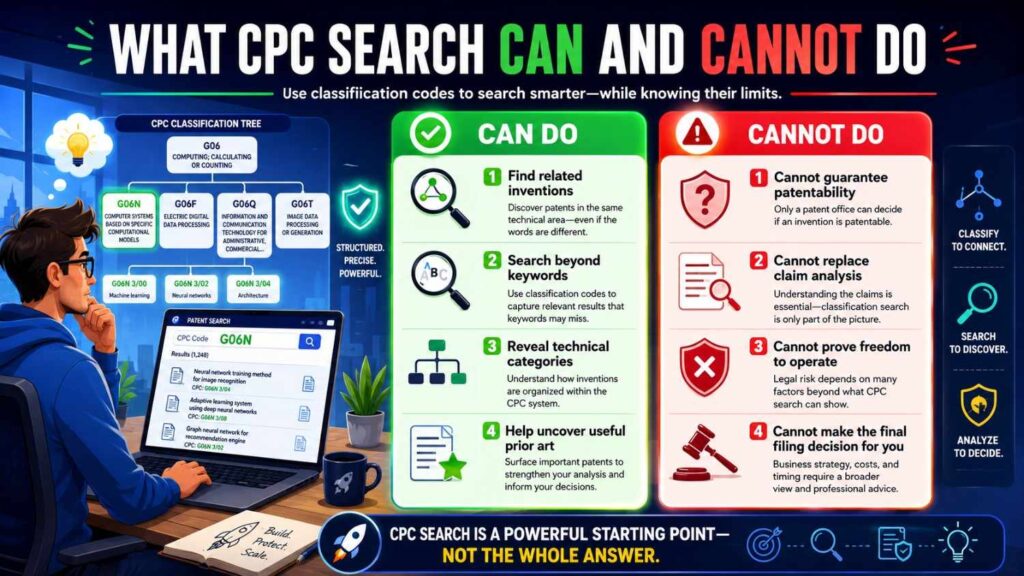
CPC search is powerful, but it is not magic.
It can help you find related patents.
It can help you find better terms.
It can help you see technical groupings.
It can help you understand crowded spaces.
But it cannot tell you by itself whether your invention is patentable.
It cannot replace a legal opinion.
It cannot promise that you found every close reference.
It cannot tell you the best claim strategy.
That is why founder-led search and attorney oversight work well together.
You can use CPC search to gather insight. Then a patent professional can help turn that insight into a smart filing plan.
PowerPatent is built around this idea: smart software to speed up the work, plus real patent attorneys to review and guide the result. Learn more here: https://powerpatent.com/how-it-works
Start With the Problem, Not the Code
Before you search CPC codes, write down the problem your invention solves.
Not the product name.
Not the brand.
Not the pitch line.
The actual problem.
For example:
“Our system predicts battery failure before it happens.”
“Our robot picks soft items without crushing them.”
“Our model detects fraud in real time with less labeled data.”
“Our sensor measures a health signal without drawing blood.”
“Our chip reduces power use during edge AI inference.”
This problem statement gives your search a center.
Then write down what makes your solution different.
Maybe it uses a new data flow.
Maybe it uses a new material.
Maybe it uses a new control loop.
Maybe it uses a new training step.
Maybe it combines sensors in a new way.
Maybe it changes the order of steps.
Maybe it does the same job with less compute, less power, less heat, less cost, or less manual work.
These details matter more than the broad idea.
Many patents are won or lost in the details.
A CPC search helps you find the field. But your invention’s edge often lives in the specific way you solve the problem.
Build a Simple Search Note
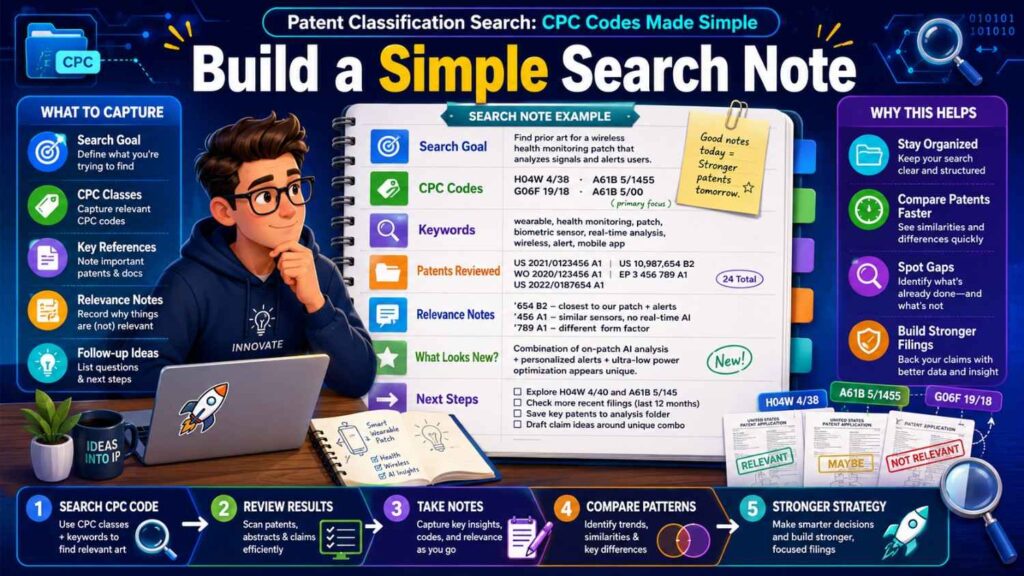
Do not search in a messy way.
Open a simple document.
Write your invention in one sentence.
Write the main problem.
Write the main technical parts.
Write the plain keywords you would use.
Write the patent words you find later.
Write the CPC codes that appear often.
Write the patents that seem close.
Write why each close patent is different from your work.
This does not need to be fancy.
The goal is to avoid losing your thinking.
Patent search creates many tabs and many results. Without notes, everything blends together.
A simple note keeps you focused.
It also gives your patent team something useful.
Instead of sending a pile of links, you send a clear map of what you found and why it matters.
That is far more helpful.
How to Find CPC Codes From a Known Patent
One easy way to find CPC codes is to start with a patent you already know is close.
Maybe you found it through Google Patents, Espacenet, the USPTO search tools, or a competitor search.
Open the patent page.
Look for classification information.
Find the CPC codes.
Look at the first few codes. The first listed code may be important, but do not assume it is the only one that matters.
Copy the codes into your notes.
Then click or search those codes.
Now you are no longer searching only by words. You are searching the technology shelf where that patent sits.
This is often the fastest way to move from a weak keyword search to a stronger classification search.
How to Find CPC Codes When You Have No Patent Yet
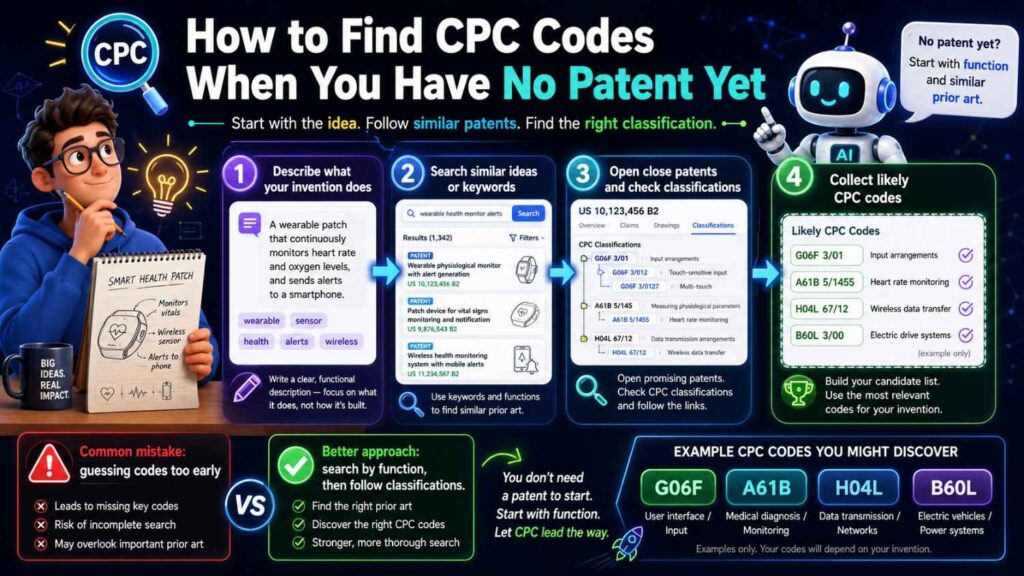
Sometimes you do not know any close patent.
That is okay.
Start with keyword search.
Search the plain words.
Then search synonyms.
Then search the technical words your field uses.
Find a few patents that seem close enough.
They do not need to be exact.
Open them and collect their CPC codes.
You may notice the same codes appear again and again.
Those repeated codes are clues.
They may point to the right search area.
Then search those codes directly.
As you review results, keep only the codes that bring useful patents.
Some codes may be too broad.
Some may be off target.
Some may point to a side feature that is not central.
That is fine.
Search is a filtering process.
Use CPC Codes With Keywords
A CPC code alone can still produce too many results.
That is why you should combine CPC codes with keywords.
For example, if you are searching an AI battery invention, a CPC code may point to machine learning or battery systems, but you may still need terms like “state of health,” “degradation,” “charge,” “thermal,” “prediction,” or “remaining useful life.”
If you are searching robotic gripping, you may combine a robotics CPC area with terms like “soft,” “gripper,” “force,” “tactile,” “deformable,” “suction,” or “end effector.”
If you are searching medical sensing, you may combine a medical device CPC area with terms like “wearable,” “non-invasive,” “optical,” “continuous,” “glucose,” “signal,” or “calibration.”
This combination gives you control.
The CPC code keeps you in the right field.
The keyword narrows the results to the part you care about.
Search the Invention From Several Angles
Most strong inventions have more than one angle.
A simple product description may hide several patentable pieces.
Take an AI-powered warehouse robot.
You could search the navigation system.
You could search the obstacle detection method.
You could search the gripping tool.
You could search the battery charging process.
You could search the fleet control system.
You could search the human safety interface.
You could search the model training method.
Each angle may have different CPC codes.
If you search only “warehouse robot,” you may miss the most valuable part.
Maybe the true invention is not the robot. Maybe it is the control method that lets many robots avoid jams. Or the sensor fusion process that works in poor light. Or the gripper that handles odd shapes. Or the charging system that reduces downtime.
This is where founders can add huge value.
You know where the real breakthrough happened.
Do not search only the product.
Search the breakthrough.
Watch for Competitor Codes
CPC search is also useful for watching competitors.
If a competitor has patents, look at their CPC codes.
Do they cluster in certain areas?
Are they filing around hardware, software, data processing, materials, or use cases?
Are their newer patents moving into a new CPC area?
This can give you clues about where they may be investing.
It can also help you avoid being surprised.
For example, if a climate hardware company starts filing heavily in control software codes, that may suggest a move toward software-driven optimization.
If a robotics company starts filing in medical device areas, that may suggest a new market.
If a chip company starts filing in edge AI power management codes, that may show where their roadmap is going.
This is not perfect. Patent filings can lag product plans. Some filings never become products. Some companies file defensively.
But CPC patterns can still be useful signals.
CPC Search for AI Startups
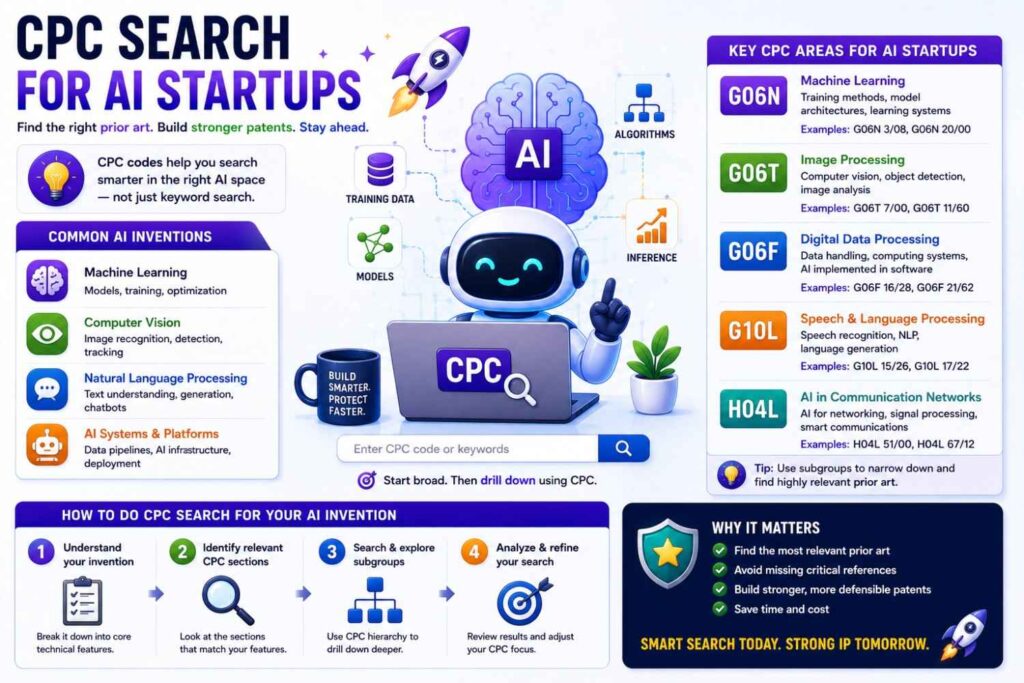
AI startups often struggle with patent search because the words are broad.
“Machine learning” appears everywhere.
“Neural network” appears everywhere.
“Model training” appears everywhere.
So you need to be more specific.
Ask what the AI does.
Does it classify images?
Does it predict failure?
Does it detect fraud?
Does it control a machine?
Does it generate text?
Does it compress data?
Does it improve chip performance?
Does it tune a chemical process?
Does it guide a medical decision?
Then ask what is new.
Is the new part the model structure?
The training data?
The way labels are created?
The way the model is updated?
The way output is used in a real-world system?
The way privacy is protected?
The way compute is reduced?
The way the model works on-device?
For AI patents, CPC search may include general computing areas plus the applied field.
That means an AI medical tool may need both AI-related codes and medical-related codes.
An AI battery tool may need both computing codes and battery codes.
An AI chip tool may need computing, circuit, and power-related codes.
The mistake is searching AI alone.
In patents, the strongest story is often not “we use AI.”
It is “we use this specific AI process to solve this specific technical problem in this specific system.”
That is what your search should reflect.
CPC Search for Robotics Startups
Robotics patents can span many areas.
A robot is not one thing. It is a bundle of hardware, software, sensing, control, motion, safety, power, and task design.
When searching robotics, start with the job the robot performs.
Does it pick items?
Inspect equipment?
Move through a warehouse?
Assist surgery?
Clean surfaces?
Harvest crops?
Work near people?
Then search the key technical part.
Is your invention about gripping?
Path planning?
Force control?
Vision?
Sensor fusion?
Human-robot interaction?
Fleet management?
Safety zones?
Actuator design?
Calibration?
Each part may lead to a different CPC code.
Robotics search gets much better when you stop searching “robot” and start searching the exact action.
A patent may not say “robot” in the title. It may say “automated handling apparatus” or “manipulator control method.”
CPC codes help uncover those patents.
CPC Search for Climate Tech Startups
Climate tech is broad.
It can include batteries, carbon capture, solar, wind, grid software, heat pumps, hydrogen, materials, recycling, fuels, sensors, and industrial systems.
Many climate inventions also span old and new fields.
For example, a carbon capture startup may involve chemistry, materials, process control, sensors, and plant design.
A battery startup may involve cell chemistry, pack design, thermal control, battery management software, manufacturing, and recycling.
A grid software startup may involve forecasting, power control, communication, and market systems.
CPC search helps split the invention into parts.
Do not search “climate tech.”
Search the actual technical action.
Capturing carbon.
Storing energy.
Managing heat.
Predicting demand.
Separating gases.
Recycling materials.
Controlling power flow.
Reducing loss.
Improving charge speed.
Then use CPC codes to find the patent areas tied to those actions.
CPC Search for Medical Device Startups
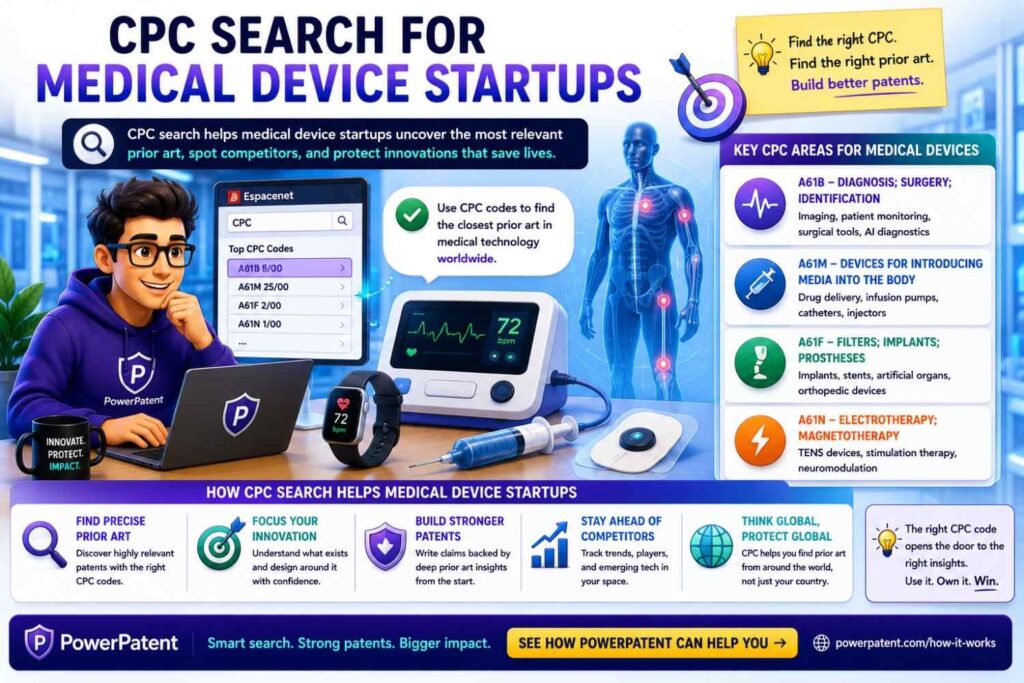
Medical device search needs care.
Many terms overlap, and similar tools may be used for different body parts, signals, or treatment steps.
Start with the function.
Does the device sense, deliver, image, guide, monitor, stimulate, cut, seal, filter, or support?
Then define the body area or condition.
Then define what is new.
Is it the sensor?
The placement?
The material?
The signal processing?
The calibration?
The dose control?
The user interface?
The remote monitoring flow?
The safety check?
A medical device can sit in medical CPC areas, but it may also involve electronics, optics, software, wireless communication, materials, or AI.
This is another place where one code is rarely enough.
CPC Search for Software Startups
Software patent search can be tricky because software words are often abstract.
The best approach is to tie the software to a technical result.
Do not search only “platform,” “dashboard,” “workflow,” or “automation.”
Search what the software actually changes.
Does it reduce network traffic?
Improve data security?
Control a machine?
Detect an error?
Compress data?
Allocate compute?
Improve database speed?
Protect privacy?
Train a model with less data?
Reduce power use?
Improve signal quality?
Coordinate devices?
Then search CPC codes that relate to that technical result.
Software patents are not just about screens. They are often about data flow, control, security, speed, scale, compute, or interaction with physical systems.
If your startup has a software invention, your patent search should focus on the technical engine, not the marketing layer.
What to Do When Results Are Too Broad
Sometimes a CPC search gives too many results.
This happens all the time.
Do not panic.
Add keywords.
Use more specific CPC subgroups.
Limit by date if you are studying recent activity.
Search within titles, abstracts, or claims depending on the tool.
Add a second concept.
Look for repeated assignees.
Focus on patents with drawings that look close.
Open the most relevant results and inspect their CPC codes.
You are trying to move from noise to signal.
For example, if a code gives 30,000 results, search that code with a key technical term.
If that gives 2,000 results, add another term.
If that gives 200 results, start reviewing.
The goal is not to make results tiny. The goal is to make them useful.
What to Do When Results Are Too Narrow
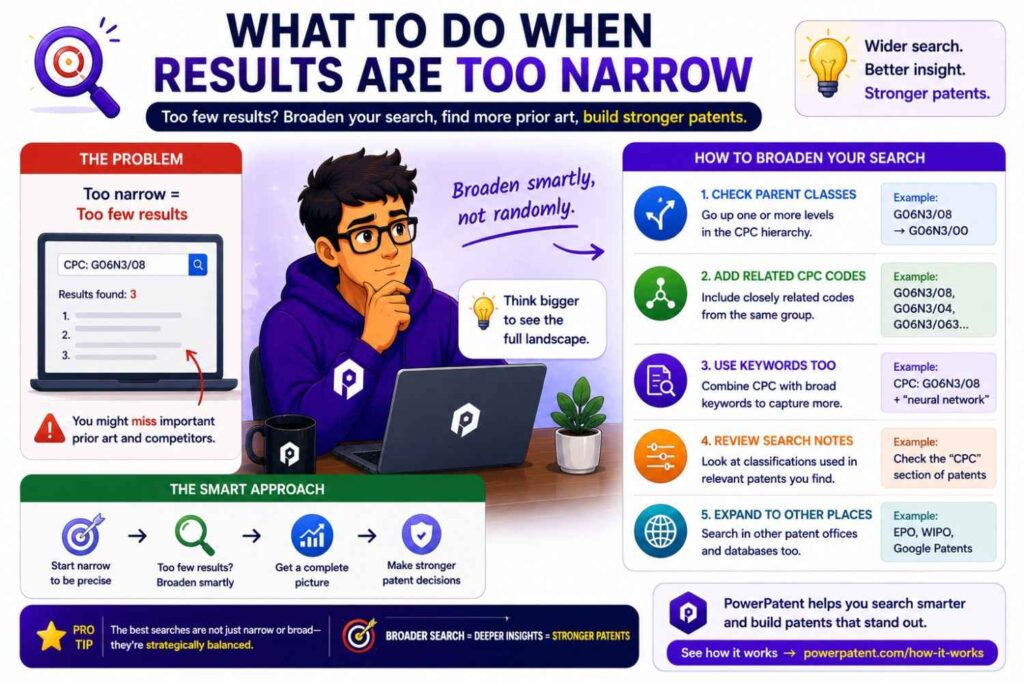
Sometimes a search gives almost nothing.
That can mean a few things.
Your keywords may be too specific.
Your CPC code may be too narrow.
The field may use different words.
Your invention may be newer than the search language.
You may be searching the wrong technical angle.
When this happens, go up one level in the CPC hierarchy.
Remove one keyword.
Try synonyms.
Search the problem instead of the product.
Search a known competitor.
Search an older version of the technology.
Search the applied field and the core method separately.
For example, if “AI-guided soft fruit harvesting gripper” gives little, search “harvesting gripper,” “soft gripper,” “end effector,” “agricultural robot,” and relevant CPC codes for gripping and harvesting.
You are widening the net without losing the core idea.
Read the Drawings First
Patent text can be dense.
Drawings help.
When you open a patent from a CPC search, look at the drawings first.
Do they show a system like yours?
Do they show the same parts?
Do they show a similar flow?
Do they show a similar device layout?
Do they show a process diagram that feels close?
Drawings can help you decide whether to read further.
Then read the abstract.
Then read the independent claims.
Then read the background and detailed description if it still looks important.
This saves time.
You do not need to read every patent from top to bottom.
You need a fast review method.
Learn to Spot the Main Claim
The claims define the legal scope of a patent.
For search purposes, you do not need to become a claim expert, but you should learn to spot the independent claims.
Independent claims often start with phrases like “A system,” “A method,” “An apparatus,” or “A computer-readable medium.”
Read the first independent claim slowly.
Ask what parts are required.
Ask what steps are required.
Ask what result is produced.
Ask what seems different from your invention.
This helps you avoid false fear.
Many founders see a patent title that sounds close and panic. But the claims may be much narrower than the title.
A patent called “AI system for battery management” may claim a very specific training process, sensor setup, or charging method.
Your invention may be different.
Do not judge by the title alone.
Track “Close But Different” Patents
When you find a close patent, do not just save the link.
Write why it is close.
Then write why your invention is different.
This is one of the most useful habits in patent search.
For example:
“This patent uses a neural network to predict battery state of health, but it relies on lab cycling data. Our system uses live fleet data and updates the model during real use.”
Or:
“This patent has a soft gripper, but it changes grip pressure based on force sensors only. Our system combines vision, tactile feedback, and item history before contact.”
Or:
“This patent monitors glucose with optical sensing, but it requires a fixed calibration step. Our method updates calibration based on motion and skin contact quality.”
These notes help your patent team understand the edge.
They also help you think clearly about what should be emphasized in the filing.
Use CPC Search to Find White Space
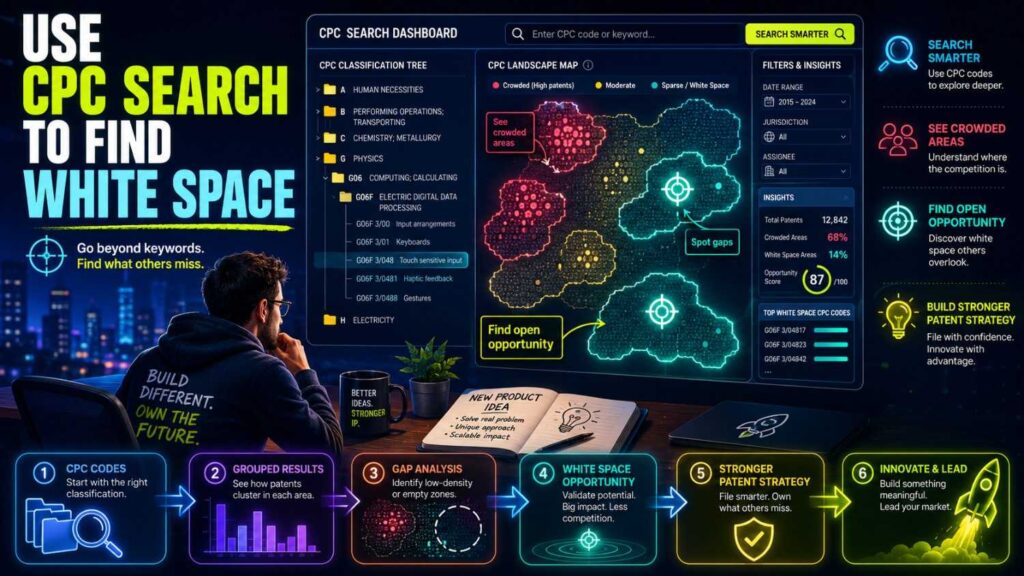
Founders love the phrase “white space.”
But in patent work, white space does not mean “no patents exist.”
It often means there may be room for a more specific, better-framed invention.
CPC search can help you find this room.
You may see that many patents solve the same broad problem but ignore a key constraint.
Maybe they work only in lab settings.
Maybe they need expensive sensors.
Maybe they use too much power.
Maybe they require too much labeled data.
Maybe they fail with edge cases.
Maybe they are not built for real-time use.
Maybe they do not handle noisy inputs.
Maybe they do not scale.
Those gaps are important.
Your invention may live in one of them.
A strong patent filing often explains not just what the invention is, but why the old way was not enough.
CPC search gives you the raw material for that story.
Do Not Copy Patent Language Blindly
Reading patents can help you learn the field’s words.
But do not copy language blindly.
Your invention needs to be described in a way that is true, clear, and tied to your real technical work.
Patent language can be broad. It can also be awkward. Some patents use old terms. Some use strange wording. Some are not well written.
Use patent language to learn.
Do not let it flatten your invention.
Your filing should capture your actual system, your real choices, and your important variations.
That is one reason founder input matters so much. A generic patent draft can miss the best parts. A strong draft starts with real technical detail.
PowerPatent helps collect that detail and turn it into a patent-ready package with attorney oversight. See the process here: https://powerpatent.com/how-it-works
Search by Assignee Inside a CPC Area
An assignee is usually the owner of a patent or application.
Searching by assignee inside a CPC area can be useful.
For example, you can look at a known company and see which CPC areas they file in.
You can also search a CPC code and see which companies appear often.
This can help you understand the market.
If the same five companies dominate a CPC area, the space may be crowded.
If universities appear often, the field may be research-heavy.
If startups appear in recent filings, the area may be heating up.
If large companies are moving into a new code, that may show strategic interest.
This does not tell you everything, but it gives useful context.
Watch Filing Dates
Patent search is not only about what exists. It is also about when things were filed.
Older patents can show the base technology.
Newer applications can show where the field is moving.
If you only read old patents, you may miss current trends.
If you only read new applications, you may miss core prior art.
Use both.
For startup planning, recent filings can be especially useful. They can reveal where competitors are investing now.
But older patents still matter because they may disclose key ideas that affect what is new.
CPC search helps you move through time inside a technical area.
Use CPC Search Before Drafting a Patent
Before drafting, CPC search can help you shape the invention story.
It can show common problems in the field.
It can show common solutions.
It can show repeated claim patterns.
It can show terms that examiners may expect.
It can show where your idea may need sharper detail.
For example, if every close patent already says “machine learning model predicts failure,” your filing should go deeper.
What kind of input data?
What preprocessing?
What model update?
What feedback loop?
What technical result?
What real-world constraint?
What is different from past systems?
A good patent filing does not just say “we use AI.” It explains the specific technical way the invention works.
Use CPC Search After Drafting Too
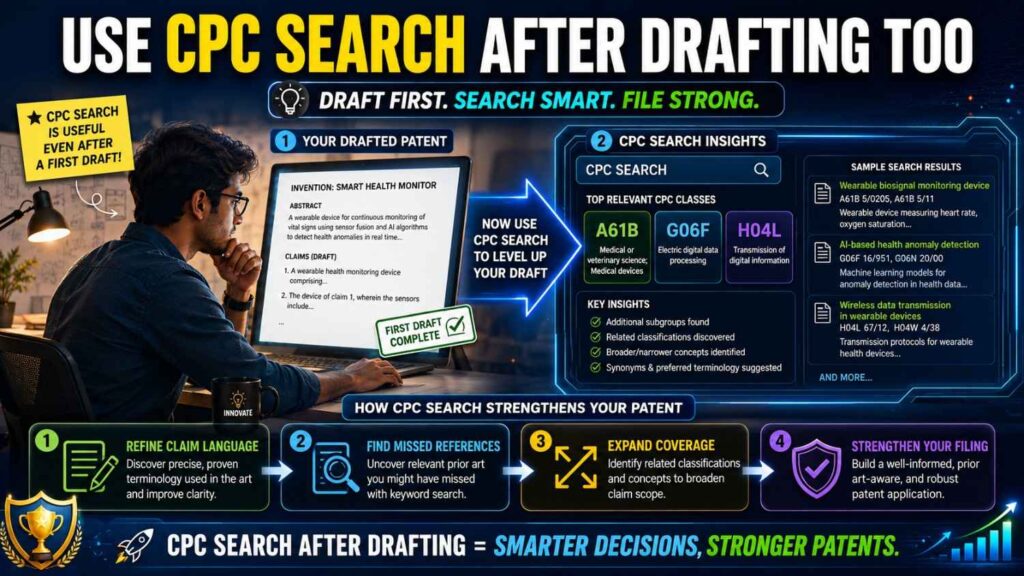
CPC search is not only a pre-draft tool.
After a draft exists, it can help check whether the draft tells the right story.
Do the claims line up with the real technical area?
Do the examples cover the right variations?
Are key terms missing?
Are there close patents that suggest a need to clarify the difference?
Are there related fields that should be mentioned?
This is where attorney review matters.
A founder may spot technical gaps. An attorney can decide how to address them safely in the patent filing.
Common CPC Search Mistake: Stopping Too Early
The first useful CPC code is not always the best one.
Many people stop as soon as they find a few close patents.
That can be risky.
A better approach is to search until patterns repeat.
When the same patents, companies, terms, and CPC codes keep showing up, you are likely getting a better view.
You may still miss things. No search is perfect.
But pattern repetition is a good sign.
It means your search is starting to stabilize.
Common CPC Search Mistake: Searching the Product, Not the Invention
A product may contain many inventions.
Your patent search should focus on the invention.
Imagine your startup makes a smart ring.
The product is a ring.
But the invention may be a sensor layout, a low-power signal process, a health metric, a charging system, a temperature correction method, a motion filter, or a user feedback loop.
If you search “smart ring,” you may find product-level patents.
But you may miss the core technical area.
Search the invention inside the product.
That is where patent value often lives.
Common CPC Search Mistake: Ignoring Adjacent Fields
Some of the closest prior art may come from a different field.
A sensor method used in cars may apply to medical devices.
A battery cooling method used in aerospace may apply to electric bikes.
A computer vision method used in factories may apply to farming.
A gripper used in food handling may apply to warehouse logistics.
CPC codes can help you find these adjacent fields.
Do not search only your market.
Search the technical function.
Patents care about technical ideas, not just business categories.
Common CPC Search Mistake: Treating CPC Codes as Final Truth
CPC codes are useful, but they are not perfect.
A patent may be classified in a way you did not expect.
A newer application may not have all useful classification data right away.
A key reference may sit in a neighboring code.
A code may cover more than you think.
That is why CPC search should be combined with keyword search, assignee search, citation search, and expert review.
Use CPC codes as a map.
Do not treat them as the whole territory.
How CPC Search Works With Citation Search
Citation search means looking at patents that cite a patent, and patents cited by that patent.
This pairs well with CPC search.
CPC search shows patents in the same technology area.
Citation search shows patents that are connected by patent examination or applicant references.
If you find one very close patent, look at its citations.
Backward citations can show older work.
Forward citations can show newer work that built on it.
Then check the CPC codes of those cited patents.
You may discover related codes you missed.
This is a strong way to expand your search.
How CPC Search Helps With Investor Readiness
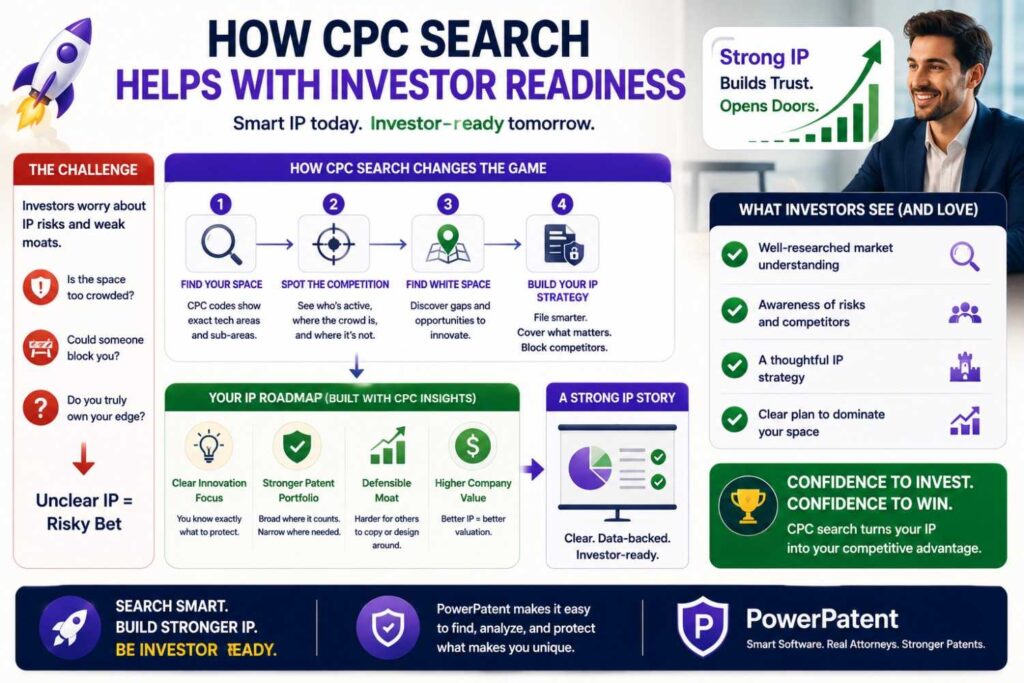
Investors may ask about IP.
They may ask what you have filed.
They may ask what makes your technology defensible.
They may ask how you compare to competitors.
A CPC search can help you answer with more confidence.
You do not need to share every detail. But you can say you have reviewed the patent landscape, identified key technical areas, and are working with counsel to protect the core invention.
That sounds much stronger than “we plan to patent it later.”
For deep tech startups, patents can be part of the trust story.
They show that you understand the value of what you are building.
They show that you are not treating IP as an afterthought.
They show that you are thinking ahead.
PowerPatent helps founders move from idea to filing without losing speed. See how it works here: https://powerpatent.com/how-it-works
How CPC Search Helps With Product Strategy
Patent search can also help product strategy.
When you review patents in your area, you may find technical paths others tried.
Some may look weak.
Some may look expensive.
Some may look clever.
Some may show risks.
Some may reveal features that competitors care about.
This can help your roadmap.
It can show where the field is crowded and where there may be room.
It can also help your team think of design-arounds or new improvements.
A patent search is not just a legal task.
It is market learning.
It is technical learning.
It is strategy.
What to Save From a CPC Search
At the end of a useful CPC search, you should have a clean set of notes.
You want the main CPC codes you searched.
You want the keywords that worked.
You want the closest patents.
You want the main companies or universities that appear often.
You want the dates of important filings.
You want notes on how your invention differs.
You want open questions for your patent team.
This is enough to support a serious conversation.
It does not need to be perfect.
It needs to be clear.
A Simple Example: AI Battery Health
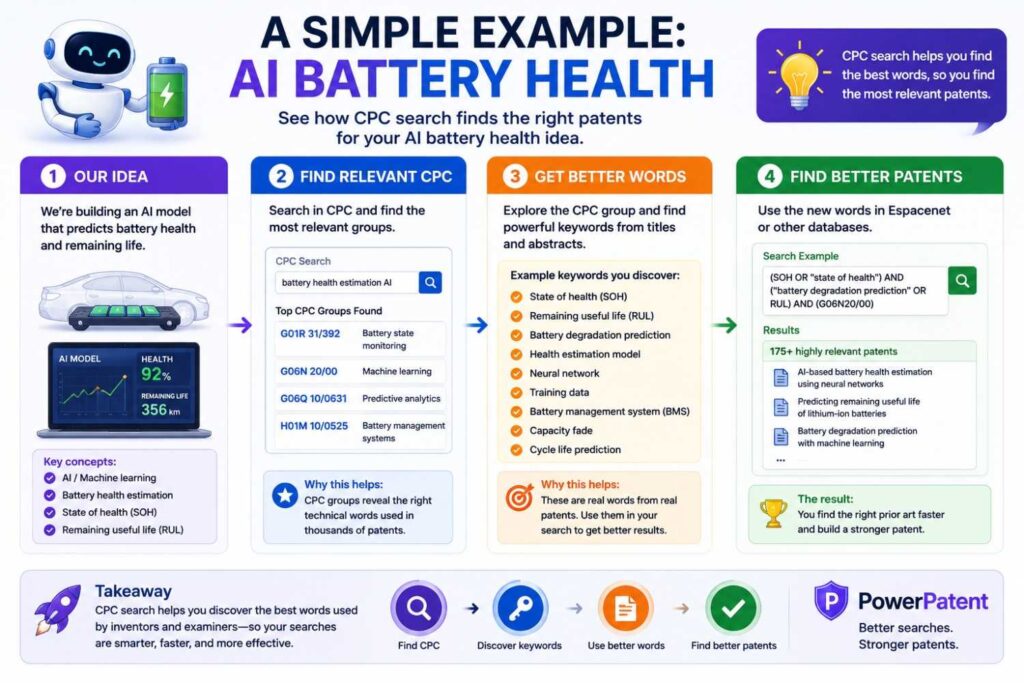
Let’s walk through a simple example.
Say your startup predicts battery failure in electric delivery fleets.
You start with plain keywords.
“battery failure prediction”
“battery health machine learning”
“state of health prediction”
“remaining useful life battery”
“fleet battery degradation”
You find several patents that discuss battery state of health and prediction models.
You open them and collect CPC codes.
Some codes relate to batteries.
Some relate to electric vehicles.
Some relate to data processing.
Some relate to machine learning.
Now you search those CPC codes with key terms like “state of health,” “degradation,” “fleet,” “charging,” “temperature,” and “prediction.”
You notice many patents use lab test data. Some use onboard vehicle data. Some focus on charging control. Some focus on estimating state of charge, not failure risk.
Now your notes get sharper.
Your invention may not be “AI predicts battery health.”
It may be “a fleet-level model that updates battery failure risk using real-world route, charge, and temperature data across vehicles.”
That is a much stronger invention story.
Another Example: Soft Robotic Gripper
Say your startup builds a soft robotic gripper for packing fragile produce.
You start with “soft robotic gripper,” “fruit picking gripper,” “deformable gripper,” “robotic end effector,” and “force controlled gripper.”
You find patents with CPC codes for manipulators, gripping tools, agricultural harvesting, sensors, and control.
Now you search those codes.
You see many grippers use suction. Others use fingers. Others use force sensors. Others use vision to locate fruit.
Your system may stand apart because it predicts bruising risk before contact and changes grip shape based on ripeness, size, and surface data.
Now the search helped you see the field.
It also helped you name the invention more clearly.
You are not just patenting “a gripper.”
You are protecting a smarter way to grip fragile objects.
Another Example: Privacy-Preserving AI
Say your startup trains AI models without moving raw customer data.
You start with “federated learning,” “privacy preserving machine learning,” “secure model training,” “distributed training,” and “encrypted gradient.”
You find patents in machine learning, cryptography, distributed systems, and privacy.
You collect CPC codes.
Then you search those codes with terms tied to your method.
You may find that many systems protect data but have high compute cost. Others work only with certain model types. Others assume stable networks. Others do not handle device dropout well.
Your invention may stand apart because it trains with partial updates from unreliable edge devices while preserving privacy and reducing communication load.
That is a more patent-ready story than “private AI.”
How to Use Official CPC Tools
The USPTO offers tools to search classification systems, including CPC, by classification symbol or text. The USPTO classification search page lets users search classification schemes and definitions, including by keyword. (USPTO)
The official CPC website also provides the CPC scheme and definitions, which can be used to browse the code structure and understand what a code covers. (Cooperative Patent Classification)
Espacenet also provides patent searching and a CPC browser, which can help users move through CPC areas while searching patent documents. (Espacenet)
For founders, the practical point is simple: use official tools when you need to confirm what a CPC code means.
Do not guess based only on one patent.
Open the CPC definition.
Read the scope.
Check related groups.
Look at nearby codes.
That can prevent you from searching the wrong area.
CPC Definitions Matter
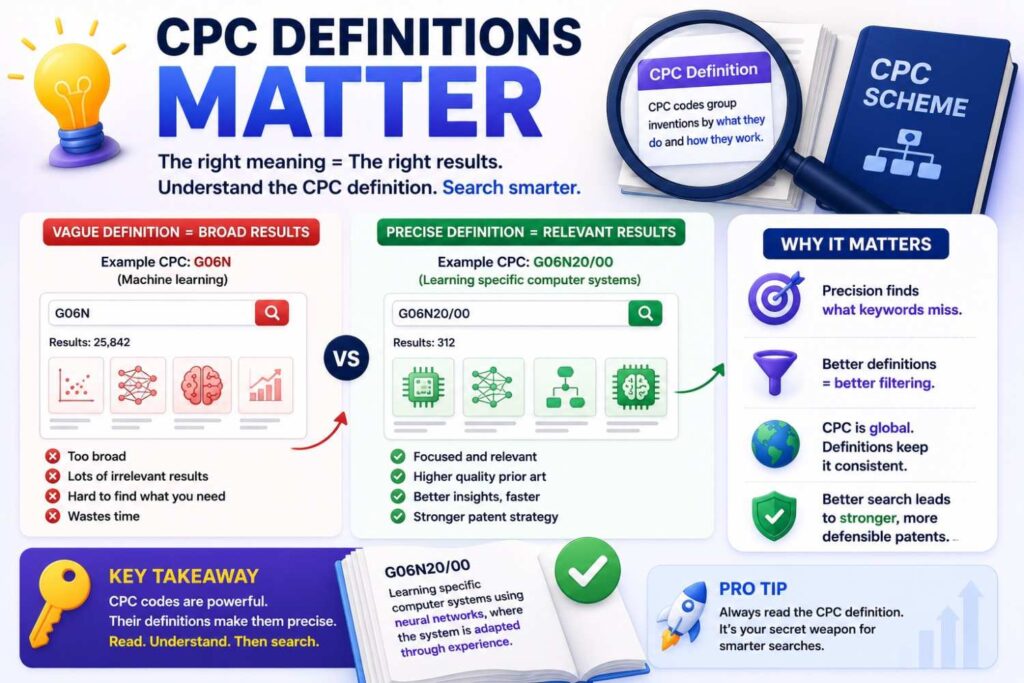
A CPC code title may be short.
The definition gives more context.
Definitions can explain what is included, what is excluded, and how the code relates to other codes.
This is important because patent classification can be subtle.
A code that sounds right may not cover your invention.
A code that sounds slightly different may be better.
When in doubt, read the definition.
It can save you from wasting hours.
What Does the Y Section Mean?
The Y section often confuses people.
It is not just another normal section.
It is used for general tagging of newer technology developments, cross-sectional technologies, and some technical subjects that span areas. The USPTO CPC section list describes Y as covering general tagging of new technological developments and cross-sectional technologies spanning several IPC sections. (USPTO)
In simple words, Y can help tag technologies that cut across fields.
This can be useful for areas like climate tech, smart grids, or other broad technology themes.
But do not rely only on Y.
Use it with the core technical codes.
For example, a battery recycling invention may have a Y tag related to climate or environmental technology, but the real technical search may also need chemistry, battery, process, and materials codes.
How Deep Should a Founder Search?
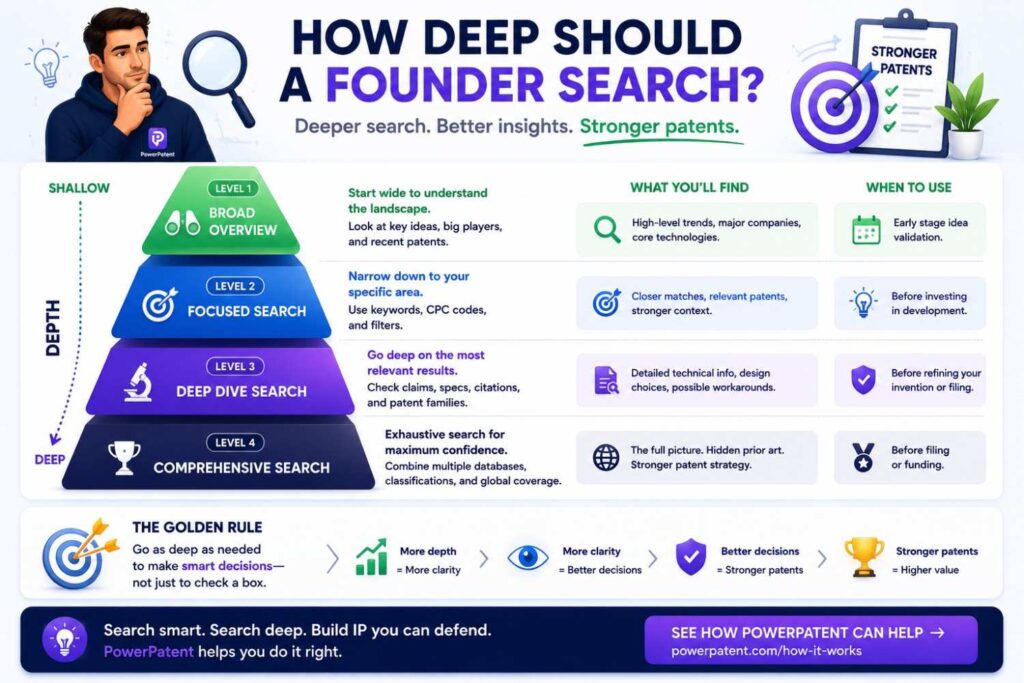
There is no perfect number of hours, patents, or CPC codes that makes a search “done.”
A patent search is not like checking a box.
It is more like checking the ground before you build a house. The deeper you dig depends on how much weight that house needs to hold.
For a startup, the right search depth depends on the business value of the invention, the risk level, the stage of the company, and how central the technology is to your future.
A small feature may need a light search.
A core platform invention may need a much deeper search.
A technical idea that investors care about may need more care.
A product detail that may change next month may not deserve the same amount of time.
The goal is not to search forever.
The goal is to search deeply enough to make a smart business move.
PowerPatent helps founders move faster by turning invention details into stronger patent work with smart software and real attorney oversight. See how it works here: https://powerpatent.com/how-it-works
Match the Search Depth to the Business Risk
Start with one simple question:
What happens if we are wrong?
If the answer is “not much,” a lighter search may be fine.
If the answer is “we could waste months of work, lose investor trust, or file a weak patent,” you need to search deeper.
For example, if your team is testing a small user interface feature, a short CPC and keyword search may be enough at first.
But if your company is built around a new battery control method, surgical tool, AI model pipeline, chip design, or robotics system, the search should be much more serious.
That invention may affect fundraising, product direction, partnerships, and company value.
In that case, do not stop after finding three patents on Google.
Search the main CPC codes.
Search nearby CPC codes.
Search close competitors.
Search older patents.
Search recent applications.
Search the core method, not just the product name.
The more the business depends on the invention, the more care the search deserves.
Use Three Search Levels
A helpful way to think about search depth is to use three levels.
A light search is for early learning. You are trying to understand the general space. You may search a few keywords, collect a few CPC codes, and save the closest results. This is useful when the idea is still rough.
A focused search is for inventions your team may file soon. Here, you search the strongest CPC codes, combine them with technical keywords, review close patents, and write down how your invention differs. This is often the right level before a provisional filing.
A deep search is for core company IP. This is for inventions that support your main product, investor story, or long-term moat. Here, you look across related CPC areas, competitor filings, citations, older patents, recent applications, and different technical angles. You also bring in patent counsel to help judge what the results mean.
This keeps your team from over-searching small ideas and under-searching big ones.
That balance matters.
Startups do not have unlimited time. But they also cannot afford to be careless with core IP.
Search Until You See Patterns, Not Until You Feel Tired
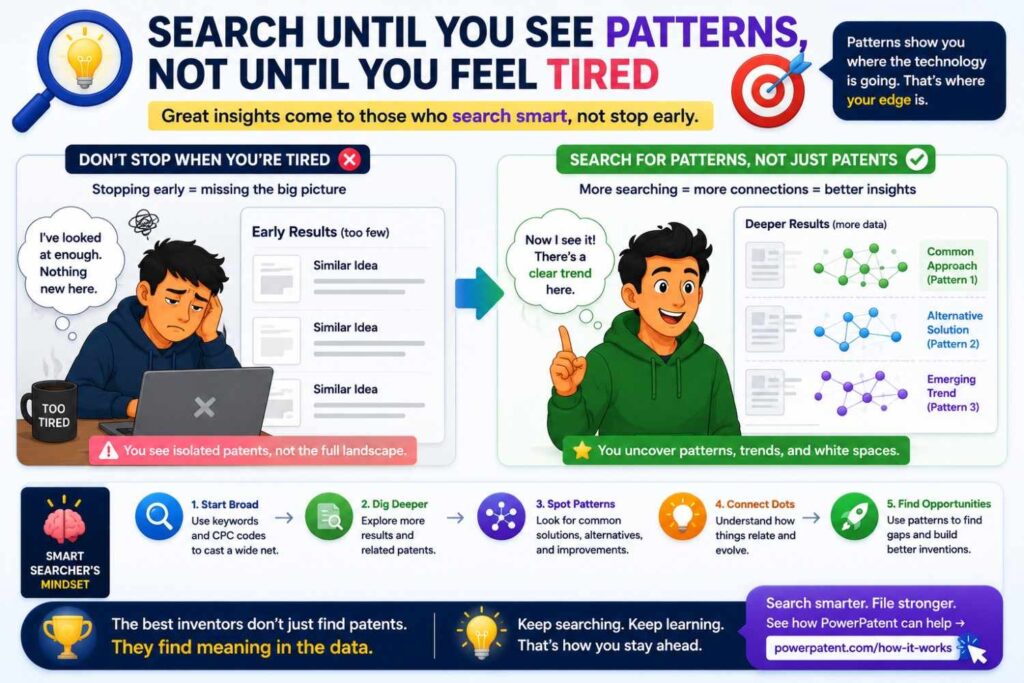
Many founders stop searching when they get tired.
That is not a good stopping rule.
A better stopping point is when patterns start to repeat.
You see the same CPC codes again.
You see the same companies again.
You see the same technical words again.
You see the same old patents cited again.
You see the same solution types again.
That repetition is useful. It means you are starting to understand the landscape.
You may still miss things. No search is perfect.
But once the same themes keep coming back, you are in a much better position than when you started.
A smart founder does not ask, “Have I found everything?”
A smarter question is, “Have I seen enough patterns to make a better decision?”
Separate Product Risk From Patent Risk
Founders often mix two questions together.
The first question is, “Can we build and sell this?”
The second question is, “Can we protect this?”
Those are not the same.
A product can be valuable even if the patent space is crowded.
A patent can be possible even if the product still needs work.
When you search CPC codes, be clear about which risk you are studying.
If you are checking product risk, you may care about who else is building in the space, what features they focus on, and where the market seems to be going.
If you are checking patent risk, you care more about what has already been disclosed, what seems close to your invention, and where your technical difference may live.
Both matter.
But do not confuse them.
A crowded patent space does not always mean “stop.”
It may mean “file more carefully.”
It may mean “focus on a narrower technical edge.”
It may mean “protect the part that competitors have not solved well.”
This is where a good patent workflow helps. PowerPatent gives founders a clearer way to move from technical insight to attorney-reviewed patent work. Learn more here: https://powerpatent.com/how-it-works
Go Deeper When the Invention Supports Your Moat
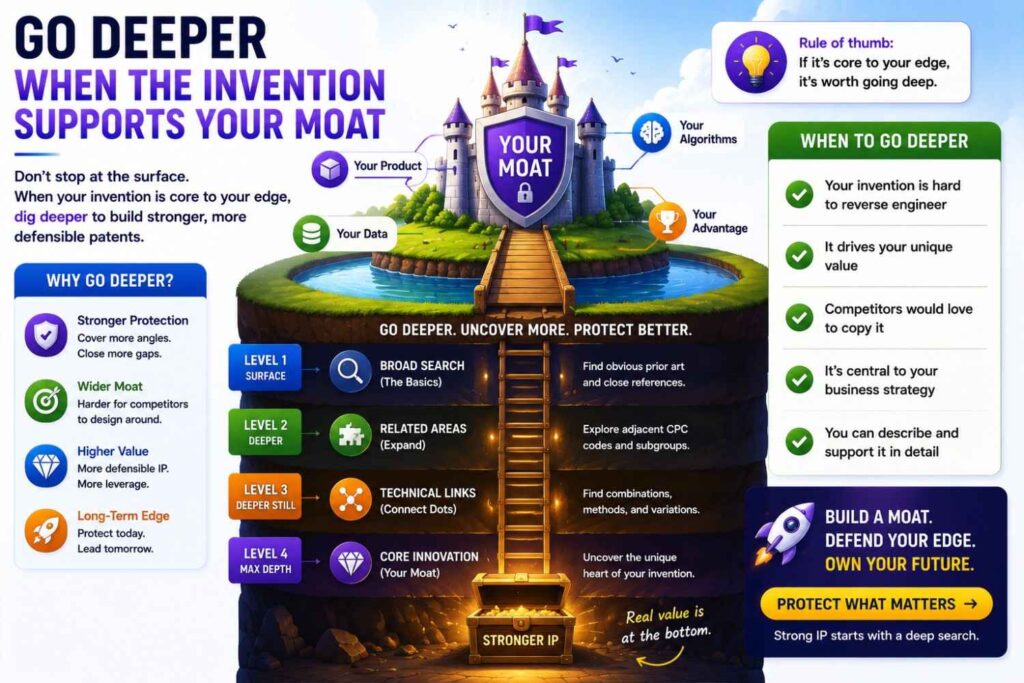
A moat is what makes your business hard to copy.
For a deep tech startup, the moat may be a model, device, process, dataset, chip design, control system, material, workflow, or full technical stack.
If the invention supports that moat, search deeper.
Do not only search the obvious use case.
Search the base technology.
Search alternate uses.
Search the key parts.
Search the method behind the result.
Search the failure cases your invention solves.
For example, if your invention is a drone inspection system, the moat may not be “drone inspection.” The moat may be the way your system detects tiny faults in bad weather using low-quality images.
That means your deeper search should cover image processing, fault detection, environmental noise handling, sensor fusion, and the inspection use case.
The business value lives in the hard part.
That is where the search should go.
Go Lighter When the Idea Is Still Moving Fast
Not every idea deserves a deep search right away.
If your team is still changing the design every week, a heavy search may be too early.
At that stage, use a lighter search to learn the space.
Find the main CPC areas.
Find the common terms.
Find a few close patents.
Find obvious red flags.
Then keep building.
Once the design becomes more stable, search deeper before filing.
This helps your team avoid two bad habits.
The first bad habit is ignoring patents until it is too late.
The second is slowing down every early idea with too much analysis.
The best path is steady and practical.
Search lightly when the idea is rough.
Search deeply when the invention becomes important.
Use Search Depth as a Filing Priority Tool
Most startups have more invention ideas than budget.
That is normal.
A CPC search can help you decide what to file first.
After searching, sort inventions by business value and patent opportunity.
Some ideas may be very important to the business and seem meaningfully different from what you found. Those should move up the list.
Some ideas may be useful but easy for others to design around. Those may move down.
Some ideas may be close to old patents but still have a narrow improvement. Those may need attorney review before you decide.
Some ideas may not be worth filing at all.
This is not failure.
This is smart IP planning.
A patent budget should not be spread evenly across every idea.
It should go toward the inventions that protect the company’s future.
Build a “Stop, Continue, File” Decision
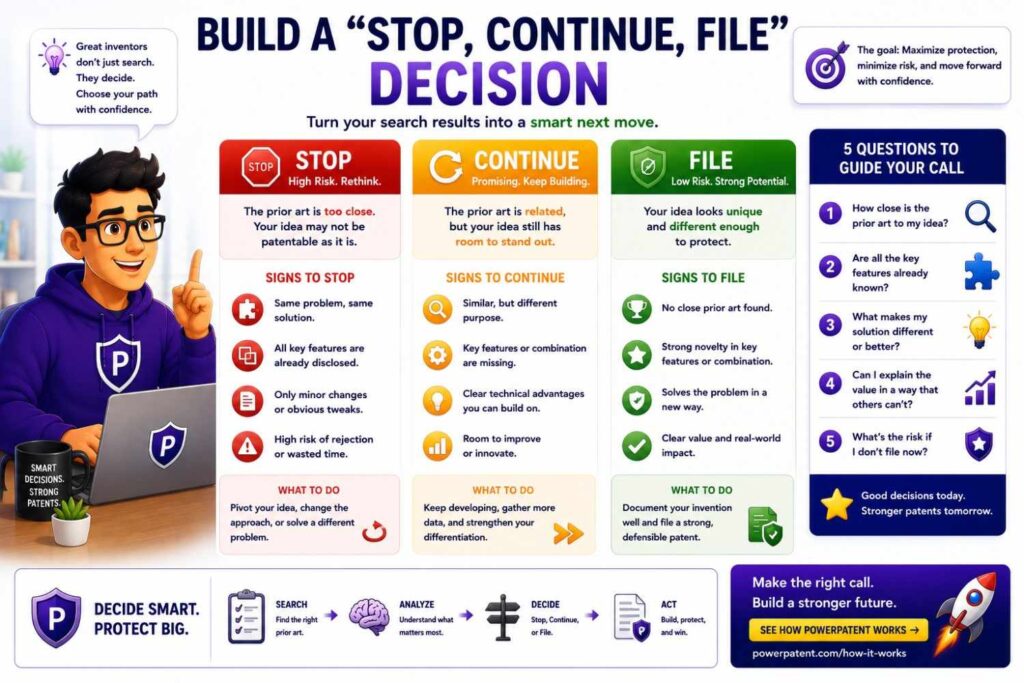
After a founder search, do not leave the result vague.
Make a simple business decision.
Use three choices.
Stop means the idea does not look worth more patent time right now. Maybe it is too early, too crowded, or not important enough.
Continue means the idea is interesting, but more technical work or more searching is needed.
File means the invention appears important enough to start the patent process with counsel.
This simple decision keeps the team moving.
Without it, patent search becomes a pile of links that no one acts on.
A good search should lead to action.
It should help the business decide what to protect, what to improve, and what to ignore.
Search More Deeply Before Public Disclosure
If you are about to share the invention outside the company, search depth becomes more important.
This includes investor decks, launch posts, demos, pilot programs, conference talks, technical papers, open-source releases, sales materials, or customer onboarding.
Before public disclosure, ask whether the invention is worth protecting.
If it is, do not wait.
Run a focused search.
Gather the closest patents.
Write down the technical difference.
Speak with patent counsel before the disclosure happens.
Timing matters in patent work.
A search does not need to slow the company down, but it should happen early enough to support a smart filing decision.
PowerPatent helps founders move quickly when timing matters, while still adding real attorney oversight. See the process here: https://powerpatent.com/how-it-works
Do a Deeper Search When Investors Will Ask About IP
If your next funding round depends on technical defensibility, your search should be more than casual.
Investors may not read your full patent search.
But they may ask hard questions.
What have you filed?
What is protectable?
Who else is in the space?
What makes your approach different?
How hard would this be to copy?
A deeper CPC search helps you answer with more confidence.
It also helps you avoid weak claims like “we are the only ones doing this.”
That kind of claim can fall apart quickly.
A stronger answer sounds more like this:
“We reviewed the main patent areas around our system. Most filings focus on X and Y. Our approach is different because it does Z in a way that reduces cost and works in real time. We are working with patent counsel to protect that core method.”
That is a better investor story.
It is specific.
It is calm.
It shows discipline.
Create a Search Depth Score
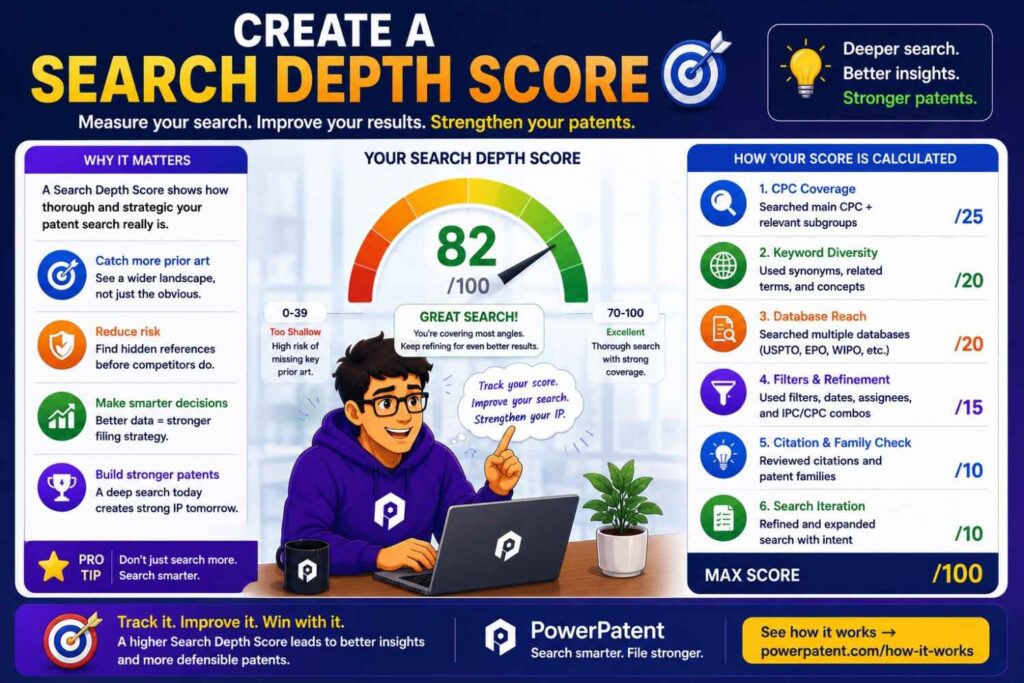
Businesses make better IP decisions when they use simple rules.
One helpful rule is a search depth score.
Score each invention from 1 to 5 in three areas:
Business importance.
Copy risk.
Technical maturity.
If an invention scores high in all three, it deserves a deeper search.
Business importance means the invention is tied to revenue, product advantage, fundraising, or customer value.
Copy risk means a competitor could copy it if they saw the product.
Technical maturity means the team understands how it works and can describe it clearly.
An invention with high business importance, high copy risk, and high maturity should not sit in a backlog.
That is a strong candidate for deeper patent work.
An idea with low maturity may need more engineering work first.
An idea with low business value may not deserve patent budget.
This keeps IP decisions tied to business strategy, not random urgency.
Look for Blocking Patents and Design Opportunities
A deeper search can help with more than filing.
It can help product design.
When you find close patents, ask two business questions.
First, could this create risk for our planned product?
Second, does this show a better design path?
Sometimes a search reveals a crowded path. That does not always mean you must stop. It may mean you should design around that path early.
This is much easier before the product is locked.
For example, if many patents cover one sensor setup, your team may explore another setup.
If many filings cover one model update method, your team may use a different data flow.
If a competitor owns patents around one hardware shape, your team may test another form.
Patent search can guide product choices before changes become expensive.
That is a major business benefit.
Do Not Let Search Become an Excuse to Delay
A deeper search is useful only if it helps you act.
Some teams get stuck searching forever.
They keep looking for one more patent.
One more CPC code.
One more competitor.
One more keyword.
That can become a delay trap.
Set a clear search goal before you start.
For example:
“We need enough information to decide whether to file a provisional this month.”
Or:
“We need to know whether this feature is worth including in our patent roadmap.”
Or:
“We need to find the closest references before our attorney drafts claims.”
A search should serve a decision.
Once it serves that decision, move forward.
Perfect certainty is not available.
Better judgment is.
Bring in Counsel When the Search Changes the Business Decision
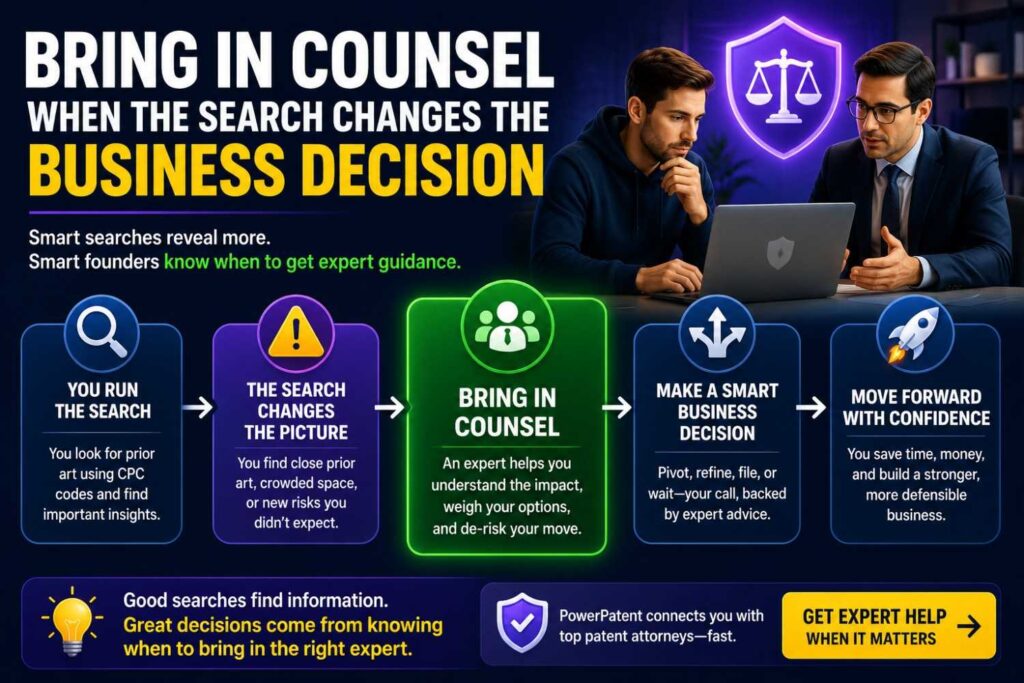
Founder-led search is useful, but there is a point where you need expert help.
Bring in patent counsel when you find a patent that looks very close.
Bring in counsel when the invention is central to your company.
Bring in counsel before public disclosure.
Bring in counsel when you are deciding whether to file.
Bring in counsel when you are worried about competitor patents.
Bring in counsel when the search results could affect the product roadmap.
This does not mean founders should stay out of the process.
It means founders and attorneys should work together.
The founder brings technical truth.
The attorney brings patent judgment.
That combination is much stronger than either one alone.
The Best Search Depth Is Business-Aware
A good CPC search is not measured by how many patents you opened.
It is measured by whether the search helped the company make a better decision.
Did it help you decide what to file?
Did it show where your invention is different?
Did it reveal competitor activity?
Did it help shape the product?
Did it prepare you for investor questions?
Did it reduce guesswork?
Did it help your patent team draft with more focus?
That is the real point.
Founders do not need endless patent research.
They need smart patent action.
Search deep enough to protect what matters.
Search lightly enough to keep moving.
And when the invention is central to the business, do not leave it to chance.
PowerPatent helps startups turn technical work into stronger patent filings with software that supports speed and real attorneys who help guide the process. Explore how it works here: https://powerpatent.com/how-it-works
CPC Search and Provisional Patents
Many startups file provisional patent applications first.
A provisional can help secure an early filing date while giving you time to refine, test, fundraise, or develop more details.
CPC search before a provisional can be useful because it helps you include the right technical details.
If you find close patents, you may realize your draft needs more examples.
You may need to describe more variations.
You may need to explain the technical problem more clearly.
You may need to show why your method works better.
A rushed provisional that misses the real invention can create problems later.
A better-informed provisional can be much stronger.
PowerPatent helps founders move quickly while still capturing the technical depth that matters. Learn more here: https://powerpatent.com/how-it-works
CPC Search and Non-Provisional Patents
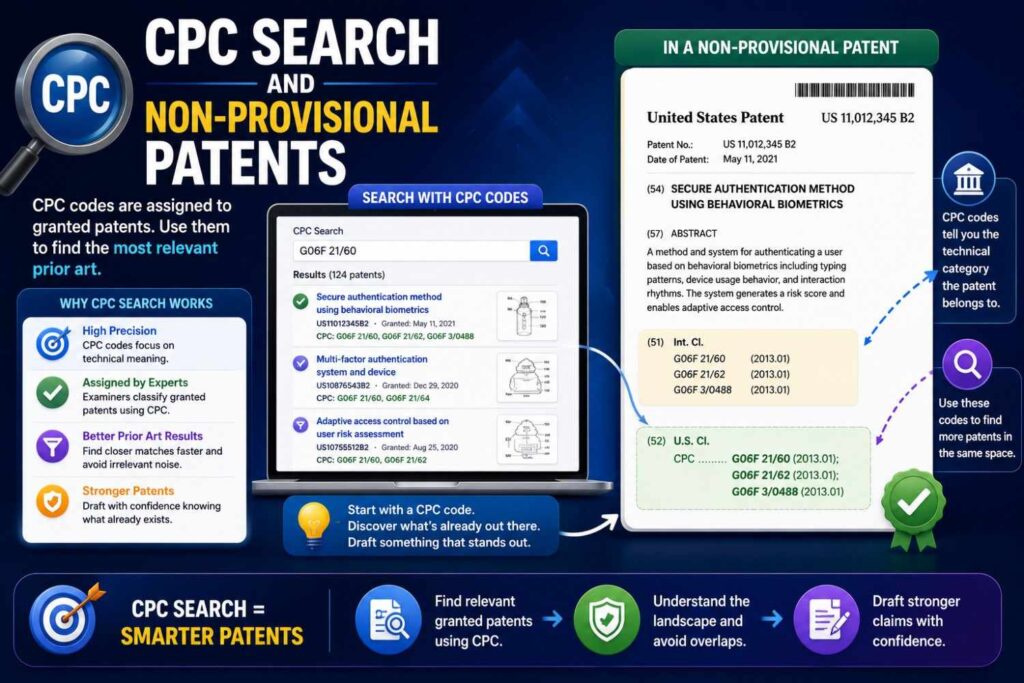
A non-provisional patent application is examined by the patent office.
At this stage, the details matter even more.
CPC search can help identify the likely technical area and close prior art before examination.
It can help your attorney draft stronger claims and a better background.
It can also help prepare for possible examiner rejections.
Patent examiners use classification systems and search tools to find prior art. The USPTO notes that patent technology is classified and indexed for searching by patent examiners.
That means CPC is not just a founder tool.
It is part of how the patent world organizes technical information.
How to Talk to Your Patent Attorney About CPC Search
You do not need to sound like an expert.
Just be clear.
Say which CPC codes came up often.
Say which patents seemed closest.
Say which ones worried you.
Say why your invention is different.
Say what you think the core technical advance is.
Say which parts are already built and which are planned.
Say which variations matter for your product roadmap.
This gives your attorney useful context.
It also makes the drafting process more focused.
A good patent attorney does not need you to solve the legal issue. They need your technical truth.
Why Your Technical Details Are the Real Gold
CPC codes help you find the neighborhood.
But your technical details create the value.
Your invention may depend on a small design choice that took months to discover.
Maybe you changed where a sensor sits.
Maybe you changed the training order.
Maybe you found a way to clean noisy data.
Maybe you reduced heat.
Maybe you made a part cheaper.
Maybe you made the system work in real time.
Maybe you handled a failure case others ignored.
These details can matter a lot.
Do not hide them behind broad buzzwords.
The strongest patent work often starts with a simple question:
“What did we learn the hard way?”
That answer can lead to strong patent material.
CPC Search Can Help You Avoid Weak Patent Claims
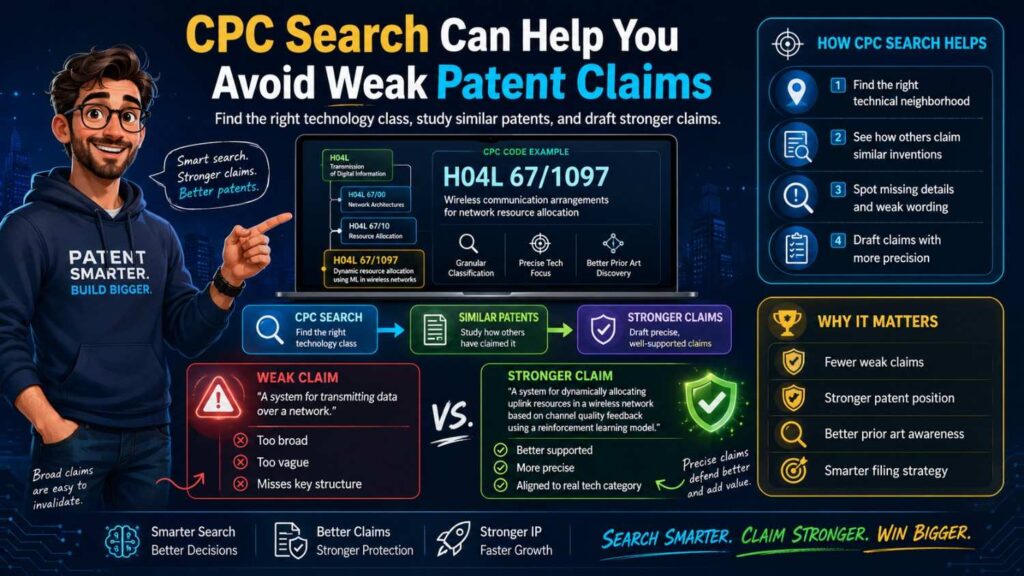
Weak claims often sound broad but lack depth.
They say things like “use AI to do X” or “use a sensor to detect Y.”
In crowded fields, that may not be enough.
CPC search shows what others have already claimed or described.
That helps you push deeper.
How does the AI do it?
What signal does the sensor use?
What step happens before the prediction?
What changes after the prediction?
What part of the system is improved?
What real technical problem is solved?
The more clearly you answer these questions, the better your patent materials can become.
CPC Search Can Help You Find Claim Variations
A good patent filing often includes different versions of the invention.
CPC search can inspire these variations.
When you read related patents, you may see different ways people solve similar problems.
This can remind you to include your own alternatives.
For example, your system may work with one sensor or several sensors.
It may run in the cloud or on-device.
It may use one model type or another.
It may use different materials.
It may apply to several use cases.
It may work with different machines.
If those variations are real and supported, they may be worth describing.
This helps future-proof the filing.
Do Not Wait Until Launch
Many founders wait too long.
They plan to deal with patents after launch, after fundraising, after customer pilots, or after the next sprint.
That can be risky.
Public disclosure can affect patent rights. Investor decks, demos, blog posts, GitHub repos, conference talks, sales calls, and customer pilots can all raise timing questions.
You should talk to patent counsel before public disclosure when the invention matters.
CPC search can happen early.
It does not need to slow the company down.
In fact, it can help you move faster because you are making decisions with more confidence.
PowerPatent is designed for founders who want speed and protection at the same time. See how it helps here: https://powerpatent.com/how-it-works
Make CPC Search Part of Your Invention Workflow
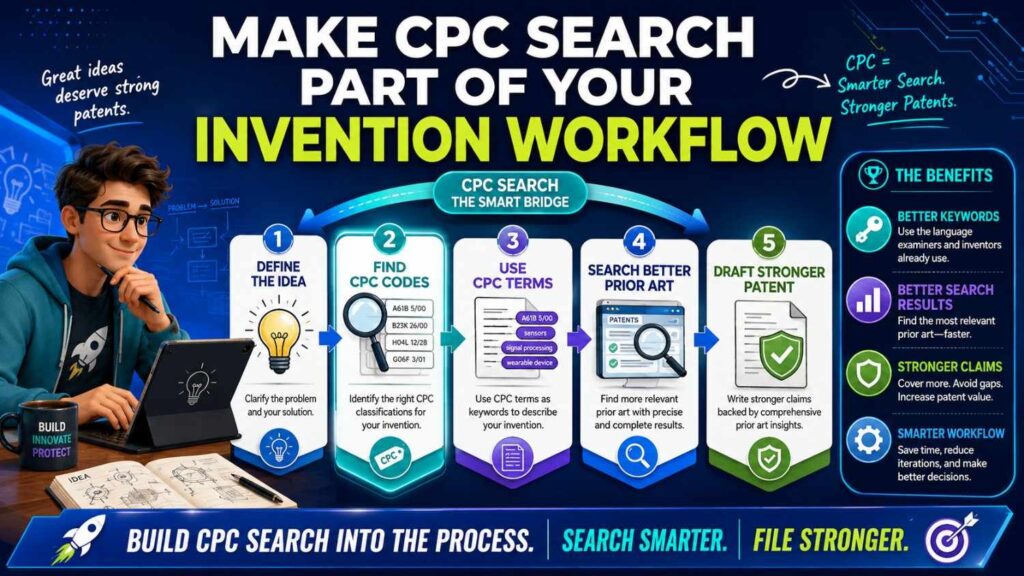
The best teams do not treat patents as a one-time event.
They build a light invention workflow.
When engineers solve a hard problem, capture it.
When a model improves in a surprising way, capture it.
When a hardware test reveals a better design, capture it.
When a customer problem leads to a new system flow, capture it.
Then run a focused search.
Find the CPC areas.
Check close patents.
Decide whether to file.
This does not need to be heavy.
It can be part of your normal product and engineering rhythm.
A Founder-Friendly CPC Search Workflow
Here is a simple workflow you can use.
Write the invention in plain English.
Search keywords.
Find five to ten close patents.
Collect their CPC codes.
Search the repeated CPC codes.
Add keywords inside those codes.
Save the closest patents.
Write how your invention differs.
Share the notes with your patent team.
That is enough to start.
You can go deeper if the invention is core.
But even this simple workflow is far better than random searching.
How to Know a CPC Code Is Useful
A useful CPC code brings up patents that teach you something.
They may not all be close. But the results should feel related.
If most results are unrelated, the code may be wrong or too broad.
If the results are close but too many, narrow the code or add keywords.
If the results show the same companies and terms you see elsewhere, it may be a strong code.
If close patents share the code, pay attention.
Use usefulness, not perfection, as the standard.
What Founders Should Not Do
Do not assume no results means no prior art.
Do not assume many results means you cannot patent anything.
Do not assume a scary title means you are blocked.
Do not copy claims from another patent.
Do not rely only on one CPC code.
Do not search only your product name.
Do not wait until after public launch to think about patents.
Most of all, do not treat patent search as a reason to freeze.
Use it as a tool to make better decisions.
The Mindset Shift
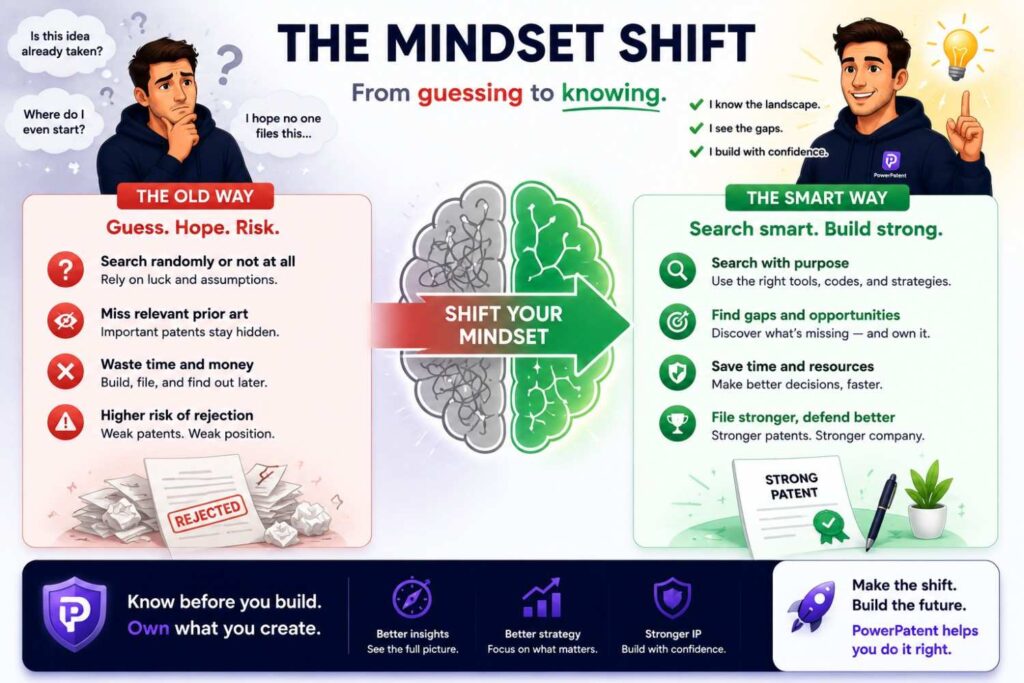
CPC search is not about proving your invention is totally alone in the world.
Most inventions build on existing work.
The real question is more focused.
What is already known?
What did your team add?
What is the technical difference?
Why does that difference matter?
Can that difference be protected?
CPC search helps you answer the first part.
Your engineering notes help answer the second part.
Your patent team helps shape the final strategy.
Together, that is how stronger patent filings happen.
Why PowerPatent Fits This Moment
Founders need patents, but they do not need a slow, confusing process.
They need speed.
They need clarity.
They need control.
They need real attorney oversight.
They need a way to turn messy technical work into strong patent filings without pulling the whole team away from building.
That is what PowerPatent is built to support.
It helps founders capture inventions, organize technical details, and work with real patent professionals so the filing is not just fast, but thoughtful.
CPC search can help you understand the patent landscape.
PowerPatent can help you turn that insight into action.
Explore how it works here: https://powerpatent.com/how-it-works
Final Takeaway
CPC codes are not as hard as they look.
They are just labels that help organize inventions by technology.
For founders, they can make patent search clearer, faster, and more useful.
Start with your invention.
Find a few close patents.
Look at their CPC codes.
Search those codes with smart keywords.
Save what matters.
Write down how your invention is different.
Then bring that insight into a stronger patent process.
You do not need to become a patent expert.
You just need a better map.
And when you are ready to protect what you are building, PowerPatent can help you move from idea to attorney-reviewed patent work with less stress and more confidence.
See how PowerPatent works here: https://powerpatent.com/how-it-works
Leave a Reply